
Mastery of BPMN 2.0: A Comprehensive Guide to Process Modeling Notation
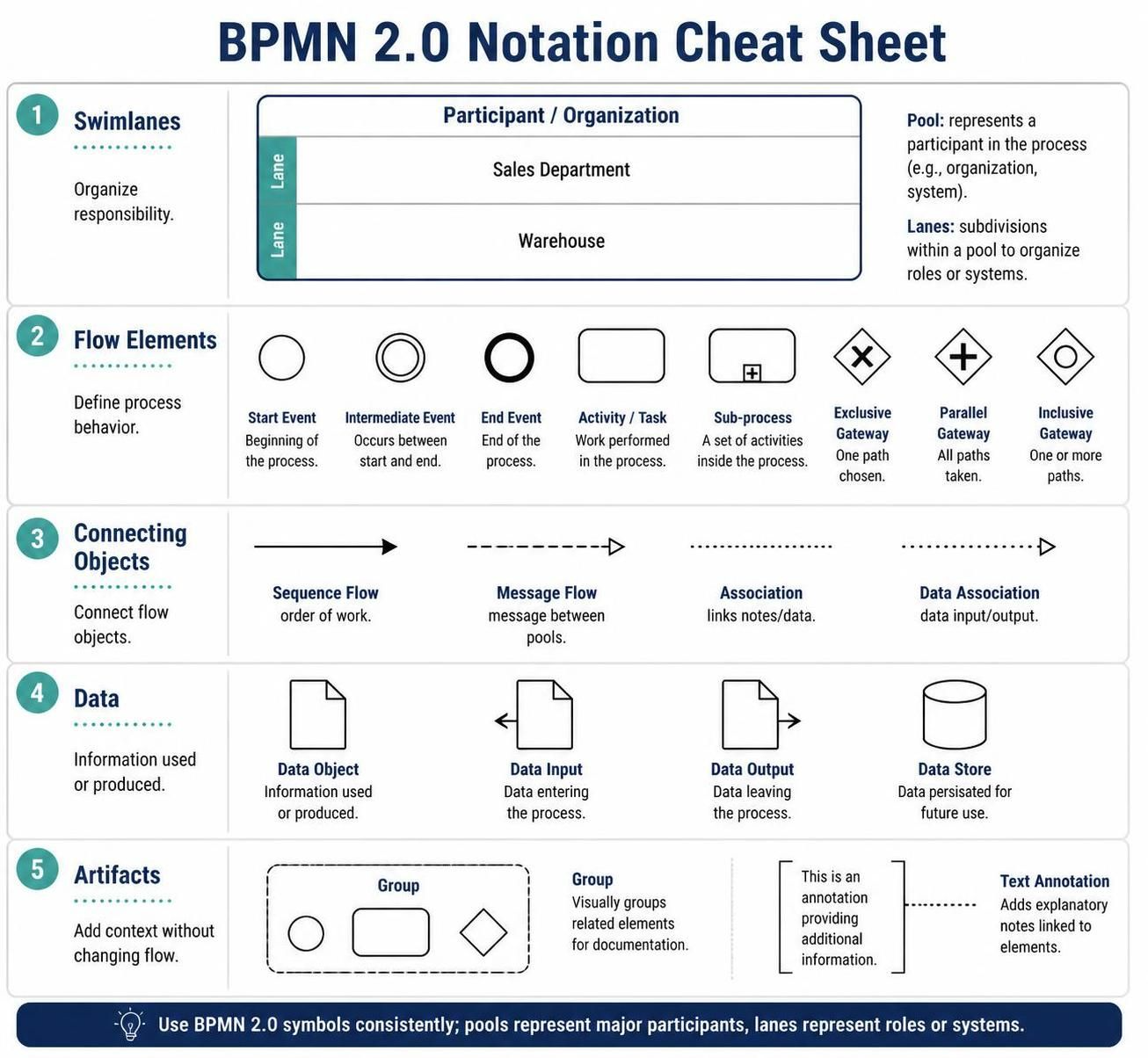
Business Process Model and Notation (BPMN) is the industry standard for visualizing business processes. Whether you are a business analyst, a software architect, or a process improvement specialist, understanding the precise notation is critical. BPMN provides a standardized graphical language that bridges the gap between business stakeholders and technical developers.
This tutorial provides a deep dive into the core components of BPMN 2.0, breaking down the visual language into five fundamental categories. By the end of this guide, you will understand how to construct clear, executable process diagrams.
1. Swimlanes: Organizing Responsibility
One of the most powerful features of BPMN is its ability to organize work by role. This is achieved through Swimlanes. Swimlanes are not just visual dividers; they define the “Who” of the process.
Pools vs. Lanes
- Pool: Represents a major participant in the process. This could be an entire organization, a specific system, or an external entity. It acts as a container for the process itself.
- Lane: A subdivision within a Pool. Lanes are used to organize roles, departments, or systems within that specific participant. For example, a “Sales Department” or a “Warehouse” lane.
Why this matters: By separating work into lanes, you eliminate ambiguity. If a task sits in the “Sales Department” lane, it is immediately clear that a salesperson, not a warehouse worker, is responsible for that action.
2. Flow Elements: Defining Process Behavior
Flow elements are the building blocks that determine the logic and behavior of your process. They are divided into Start/End events, Activities, and Gateways.
Events: Start, Intermediate, and End
Events are represented by circles. They signify something that happens, rather than something that is done.
- Start Event: A thin circle. This is the trigger that initiates the process (e.g., “Order Received”).
- Intermediate Event: A double-lined circle. These occur between the start and end, representing a delay or a message received mid-process.
- End Event: A thick circle. This signifies the successful completion of the process (e.g., “Order Shipped”).
Activities: Work Performed
An Activity (often a rounded rectangle) represents work being performed. It can be a single task, a group of related activities, or a reusable process definition.
Gateways: Decision Logic
Gateways control the flow of the process. They are represented by diamonds and determine how the process diverges or converges:
- Exclusive Gateway (X): Used for decisions. Only one path is chosen based on a condition (e.g., “Is Order > $500?”).
- Parallel Gateway (+): Used for splitting and synchronizing. All paths are taken simultaneously.
- Inclusive Gateway (O): A flexible decision where one or more paths can be taken.
3. Connecting Objects: The Glue of the Process
Connecting objects link the flow elements together, defining the sequence and the data exchange.
Sequence Flow
A solid line with a single arrowhead. This defines the order of work within a single process. It dictates that one activity must finish before the next begins.
Message Flow
A dashed line with an open arrowhead. This is crucial for communication between Pools. It represents a message sent from one participant to another (e.g., a notification sent from the Customer to the Company).
Associations and Data Associations
These are dotted lines used to link notes, data objects, or text annotations to specific elements, providing context without altering the process logic.
4. Data: Information in Motion
Processes consume and produce data. BPMN uses specific icons to visualize this data flow.
- Data Object: A document icon representing information used or produced during the process.
- Data Input: An arrow pointing into a document, indicating data entering the process.
- Data Output: An arrow pointing out of a document, indicating data leaving the process.
- Data Store: A cylinder icon representing data that is persisted for future use (like a database or a filing cabinet).
5. Artifacts: Adding Context
Not everything in a diagram needs to change the flow. Artifacts are used to add information that helps the reader understand the diagram better.
- Group: A dashed line box that visually groups related elements. This is purely for documentation and does not change execution logic.
- Text Annotation: A note symbol linked to an element, used to provide explanatory details, constraints, or business rules.
Conclusion
Mastering BPMN 2.0 notation is essential for creating diagrams that are not only visually appealing but also logically sound and executable. By correctly utilizing swimlanes to assign responsibility, flow elements to define logic, and connecting objects to map the journey, you ensure that your process models are unambiguous.
To effectively implement these concepts, accuracy and efficiency are paramount. For the most robust and modern approach to business process modeling, we recommend using Visual Paradigm BPMN paired with the power of AI. Visual Paradigm offers a comprehensive environment to manage complex diagrams, while AI integration can assist in generating models, automating error checking, and streamlining the transition from design to execution.