
Introduction
In modern software architecture, the gap between high-level business requirements and low-level code implementation is often where projects fail. Stakeholders need context, developers need structure, and architects need a shared language. The C4 model (Context, Containers, Components, and Code) has emerged as the industry standard for visualizing software architecture at varying levels of abstraction.
This guide focuses specifically on the Container Diagram, the second level of the C4 model, using the “Internet Banking System” as a practical case study. We will explore how to leverage Visual Paradigm, its AI Chatbot, and the VPasCode scripting language to create, maintain, and evolve these diagrams efficiently. By integrating AI-driven assistance with Infrastructure-as-Code principles, teams can transform static diagrams into living architectural documentation.
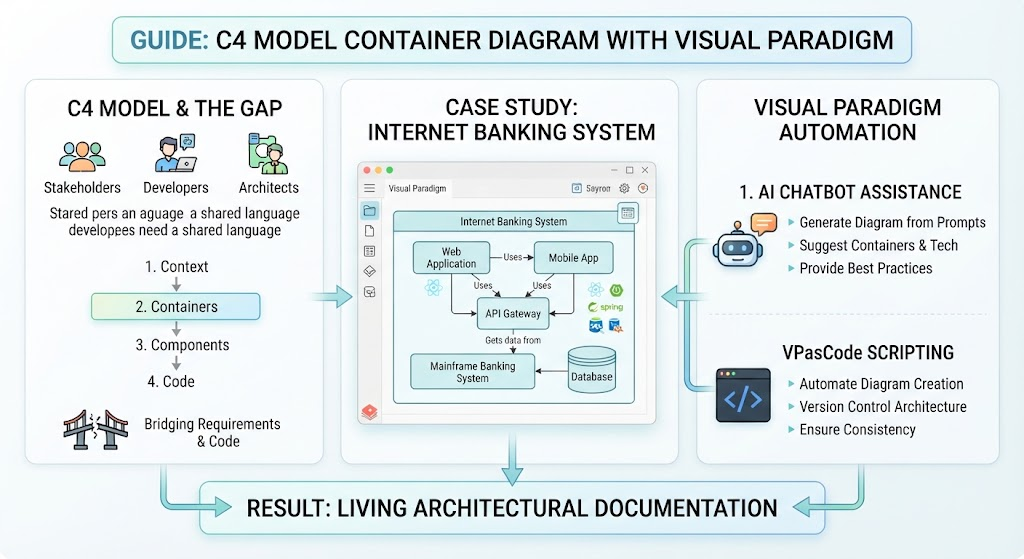
Key Concepts: The C4 Container Level
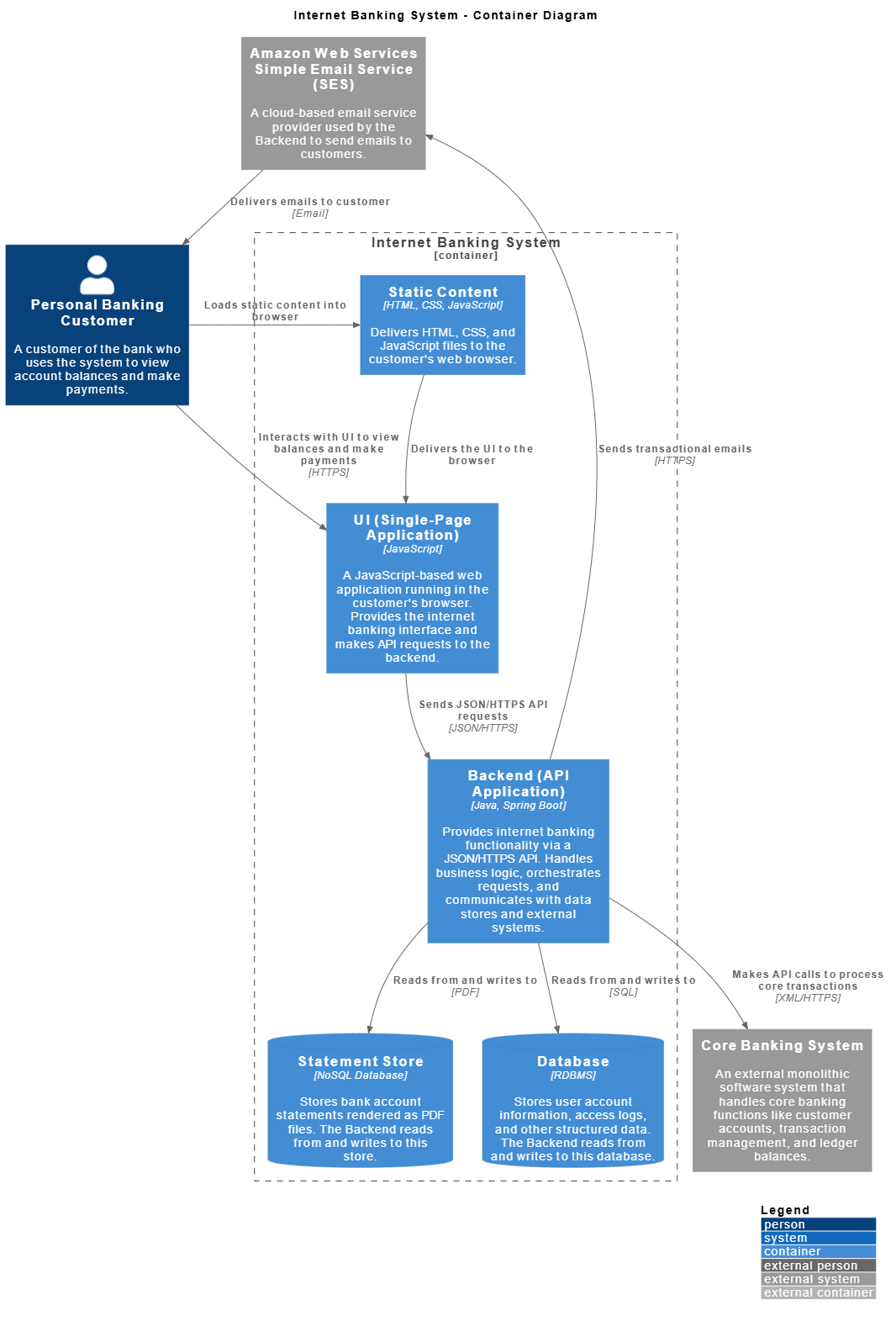
A Container in the C4 model represents an application or a data store. It is a runtime boundary that encapsulates behavior and technology choices. Based on the Internet Banking System diagram provided, here are the core concepts:
1. Containers vs. Components
It is critical not to confuse C4 Containers with Docker containers or UML components. In this diagram:
-
UI (Single-Page Application): A JavaScript SPA running in the browser.
-
Backend (API Application): A Java/Spring Boot service handling business logic.
-
Statement Store & Database: Specialized
ContainerDbelements representing NoSQL and RDBMS technologies respectively.
2. Relationships and Protocols
Arrows in C4 diagrams must be labeled with both the intent and the technology. The provided diagram exemplifies this best practice:
-
Rel(ui, backend, "Sends JSON/HTTPS API requests", "JSON/HTTPS")clearly defines the contract. -
Rel(backend, coreBanking, "Makes API calls...", "XML/HTTPS")highlights legacy integration patterns. -
Rel(ses, customer, "Delivers emails...", "Email")shows asynchronous outbound communication.
3. System Boundaries
The Container_Boundary(system, "Internet Banking System") groups internal containers separately from external systems (System_Ext). This visual distinction immediately tells readers what the team owns versus what they depend on (e.g., AWS SES, Core Banking System).
Tooling Synergy: Visual Paradigm + AI Chatbot + VPasCode
Creating and maintaining C4 diagrams manually is error-prone. The combination of Visual Paradigm (VP), AI Chatbot, and VPasCode creates a powerful workflow.
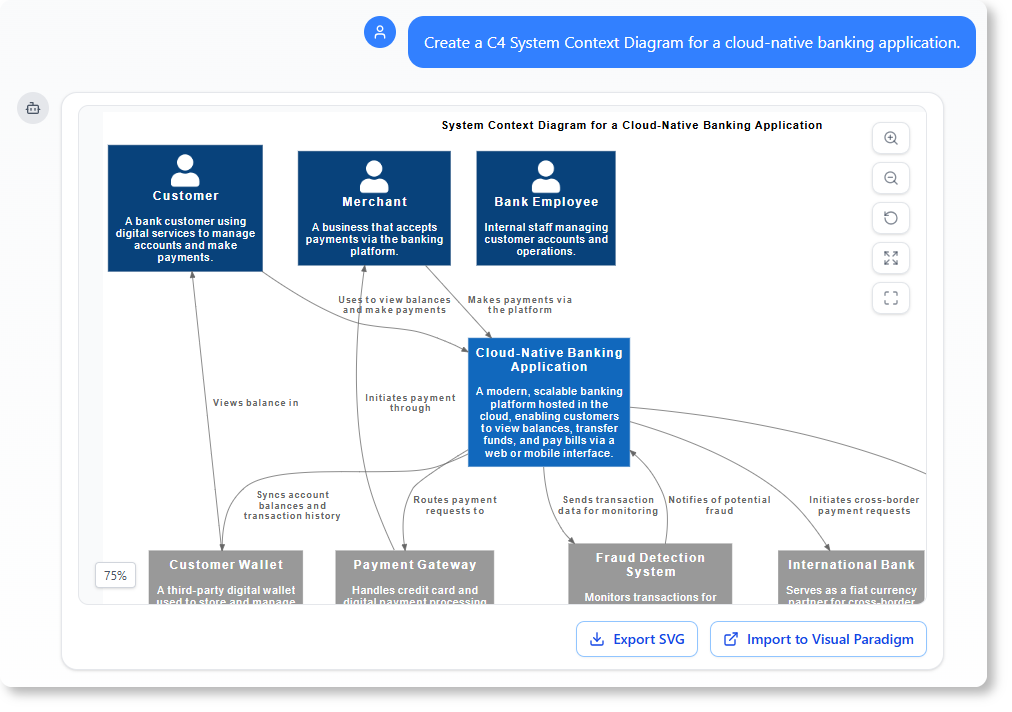
Why Use This Stack?
| Tool | Role | Benefit in C4 Modeling |
|---|---|---|
| Visual Paradigm | Modeling Platform | Native C4 support, enterprise repository, multi-format export, and traceability to requirements. |
| AI Chatbot | Intelligent Assistant | Generates VPasCode from natural language, validates C4 syntax, suggests missing relationships, and explains architectural decisions. |
| VPasCode | Scripting Language | Text-based diagram definition (similar to PlantUML), version-controllable, enables CI/CD integration, and bulk editing. |
The Relationship Between Tools
These tools form a feedback loop:
-
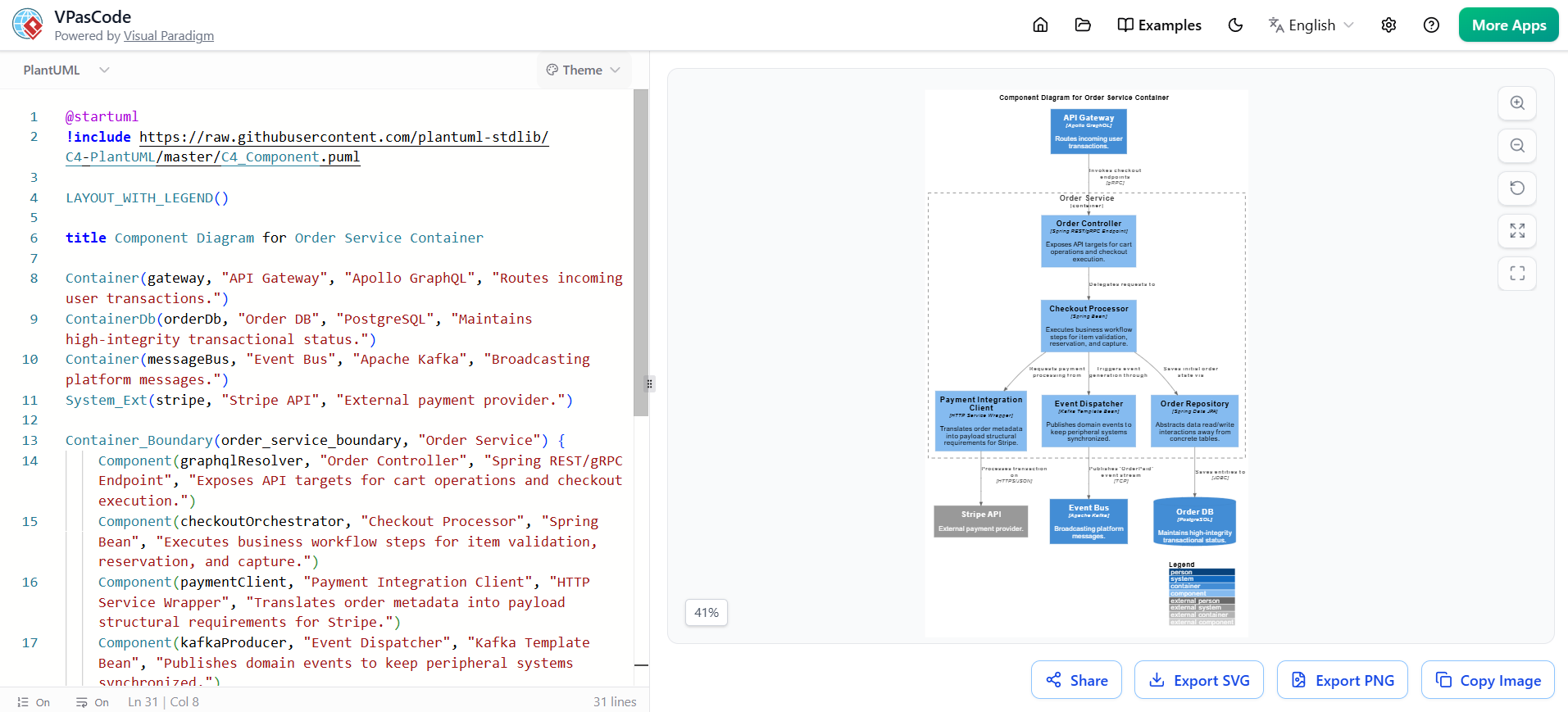
AI Chatbot acts as the translator between human intent and machine-readable VPasCode.
-
VPasCode serves as the single source of truth, stored in Git alongside application code.
-
Visual Paradigm renders the VPasCode into interactive diagrams, enriches them with metadata, and publishes them to stakeholders.
When you update the VPasCode (manually or via AI), Visual Paradigm automatically refreshes the diagram. When you ask the AI to “add a caching layer,” it modifies the VPasCode directly, preserving layout directives like LAYOUT_TOP_DOWN().
Practical Example: Internet Banking System
Below is the complete VPasCode source for the Internet Banking System Container Diagram. This code demonstrates proper C4-PlantUML stdlib usage within the Visual Paradigm ecosystem.
@startuml
!include https://raw.githubusercontent.com/plantuml-stdlib/C4-PlantUML/master/C4_Container.puml
skinparam vpDiagramType C4modelContainerDiagram

LAYOUT_TOP_DOWN()
LAYOUT_WITH_LEGEND()

title Internet Banking System - Container Diagram

Person(customer, "Personal Banking Customer", "A customer of the bank who uses the system to view account balances and make payments.")

Container_Boundary(system, "Internet Banking System") {
    Container(staticContent, "Static Content", "HTML, CSS, JavaScript", "Delivers HTML, CSS, and JavaScript files to the customer's web browser.")
    Container(ui, "UI (Single-Page Application)", "JavaScript", "A JavaScript-based web application running in the customer's browser. Provides the internet banking interface and makes API requests to the backend.")
    Container(backend, "Backend (API Application)", "Java, Spring Boot", "Provides internet banking functionality via a JSON/HTTPS API. Handles business logic, orchestrates requests, and communicates with data stores and external systems.")
    ContainerDb(statementStore, "Statement Store", "NoSQL Database", "Stores bank account statements rendered as PDF files. The Backend reads from and writes to this store.")
    ContainerDb(database, "Database", "RDBMS", "Stores user account information, access logs, and other structured data. The Backend reads from and writes to this database.")
}

System_Ext(ses, "Amazon Web Services Simple Email Service (SES)", "A cloud-based email service provider used by the Backend to send emails to customers.")
System_Ext(coreBanking, "Core Banking System", "An external monolithic software system that handles core banking functions like customer accounts, transaction management, and ledger balances.")

Rel(customer, staticContent, "Loads static content into browser")
Rel(staticContent, ui, "Delivers the UI to the browser")
Rel(customer, ui, "Interacts with UI to view balances and make payments", "HTTPS")
Rel(ui, backend, "Sends JSON/HTTPS API requests", "JSON/HTTPS")
Rel(backend, statementStore, "Reads from and writes to", "PDF")
Rel(backend, database, "Reads from and writes to", "SQL")
Rel(backend, coreBanking, "Makes API calls to process core transactions", "XML/HTTPS")
Rel(backend, ses, "Sends transactional emails", "HTTPS")
Rel(ses, customer, "Delivers emails to customer", "Email")

@enduml
Leveraging AI Chatbot with This Diagram
Instead of writing the above code manually, you can use the Visual Paradigm AI Chatbot with prompts such as:
“Generate a C4 Container diagram for an internet banking system. Include a customer, a JavaScript SPA frontend, a Spring Boot backend, an RDBMS for accounts, a NoSQL store for PDF statements, AWS SES for email, and an external Core Banking System connected via XML/HTTPS.”
The AI will produce syntactically correct VPasCode, which you can then paste into Visual Paradigm. For existing diagrams, you can ask:
“Review this container diagram. Are there any missing security boundaries or unlabelled protocols?”
This shifts the architect’s role from drawing to validating and refining.
Best Practices for Container Diagrams
-
Always Specify Technology: Never write just “Database.” Write “PostgreSQL 15” or “MongoDB Atlas.” Technology choices drive deployment and operational concerns.
-
Label Every Arrow: Unlabelled arrows are ambiguous. Use the format
"Description", "Technology/Protocol". -
Use Layout Directives:
LAYOUT_TOP_DOWN()andLAYOUT_WITH_LEGEND()ensure consistency across team members’ diagrams. -
Version Control Your VPasCode: Treat diagrams as code. Use pull requests to review architectural changes.
-
Keep Containers at Runtime Boundaries: If two modules deploy together and share a process, they may be one container. If they scale independently, they are separate containers.
Conclusion
The C4 Container Diagram is the pivotal artifact that bridges business context and technical implementation. By adopting Visual Paradigm as your modeling platform, VPasCode as your version-controlled source format, and AI Chatbot as your intelligent co-pilot, you transform architecture documentation from a stale deliverable into a dynamic, collaborative asset.
The Internet Banking System example illustrates how cleanly this approach captures complex integrations—from SPAs to legacy core banking systems—while remaining readable to both engineers and stakeholders. Embrace this toolchain to ensure your architecture is not only well-designed but also well-communicated, well-maintained, and always aligned with your evolving system.
Related posts:
 Use Cases Are More Than Just Ovals: Unlock Hidden Power with AI Tools
 Value Stream Mapping Feels Hard? Let an AI Tool Do the Heavy Lifting!
 AI Deployment Diagram Tools: A Skeptic’s Guide to Seeing Is Believing
 My First Week with OpenDocs’ AI ERD Generator: A Hands-On Review from a Database Developer