
Mastering VP OpenDocs: AI-Powered Modeling and Synchronized Documentation
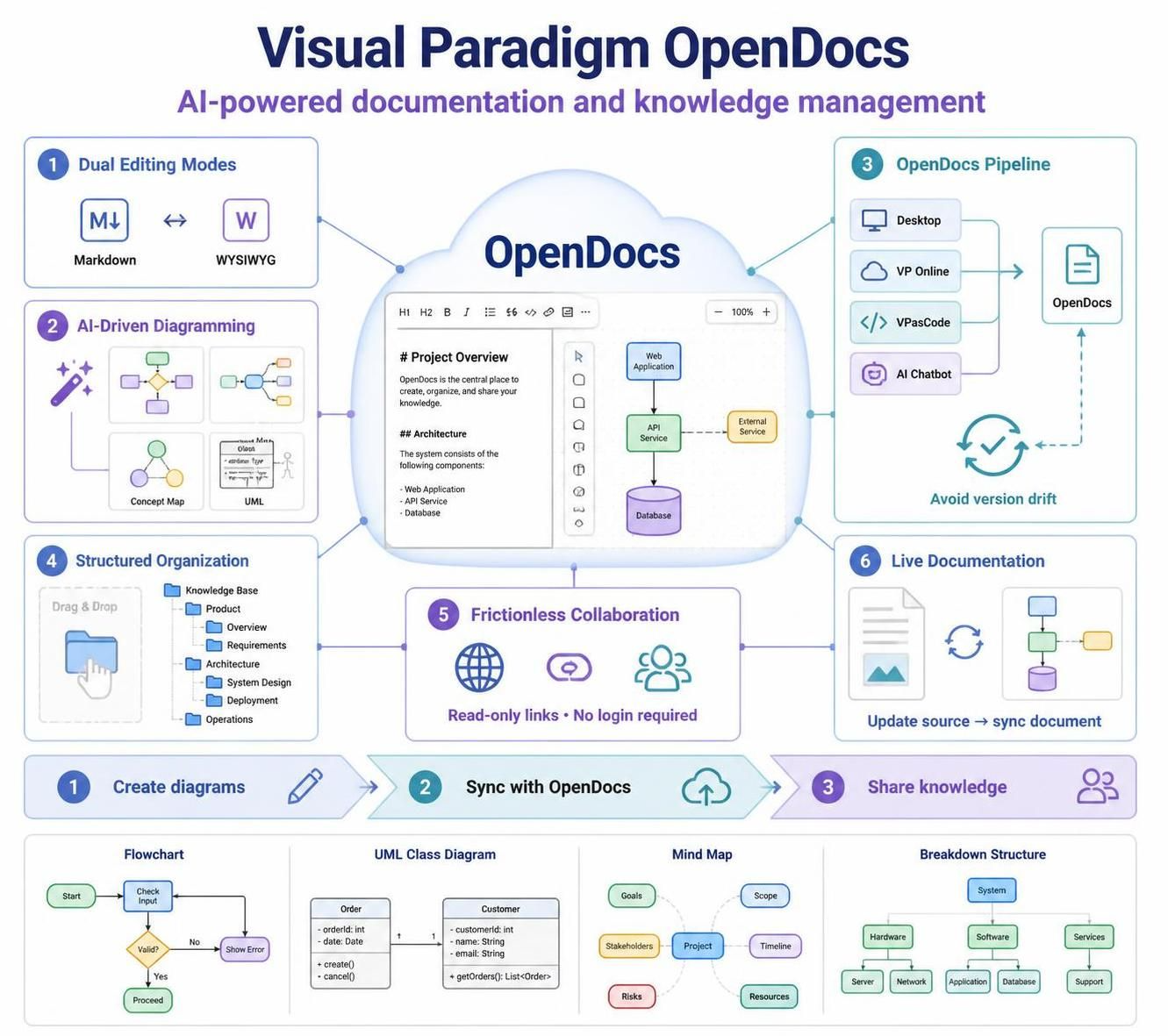
In the modern software development lifecycle, the disconnect between documentation and implementation is a primary source of technical debt. Visual Paradigm OpenDocs addresses this critical gap by merging the precision of software modeling with the accessibility of knowledge management platforms. This tutorial explores the system architecture of OpenDocs, demonstrating how it leverages AI-driven diagramming, dual-editing environments, and a robust synchronization pipeline to maintain a single source of truth for your projects.
1. The Architecture of Dual Editing Modes
OpenDocs is built on the premise that technical documentation requires two distinct workflows: the speed of code-based editing and the visual intuition of WYSIWYG (What You See Is What You Get) design. The architecture supports both simultaneously, ensuring that the knowledge base remains accessible to both developers and stakeholders.
The Markdown Editor
Designed for developers and technical writers, the Markdown interface offers a lightweight, keyboard-centric environment. It allows users to write content using simple syntax rules that are then rendered into rich text. This mode is crucial for version control compatibility and rapid prototyping of documentation.
The WYSIWYG Interface
For stakeholders who require a traditional word-processing experience, the WYSIWYG editor provides real-time formatting visibility. Users can manipulate text, embed diagrams, and structure documents visually without needing to understand the underlying markup syntax.
2. AI-Driven Diagramming: From Natural Language to Visual Models
One of the most transformative features of the OpenDocs ecosystem is its integration of Artificial Intelligence to automate the creation of complex diagrams. Rather than manually dragging and dropping shapes, users can utilize natural language prompts to generate architectural visuals.
OpenDocs supports a wide variety of diagram types, including:
- Flowcharts: For process mapping and workflow visualization.
- UML Diagrams: Including deployment and profile diagrams for technical architecture.
- Mind Maps & Concept Maps: For brainstorming and organizing abstract ideas.
- Breakdown Structures: For hierarchical project planning.
For example, a user might input a prompt such as:
"Create a UML deployment diagram showing a web server connected to a database server, with a load balancer in front of the web server."The AI engine parses this instruction and constructs the visual representation, complete with appropriate connectors and standard UML notation.
3. The OpenDocs Pipeline: Eliminating Version Drift
The most common failure point in software documentation is “version drift”—the state where the documentation no longer matches the actual software. OpenDocs solves this through its Pipeline architecture, which connects the documentation engine to external modeling tools.
The pipeline acts as a synchronization bridge between the following sources:
- Visual Paradigm Desktop: The heavy-duty modeling environment.
- VP Online: Cloud-based modeling capabilities.
- VPasCode: Automated code generation and modeling integration.
- AI Chatbot: Direct interaction for model generation.
The Synchronization Workflow
When a source diagram is updated in any of the connected tools (e.g., an engineer modifies a deployment architecture in Visual Paradigm Desktop), the OpenDocs Pipeline receives a notification. The user can then trigger a synchronization event with a single click, updating the embedded diagrams in their documentation to reflect the current state of the models.
graph TD
    A[Source Model: VP Desktop] -->|Update Detected| B(OpenDocs Pipeline)
    B -->|Notification| C[OpenDocs Document]
    D[User Action: Click 'Synchronize'] --> C
    C -->|Embeds| E[Live Diagram]

    style A fill:#f9f,stroke:#333,stroke-width:2px
    style C fill:#e1f5fe,stroke:#0277bd,stroke-width:2px
style E fill:#c8e6c9,stroke:#2e7d32,stroke-width:2px4. Structured Organization and Frictionless Collaboration
OpenDocs employs a hierarchical file system tree structure that mirrors the logical organization of a software project. This allows teams to create folders for specific projects, modules, or teams, ensuring that the knowledge base remains navigable even as it grows in complexity.
Secure Sharing Model
To facilitate “frictionless collaboration,” OpenDocs allows for the generation of secure, read-only links. This feature is particularly powerful for external stakeholders, such as clients or executives, who need access to requirements or architecture diagrams but do not have a Visual Paradigm account.
- Navigate to the root folder of the desired documentation.
- Generate a secure, read-only link for the workspace.
- Share the link via email or chat.
- Recipients can view the documentation and diagrams without needing to log in.
5. Practical Implementation Example: Project Breakdown
To demonstrate the end-to-end workflow, consider a scenario where a team needs to outline a new feature development cycle.
- Initiate: Open a new document in OpenDocs.
- Generate: Use the AI prompt: “Generate a work breakdown structure for a mobile app login feature, including UI design, backend API development, and testing phases.”
- Refine: Review and refine the generated chart directly within the document.
- Organize: Drag and drop the document into the “Feature Development” folder within the tree structure.
- Synchronize: If the breakdown structure is linked to a VP Desktop model, ensure the pipeline is active to keep the documentation up to date as requirements evolve.
Conclusion
Visual Paradigm OpenDocs transforms documentation from a static, burdensome task into a dynamic, integral part of the development lifecycle. By leveraging AI-driven diagramming, dual editing modes, and the powerful OpenDocs Pipeline, teams can ensure their knowledge base remains accurate, organized, and accessible. Whether outlining requirements or documenting architecture, OpenDocs provides the tools to keep your documentation in sync with your work, effectively eliminating version drift.