
Mastering UML in Visual Paradigm: 8 Pitfalls to Avoid with AI & VPasCode
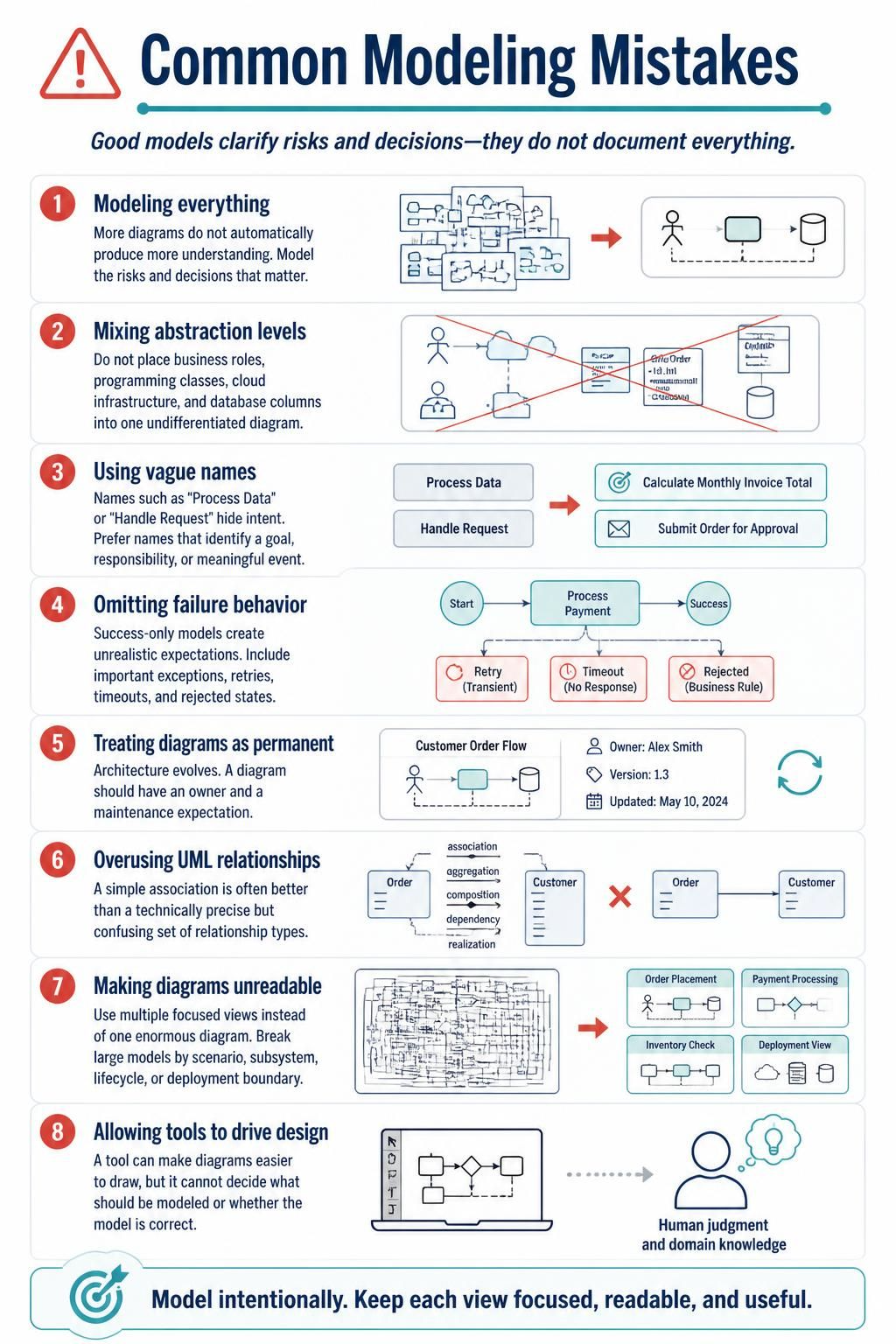
Effective system architecture is not just about drawing boxes and lines; it is a communication discipline. As emphasized in the industry-standard infographic on “Common Modeling Mistakes,” the goal of modeling is to clarify risks and decisions, not to document every single detail of a system. When using tools like Visual Paradigm (VP), it is easy to get lost in the feature set. This tutorial explores the eight critical errors architects frequently make and how to correct them to produce diagrams that actually drive project success.
1. Modeling Everything: The Trap of Over-Engineering
A common misconception is that more diagrams equal better understanding. In reality, an over-abundance of models often obscures the critical path. The goal of architecture modeling is to highlight risks and decisions that matter.
Why it fails: When you model everything, you drown the reader in noise. Stakeholders lose focus on the critical business logic because they are distracted by trivial implementation details.
The Solution: Adopt a “Risk-Driven” approach. Only create a model if it addresses a specific uncertainty or decision point. If a component is standard and low-risk, describe it in text or leave it out of high-level diagrams.
2. Mixing Abstraction Levels
One of the most frequent errors is placing disparate elements into a single undifferentiated diagram. You will often see business roles (Actors) sitting next to cloud infrastructure icons, database columns, and programming classes.
Why it fails: These elements exist on different planes of abstraction. A business role represents a human interaction, while a database column represents physical storage. Mixing them confuses the reader about the scope of the diagram. Is this a business process map? A database schema? A cloud deployment?
The Solution: Separate your views.
- Business Layer: Focus on actors, roles, and high-level processes.
- Application Layer: Focus on classes, components, and services.
- Infrastructure Layer: Focus on servers, clouds, and network topology.
3. Using Vague Names
Labels like “Process Data” or “Handle Request” are the enemies of clarity. They describe actions but hide intent.
Why it fails: A diagram with vague names forces the reader to guess what the system is actually trying to achieve. “Handle Request” could mean anything from a simple ping to a complex multi-step transaction.
The Solution: Use Goal-Oriented Naming. Instead of “Process Data,” use “Calculate Monthly Invoice Total.” Instead of “Handle Request,” use “Submit Order for Approval.” Names should identify a goal, responsibility, or a meaningful event.
4. Omitting Failure Behavior
Success-only models are dangerous because they create unrealistic expectations. A system that works 100% of the time is a fantasy. Real-world systems must handle exceptions, retries, timeouts, and rejected states.
Why it fails: If your diagram only shows the “Happy Path,” developers will build systems that crash when the network drops or the user enters invalid data. This leads to fragile architecture.
The Solution: Explicitly model the “Unhappy Paths.”
- Retry Logic: Show how the system handles transient network errors.
- Timeouts: Indicate what happens if a service hangs.
- Business Rules: Show states where a request is rejected (e.g., Insufficient Funds).
5. Treating Diagrams as Permanent
Architecture is not static; it evolves with the business. A diagram should never be treated as a permanent artifact of the past.
Why it fails: Outdated diagrams are worse than no diagrams at all. They mislead new developers and cause architectural drift.
The Solution: Assign ownership. Every diagram in Visual Paradigm should have an Owner and a Maintenance Expectation. If a diagram cannot be kept up-to-date, it should be archived or deleted.
6. Overusing UML Relationships
UML offers a rich set of relationship types: Association, Aggregation, Composition, Dependency, Realization, and Generalization. However, using all of them often leads to confusion.
Why it fails: A diagram filled with technically precise but confusing relationship lines often fails to communicate the logical structure of the system. Not every line needs to be a specific type of connection.
The Solution: Simplicity wins. A simple Association (a straight line) is often better than a technically precise but confusing set of relationship types. Use UML semantics only when they add specific semantic value (e.g., distinguishing between a “Has-A” and a “Part-of” relationship).
7. Making Diagrams Unreadable
There is a temptation to create a “God Diagram”—a single, enormous view containing the entire system. This is almost always unreadable.
Why it fails: Cognitive load limits. Humans cannot process complex, dense diagrams effectively. If a diagram requires scrolling or zooming to understand a single flow, it has failed.
The Solution: Use Focused Views. Break large models by:
- Scenario: “Order Placement Flow” vs. “Inventory Check Flow.”
- Subsystem: Separate diagrams for Billing, Shipping, and User Management.
- Deployment: Isolate physical infrastructure from logical components.
8. Allowing Tools to Drive Design
Tools like Visual Paradigm make it incredibly easy to draw diagrams. You can drag and drop shapes, auto-align lines, and generate code. However, a tool cannot decide what should be modeled.
Why it fails: If you let the tool dictate the design, you end up with a technically perfect diagram that lacks domain insight. The tool cannot know if the model is correct for your specific business context.
The Solution: Use the tool as a canvas, not a compiler. The human judgment and domain knowledge must drive the design decisions. The software is just a helper to ensure consistency and clarity.
Conclusion
By avoiding these eight common mistakes, you transform your modeling practice from a bureaucratic exercise into a strategic asset. Remember: Model intentionally. Keep each view focused, readable, and useful.