
Mastering C4 Diagrams with VPa Code: Avoiding 6 Common Modeling Mistakes
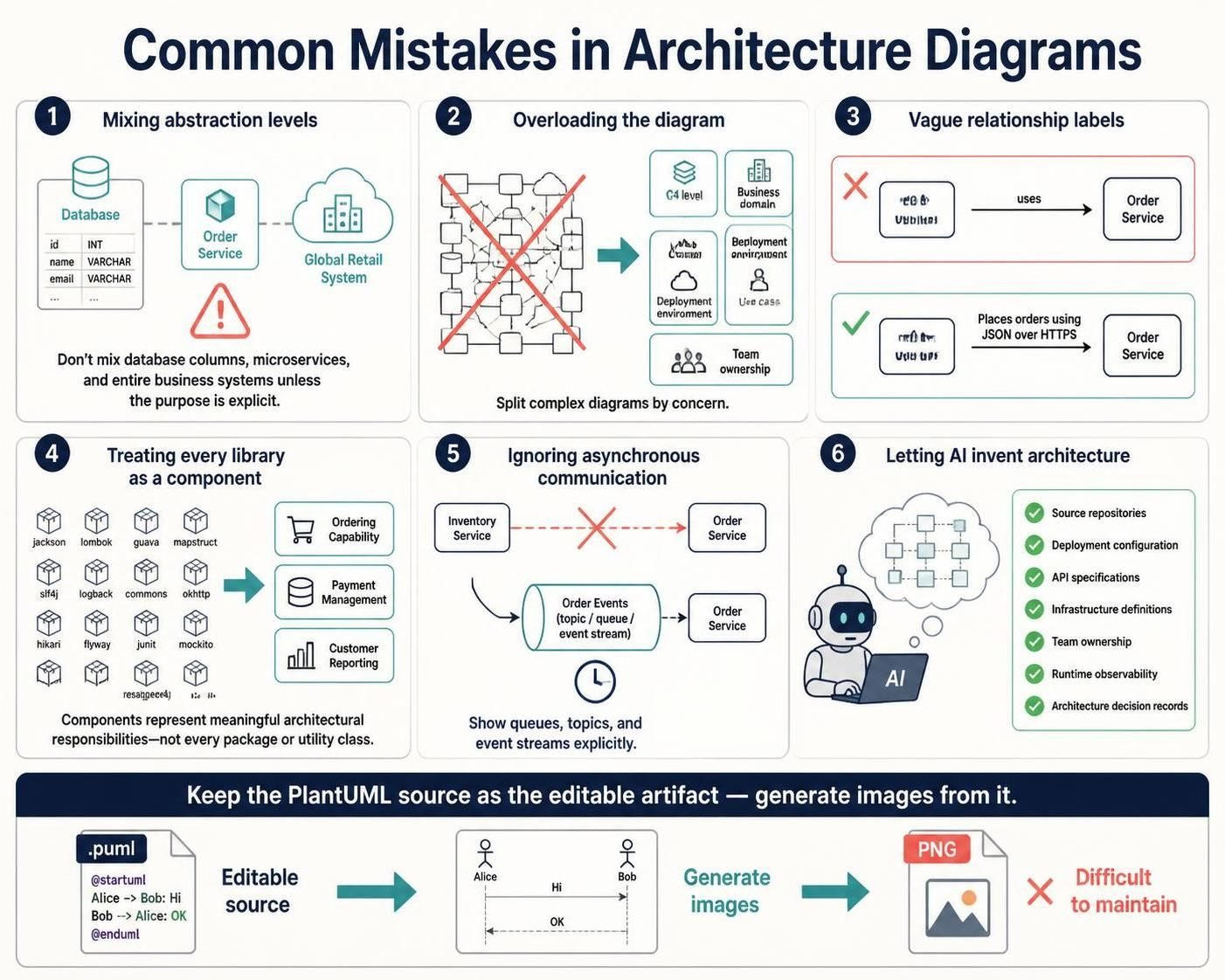
System architecture diagrams are the universal language of software engineering, bridging the gap between technical implementation and business strategy. However, a diagram that confuses more than it clarifies is worse than no diagram at all. Using the C4 model and tools like Visual Paradigm (VPasCode), you can create clear, maintainable, and insightful models. This tutorial breaks down the six most common mistakes in architecture modeling and provides actionable strategies to avoid them.
1. Mixing Abstraction Levels
The most frequent error in modeling is placing elements of vastly different granularities on the same canvas. You might see a diagram containing a database schema, a microservice, and a high-level business system all connected together. This creates cognitive overload because the viewer cannot determine the scope of the diagram.
The Rule: Do not place a database column, a microservice, and an entire business system on the same diagram unless the purpose is explicitly explained.
Instead, adhere to the C4 hierarchy. Use Level 2 (Container) diagrams to show the interaction between services and databases. Use Level 3 (Component) diagrams to zoom into the internal logic of a single service. Keep the database columns for code documentation, not system architecture.
2. Overloading the Diagram
When a diagram becomes difficult to read, it is usually a sign that too many concerns are being addressed simultaneously. A “kitchen sink” diagram that tries to show everything at once becomes a “spaghetti diagram” that is impossible to maintain.
If you find your diagram is cluttered, split it by one of the following dimensions:
- C4 Level: Separate the Context, Container, and Component views.
- Business Domain: Create separate diagrams for different bounded contexts (e.g., Order Management vs. Inventory).
- Deployment Environment: Show on-premise vs. cloud infrastructure separately if they differ significantly.
- Use Case: Focus the diagram on a specific flow (e.g., “Payment Processing Flow”).
- Team Ownership: Split diagrams by the teams responsible for specific domains.
3. Vague Relationship Labels
A generic arrow labeled “uses” or “manages” tells the viewer very little about the actual system behavior. In a microservices environment, the protocol and data format are critical architectural decisions.
The Fix: Be explicit in your relationship labels.
- Bad: [User] –(uses)–> [Order Service]
- Good: [User] –(Places orders using JSON over HTTPS)–> [Order Service]
By specifying the protocol (HTTPS), the data format (JSON), and the action (Places orders), you provide immediate context that helps developers understand the integration points without reading the code.
4. Treating Every Library as a Component
In object-oriented design, it is tempting to model every package or utility class as a C4 component. This is a category error. A C4 component represents a meaningful architectural responsibility, such as an API Gateway or a Payment Processor. It should not be a container for internal implementation details like jackson (serialization) or logback (logging).
Keep your C4 model high-level. If a library is an internal implementation detail of a component, document it in the component’s description or code comments, not in the system diagram.
5. Ignoring Asynchronous Communication
Modern systems rely heavily on event-driven architectures, message queues, and event streams. If you represent all interactions as simple arrows, you imply that the communication is synchronous (blocking).
Visualize the Queue: You must explicitly show queues, topics, and event streams. Use a cylinder shape for queues (e.g., Kafka, RabbitMQ) to indicate that the sender does not wait for a response immediately.
Example Flow:
[Order Service] -->|Publishes Event| (Order Events)
(Order Events) -->|Consumes Event| [Inventory Service]
This visual distinction prevents readers from assuming that the Inventory Service must be online and responsive at the exact moment the Order Service fires the event.
6. Letting AI Invent Architecture
Generative AI is a powerful tool for drafting diagrams, but it is prone to hallucination. AI can infer plausible services, protocols, and relationships that simply do not exist in your actual infrastructure. Relying on an AI-generated diagram without verification is dangerous.
The Validation Checklist: Before accepting an AI-generated diagram, validate it against these artifacts:
- Source Repositories: Check the actual code structure.
- Deployment Configuration: Review Kubernetes manifests, Terraform, or Docker Compose files.
- API Specifications: Verify endpoints in Swagger/OpenAPI docs.
- Infrastructure Definitions: Check AWS/Azure/GCP resource lists.
- Team Ownership: Confirm with the teams responsible for the services.
- Runtime Observability: Look at logs or tracing data to see real traffic flows.
- Architecture Decision Records (ADRs): Ensure the diagram matches documented decisions.
Conclusion: Maintain the Source
Finally, avoid the trap of “diagram drift.” Once you export a diagram to a PNG, it becomes a static image that is difficult to maintain. Changes in the code require you to manually redraw the image or find the original source.
Best Practice: Always keep the PlantUML source (or VPasCode code) as the single source of truth. Generate images from the source for documentation, but edit the source code to update the architecture. This ensures your diagrams remain synchronized with your system.