
Mastering BPMN Subprocesses: A Guide to Controlling Complexity and Scalability
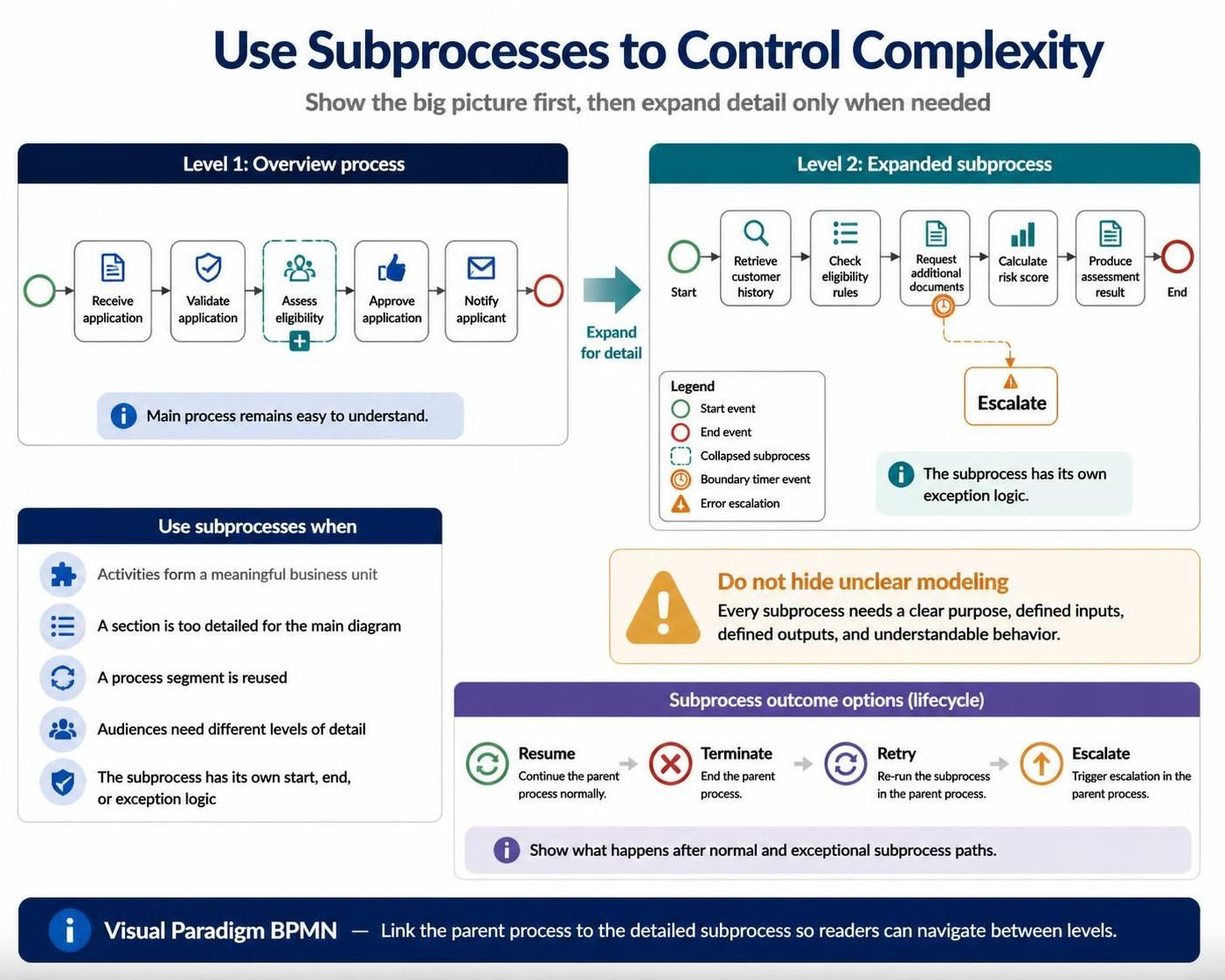
In the world of Business Process Model and Notation (BPMN), clarity is king. As business processes grow in sophistication, they inevitably become too complex to fit onto a single, readable diagram. Trying to cram every granular detail into a “Level 0” overview results in a spaghetti diagram that confuses stakeholders rather than clarifying them. The solution lies in the strategic use of Subprocesses.
This tutorial explores how to leverage subprocesses to control complexity, manage information density, and create a scalable modeling architecture. We will break down the mechanics of expanding processes from a high-level overview to a detailed execution view.
The Concept: Controlling Complexity
The core philosophy behind using subprocesses is “Show the big picture first, then expand detail only when needed.” This approach allows modelers to present a process at multiple levels of abstraction.
Level 1: The High-Level Overview
At the macro level, a process should be readable at a glance. Consider an application approval workflow. The high-level process consists of five key milestones:
- Receive application
- Validate application
- Assess eligibility
- Approve application
- Notify applicant
While this list is simple, the “Assess eligibility” step is actually a black box. It is a complex operation that involves data retrieval, rule checking, and risk calculation. If we put all that detail into the high-level diagram, the flow becomes cluttered.
Level 2: The Expanded Subprocess
By converting “Assess eligibility” into a subprocess, we encapsulate the complexity. The main diagram remains clean, while a separate diagram (or an expanded view) details the specific activities:
- Retrieve customer history
- Check eligibility rules
- Request additional documents
- Calculate risk score
- Produce assessment result
This separation allows different audiences to view the process at their required level of detail. Executives see the Level 1 flow, while analysts see the Level 2 breakdown.
When to Use Subprocesses
Subprocesses are not just for hiding details; they are structural tools used to organize logic. You should utilize subprocesses in the following scenarios:
- Meaningful Business Units: A group of activities that form a logical unit (e.g., “Assess Eligibility” or “Customer Onboarding”).
- Detail Management: When a section of the process is too detailed for the main diagram.
- Reusability: When the same process segment is reused in different parts of the model.
- Audience Segmentation: When different stakeholders need different levels of detail.
- Independent Lifecycle: When the subprocess has its own start, end, or exception logic distinct from the parent process.
Subprocess Lifecycle and Outcomes
One of the most critical aspects of subprocess modeling is understanding how the subprocess interacts with the parent process upon completion. The subprocess must have defined outcomes that dictate the flow of the parent process.
The standard lifecycle outcomes include:
- Resume: The subprocess completes successfully, and the parent process continues normally along the outgoing sequence flow.
- Terminate: The subprocess completes, but it triggers a termination event that ends the parent process immediately.
- Retry: The subprocess fails or requires rework; this outcome triggers a re-run of the subprocess within the parent flow.
- Escalate: The subprocess encounters an issue that cannot be resolved locally, triggering an escalation to a higher-level handler or the parent process.
Best Practices and Pitfalls
To maintain a healthy modeling ecosystem, adhere to these rules:
- Define Inputs and Outputs: Every subprocess must have a clear purpose. It should not be a “black box” with no defined entry or exit points.
- Avoid Hiding Unclear Modeling: Do not use subprocesses merely to hide unclear modeling or to simplify a diagram because you are stuck. If a subprocess is unclear, refine it before collapsing it.
- Maintain Logical Relationships: Ensure that the parent process and the detailed subprocess diagram are linked logically. Readers must be able to navigate seamlessly from the overview to the expanded view.
Conclusion
Mastering the art of subprocesses is essential for creating scalable, maintainable, and understandable business process models. By treating complex activities as encapsulated units, you preserve the integrity of the high-level view while providing the necessary depth for execution.
For professionals looking to implement these architectural patterns effectively, the Recommended tooling is the Visual Paradigm BPMN Tool. Visual Paradigm provides robust support for creating these hierarchical relationships, allowing modelers to maintain a logical link between the parent process and the detailed subprocess diagram so readers can easily navigate between levels.