


Introduction: The Modern Documentation Dilemma
In today’s fast-paced development environments, technical teams face a persistent challenge: keeping documentation synchronized with rapidly evolving diagrams and models. Traditional workflows involving manual exports, email chains, and version control nightmares have long plagued organizations seeking efficient knowledge management solutions. Enter Visual Paradigm’s Pipeline feature—a cloud-based asset transit hub that promises to bridge the gap between diagram creation and documentation publishing. This comprehensive review examines how this integration transforms the documentation workflow for teams leveraging Visual Paradigm’s ecosystem, from initial concept through to published WordPress content.
Understanding the Pipeline: A User-Centric Perspective
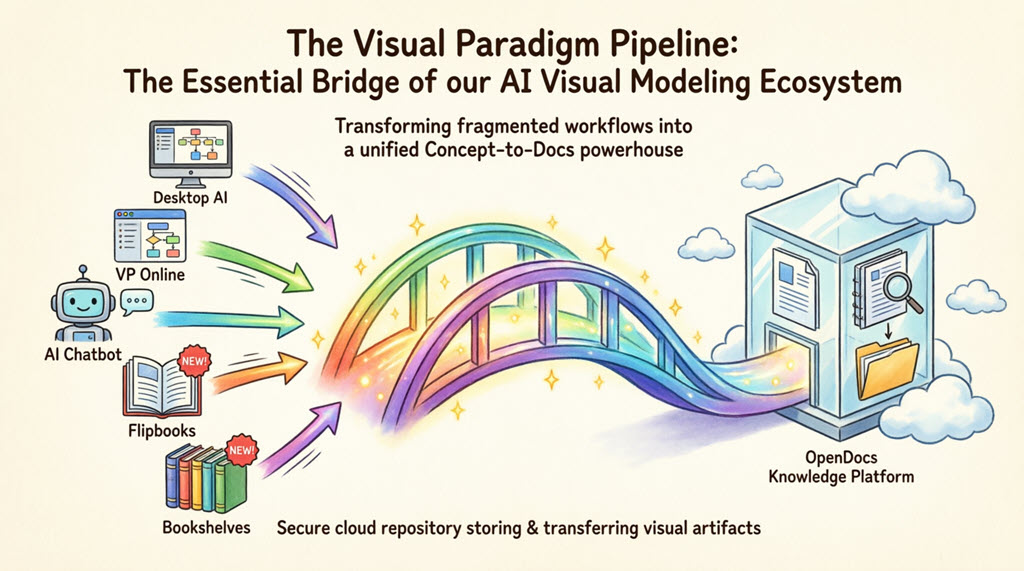
From a user experience standpoint, the Pipeline functions as a secure, cloud-based intermediary that eliminates the tedious back-and-forth between creating visuals and documenting them. Teams previously found themselves exporting diagrams as PNG files, emailing them to writers, waiting for manual updates, and constantly chasing down which version represented the current state. With Pipeline implementation, that friction reportedly vanishes.
What stands out most isn’t merely the technical capability—it’s the psychological shift that occurs when teams realize that diagrams edited in Visual Paradigm Online can automatically propagate to their OpenDocs knowledge base. Documentation finally feels dynamic rather than static. The Pipeline’s preservation of editability proves critical when stakeholders request last-minute adjustments, eliminating the need for “I’ll just redraw that in PowerPoint” compromises.
The OpenDocs Connection: Where Diagrams Transform into Living Documentation
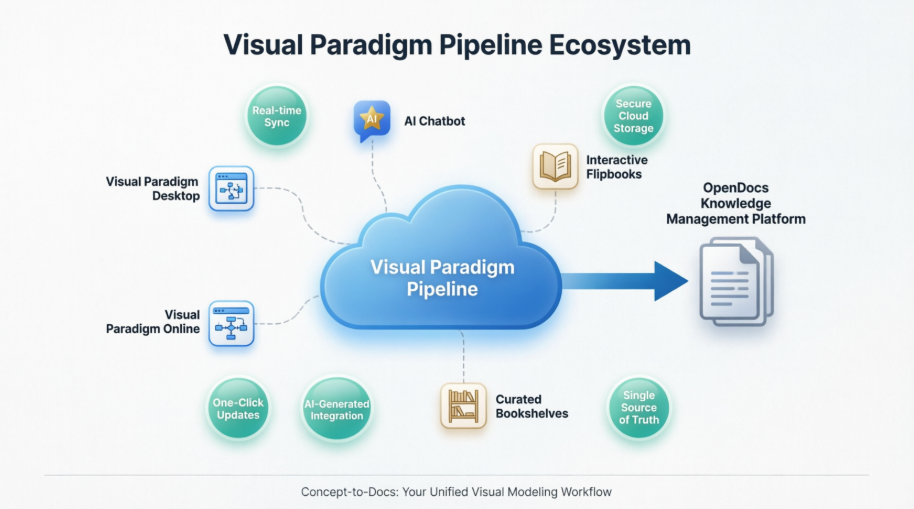
For many users, OpenDocs represents where the Pipeline truly demonstrates its value. Rather than functioning as a simple document editor, it operates as a “diagram-aware” platform that treats visuals as first-class citizens. When embedding a Pipeline artifact into technical specifications, users aren’t inserting flat images—they’re linking to dynamic assets capable of evolution.
The “Work-to-Publish” flow has reportedly transformed documentation routines in several key ways:
-
Model with confidence: Teams create complex SysML architectures in Visual Paradigm Desktop, knowing they won’t get stranded on local drives.
-
Iterate without fear: When clients request BPMN adjustments, users update the source diagram, re-send to Pipeline, and refresh the OpenDocs page—completed in minutes rather than hours.
-
Collaborate seamlessly: Team members across time zones access the same canonical version, reducing misalignment and rework.
The 5 Core Connections: Real-World Usage Scenarios
1. Visual Paradigm Desktop → OpenDocs: The Power User’s Dream
For professionals relying on advanced UML and SysML modeling, the Desktop-to-OpenDocs pipeline has proven transformative. The step-by-step experience typically unfolds as follows:
-
Users open a complex class diagram in Visual Paradigm Desktop.
-
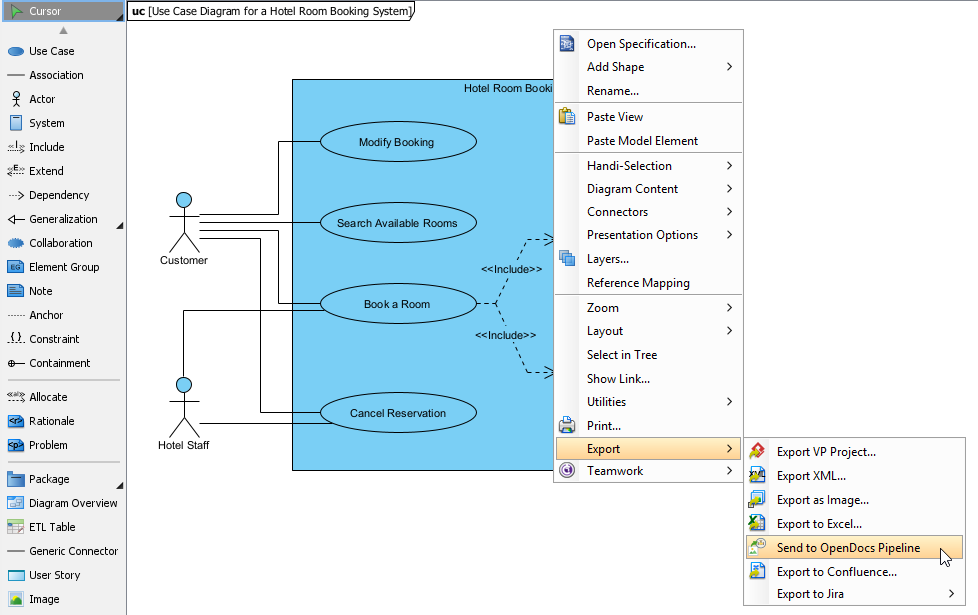
They right-click the diagram canvas → Export > Send to OpenDocs Pipeline.
-
The system prompts to save the project—a quick step ensuring version integrity.
-
Users add a brief comment like “V2.1 – Added payment gateway integration” for team context.
-
Upon confirming export, the diagram uploads to the cloud repository in seconds.
-
In OpenDocs, editors access their specification document, click Insert > Pipeline, and select the artifact. It embeds instantly, retaining full fidelity.
User takeaway: This workflow has reportedly cut documentation update time by approximately 70% on recent fintech projects, eliminating screenshot crops and resolution concerns.
2. Visual Paradigm Online → OpenDocs: Cloud-Native Efficiency
For quick iterations or collaborative sessions, many teams utilize Visual Paradigm Online in-browser. The Pipeline integration here feels native and intuitive:
-
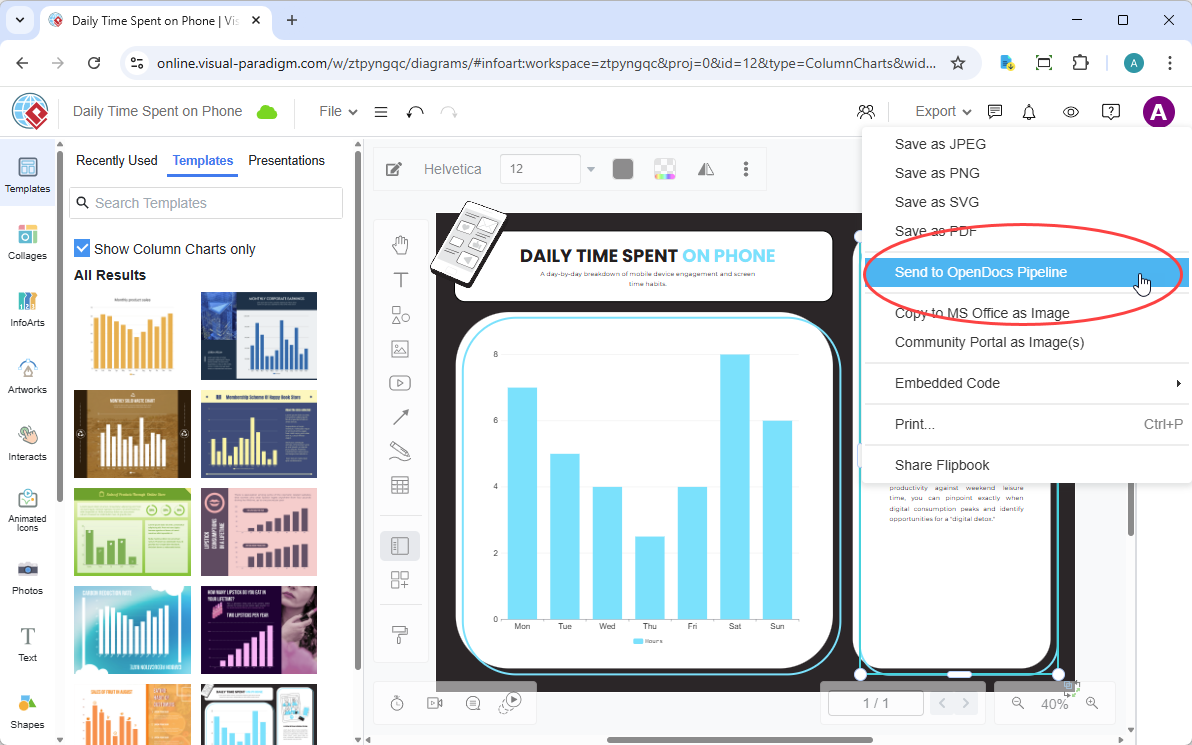
While refining a flowchart in VP Online, users navigate to Export > Send to OpenDocs Pipeline.
-
They add a descriptive note (e.g., “Customer onboarding journey – Q2 revision”).
-
Upon confirming export, the asset appears in the Pipeline library immediately.
-
In OpenDocs, users insert it via Insert > Pipeline and position it within process documentation.
User observation: This cloud-to-cloud flow proves perfect for agile teams. During recent sprint planning sessions, teams have updated user journey maps and had them reflected in shared documentation before meetings concluded.
3. AI Chatbot → OpenDocs: Accelerating Ideation to Documentation
This connection has surprised many users with its practicality. When brainstorming system architectures, teams prompt the AI Chatbot: “Generate a microservices architecture diagram for an e-commerce platform.” Once the visual appears:
-
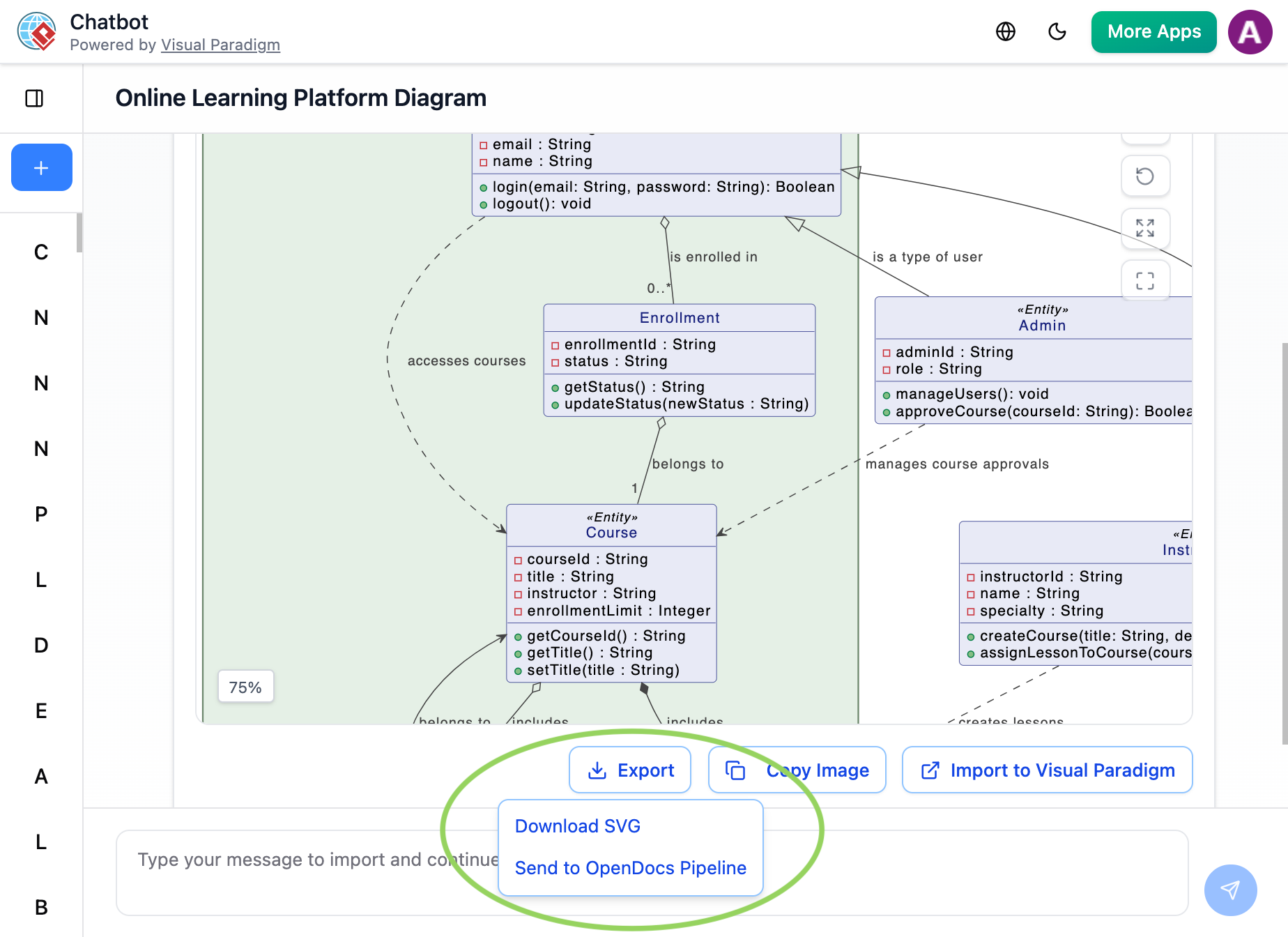
Users click Export > Send to OpenDocs Pipeline directly from the chat interface.
-
The AI-generated artifact lands in the Pipeline library, ready for refinement.
-
In OpenDocs, teams embed it into requirements documents and add contextual notes.
User insight: This capability isn’t just about speed—it’s about capturing fleeting ideas before they evaporate. The Pipeline ensures AI-assisted visuals don’t get lost in chat history.
4. Flipbooks → OpenDocs: Interactive Media Simplified
When teams need to embed product catalogs with flipbook functionality into client-facing knowledge bases, sending the Flipbook through Pipeline reportedly preserves its interactivity within OpenDocs—a significant win for engagement. No iframe hacks or external hosting required.
5. Bookshelves → OpenDocs: Scaling Knowledge Management
When organizing training materials across multiple projects, sending entire Bookshelves to OpenDocs via Pipeline creates a centralized, searchable library. This has scaled beautifully for recent enterprise onboarding initiatives, reportedly reducing content discovery time significantly.
Workflow Transformation: A Side-by-Side Comparison
| Traditional Workflow | Pipeline-Enabled Workflow |
|---|---|
| Export diagram as PNG/JPG → email to writer → wait for manual insertion | One-click “Send to Pipeline” → instant availability in OpenDocs |
| Manual re-upload for every revision → version confusion | “Update to latest revision” in OpenDocs → always current |
| Static images that can’t be edited post-export | Deep-linked, editable artifacts that evolve with the project |
| Files scattered across local drives, cloud folders, and email attachments | Centralized cloud repository with search, comments, and access control |
User verdict: The time savings prove substantial, but the bigger win appears to be cognitive load reduction. Teams spend less energy managing files and more energy on actual content quality.
Application Areas: Where Real Impact Emerges
Based on hands-on use across different domains, the Pipeline reportedly excels in:
-
UML & IT Systems: Modeling microservices architectures and class diagrams for development teams. The real-time sync keeps technical docs aligned with code changes.
-
Process Engineering: Creating P&ID diagrams for manufacturing clients. Pipeline ensures safety-critical documentation always references the latest design revision.
-
Project Management: Embedding PERT charts and WBS structures directly into project charters. Stakeholders see live progress visuals without requesting exports.
-
Strategic Analysis: Integrating SWOT and Business Canvas visuals into executive reports. The professional presentation elevates strategic discussions.
The Complete Integration Pipeline: From Concept to WordPress
The Visual Paradigm Pipeline acts as a centralized cloud hub connecting modeling tools (Desktop, Online, and AI Chatbots) to OpenDocs, which can then publish content directly to WordPress. The “Concept-to-Docs” pipeline follows a specific sequence to move data from a design environment to a live website:
Step 1: Creation & Capture
Teams create diagrams, UML models, or technical designs in Visual Paradigm Desktop, Visual Paradigm Online, or via the AI Chatbot.
Step 2: Send to Pipeline
In these tools, users employ the “Send to OpenDocs Pipeline” feature (found under Export) to upload the asset (artifact) to a secure cloud repository.
Step 3: Embed in OpenDocs
Inside OpenDocs, teams open their document and select Insert > Pipeline to pull the live diagrams or assets directly into their knowledge base.
Step 4: Publish to WordPress
Once the OpenDocs page is ready, users can export it as a WordPress Page. This allows selective sharing of subsets from internal documentation with the public or clients.
Key Benefits Observed
-
Single Source of Truth: Diagram updates in the original tool automatically propagate to the Pipeline, allowing users to “swap to latest revision” in OpenDocs with one click.
-
Selective Sharing: Teams can build a massive internal knowledge base in OpenDocs but only publish specific pages to their external WordPress site.
-
Seamless Workflow: The integration eliminates manual file exports and imports, keeping technical documentation and visuals synced across platforms.
One-Time WordPress Setup
To enable the final step of the pipeline, teams must connect OpenDocs to their WordPress site:
-
Log into the WordPress Dashboard.
-
Navigate to Users > Profile and scroll to Application Passwords.
-
Generate a new password (e.g., named “Visual Paradigm”) and copy it into the OpenDocs export settings.
Important Considerations from a User’s Lens
Several practical notes emerge from user experiences:
-
Subscription requirements: Pipeline access requires Visual Paradigm Online Combo Edition or Professional Edition. Users confirmed this during onboarding—worth verifying before committing to a workflow change.
-
Learning curve: Initial setup reportedly took teams about 30 minutes to grasp, but adoption proved rapid because the mental model (“send to cloud, insert anywhere”) remains intuitive.
-
Offline limitations: As a cloud-centric feature, Pipeline requires internet connectivity. For highly regulated environments with air-gapped systems, this may need evaluation.
Conclusion: Evaluating the Pipeline’s Worth for Your Workflow
After extensive use across diverse projects, the consensus among users points to a confident yes—with caveats. For teams already using Visual Paradigm tools and struggling with documentation synchronization, the Pipeline isn’t just convenient; it’s transformative. It turns fragmented, error-prone processes into a cohesive “Concept-to-Docs” pipeline that respects both creator intent and consumer needs.
However, for organizations using disparate tools without Visual Paradigm at the core, the value proposition diminishes. This isn’t a universal integration layer—it’s a powerful accelerator within a specific ecosystem.
For many users, the Pipeline’s greatest gift wasn’t technical—it was psychological. It restored faith that documentation could be dynamic, collaborative, and genuinely useful—not a bureaucratic afterthought. For teams whose workflow pain points resonate with these experiences, a hands-on trial seems warranted. Sometimes, the right tool doesn’t just save time; it changes how teams think about the work itself.
The Visual Paradigm Pipeline represents more than a feature update—it embodies a fundamental shift toward living documentation that evolves alongside projects. As organizations continue grappling with the challenge of maintaining accurate, accessible technical knowledge, solutions like Pipeline demonstrate that the future of documentation lies not in static files, but in connected, intelligent systems that grow with the work they describe.
References
- Export OpenDocs to WordPress Page: Official release notes detailing how to export OpenDocs documentation as WordPress pages, including setup instructions for application passwords and publishing workflows.
- Mastering Visual Paradigm OpenDocs: The Ultimate Guide to AI-Powered Knowledge Management and the Pipeline Ecosystem: Comprehensive guide covering the complete Visual Paradigm OpenDocs platform, Pipeline integration, and AI-powered knowledge management capabilities.
- Sync AI Diagram to OpenDocs Pipeline Guide: Step-by-step tutorial on synchronizing AI-generated diagrams with OpenDocs through the Pipeline feature, ensuring seamless integration from creation to documentation.
- Visual Paradigm Online to OpenDocs Export: Official announcement and documentation for the integration between Visual Paradigm Online and OpenDocs via the Pipeline feature, enabling direct export of cloud-based diagrams.
- Visual Paradigm OpenDocs: The Complete Guide to AI-Powered Knowledge Management and Diagram Generation: In-depth resource covering Visual Paradigm OpenDocs capabilities, AI diagram generation, and knowledge management best practices.
- My Journey with Visual Paradigm Pipeline: How This ‘Asset Transit Hub’ Transformed My Documentation Workflow: First-hand user experience review detailing real-world implementation of the Pipeline feature across multiple client projects and documentation scenarios.
- 🚀 My Journey to Seamless Documentation: Sending Visual Paradigm Creations Directly to OpenDocs: Personal account of implementing direct export from Visual Paradigm tools to OpenDocs, highlighting workflow improvements and time savings.
- Seamlessly Integrate Visual Paradigm OpenDocs into WordPress: The Ultimate Guide to Embedding AI-Powered Knowledge Bases: Detailed guide on connecting OpenDocs documentation to WordPress sites, including configuration steps and publishing strategies.
- Visual Paradigm OpenDocs: The Complete Guide to AI-Powered Knowledge Management: Comprehensive overview of Visual Paradigm OpenDocs platform features, AI capabilities, and knowledge management workflows.
Related posts:
 My First Week with OpenDocs’ AI ERD Generator: A Hands-On Review from a Database Developer
From Diagrams to Documentation: OpenDocs’ AI-Powered DFD Generator and WordPress Integration
Beyond Static Docs: A Hands-On Review of Visual Paradigm OpenDocs as a Living Knowledge Engine
Mastering Visual Paradigm OpenDocs: A Complete Guide to Integrated AI Diagramming
My First Week with OpenDocs’ AI ERD Generator: A Hands-On Review from a Database Developer
From Diagrams to Documentation: OpenDocs’ AI-Powered DFD Generator and WordPress Integration
Beyond Static Docs: A Hands-On Review of Visual Paradigm OpenDocs as a Living Knowledge Engine
Mastering Visual Paradigm OpenDocs: A Complete Guide to Integrated AI Diagramming