In the landscape of modern software development and project delivery, the gap between intent and execution is often where value is lost. Teams may possess brilliant ideas and skilled engineers, yet the path from concept to deployed feature remains fraught with ambiguity. This friction usually stems not from a lack of technical ability, but from a breakdown in communication. One of the most potent tools to bridge this divide is the disciplined use of story cards.
A story card is more than a ticket in a backlog; it is a promise of communication. It serves as the primary artifact that aligns stakeholders, developers, designers, and quality assurance professionals around a single, shared understanding of value. When crafted with precision, these cards reduce meeting time, decrease rework, and accelerate the flow of work. This guide explores the mechanics of building story cards that speak clearly, ensuring every team member knows exactly what needs to be built and why.
🧠 Understanding the Purpose of a Story Card
At its core, a story card represents a specific slice of functionality from the perspective of an end user. It is the unit of work that drives progress. However, its function extends beyond task assignment. It is a communication medium designed to trigger conversation.
- Focus: It isolates a specific capability rather than a vague goal.
- Context: It provides the “why” behind the “what”.
- Agreement: It establishes a baseline for what constitutes completion.
Without a clear story card, teams risk building features that solve the wrong problems or miss critical edge cases. The card acts as the single source of truth, preventing information from being lost in hallway conversations or fragmented across multiple chat channels.
🏗️ The Anatomy of a High-Performance Story Card
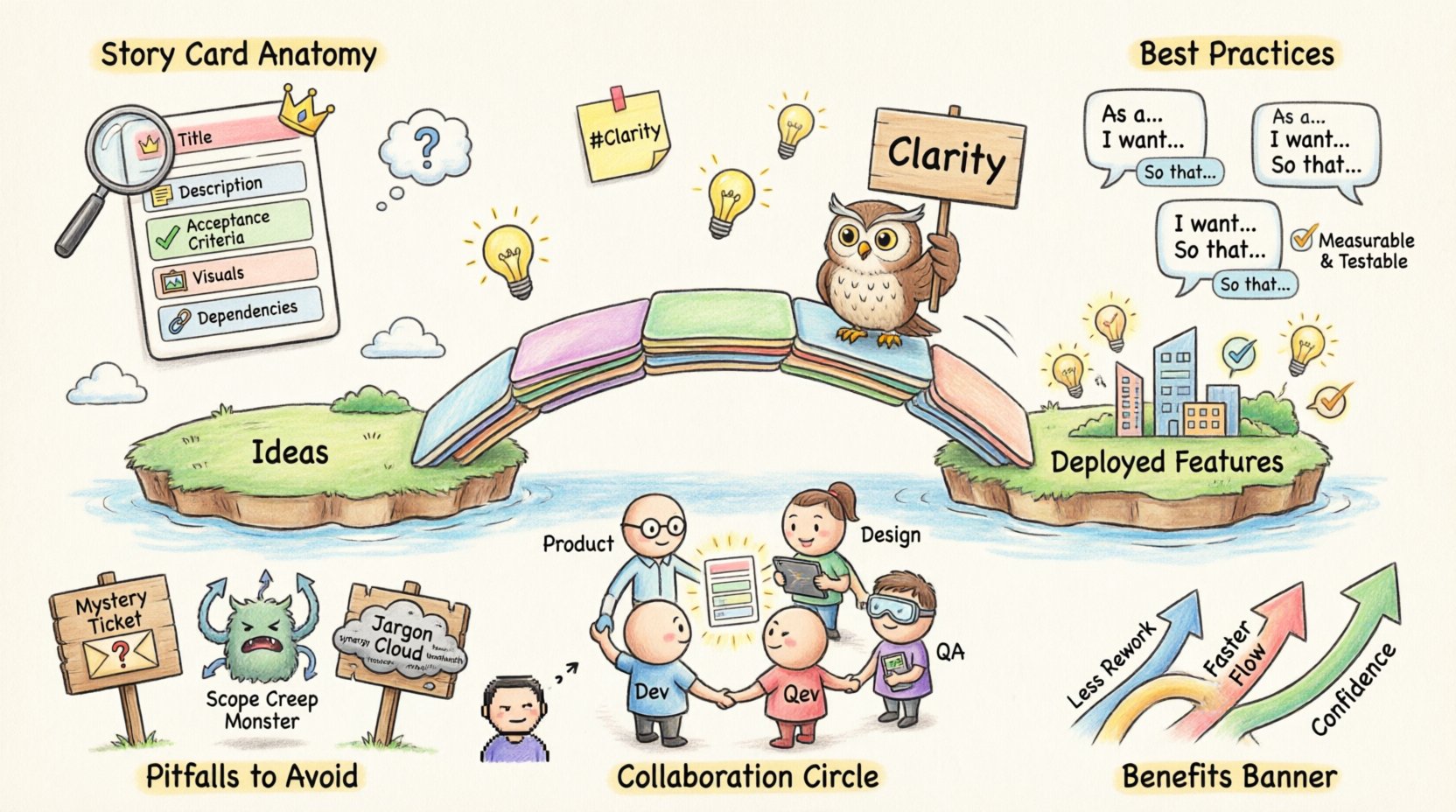
To ensure clarity, a story card must contain specific elements. While the exact fields may vary by platform, the underlying logic remains consistent. A robust card typically includes the following components:
| Component | Purpose | Example Content |
|---|---|---|
| Title | Identifies the feature quickly | As a user, I want to reset my password via email |
| Description | Elaborates on the user need | Users who forget credentials should not be locked out permanently. |
| Acceptance Criteria | Defines testable conditions for success | Link must expire in 24 hours; Email must be delivered. |
| Visuals/Attachments | Provides design reference | Link to mockup or screenshot of current state. |
| Dependencies | Lists prerequisites | Requires backend API endpoint #402 to be live. |
When these elements are present and well-written, the card becomes self-sufficient enough to allow a developer to begin work without needing to stop and ask clarifying questions every five minutes. This reduces cognitive load and maintains flow state.
✍️ Crafting the Title and Description
The title is the first thing anyone sees. It must be concise yet descriptive. A common mistake is using technical jargon in the title, such as “Fix API Latency.” While accurate to the engineer, this does not convey value to the business or the user. Instead, focus on the outcome.
Best Practices for Titles
- Use Standard Formats: Adopting the “As a… I want… So that…” format helps maintain consistency across the backlog.
- Be Specific: Avoid vague terms like “Improve” or “Update.” Use “Optimize,” “Migrate,” or “Refactor” only when necessary.
- Limit Scope: If a title suggests too much work, it is likely a collection of multiple stories.
Writing the Description
The description expands on the title. It should answer the question: “What is the problem we are solving?” This section is crucial for alignment. It allows the reader to understand the context before they see the solution.
- Identify the User: Who is experiencing the pain point?
- Identify the Action: What is the user trying to achieve?
- Identify the Benefit: What value does this deliver?
Consider the difference between “Add Search Bar” and “Enable users to find products quickly using keywords.” The second option connects the feature to a business outcome. This connection ensures that the team understands the priority and the urgency of the work.
🎯 Acceptance Criteria: The Contract of Completion
Acceptance criteria are the most critical part of a story card for quality assurance. They define the boundaries of the work. Without them, “done” becomes subjective. One developer might consider the feature done when the button works, while another might include error handling and logging.
Writing Testable Statements
Criteria should be written as statements that can be proven true or false. Avoid subjective terms like “fast,” “easy,” or “good.” Instead, use measurable thresholds.
- Bad: The page should load quickly.
- Good: The page loads in under 2 seconds on a 4G connection.
- Bad: The system should handle errors gracefully.
- Good: An error toast appears within 1 second if the API fails, and the user can retry.
Structuring with Given-When-Then
For complex logic, the Given-When-Then structure helps clarify the behavior.
- Given: The initial state or context (e.g., The user is logged in).
- When: The action taken (e.g., The user clicks the logout button).
- Then: The expected result (e.g., The user is redirected to the login page).
This structure forces the writer to think through the scenario step-by-step, uncovering edge cases that might otherwise be missed. It also serves as a direct input for automated testing scripts later in the lifecycle.
🖼️ Visuals and Contextual Attachments
Text is powerful, but images are faster. A picture of the desired state can convey layout, color, and spacing information in seconds that might take paragraphs to describe. Whenever possible, attach mockups, wireframes, or screenshots.
- Design Handoff: Link to the design file or a preview URL.
- Existing State: If modifying a feature, include a screenshot of the current behavior to highlight the change.
- Diagrams: Flowcharts or sequence diagrams can explain complex data movement better than text.
Ensure that all links are accessible to the entire team. If a design file is behind a permission wall, the developer cannot see it, and the story card fails its purpose. Context is king; provide everything needed to visualize the goal.
🤝 Collaboration Dynamics
A story card is a collaborative object. It is not a command from a manager to an employee. It is a request for partnership. The creation of the card often happens before the work begins, but the refinement happens throughout the process.
The Role of the Team
- Product: Defines the value and the user need.
- Development: Assesses feasibility and technical complexity.
- Design: Ensures the experience meets user standards.
- QA: Validates the acceptance criteria are testable.
When these roles review the card together, they bring different perspectives. A developer might spot a security constraint that the product owner missed. A designer might notice a usability issue that the developer overlooked. This collective scrutiny improves the quality of the card before a single line of code is written.
🚫 Common Pitfalls and How to Avoid Them
Even with the best intentions, story cards can become cluttered or confusing. Recognizing these patterns helps teams self-correct.
1. The Mystery Ticket
Sometimes a card is created with no description or criteria, expecting the assignee to figure it out. This leads to wasted time and frustration.
- Solution: Enforce a rule that a card cannot be moved to “In Progress” without complete criteria.
2. The Scope Creep
A card grows larger than intended as more requirements are added to the description. This delays delivery.
- Solution: If a requirement doesn’t fit the core user story, create a new card linked to the original.
3. The Technical Jargon
Using internal system names confuses stakeholders who are not technical.
- Solution: Translate technical terms into business value. Explain the impact, not just the implementation.
4. The Missing Definition of Done
Without a clear Definition of Done (DoD), a story might be marked complete without documentation or testing.
- Solution: Maintain a standard DoD checklist at the team level that applies to all cards.
📊 Measuring Clarity and Success
How do you know if your story cards are working? Look for metrics that reflect efficiency and quality.
- Rework Rate: How often does a story return to the backlog due to ambiguity or errors? A high rate suggests unclear cards.
- Flow Time: Does the time from “Ready” to “Done” decrease? Clear cards reduce questions and delays.
- Team Confidence: Ask the team. Do they feel they understand the work before starting? Confidence is a qualitative metric of clarity.
Regular retrospectives should include a discussion on the quality of the work items. If the team feels they are constantly guessing, the cards need refinement.
🔗 Handling Complex Dependencies
Not all work exists in a vacuum. Sometimes a story depends on another team, an external API, or a regulatory change. These dependencies must be visible on the card.
- Link Related Cards: Use the system to link dependent tickets.
- State the Risk: If a dependency is blocked, note the impact on the delivery date.
- Identify Owners: Clearly state who is responsible for resolving the dependency.
Transparency regarding dependencies prevents bottlenecks. If a developer cannot start because a prerequisite is missing, the card should reflect that status immediately. Do not wait until the deadline to report a blockage.
🔄 Refinement and Evolution
A story card is a living document. As the team learns more about the problem, the card should evolve. New information discovered during development might reveal that the initial assumption was incorrect.
- Update Regularly: If a requirement changes, update the card and notify the team.
- Document Decisions: If a technical decision is made that affects the scope, record it in the comments or description.
- Archive Obsolete Info: Remove outdated comments to keep the history clean.
This evolution ensures that the record of what was built matches what was actually delivered. It provides a valuable audit trail for future maintenance and knowledge transfer.
🛠️ Integrating into the Workflow
The card is most effective when it is integrated into the daily rhythm of the team. It should be referenced in stand-ups, planning sessions, and reviews.
- Stand-ups: Discuss progress against the acceptance criteria.
- Planning: Use the card details to estimate effort accurately.
- Review: Walk through the criteria to demonstrate the work is done.
When the card is the central artifact, meetings become more focused. There is less time spent on status updates and more time on problem-solving. The team moves faster because everyone is looking at the same information.
💡 Advanced Techniques for Complex Stories
For highly complex features, a single card might not suffice. Consider breaking the work down into sub-tasks or using a feature toggle approach.
- Sub-tasks: Break the story into technical steps (Database, API, UI) while keeping the user story intact.
- Feature Toggles: Implement the feature behind a switch to allow for incremental rollout and testing.
- Exploratory Testing: Reserve time in the card for open-ended testing beyond the strict criteria.
These techniques allow the team to manage risk while maintaining the clarity of the primary user story. They ensure that even the most complicated work remains traceable to a user need.
🌟 The Human Element
Finally, remember that story cards are written by humans for humans. A card should never be so rigid that it stifles creativity or problem-solving. It is a guide, not a prison. Allow room for the team to propose better solutions than the initial description suggests.
- Encourage Questions: If something is unclear, ask. Do not assume.
- Foster Ownership: Let the team take pride in the quality of the card.
- Keep it Human: Use a friendly tone. Avoid robotic language that distances the reader from the work.
When communication flows smoothly through clear story cards, the result is more than just software. It is a shared sense of purpose. The team moves with intent, knowing exactly what they are building and why it matters. This alignment is the foundation of high-performing delivery systems.
🚀 Final Thoughts on Implementation
Implementing better story cards requires a shift in mindset. It is not about filling out fields; it is about thinking clearly. It requires discipline to write good descriptions and the humility to admit when a card is unclear. Over time, this discipline pays dividends in speed, quality, and team morale.
Start by auditing your current backlog. Look for cards that are vague, missing criteria, or overly technical. Apply the principles outlined here to refine them. Watch how the team’s confidence grows as the ambiguity fades. Communication is the bridge between idea and reality; story cards are the planks that make up that bridge. Build them strong, and the path forward becomes clear.