![Infographic comparing features vs user stories in product development: shows user story formula (As a [user] I want [action] so that [benefit]), INVEST criteria checklist, Given-When-Then acceptance criteria framework, and key benefits like reduced rework and faster onboarding, designed with decorative washi tape borders and rubber stamp style icons](https://www.hi-posts.com/wp-content/uploads/2026/03/stop-writing-features-start-user-stories-infographic.jpg)
In the fast-paced world of product development, it is easy to fall into the trap of listing capabilities. Teams often create documents filled with checkboxes for “Login,” “Search,” or “Export to PDF.” These are features. They are inputs. They describe what the system does, not why it matters. When you focus on features, you risk building solutions that do not solve the actual problem.
The shift from feature-based thinking to user-centric writing changes the entire trajectory of your project. It moves the conversation from technical implementation to user value. This guide explores why you should stop writing features and start writing user stories. We will cover the anatomy of a strong story, how to define acceptance criteria, and how to align your team around meaningful outcomes.
Understanding the Core Difference 🧠
Before diving into the mechanics, we must clarify the distinction between a feature and a story. A feature is a distinct function or capability of a software system. It is static. A user story is a placeholder for a conversation about a need. It is dynamic.
Consider the statement: “Add a dark mode.” This is a feature. It tells the engineering team to change CSS variables and toggle UI elements. It does not explain who needs this or why. It assumes the value is self-evident.
Now consider the user story: “As a graphic designer working at night, I want to switch to a dark interface so that I can reduce eye strain during long editing sessions.” This statement provides context. It identifies the persona. It defines the benefit.
When you write features, you hand off a list of tasks. When you write user stories, you invite collaboration. The feature is the output; the story is the outcome.
The Anatomy of a User Story 🧩
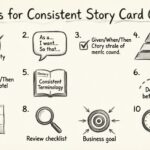
While the classic format is simple, the depth lies in the details. A well-crafted user story follows a specific structure that ensures clarity for everyone involved.
- Who: The persona or user type.
- What: The action or capability they need.
- Why: The value or benefit they gain.
This format forces the writer to think about the human element. If you cannot fill out the “Why” section, you likely do not have a valid story yet. You have a wish list item. Validating the “Why” is the first step in prioritization.
Example of a Weak Story:
“As a user, I want to upload a file.”
This is too vague. What kind of file? How big? What happens if it fails? What is the business goal?
Example of a Strong Story:
“As a project manager, I want to upload large CSV datasets so that I can bulk-update employee records without manual entry.”
This specifies the role, the action, the constraint (large CSV), and the business goal (bulk-update without manual entry).
The INVEST Model 📏
To ensure your stories are high quality, they should adhere to the INVEST criteria. This framework helps determine if a story is ready for development.
- I – Independent: The story should not rely on another story being completed first. Dependencies create bottlenecks.
- N – Negotiable: The details are not set in stone. They are open for discussion between the developers and the product owner.
- V – Valuable: It must deliver value to the user or the business. If it does not, why build it?
- E – Estimable: The team must be able to estimate the effort required. If the scope is unknown, the story is too vague.
- S – Small: It should be small enough to be completed within a single sprint or iteration.
- T – Testable: There must be clear criteria to determine if the story is done.
When a story fails the “Testable” criterion, it is often a feature list disguised as a story. Acceptance criteria are the key to making a story testable.
Feature vs. User Story Comparison 📊
Visualizing the difference helps clarify when to use which format. While user stories are the gold standard for development work, features still have a place in high-level planning.
| Aspect | Feature List | User Story |
|---|---|---|
| Focus | System Capability | User Value |
| Context | Low (Technical) | High (Human) |
| Flexibility | Rigid | Negotiable |
| Outcome | Delivered Function | Solved Problem |
| Stakeholder Buy-in | Harder to justify | Easier to justify |
| Best For | Roadmaps & High-level Planning | Sprint Planning & Execution |
Use features for the roadmap to show direction. Use stories for the sprint to define the work. Mixing them up leads to confusion.
Writing Acceptance Criteria ✅
A story without acceptance criteria is a promise you cannot keep. Acceptance criteria define the boundaries of the story. They tell the developer when to stop coding and the tester when to stop testing.
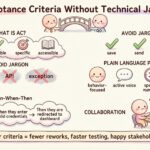
Effective criteria should be clear, concise, and unambiguous. Avoid phrases like “user-friendly” or “fast.” These are subjective. Instead, use measurable terms.
Bad Criteria:
- The page should load quickly.
- The form must be easy to use.
Good Criteria:
- The page must load in under 2 seconds on a 4G connection.
- The form must prevent submission if the email field is empty.
- The user must receive a confirmation message within 1 second of submission.
Some teams use the Given-When-Then format to structure these criteria. This approach aligns well with testing frameworks and ensures logic is covered.
- Given: The initial context or state.
- When: The action or event.
- Then: The expected outcome.
Example:
Given I am logged in, When I click the export button, Then I should see a download starting immediately.
Common Pitfalls in Story Writing 🚧
Transitioning to user stories is not instant. Teams often struggle with common mistakes that undermine the process.
1. The “As a Developer” Story
This is a frequent error. Writing a story like “As a developer, I want to refactor the database” is a technical task, not a user story. While technical debt is real, it should be framed in terms of value. “As a system, I want to optimize queries so that user load times decrease.” If the value is not clear to the business, the work may be deprioritized.
2. The Epic Trap
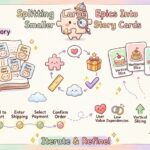
Epics are large bodies of work that span multiple iterations. They are necessary for tracking large initiatives. However, do not confuse an Epic with a Story. An Epic is a collection of stories. Do not try to estimate an Epic as if it were a single story. Break it down.
3. Ignoring the “Why”
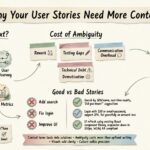
If you write the “What” but forget the “Why,” the team will build the wrong thing. Engineers need to understand the problem to find the best solution. Without the “Why,” they might build a technically superior solution that solves no one’s problem.
4. Over-Engineering the Definition
Do not write a novel for every story. If a story is too complex, it needs to be broken down. The goal is clarity, not documentation completeness. The conversation is the documentation. The written text is a reminder of that conversation.
Collaboration Over Documentation 🤝
One of the biggest misconceptions about user stories is that they are documentation. They are not. They are prompts for conversation. The value lies in the discussion between the product owner, the developers, and the testers.
This is often referred to as the “Three Amigos” conversation. Before a story enters the sprint, these three roles should review it together.
- Product Owner: Clarifies the business value and requirements.
- Developer: Identifies technical constraints and implementation details.
- Tester: Identifies edge cases and acceptance criteria.
When you write features, this collaboration often happens too late, after the code is written. When you write stories, this collaboration happens before the work begins, saving time and rework.
Prioritization and Value 📈
User stories make prioritization easier. Because every story is tied to a specific user value, it is easier to rank them. You can ask: “Which story delivers the most value to the user right now?”
Feature lists often prioritize based on difficulty or technical debt. User stories prioritize based on impact. This alignment ensures that the team is always working on the most important things.
Use techniques like MoSCoW (Must have, Should have, Could have, Won’t have) or Weighted Shortest Job First (WSJF) to rank your stories. These methods rely on the clear definition of value provided by the story format.
Handling Technical Requirements 🛠️
What about tasks that do not directly impact the user? Technical debt, infrastructure upgrades, and security patches are real work. They often do not fit the “As a user” template.
You have two options for these items.
- Frame them as System Stories: “As a system, I want to reduce latency so that the application remains stable under load.”
- Use Technical Spikes: If the value is unknown, create a time-boxed investigation story to learn enough to estimate the actual work.
Never hide technical work inside a user story without explaining the benefit. If the team does not understand the benefit, they will view the work as unnecessary overhead.
Transitioning Your Team Culture 🔄
Changing from features to stories is a cultural shift. It requires trust. You must trust your team to understand the user. You must trust the user to provide feedback.
Start small. Pick one upcoming sprint and require that all items be written as user stories. Hold a training session to explain the “Why.” Encourage the team to ask questions if a story is unclear.
Monitor the results. Measure the speed of delivery. Measure the satisfaction of the users. When the team sees that stories lead to better outcomes, adoption will become natural.
Measuring Success 📊
How do you know if this approach is working? Look for these indicators:
- Reduced Rework: Fewer bugs and misunderstandings mean less time fixing mistakes.
- Faster Onboarding: New team members understand the product better when stories explain the value.
- Better Stakeholder Communication: Stakeholders care more when they see user value rather than technical tasks.
- Higher Velocity: With clear acceptance criteria, the team moves faster without losing quality.
If you see these improvements, you have successfully shifted your workflow. If not, revisit your acceptance criteria and your collaboration habits.
Frequently Asked Questions ❓
Can I still use a backlog?
Yes. A backlog is simply a list of work. You can have a backlog of user stories. In fact, a backlog of user stories is the best kind of backlog because it is organized by value.
What if I don’t know the user?
Use a generic persona. “As a customer” is acceptable if you do not have specific data. However, strive to create specific personas as you gather data. Specificity leads to better decisions.
Is this only for Agile teams?
While popular in Agile, the principle applies to any development methodology. Any team that wants to build valuable products benefits from focusing on user outcomes rather than feature inputs.
How do I handle bugs?
Bugs are often written as stories: “As a user, I am unable to save my data, so I want the system to store my progress automatically.” This frames the bug as a broken promise of value.
Final Thoughts on Value 🌟
The goal of software development is to solve problems. Features are just tools to solve those problems. User stories are the map that ensures you are using the tools correctly.
By shifting your focus from features to user stories, you align your team with the people who matter most: the users. You reduce waste, increase clarity, and build products that truly resonate.
Start today. Look at your current backlog. Identify the features. Rewrite them as stories. Ask the “Why.” The difference you see will be immediate.