Effective collaboration relies on a shared understanding of what needs to be built. When teams work on complex systems, the gap between intent and implementation often widens due to vague documentation. This gap creates rework, delays, and frustration. Requirement cards, often known as user stories in agile frameworks, serve as the primary vehicle for communication between stakeholders and delivery teams. They are not just tasks to be checked off; they are promises of value delivered.
To build software that meets user needs, teams must invest time in defining these cards with precision. This process involves more than just writing a sentence. It requires a deep dive into the user context, the functional requirements, and the constraints of the system. Below, we explore the mechanics of creating requirement cards that stand the test of refinement and development.
🔍 Why Clarity Matters in Requirement Cards
Ambiguity is the enemy of velocity. When a requirement card is open to interpretation, different team members visualize the solution differently. The designer might create one interface, the developer might code a different logic, and the tester might verify against a third expectation. This divergence leads to defects that are discovered late in the cycle.
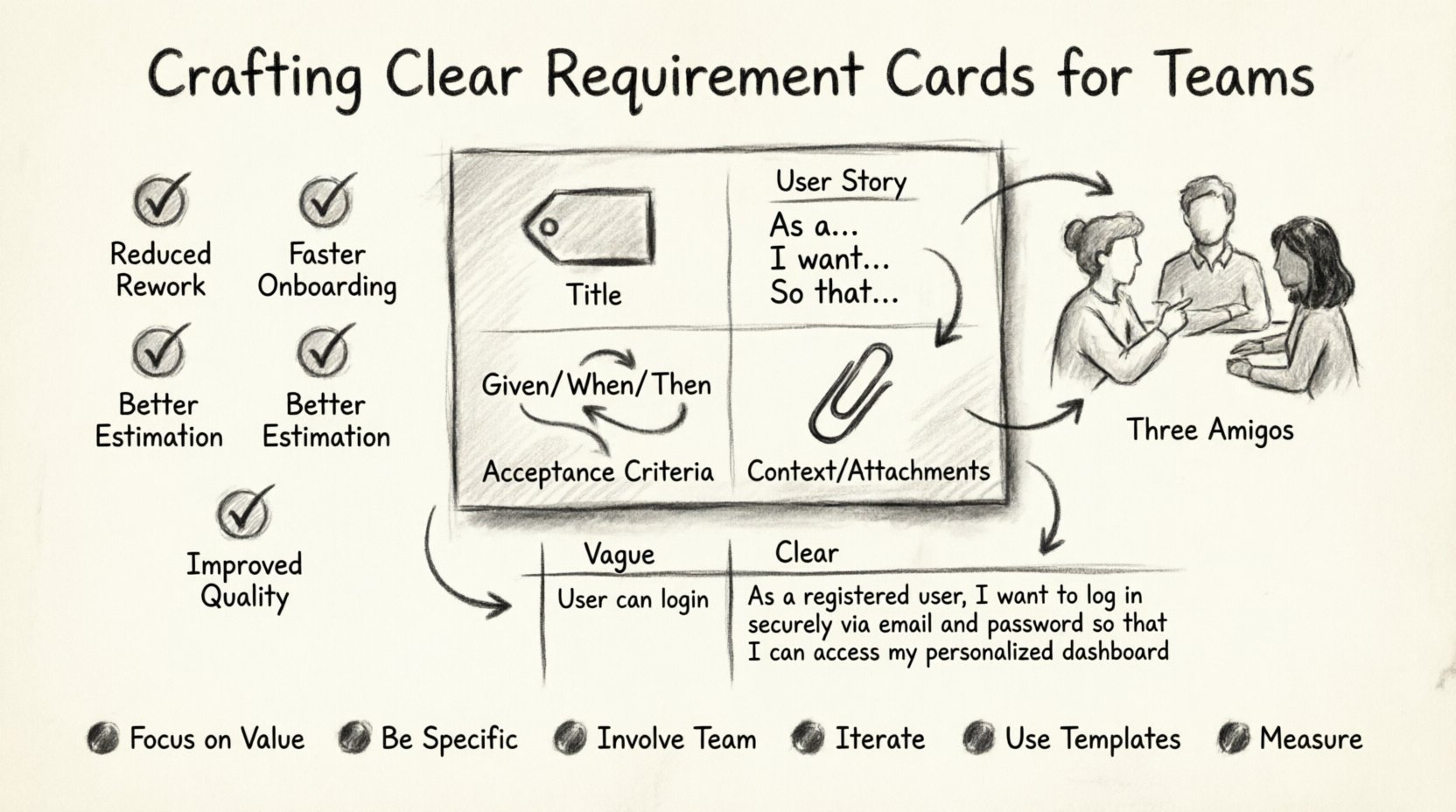
Investing in clear documentation yields several tangible benefits:
- Reduced Rework: When expectations are explicit, fewer changes are needed after development begins.
- Faster Onboarding: New team members can understand the scope without constant clarification.
- Better Estimation: Developers can assess effort more accurately when the path forward is visible.
- Improved Quality: Testers can derive comprehensive test cases directly from the requirements.
Clear requirement cards act as a single source of truth. They anchor the conversation. Instead of debating what a feature does, the team debates how to build it efficiently.
📝 The Anatomy of a High-Quality Requirement Card
A well-structured card contains specific elements that guide the team from concept to completion. While formats vary, the core components remain consistent. A robust card includes a descriptive title, a user-centric description, clear acceptance criteria, and context notes.
1. The Title 🏷️
The title should be concise yet descriptive. It acts as the headline for the work item. Avoid vague labels like “Fix Login” or “Update UI.” Instead, use specific identifiers that reflect the scope.
- Weak: Fix Button
- Strong: Update Submit Button Color on Checkout Page
A specific title helps teams search, filter, and track work items across the backlog without confusion.
2. The User Story Description 🗣️
The standard format for a user story follows a simple pattern: As a [type of user], I want [an action], so that [a benefit/value]. This structure forces the writer to consider the persona and the value proposition.
However, the story format is a starting point, not a finish line. It must be supplemented with details that answer the “who” and the “why.” Without the “why,” developers might optimize for speed rather than value. Without the “who,” the design might miss accessibility needs.
3. Acceptance Criteria ✅
Acceptance criteria define the boundaries of the work. They are the conditions that must be met for the card to be considered complete. These criteria should be specific, testable, and unambiguous.
Using the Given/When/Then pattern helps structure these criteria logically:
- Given: The initial state or precondition.
- When: The action or event that occurs.
- Then: The observable outcome or result.
This format minimizes interpretation. It turns subjective statements into objective verification steps.
4. Context and Attachments 📎
Sometimes text is not enough. Visual aids, mockups, or links to data models provide necessary context. If a requirement involves a complex data flow, a diagram clarifies the movement of information better than paragraphs of text.
Context also includes constraints. Are there specific performance metrics? Are there regulatory compliance rules? Mentioning these upfront prevents surprise blockers during implementation.
🧩 Writing Effective Acceptance Criteria
Acceptance criteria are the most critical part of a requirement card. They define success. Writing them effectively requires shifting the mindset from “what the system does” to “how the system behaves.”
Common Pitfalls in Criteria Writing
Many teams fall into traps that reduce the utility of their criteria. Below are common mistakes to avoid.
- Being too vague: Phrases like “user-friendly” or “fast loading” are subjective. Define specific metrics, such as “page load under 2 seconds.”
- Describing the solution: Criteria should focus on behavior, not implementation. Instead of “Use API endpoint X,” say “Display data from the external source.”
- Missing edge cases: Focusing only on the happy path ignores errors. Include scenarios for invalid input, network failures, or empty states.
- Too many criteria: If a card has 20 acceptance criteria, it might be too large. Consider splitting it into smaller, manageable cards.
Example: Good vs. Bad Criteria
| Aspect | ❌ Vague / Weak | ✅ Clear / Strong |
|---|---|---|
| Login Success | User can log in. | Given valid credentials, when the user clicks submit, the system redirects to the dashboard. |
| Validation | Email must be correct. | Given an invalid email format, display an error message below the input field. |
| Performance | System should be fast. | Given a standard internet connection, the search results appear within 500 milliseconds. |
🤝 Collaboration and Refinement
Requirement cards are not written in isolation. They are the product of collaboration between product owners, developers, and quality assurance engineers. This collective effort ensures that all perspectives are considered before work begins.
The Three Amigos Model
One effective practice is the “Three Amigos” conversation. This involves a short meeting between the Product Owner, a Developer, and a Tester. The goal is to review the requirement card before it enters the development queue.
During this session, the team asks:
- Product Owner: “Is this what the user actually needs? Is the value clear?”
- Developer: “Is this technically feasible? Are there hidden risks?”
- Tester: “How do we verify this? Are there edge cases we missed?”
This triad approach surfaces ambiguities early. It prevents the scenario where a developer builds a feature that the tester cannot verify or the user finds confusing.
Refinement Sessions
Refinement is an ongoing activity. As the team learns more about the system, requirements evolve. Regular sessions allow the backlog to be groomed, ensuring that cards are ready for the next sprint.
Key activities during refinement include:
- Breaking down large cards into smaller, independent units.
- Adding missing acceptance criteria based on feedback.
- Estimating effort to ensure the card fits the team’s capacity.
- Removing outdated cards that no longer align with business goals.
Consistent refinement keeps the pipeline flowing smoothly. It ensures that the team is always working on the most valuable items with the clearest instructions.
🚫 Common Anti-Patterns in Requirement Cards
Even experienced teams struggle with clarity. Identifying anti-patterns helps teams self-correct and improve their documentation standards over time.
1. The Feature Factory Mindset
Sometimes teams focus on delivering features rather than solving problems. Cards are written as “Add button X” rather than “Allow user to save progress.” This leads to solutions that check boxes but fail to deliver value. Focus on outcomes, not outputs.
2. Over-Engineering the Card
While clarity is good, excessive detail can hinder progress. If a card reads like a technical specification, developers may feel restricted. Allow them the autonomy to choose the best implementation details. The card should define what, not how.
3. Ignoring Non-Functional Requirements
Functional requirements describe behavior. Non-functional requirements describe qualities like security, performance, and reliability. These are often overlooked. If a card does not mention security constraints, the team might build a feature that is vulnerable. Always include non-functional needs in the context section.
4. Static Documentation
Requirements change. If a card is written once and never revisited, it becomes obsolete. Treat requirement cards as living documents. Update them as new information emerges. A stale card is a liability.
📊 Measuring the Quality of Requirements
How do you know if your requirement cards are working? You can track metrics related to the development process. These metrics provide feedback on the clarity and effectiveness of your documentation.
Key Metrics to Monitor
- Rework Rate: The percentage of work that requires changes after initial completion. High rework often indicates unclear requirements.
- Definition of Done (DoD) Adherence: How often cards are marked complete but require additional work. Low adherence suggests criteria were missed.
- Refinement Time: How long it takes to get a card ready. If refinement takes too long, the initial draft may be too vague.
- Defect Leakage: Bugs found in production. Clear acceptance criteria should catch issues before deployment.
Feedback Loops
Regular retrospectives provide qualitative data. Ask the team: “Did any requirement card cause confusion this sprint?” and “What information was missing?” Use this feedback to adjust templates and guidelines.
🛠️ Templates and Guidelines for Teams
To standardize the process, teams should adopt a template. This ensures consistency across the backlog. Below is a recommended structure for a requirement card.
Standard Template Structure
- Title: Short, action-oriented phrase.
- User Story: As a… I want… So that…
- Acceptance Criteria: List of conditions (Given/When/Then).
- Notes: Links to designs, data models, or constraints.
- Priority: High, Medium, Low.
- Dependencies: Other cards or external systems required.
Using a template reduces cognitive load. Writers know exactly what to fill in, and readers know where to find specific information.
🌱 Continuous Improvement
Writing clear requirement cards is a skill that improves with practice. Teams should view documentation as a craft. Encourage writers to review each other’s cards before they are added to the backlog. Peer reviews catch errors that single authors miss.
Training is also essential. New team members may not understand the nuances of your specific framework. Conduct workshops on writing user stories and defining acceptance criteria. Share examples of good and bad cards to illustrate the difference.
🔄 The Impact on Team Morale
Clear requirements do more than improve software quality; they improve team morale. When developers understand what to build, they feel more confident. When testers know what to verify, they feel more empowered. When stakeholders see features delivered as promised, trust increases.
Conversely, vague requirements create stress. Developers spend time guessing instead of building. Testers spend time hunting for missing information. This friction drains energy and slows down delivery.
By prioritizing clarity, you create an environment where the team can focus on problem-solving. You remove the noise and let the signal through. This leads to sustainable pace and higher quality output.
🎯 Summary of Best Practices
To summarize, here are the core principles for crafting clear requirement cards:
- Focus on Value: Always answer the “so that” part of the user story.
- Be Specific: Avoid subjective language in acceptance criteria.
- Involve the Team: Use collaboration to validate understanding before work starts.
- Iterate: Treat cards as living documents that evolve with the project.
- Use Templates: Standardize structure to reduce friction.
- Measure: Track metrics to identify areas for improvement.
Implementing these practices requires discipline, but the return on investment is significant. Teams that master the art of clear communication build better software, faster. They reduce waste and increase value. This is the foundation of effective delivery.