


The journey from a vague concept to a functioning software system is rarely linear. It involves mapping human intent onto machine logic. Object-Oriented Analysis and Design (OOAD) serves as the critical bridge in this process. It provides a structured methodology to identify the entities within a system, define their behaviors, and establish how they interact. This approach ensures that software is not just a collection of code, but a cohesive architecture capable of scaling and adapting.
When developers engage in OOAD, they move beyond immediate coding tasks. They focus on the underlying structure of the problem domain. This guide outlines the practical application of these principles, breaking down the transition from abstract requirements to concrete modules.
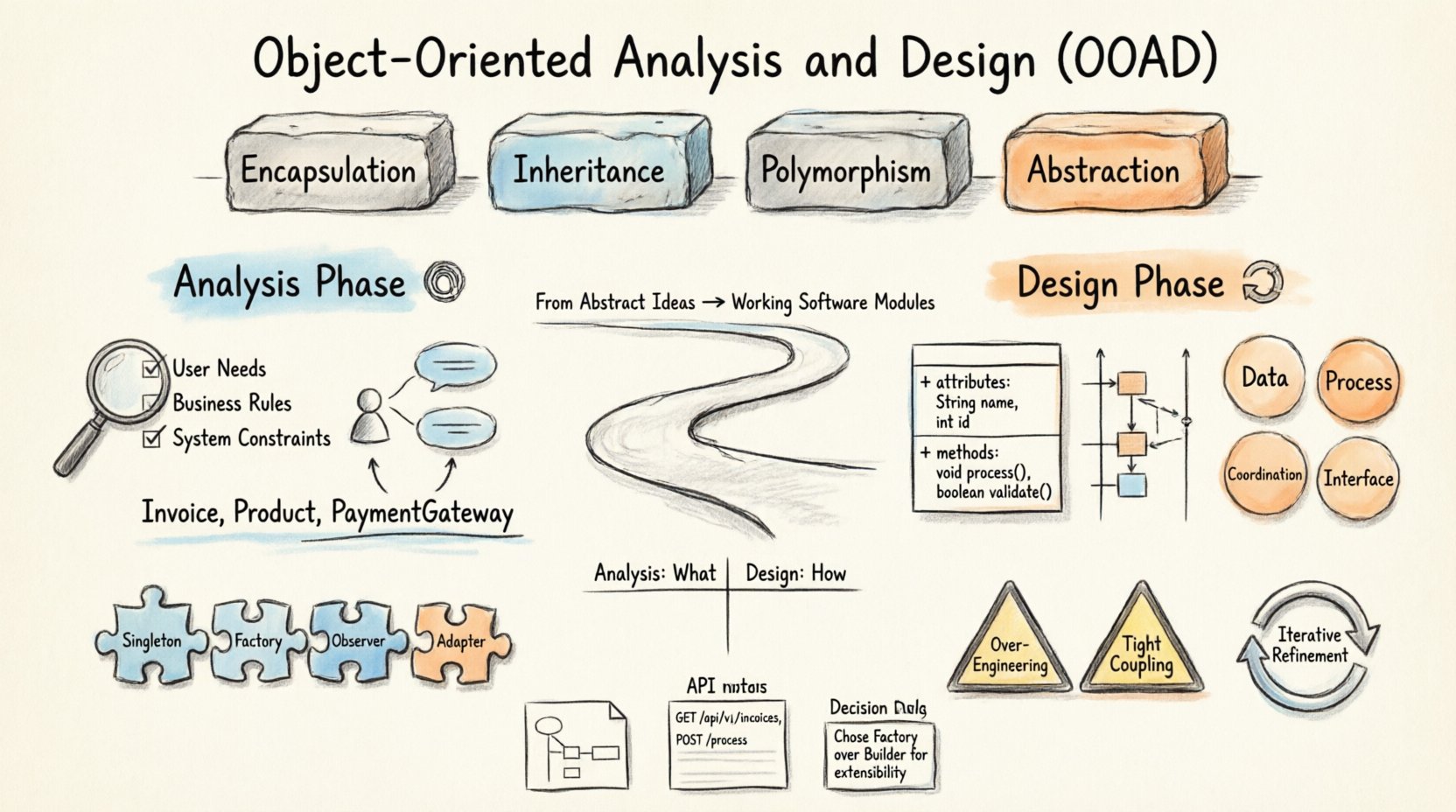
Understanding the Core Pillars of OOAD 🧱
Before diving into the phases, it is essential to grasp the fundamental concepts that drive this methodology. Object-oriented programming relies on a few key tenets that influence how analysis and design are conducted.
- Encapsulation: Bundling data and methods that operate on that data within a single unit. This hides internal complexity and protects data integrity.
- Inheritance: Allowing new classes to adopt the properties and behaviors of existing classes. This promotes code reuse and logical hierarchy.
- Polymorphism: The ability for different objects to respond to the same message in different ways. This enables flexible interfaces.
- Abstraction: Hiding complex reality while exposing only necessary parts. This simplifies the mental model of the system.
These pillars guide the creation of classes and objects. In the analysis phase, you identify what these objects represent. In the design phase, you determine how they interact to solve the problem.
The Analysis Phase: Identifying the Domain 🕵️♂️
Analysis is the investigative stage. It does not concern itself with how the system will be built, but rather what the system needs to do. The goal is to understand the business domain and translate user needs into technical requirements.
1. Gathering Requirements
Start by collecting information from stakeholders. Look for functional requirements (what the system does) and non-functional requirements (how the system performs). Ask questions like:
- Who are the users interacting with the system?
- What actions do these users need to perform?
- What data must be stored and retrieved?
- What are the constraints of the environment?
2. Identifying Use Cases
Use cases describe the interactions between actors and the system. They provide a narrative flow of how the software will be used. Breaking down a use case helps identify potential objects.
- Actor: Someone or something interacting with the system (e.g., a customer, a sensor).
- Scenario: A specific sequence of steps to achieve a goal.
- Goal: The desired outcome of the interaction.
3. Finding Candidate Objects
Once the use cases are clear, scan the text for nouns. These nouns often represent potential objects or classes. However, not every noun becomes a class. You must filter them based on responsibility.
- Concrete Objects: Things that exist in the real world (e.g., Invoice, Product).
- Interface Objects: Things that represent a boundary (e.g., PaymentGateway).
- Process Objects: Things that perform a specific task (e.g., ReportGenerator).
It is crucial to avoid creating classes that do not hold state or behavior. If a noun does not need to store information or perform actions, it might be a property rather than a class.
The Design Phase: Structuring the Solution 🎨
Design takes the objects identified during analysis and defines their structure and relationships. This is where the abstract model becomes a blueprint for implementation. The design phase is divided into structural and behavioral aspects.
1. Structural Design
Structural design focuses on the static architecture of the system. It defines classes, attributes, and methods.
- Class Diagrams: Visual representations showing classes, their attributes, operations, and relationships.
- Relationships: Define how classes connect. Common relationships include:
- Association: A link between objects.
- Aggregation: A whole-part relationship where parts can exist independently.
- Composition: A strong whole-part relationship where parts cannot exist without the whole.
- Inheritance: A parent-child relationship.
2. Behavioral Design
Behavioral design focuses on the dynamic interactions between objects. It defines the flow of messages and state changes.
- Sequence Diagrams: Show the order of interactions between objects over time.
- State Diagrams: Illustrate the states an object goes through and the events that trigger transitions.
- Activity Diagrams: Describe the flow of activities within a system, similar to a flowchart.
3. Defining Responsibilities
Every class must have a clear responsibility. The Single Responsibility Principle suggests that a class should have one reason to change. Assigning responsibilities clearly prevents classes from becoming bloated.
- Data: The class stores information.
- Process: The class performs calculations or logic.
- Coordination: The class manages other objects.
- Interface: The class acts as a gateway to an external system.
Comparison: Analysis vs. Design ⚖️
Understanding the distinction between analysis and design is vital for maintaining focus. The table below highlights the key differences.
| Feature | Analysis Phase | Design Phase |
|---|---|---|
| Focus | What the system does | How the system does it |
| Output | Use Cases, Domain Model | Class Diagrams, Sequence Diagrams |
| Abstraction Level | High, Business Domain | Low, Technical Implementation |
| Changes | Driven by User Needs | Driven by Technical Constraints |
| Stakeholders | Business Owners, Users | Developers, Architects |
Applying Design Patterns 🧩
Design patterns are reusable solutions to common problems in software design. They provide a standard vocabulary for architects and developers to communicate complex ideas efficiently.
Creational Patterns
These patterns deal with object creation mechanisms, trying to create objects in a manner suitable to the situation.
- Singleton: Ensures a class has only one instance.
- Factory Method: Defines an interface for creating an object, but lets subclasses decide which class to instantiate.
- Builder: Constructs complex objects step by step.
Structural Patterns
These patterns explain how to assemble objects and classes into larger structures.
- Adapter: Allows incompatible interfaces to work together.
- Decorator: Attaches additional responsibilities to an object dynamically.
- Facade: Provides a simplified interface to a complex subsystem.
Behavioral Patterns
These patterns identify common communication patterns between objects and realize these patterns.
- Observer: Defines a dependency where changes in one object notify others.
- Strategy: Defines a family of algorithms and encapsulates each one.
- Command: Encapsulates a request as an object.
Using these patterns prevents reinventing the wheel. They offer proven solutions that have been tested in various contexts.
From Design to Implementation 🚀
The final step is translating the design into code. This process requires precision. The code should reflect the design as closely as possible.
- Map Classes to Code: Every class in the diagram should have a corresponding file or module.
- Implement Interfaces: Ensure that methods defined in the design are implemented correctly in the code.
- Enforce Encapsulation: Use access modifiers to protect internal data.
- Write Tests: Unit tests verify that the implementation matches the design logic.
It is common for the implementation phase to reveal flaws in the design. This is expected. The design is a guide, not a rigid law. If the code becomes difficult to maintain, the design may need adjustment.
Common Pitfalls to Avoid ⚠️
Even with a solid methodology, mistakes can occur. Recognizing these pitfalls early can save significant time and effort.
1. Over-Engineering
Creating complex hierarchies and patterns that are not needed for the current requirements. Simpler solutions are often better. Do not add complexity until it is required.
2. Premature Optimization
Focusing on performance before functionality. Ensure the system works correctly first. Optimize only when bottlenecks are identified.
3. God Classes
A class that knows too much or does too much. This violates the Single Responsibility Principle. Break down large classes into smaller, focused units.
4. Tight Coupling
When classes depend heavily on each other. This makes the system rigid and hard to change. Aim for loose coupling through interfaces and dependency injection.
Iterative Refinement and Maintenance 🔄
Software is never truly finished. It evolves. OOAD supports this evolution through iterative refinement.
- Refactoring: Improving the internal structure of code without changing its external behavior. This keeps the design clean.
- Version Control: Tracking changes to the design and code over time.
- Feedback Loops: Gathering feedback from users to update the analysis and design.
When new requirements arise, revisit the analysis phase. Update the domain model. Adjust the design accordingly. This cycle ensures the software remains aligned with business goals.
Documentation and Communication 📝
Documentation is a critical component of OOAD. It ensures that the design intent is preserved and understood by the team.
- UML Diagrams: Use standard notation to represent the system visually.
- API Documentation: Describe how external systems interact with the modules.
- Design Decisions: Record why certain patterns or structures were chosen. This helps future developers understand the rationale.
Clear documentation reduces the learning curve for new team members and aids in troubleshooting.
Final Thoughts on OOAD Practice 💡
Transforming abstract ideas into working software modules requires discipline and a clear understanding of object-oriented principles. By following the structured approach of analysis and design, teams can build systems that are robust, maintainable, and scalable.
The process is not about following rules blindly. It is about thinking clearly about the problem. When you focus on objects, responsibilities, and interactions, you create a foundation that supports long-term growth. Whether the system is small or large, the principles remain the same.
Consistent application of these methods leads to higher quality code. It reduces technical debt and makes future enhancements easier. The effort invested in the design phase pays dividends during development and maintenance.
As you move forward, keep the user needs at the center of your design. Let the requirements drive the structure. With patience and attention to detail, abstract ideas become reliable software solutions.
Related posts:
 Object-Oriented Analysis and Design: A Step-by-Step Guide for Beginners to Build Scalable Systems
 Q&A: Answering Top Questions About Object-Oriented Analysis and Design for Career Growth
 The Complete Walkthrough of Object-Oriented Analysis and Design: From Requirements to Deployment
 Object-Oriented Analysis and Design Guide: Aligning Team Requirements with Technical Design Decisions