


In the landscape of software architecture, few disciplines carry as much weight as Object-Oriented Analysis and Design (OOAD). It serves as the bridge between abstract requirements and concrete implementation. Without a structured approach, systems become fragile, difficult to maintain, and prone to cascading failures. This guide examines the nuances of OOAD, specifically focusing on how Unified Modeling Language (UML) patterns can be evaluated and selected for specific architectural needs. We will move beyond syntax to discuss the underlying principles that dictate successful system construction. 📐
Understanding the Distinction: Analysis vs. Design 🧩
While often grouped together, Analysis and Design address different questions within the development lifecycle. Confusion between these two phases often leads to premature optimization or architectural drift. Understanding the boundary is critical for selecting the right patterns.
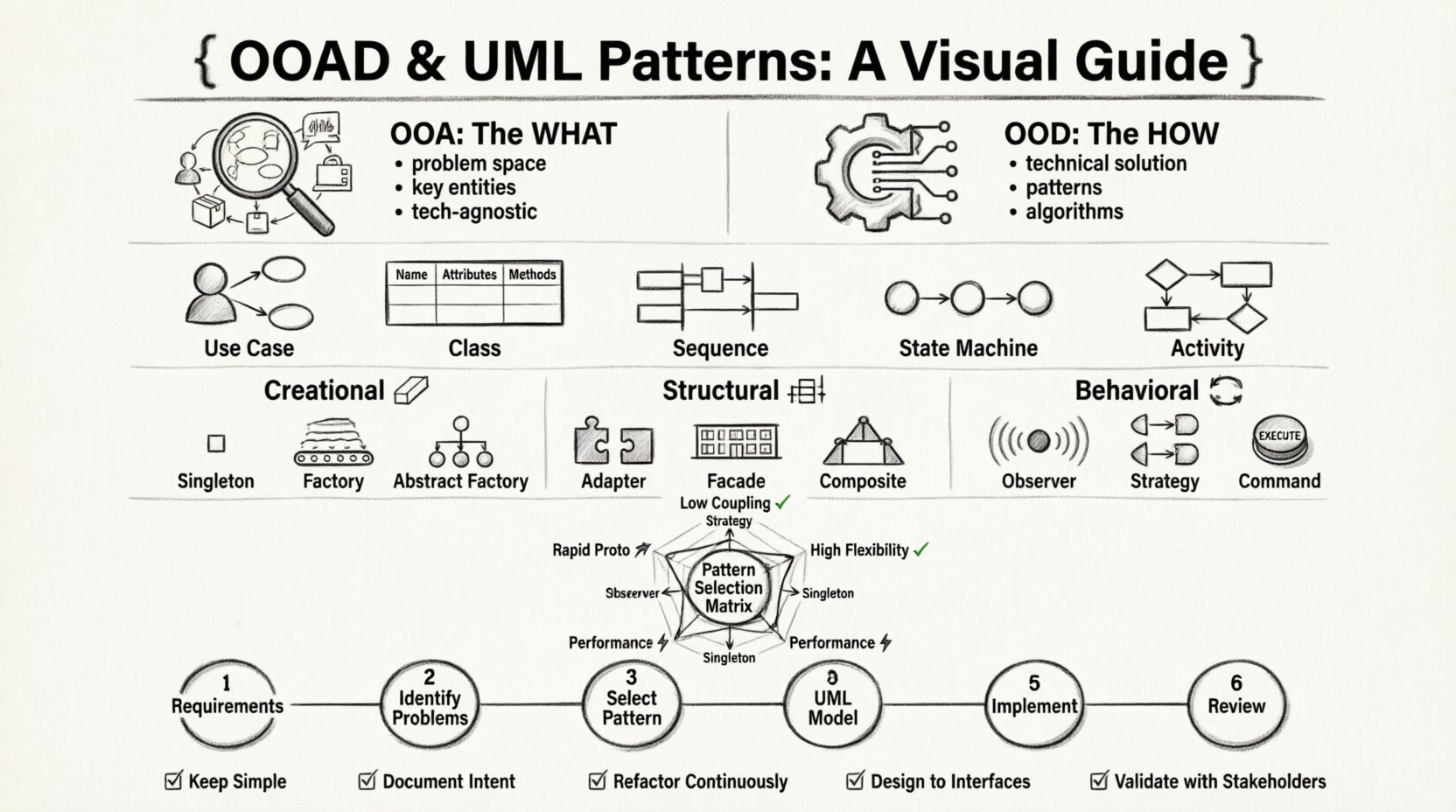
- Object-Oriented Analysis (OOA): Focuses on the what. It defines the problem space, identifies key entities, and establishes relationships based on business requirements. It is technology-agnostic.
- Object-Oriented Design (OOD): Focuses on the how. It translates the analysis models into a technical solution. This is where specific patterns, data structures, and algorithms are applied.
When evaluating UML patterns, it is vital to know which phase they support. Some patterns belong strictly to analysis to clarify logic. Others are design artifacts intended to solve technical constraints like performance or memory management.
The Role of UML in the OOAD Lifecycle 🔍
Unified Modeling Language is not merely a drawing tool; it is a communication standard. In OOAD, UML diagrams act as the blueprint for the system. They allow stakeholders to visualize the structure and behavior before a single line of code is written. However, not all diagrams hold equal weight for every project.
Effective use of UML requires knowing which diagrams to employ at which stage:
- Use Case Diagrams: Ideal for OOA. They capture functional requirements from the user’s perspective.
- Class Diagrams: The backbone of OOD. They define static structure, attributes, and methods.
- Sequence Diagrams: Crucial for understanding dynamic behavior and interaction flow over time.
- State Machine Diagrams: Essential for systems with complex lifecycle behaviors.
- Activity Diagrams: Useful for modeling business logic and workflows.
Selecting the right combination of these diagrams ensures that the patterns applied later are grounded in a solid understanding of the system’s intent.
Evaluating Creational Patterns 🧱
Creational design patterns deal with object creation mechanisms. The goal is to create objects in a manner suitable to the situation, reducing the complexity of instantiation. In OOAD, this often relates to how objects are instantiated and managed throughout their lifecycle.
1. Singleton Pattern
This pattern restricts a class to a single instance. It is frequently used for shared resources like database connections or configuration managers. However, overuse can lead to tight coupling and hidden dependencies.
- Best For: Global access points, logging services, connection pools.
- Risks: Testing becomes difficult; global state can lead to race conditions.
- UML Representation: A class diagram showing a static attribute holding the instance and a static method for retrieval.
2. Factory Method
This pattern defines an interface for creating an object but lets subclasses decide which class to instantiate. It promotes loose coupling by eliminating the need to bind application-specific classes into the code.
- Best For: Systems where the type of object to be created is not known until runtime.
- Risks: Can lead to a proliferation of subclasses if over-engineered.
3. Abstract Factory
This pattern provides an interface for creating families of related or dependent objects without specifying their concrete subclasses. It is highly effective when a system needs to be independent of how its products are created, composed, and represented.
- Best For: Cross-platform applications or systems with multiple product families (e.g., UI widgets for different operating systems).
Evaluating Structural Patterns 🔗
Structural patterns explain how to assemble objects and classes into larger structures while keeping these structures flexible and efficient. They deal with the composition of the system.
1. Adapter Pattern
An adapter allows incompatible interfaces to work together. It acts as a wrapper that converts one interface into another that clients expect. This is particularly useful when integrating legacy systems with new components.
- Key Benefit: Reusability of existing code without modification.
- UML Visualization: Class diagram showing the Target interface, the Adaptee, and the Adapter class.
2. Facade Pattern
A facade provides a simplified interface to a complex subsystem. It hides the complexities of the subsystem behind a simple API, making it easier for clients to interact with the system.
- Key Benefit: Reduces the learning curve for developers integrating with the system.
- UML Visualization: A single class or interface connected to multiple subsystem classes.
3. Composite Pattern
This pattern allows clients to treat individual objects and compositions of objects uniformly. It is ideal for representing part-whole hierarchies, such as file systems or organizational structures.
- Key Benefit: Simplifies client code by removing the need to distinguish between leaves and branches.
- UML Visualization: Recursive class diagram where a Component class contains references to other Component objects.
Evaluating Behavioral Patterns 🔄
Behavioral patterns are concerned with algorithms and the assignment of responsibilities between objects. They describe how objects interact and distribute responsibility.
1. Observer Pattern
The Observer defines a subscription mechanism to notify multiple objects about events that relate to a subject. This is the foundation of many event-driven architectures.
- Best For: Event handling, state changes, distributed messaging.
- Risks: Memory leaks if observers are not properly removed; unpredictable order of notification.
2. Strategy Pattern
The Strategy pattern defines a family of algorithms, encapsulates each one, and makes them interchangeable. It allows the algorithm to vary independently from the clients that use it.
- Best For: Switching algorithms at runtime, such as different sorting methods or payment processing routes.
- UML Visualization: Interface for the strategy, concrete implementations, and a context class.
3. Command Pattern
This pattern encapsulates a request as an object, thereby letting you parameterize clients with different requests, queue or log requests, and support undoable operations.
- Best For: GUI buttons, macro systems, transaction management.
Decision Matrix for Pattern Selection 📊
Choosing the correct pattern is rarely about finding the “best” one. It is about finding the one that fits the current constraints. The following table helps evaluate patterns based on specific criteria.
| Criteria | Low Coupling | High Flexibility | Performance Critical | Rapid Prototyping |
|---|---|---|---|---|
| Factory Method | ✅ | ✅ | ⚠️ | ✅ |
| Singleton | ❌ | ❌ | ✅ | ✅ |
| Observer | ✅ | ✅ | ⚠️ | ⚠️ |
| Adapter | ✅ | ✅ | ✅ | ⚠️ |
| Strategy | ✅ | ✅✅ | ✅ | ⚠️ |
| Composite | ✅ | ✅ | ⚠️ | ✅ |
Key considerations for the matrix:
- Low Coupling: Critical for maintainability. Patterns like Observer and Strategy excel here.
- High Flexibility: Important for systems expected to change frequently. Factory and Strategy provide this.
- Performance Critical: Patterns that add layers of indirection (like Adapter) may introduce overhead. Singleton is often preferred here for resource sharing.
- Rapid Prototyping: Simplicity wins. Singleton and Adapter are quick to implement.
Common Implementation Pitfalls ⚠️
Even with a solid theoretical understanding, practical implementation often introduces errors. Being aware of these common pitfalls can save significant debugging time.
1. Pattern Overuse
Applying a pattern where a simple solution suffices is a common mistake. This is often referred to as “Gold Plating.” If a class only has one responsibility and no variation is expected, a Factory pattern may be unnecessary complexity.
2. Violating the Liskov Substitution Principle
In OOAD, inheritance hierarchies must respect behavioral contracts. If a subclass cannot perform the actions expected of its parent, the design is flawed. This often happens when overriding methods in a Strategy or Factory context without maintaining the interface contract.
3. Ignoring Concurrency
Many patterns assume a single-threaded execution model. In modern distributed systems, patterns like Singleton or Observer must be implemented with thread safety in mind. Failure to do so leads to race conditions.
4. Hidden Dependencies
While the Observer pattern decouples the subject from the observer, it can create hidden dependencies if the observer list is managed poorly. The system should explicitly declare dependencies wherever possible.
Integrating Patterns into Workflow 🛠️
Implementing these patterns requires a structured workflow. It is not enough to apply them randomly; they must fit into the broader engineering process.
- Step 1: Requirement Analysis: Identify the core entities and their relationships using Use Case and Class diagrams.
- Step 2: Identify Problems: Look for areas of high complexity, tight coupling, or rigid logic.
- Step 3: Pattern Selection: Map the identified problems to specific Creational, Structural, or Behavioral patterns.
- Step 4: UML Modeling: Draft the specific diagrams showing how the pattern alters the structure.
- Step 5: Implementation: Write the code, ensuring adherence to the design.
- Step 6: Review: Check against the original requirements to ensure the pattern solved the intended problem without introducing new ones.
Summary of Best Practices ✅
Successful OOAD is an iterative process. It requires constant evaluation of the system’s health against the design patterns applied. Keep these principles in mind:
- Keep it Simple: The simplest solution that works is usually the best. Avoid adding patterns just to demonstrate knowledge.
- Document Intent: Use UML to document *why* a pattern was chosen, not just *what* the code looks like.
- Refactor Continuously: As requirements change, patterns may no longer fit. Be willing to refactor the design.
- Focus on Interfaces: Design to interfaces, not implementations. This is the core tenet of flexible OOAD.
- Validate with Stakeholders: Ensure the UML diagrams align with the business understanding. A technically perfect design is useless if it does not meet business needs.
By rigorously applying these comparisons and evaluations, you can build systems that are robust, scalable, and maintainable. The choice of pattern is a strategic decision that impacts the entire lifecycle of the software. Treat it with the weight it deserves. 🚀
Related posts:
 Object-Oriented Analysis and Design Quick Start: From Concept to Class Diagram in One Day
 Object-Oriented Analysis and Design Best Practices: Writing Maintainable Code from Day One
 Avoiding the “God Class” Trap: Key Object-Oriented Analysis and Design Principles for Clean Code
 The Role of Object-Oriented Analysis and Design in Agile Teams: Balancing Speed and Structure