


Object-Oriented Analysis and Design (OOAD) represents a disciplined approach to software engineering. It bridges the gap between human understanding of a problem and the structural requirements of a computer system. When teams transition from vague requirements to concrete code, the ability to model real-world entities accurately becomes the deciding factor between a maintainable system and technical debt.
This guide explores the critical components of OOAD. We will examine how to identify entities, map them to classes, and define the relationships that bind them together. By understanding these mechanics, developers create systems that align with business logic while adhering to engineering standards.

🔍 The Foundation: Understanding OOAD
Object-Oriented Analysis and Design is not merely a diagramming exercise. It is a cognitive process. It involves deconstructing a problem space into manageable units called objects. Each object encapsulates data and behavior, mimicking how humans perceive the world.
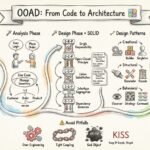
The process generally flows through two distinct phases:
- Analysis: Focuses on what the system needs to do. This phase ignores implementation details. It concentrates on capturing requirements and identifying the core entities involved in the business domain.
- Design: Focuses on how the system will do it. This phase translates analysis models into a technical blueprint, specifying interfaces, algorithms, and data structures.
Skipping the analysis phase often leads to premature optimization. Designing classes before understanding the entities they represent results in rigid architectures that struggle to adapt to changing requirements.
🧩 Core Components of the OOAD Process
A robust OOAD effort relies on several interconnected components. These components work together to ensure consistency between the problem statement and the solution.
1. Use Case Models
Use cases describe interactions between actors (users or external systems) and the system itself. They provide the context for the objects. Without use cases, classes lack purpose. A class exists to support a specific function or interaction defined in the use case model.
2. Domain Models
The domain model is the heart of the analysis. It represents the static structure of the problem domain. It consists of classes, attributes, and relationships that exist independently of the software. It answers the question: “What concepts exist in this business context?”
3. Interaction Diagrams
Once static structures are defined, dynamic behavior must be mapped. Sequence diagrams and communication diagrams illustrate how objects collaborate over time to fulfill a use case. This helps identify which methods belong to which classes.
4. State Diagrams
Some entities have distinct states throughout their lifecycle. A Order might be Pending, Shipped, or Delivered. State diagrams clarify the transitions and the events that trigger them.
📋 From Real Entities to Abstract Classes
Translating real-world concepts into software classes is a critical skill. It requires a methodical approach to ensure no relevant detail is lost and no irrelevant detail is included.
Step 1: Identifying Nouns and Verbs
Review your requirements documents. Highlight the nouns. These usually represent the entities or classes you need to model. Highlight the verbs. These often translate into methods or operations.
- Noun: Customer, Invoice, Product, Inventory.
- Verb: Purchase, Calculate, Ship, Store.
Step 2: Filtering for Relevance
Not every noun becomes a class. Some nouns are attributes of other classes. For example, in a Customer class, Address might be a string attribute or a separate class depending on complexity.
Apply the Responsibility-Driven Design principle. Ask: “Does this entity have responsibilities that it should manage itself?” If yes, it is a candidate for a class. If it is just data being passed around, it might be an attribute.
Step 3: Defining Attributes
Attributes are the properties that describe the state of a class. They should be specific and measurable.
- Identifier: A unique ID (e.g.,
orderID). - Descriptive: Details that define the object (e.g.,
orderDate,totalAmount). - Derived: Values calculated from other attributes (e.g.,
discountedTotal).
Step 4: Defining Methods
Methods represent the behavior. They should be verbs that the class can perform. A common mistake is creating methods that belong to another class. For example, a Car class should not have a method to printTicket if the PoliceStation is responsible for that.
🔗 Modeling Relationships
Classes do not exist in isolation. They interact through relationships. Correctly modeling these relationships is vital for data integrity and system flexibility.
Types of Relationships
| Relationship Type | Symbol | Meaning | Example |
|---|---|---|---|
| Association | Line | A general connection between classes. | A Teacher teaches a Student. |
| Aggregation | Diamond (Hollow) | A “has-a” relationship where parts can exist independently. | A Team has Players. Players exist without the team. |
| Composition | Diamond (Filled) | A strong “has-a” where parts cannot exist without the whole. | A House has Rooms. Rooms do not exist without the house. |
| Inheritance | Triangle | An “is-a” relationship. Specialization of a class. | A Truck is a Vehicle. |
| Dependency | Dashed Line | One class uses another temporarily. | A ReportGenerator uses a DatabaseConnection. |
Understanding these distinctions prevents structural flaws. For instance, using Composition when you should use Aggregation makes the system fragile. If the parent object is destroyed, the child object is lost, which might not be the intended business logic.
🛠️ Design Patterns in OOAD
Over time, specific solutions to recurring problems have been documented as design patterns. Incorporating these into your OOAD process saves time and improves reliability.
Creational Patterns
These patterns handle object creation mechanisms, trying to create objects in a manner suitable to the situation. The basic form of object creation could result in design problems or added complexity.
- Factory Method: Defines an interface for creating an object but lets subclasses decide which class to instantiate.
- Singleton: Ensures a class has only one instance and provides a global point of access to it.
Structural Patterns
These patterns ease design by identifying a simple way to realize relationships between entities.
- Adapter: Allows incompatible interfaces to work together.
- Decorator: Allows behavior to be added to an individual object, dynamically, without affecting the behavior of other objects from the same class.
Behavioral Patterns
These patterns are specifically concerned with algorithms and the assignment of responsibilities between objects.
- Observer: Defines a dependency between objects so that when one object changes state, all its dependents are notified.
- Strategy: Defines a family of algorithms, encapsulates each one, and makes them interchangeable.
🔄 Iterative Refinement
OOAD is rarely a linear process. It is iterative. You create an initial model, review it, find gaps, and refine it. This cycle continues until the model is stable and ready for implementation.
Level 1: Conceptual Model
This is the high-level view. It includes the main entities and their relationships without worrying about implementation details. It is used to communicate with stakeholders.
Level 2: Logical Model
This model adds detail. It specifies data types, visibility (public/private), and more precise relationships. It serves as the blueprint for developers.
Level 3: Physical Model
This model maps to the actual database schema and code structure. It considers performance, storage constraints, and specific language features.
⚠️ Common Pitfalls to Avoid
Even experienced architects make mistakes. Being aware of common pitfalls helps you maintain a clean model.
- The God Object: A class that knows too much or does too much. It becomes a bottleneck for change. Split this class into smaller, focused units.
- Tight Coupling: When classes depend heavily on each other’s internal details. Use interfaces or abstract classes to reduce dependencies.
- Feature Creep: Adding features to classes that are not required by the current requirements. Stick to the current scope.
- Ignoring Invariants: Ensuring that the data within a class remains valid. For example, a
BankAccountclass should prevent a negative balance if that is against business rules. - Over-Engineering: Creating complex inheritance hierarchies where simple composition would suffice. Keep the design as simple as possible.
📝 Validating Your Model
Before moving to code, validate your model against the requirements.
- Completeness: Are all entities from the requirements represented?
- Consistency: Do relationships make sense in both directions?
- Viability: Can the system realistically perform the required actions?
- Extensibility: Is the model flexible enough to handle future changes without major refactoring?
Walk through your use cases using the class diagram. Can the objects perform the steps required? If you get stuck, the model needs adjustment.
🚀 Best Practices for Maintainability
Maintainability is often more important than initial speed. A well-modeled system is easier to fix and extend.
- Single Responsibility Principle: A class should have only one reason to change. If a class handles both data storage and user interface logic, split it.
- Encapsulation: Hide internal state. Use getters and setters carefully to maintain control over how data is accessed.
- Open/Closed Principle: Software entities should be open for extension but closed for modification. Use inheritance or composition to add features rather than changing existing code.
- Dependency Inversion: Depend on abstractions, not on concretions. This reduces the coupling between high-level modules and low-level modules.
🌟 Summary of the Modeling Workflow
To summarize the journey from concept to class:
- Analyze Requirements: Gather use cases and identify actors.
- Identify Entities: Extract nouns and determine class candidates.
- Define Attributes: Specify the data each class holds.
- Define Methods: Specify the behavior each class performs.
- Map Relationships: Draw associations, aggregations, and inheritances.
- Refine: Apply design patterns and optimize for performance.
- Validate: Trace use cases through the model to ensure logic holds.
Following this workflow ensures that the resulting software architecture is robust. It aligns the technical implementation with the business reality, reducing the risk of failure during deployment.
🎓 Final Thoughts on OOAD
Object-Oriented Analysis and Design is a skill that improves with practice. It requires a balance between creativity and discipline. There is no single “correct” way to model every system, but there are proven patterns and principles that guide you toward a stable solution.
By focusing on real entities and their relationships, you build systems that are easier to understand. Documentation created from these models serves as a long-term asset for the team. It allows new members to grasp the system quickly and helps maintainers avoid breaking changes.
Remember, the goal is not just to write code that works, but to build a structure that can endure the evolution of the problem domain. Invest time in the design phase, and the development phase will flow more smoothly.
Related posts:
 Troubleshooting Weak Designs: When Object-Oriented Analysis and Design Fails and How to Rescue Your Project
 Myth-Busting Object-Oriented Analysis and Design: Separating Hype from Reality for New Developers
 Object-Oriented Analysis and Design for Mid-Level Developers: Moving Beyond Basic Syntax to Architecture
 The Hidden Value of Object-Oriented Analysis and Design: Why It Matters More Than Writing Code Fast