


In the world of software development, the difference between a system that crumbles under pressure and one that grows effortlessly often lies in the planning phase. This is where Object-Oriented Analysis and Design (OOAD) becomes essential. OOAD is not merely a set of diagrams; it is a disciplined approach to understanding problems and structuring solutions. For beginners aiming to build scalable systems, mastering the fundamentals of this methodology is crucial. It provides a blueprint for organizing code, managing complexity, and ensuring long-term maintainability.
This guide walks you through the entire process without relying on specific tools or products. We focus on the underlying principles, the logical flow, and the architectural decisions that define robust software. Whether you are designing a small utility or a large enterprise platform, the core tenets remain the same. Let us begin this journey into structured thinking and system architecture.
🧩 Understanding the Core Concepts
Before diving into the steps, it is vital to grasp what OOAD actually represents. It combines two distinct phases: Analysis and Design. While often used interchangeably, they serve different purposes in the lifecycle of a project.
- Analysis focuses on what the system should do. It involves gathering requirements, understanding user needs, and defining the scope without worrying about the technical implementation details.
- Design focuses on how the system will achieve those goals. This is where you define the structure, the data flow, and the interactions between components.
Object-Orientation is the paradigm used in both phases. It models the system using objects that contain both data and behavior. This approach mirrors real-world entities, making the code easier to understand and modify.
🔑 The Pillars of Object-Orientation
To build a solid foundation, you must understand the four fundamental pillars. These concepts are the building blocks of any OOAD implementation.
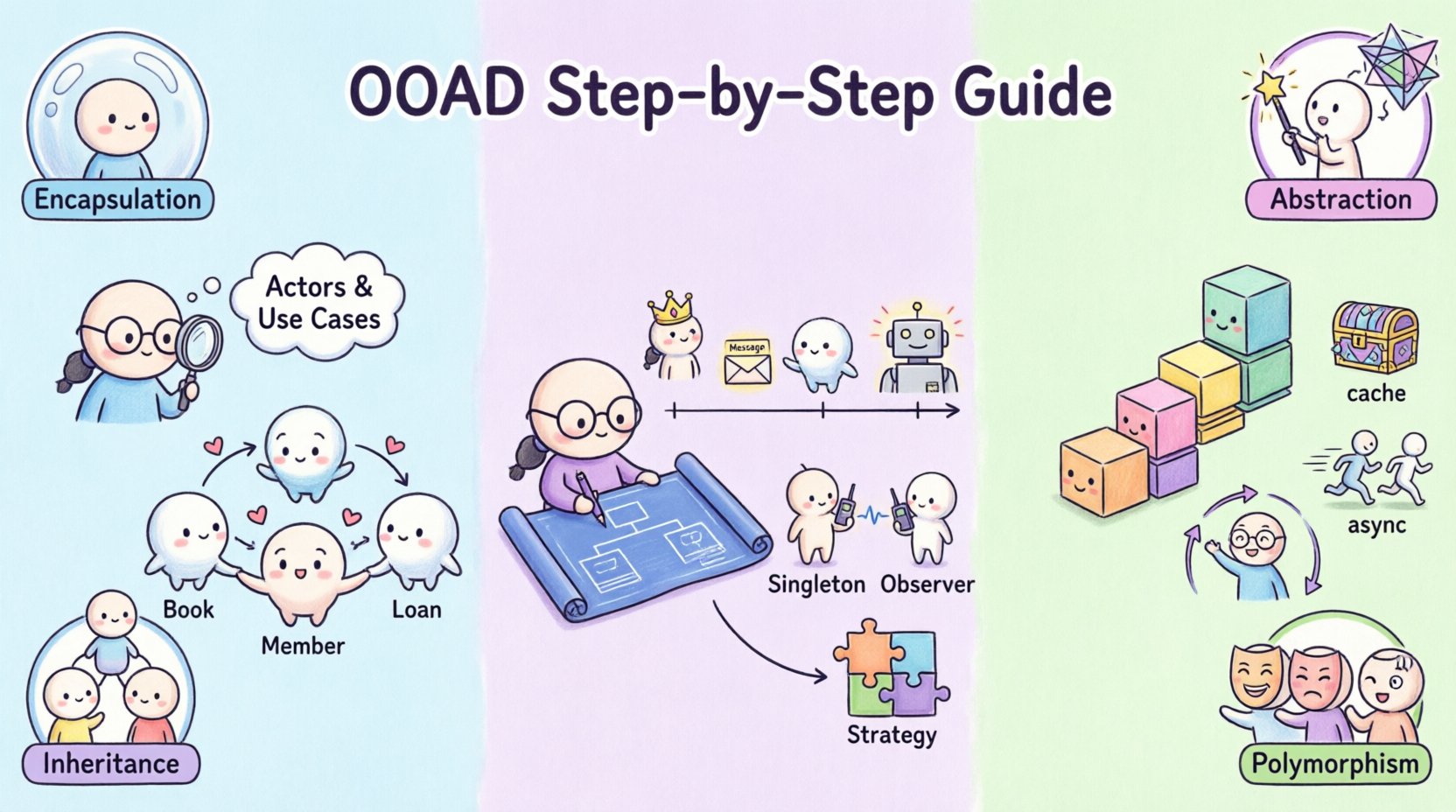
- Encapsulation: This principle bundles data and methods that operate on that data within a single unit, known as a class. It restricts direct access to some of an object’s components, preventing unintended interference and misuse of the data.
- Abstraction: Abstraction involves hiding complex implementation details and showing only the necessary features of an object. It allows you to focus on interactions rather than internal mechanics.
- Inheritance: This mechanism allows a new class to adopt properties and behaviors from an existing class. It promotes code reuse and establishes a natural hierarchy within the system.
- Polymorphism: This allows objects to be treated as instances of their parent class rather than their actual class. It enables flexibility, allowing different classes to respond to the same message in different ways.
📋 Phase 1: Object-Oriented Analysis
The analysis phase is about capturing the problem space. It is a period of inquiry where you ask questions about the domain and the users. The goal is to create a clear picture of the requirements before writing a single line of code.
🔍 Step 1: Identify the Actors and Use Cases
Every system has users. In technical terms, these are called actors. They can be human users, external systems, or hardware devices. Identifying who interacts with your system is the first logical step.
- Actors: List every entity that initiates a process. For example, a Customer, an Administrator, or an External Payment Gateway.
- Use Cases: A use case describes a specific interaction between an actor and the system to achieve a goal. Examples include Place Order, Generate Report, or Update Profile.
When documenting use cases, focus on the flow of events. What happens when the action is successful? What happens if an error occurs? This scenario planning helps anticipate edge cases early.
📊 Step 2: Define the Domain Model
Once you know who uses the system, you must identify the key concepts within the domain. These concepts become your classes. A domain model represents the static structure of the information the system manages.
Consider a library system. The key concepts might be Book, Member, Loan, and Author. You need to define the attributes for each. For a Book, attributes might include Title, ISBN, and Publication Year. This step creates a shared vocabulary between developers and stakeholders.
🔄 Step 3: Map the Relationships
Objects rarely exist in isolation. They relate to one another. You must define how these entities connect. Common relationship types include:
- Association: A structural relationship where one object uses another. For example, a Member borrows a Book.
- Aggregation: A weak form of association where objects can exist independently. A Team has Members, but members can exist without the team.
- Composition: A strong form of association where the lifecycle is dependent. A House contains Rooms; if the house is destroyed, the rooms cease to exist.
- Inheritance: As mentioned earlier, this defines a hierarchy where a subclass is a specialized version of a superclass.
| Relationship Type | Dependency | Example | Lifecycle Impact |
|---|---|---|---|
| Association | Weak | Teacher teaches Student | Independent |
| Aggregation | Weak | Department has Employees | Independent |
| Composition | Strong | Order contains Items | Dependent |
| Inheritance | Strict | Car extends Vehicle | Specialized |
⚙️ Phase 2: Object-Oriented Design
With the requirements and domain model established, you move to the design phase. Here, you translate the conceptual analysis into a technical blueprint. The focus shifts from business logic to software structure.
🛠️ Step 4: Create the Class Diagrams
Class diagrams are the backbone of object-oriented design. They visualize the classes, their attributes, methods, and relationships. A well-structured class diagram serves as a map for developers implementing the system.
When drawing these diagrams, ensure the following:
- Visibility: Clearly mark attributes and methods as public (+), private (-), or protected (#). This enforces encapsulation.
- Responsibility: Each class should have a single, clear responsibility. If a class does too many things, it becomes hard to test and maintain.
- Interface: Define the public interface of the class. Internal implementation details should be hidden to allow for future changes without breaking dependent code.
📉 Step 5: Model the Behavior with Sequence Diagrams
Static diagrams show structure, but dynamic diagrams show behavior. Sequence diagrams are particularly useful for understanding how objects interact over time to fulfill a specific use case.
In a sequence diagram, you:
- Place objects horizontally across the top.
- Draw vertical lines (lifelines) extending downwards to represent time.
- Draw horizontal arrows to represent messages passed between objects.
- Annotate the flow with conditions and loops.
This visualization helps identify bottlenecks, circular dependencies, and unnecessary communication paths. It ensures that the logic flows logically from the user action to the system response.
🧱 Step 6: Apply Design Patterns
Design patterns are proven solutions to common problems in software design. They provide a template for how to solve a problem in a way that is flexible and maintainable. While you do not need to use every pattern, understanding them is key to building scalable systems.
- Singleton: Ensures a class has only one instance and provides a global point of access to it. Useful for configuration managers or connection pools.
- Factory: Provides an interface for creating objects in a superclass, allowing subclasses to alter the type of objects that will be created. This decouples the client code from concrete classes.
- Observer: Defines a dependency between objects so that when one object changes state, all its dependents are notified and updated automatically. Ideal for event-driven systems.
- Strategy: Defines a family of algorithms, encapsulates each one, and makes them interchangeable. This allows the algorithm to vary independently from the clients that use it.
🚀 Building for Scalability
Scalability is the ability of a system to handle growth. Whether it is more users, more data, or more features, the design must accommodate expansion without requiring a complete rewrite.
📐 Step 7: Enforce Modularity
A scalable system is modular. Break the system into independent modules that communicate through well-defined interfaces. If one module needs to change, it should not impact others.
- Separation of Concerns: Keep business logic separate from data access logic and user interface logic. This allows you to update the database layer without affecting the user experience.
- High Cohesion: Ensure that the elements within a module are closely related. If a module contains unrelated functionality, it creates a tangled web of dependencies.
- Low Coupling: Minimize the dependencies between modules. Modules should depend on abstractions, not concrete implementations. This allows you to swap out components easily.
📈 Step 8: Plan for Concurrency and Performance
As the system grows, multiple users will interact with it simultaneously. Your design must account for concurrency issues.
- Thread Safety: Ensure that shared resources are protected when accessed by multiple threads. Use locks or immutable data structures where appropriate.
- Caching: Implement caching strategies to reduce the load on the database. Store frequently accessed data in memory for faster retrieval.
- Asynchronous Processing: For long-running tasks, consider asynchronous processing. This prevents the user interface from freezing and improves overall throughput.
🔄 Step 9: Embrace Iteration
Design is not a one-time event. It is an iterative process. As you build the system, you will discover new requirements and constraints. Be prepared to refactor your design.
- Refactoring: Regularly clean up the code without changing its external behavior. This keeps the design aligned with current needs.
- Feedback Loops: Integrate feedback from testing and user reviews into the design process. If a pattern is not working, change it.
- Documentation: Keep your documentation up to date. Outdated diagrams lead to confusion and technical debt.
⚠️ Common Pitfalls to Avoid
Even with a solid plan, mistakes happen. Being aware of common pitfalls can save significant time and effort later in the development cycle.
- Over-Engineering: Do not design for requirements you do not have. Avoid creating complex inheritance hierarchies for simple tasks. Keep it simple until complexity is proven necessary.
- God Objects: Avoid creating classes that do everything. A class that manages users, orders, payments, and reports is a maintenance nightmare. Split responsibilities.
- Ignoring Error Handling: A system that crashes on the first error is not usable. Design robust error handling and recovery mechanisms into your logic.
- Hardcoding: Never hardcode values that might change, such as timeouts, thresholds, or configuration paths. Use configuration files or environment variables instead.
📝 Summary of the Process
To recap, the journey from idea to scalable system follows a logical progression. You start by understanding the problem, then structure the data, define the behavior, and finally optimize for growth.
- Analysis: Gather requirements, identify actors, and map the domain.
- Design: Create class diagrams, model behavior, and apply patterns.
- Implementation: Write code that adheres to the design principles.
- Review: Refactor and iterate based on feedback and changing needs.
By following these steps, you create a system that is not only functional today but adaptable for tomorrow. Object-Oriented Analysis and Design provides the structure needed to manage complexity effectively. It transforms vague ideas into concrete, maintainable solutions.
🎓 Final Thoughts
The path to building scalable systems is paved with thoughtful design. It requires patience, discipline, and a willingness to learn from mistakes. OOAD is a tool in your arsenal, but the skill lies in knowing when and how to use it. Start small, focus on clarity, and let the architecture evolve with the needs of your users.
Remember that no design is perfect from the start. The goal is to create a foundation that supports change. With a solid grasp of these principles, you are well-equipped to tackle complex software challenges and deliver systems that stand the test of time.
Related posts:
 Common Mistakes in Object-Oriented Analysis and Design and How to Fix Them Before They Break Your Code
 Future Outlook of Object-Oriented Analysis and Design: How Modern Trends Are Shaping the Classic Method
 Avoiding the “God Class” Trap: Key Object-Oriented Analysis and Design Principles for Clean Code
 The Role of Object-Oriented Analysis and Design in Agile Teams: Balancing Speed and Structure