Understanding how a person interacts with your brand can feel like navigating a maze without a map. Every click, every call, and every purchase decision is part of a larger narrative. This narrative is what we call the customer journey. For many business owners and marketers, the sheer complexity of tracking these interactions across various channels can be overwhelming. The goal is not just to track data, but to understand the human experience behind the data.
This guide is designed to demystify the process of mapping these journeys. We will move beyond high-level theory and dive into the practical steps required to visualize, analyze, and improve the customer experience. By the end of this article, you will have a clear framework for approaching complex interactions with clarity and confidence.
What is a Customer Journey Map? 🤔
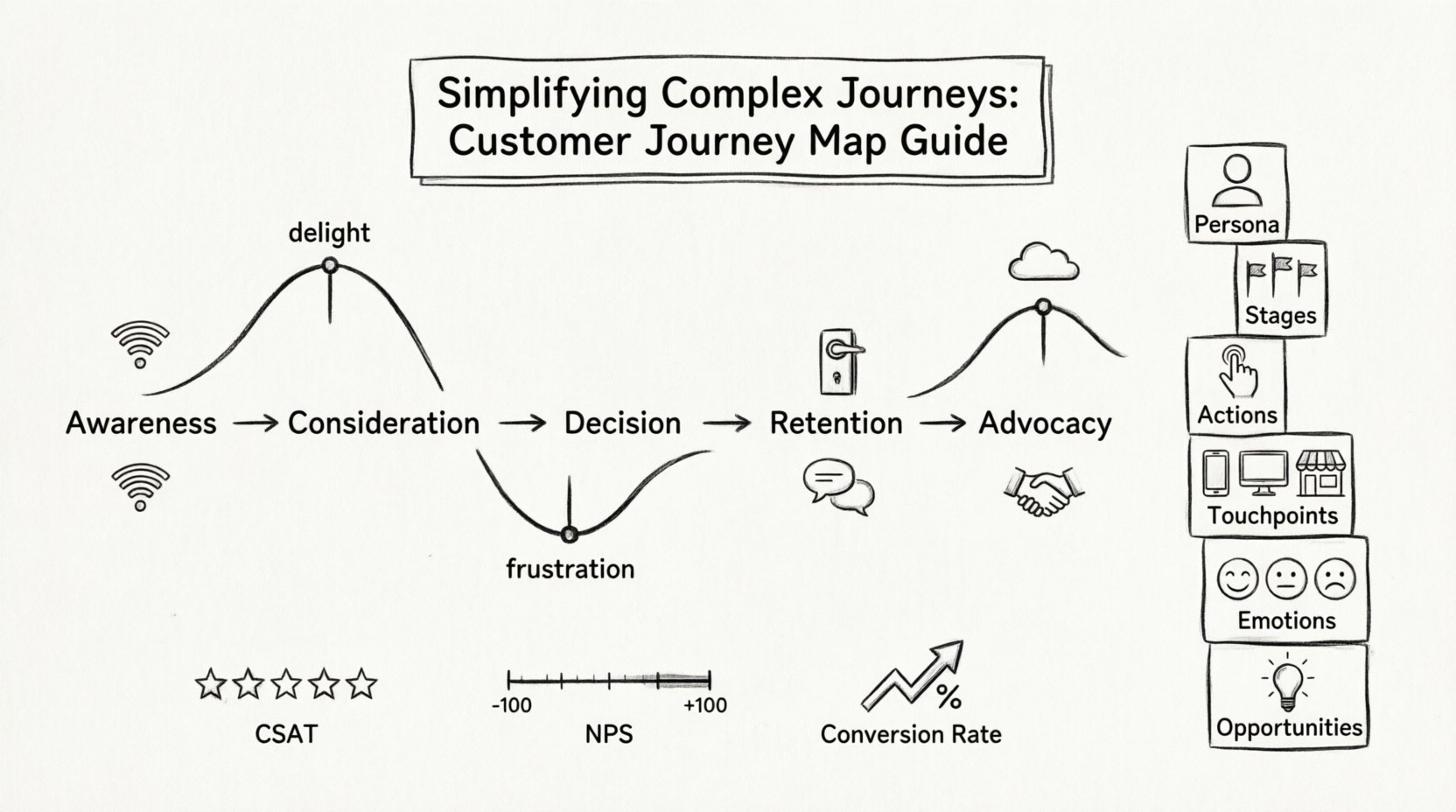
A customer journey map is a visual representation of every experience your customers have with you. It tells the story of a customer from the moment they become aware of your brand to the point where they become a loyal advocate. It is not merely a diagram of touchpoints; it is a synthesis of actions, emotions, and motivations.
Think of it as a blueprint for empathy. It allows you to step out of your internal operations and see the product or service through the eyes of the person using it. This perspective shift is critical for identifying gaps where the experience falls short.
- Visual Tool: It organizes scattered data into a coherent timeline.
- Empathy Driver: It highlights the emotional state of the customer at each stage.
- Alignment Mechanism: It ensures all departments understand the customer’s path.
Without this visual aid, teams often operate in silos. The sales team might promise one thing, while the support team delivers another. A map aligns these voices into a single, consistent story.
Why Do You Need This Tool? 📈
Businesses that invest in understanding the customer journey see tangible improvements in retention and satisfaction. When you know where friction occurs, you can remove it. When you know where delight occurs, you can amplify it.
Here are the primary reasons to implement this practice:
- Identify Friction Points: Find out exactly where customers get stuck or frustrated.
- Optimize Resource Allocation: Invest effort in the channels that matter most to the customer.
- Improve Retention: Address pain points before customers decide to leave.
- Enhance Communication: Ensure messaging is consistent across all platforms.
- Drive Innovation: Spot opportunities for new features based on unmet needs.
The Core Components of a Journey Map 🧩
Before drawing a single line, you must understand the building blocks. A comprehensive map requires specific data points to be accurate. The following table outlines the essential elements you need to gather.
| Component | Description | Example |
|---|---|---|
| Persona | The specific type of customer you are representing. | Sarah, a busy professional looking for quick solutions. |
| Stages | The high-level phases of the relationship. | Awareness, Consideration, Purchase, Retention. |
| Actions | What the customer actually does. | Searches Google, reads reviews, adds to cart. |
| Touchpoints | Where the interaction happens. | Website, Email, Phone Call, Physical Store. |
| Emotions | How the customer feels during the action. | Curious, Confused, Excited, Frustrated. |
| Opportunities | Where improvements can be made. | Simplify checkout, add live chat. |
Each of these components works together to create a complete picture. Ignoring one aspect, such as emotion, can lead to a map that is factually correct but emotionally hollow.
Preparing for the Mapping Process 🛠️
Jumping straight into drawing a map is a common mistake. Preparation ensures the output is actionable. You need to gather the right information and align the right people before starting.
1. Gather Data from Multiple Sources
Reliance on a single source of truth is dangerous. You need a mix of qualitative and quantitative data.
- Analytics Data: Look at where users drop off on your website.
- Customer Interviews: Ask direct questions about their experience.
- Support Tickets: Review common complaints and issues.
- Sales Feedback: Understand objections raised during the sales cycle.
2. Assemble the Right Team
This is not a task for one person. It requires cross-functional collaboration.
- Marketing: Knows how customers find you.
- Sales: Knows how customers decide to buy.
- Support: Knows what happens after the sale.
- Product: Knows how the service functions.
Bring these stakeholders together to validate the information. If marketing says one thing and support says another, you must resolve the discrepancy before finalizing the map.
Step-by-Step: Building Your Map 🚶♂️
Now that you are prepared, we move to the actual creation. This section breaks down the construction process into five manageable steps.
Step 1: Define the Persona
A journey map is never generic. It represents a specific type of user. Create a detailed persona profile. Give them a name, a job, goals, and frustrations. This humanizes the data.
- Name: Give the persona a real identity.
- Goals: What are they trying to achieve?
- Frustrations: What stands in their way?
- Demographics: Age, location, tech-savviness.
For example, if you are mapping the journey for a high-ticket purchase, your persona might be a decision-maker who values speed and reliability over price. If you are mapping for a subscription service, the persona might value flexibility and ease of cancellation.
Step 2: Identify the Stages
Stages represent the high-level phases of the relationship. While every business is different, most journeys follow a standard progression.
- Awareness: The customer realizes they have a problem.
- Consideration: The customer looks for solutions.
- Decision: The customer chooses a provider.
- Retention: The customer uses the product.
- Advocacy: The customer recommends the brand.
Ensure your stages align with your actual business model. If your sales cycle is long, the Consideration stage might be the most complex. If your product is self-serve, the Decision stage might happen quickly.
Step 3: Chart the Touchpoints
A touchpoint is any place where the customer interacts with your brand. These can be digital, physical, or interpersonal.
- Digital: Website, social media, email, app.
- Physical: Storefront, packaging, events.
- Human: Sales calls, support chats, onboarding calls.
Map these touchpoints to the specific stages. In the Awareness stage, the touchpoints might be a blog post or a social media ad. In the Retention stage, they might be a monthly newsletter or a product update notification.
Be thorough. Often, the most critical interactions happen in the background, such as a system notification email that goes unnoticed.
Step 4: Map Emotions and Thoughts
This is the most critical part of the map. Numbers tell you what happened; emotions tell you why it matters. Plot the emotional curve across the journey.
- High Points: Moments of delight or success.
- Low Points: Moments of frustration or confusion.
Ask the persona questions like: “How did you feel when you clicked that button?” or “Were you worried about the security of your payment?” Use a scale to rate the emotion, such as 1 to 5, where 1 is negative and 5 is positive.
This visual curve often reveals the “peak-end rule,” where customers judge the experience based on the peak emotional moment and the final moment, rather than the total sum of the experience.
Step 5: Identify Pain Points
Pain points are the friction that causes customers to abandon the journey or feel negative emotions. Once you have mapped the emotions, highlight the causes.
- Confusion: Is the language too technical?
- Delay: Is the response time too slow?
- Complexity: Is the process too many steps?
- Inconsistency: Does the message change between channels?
For each pain point, note a potential solution. If the customer gets lost during checkout, the solution might be a progress bar or a simpler form. If they are confused by the pricing, the solution might be clearer comparison charts.
Common Pitfalls to Avoid 🚫
Even with a solid plan, mistakes can happen. Being aware of common errors helps you steer clear of them.
- Creating a Generic Map: One size does not fit all. Map different personas separately.
- Ignoring Internal Processes: You cannot map the customer experience without understanding what your team does behind the scenes.
- Static Documents: A map created once and never updated becomes obsolete quickly.
- Overloading with Data: Too much information obscures the key insights. Keep it focused.
- Skipping Validation: Never assume your map is accurate without testing it against real customer feedback.
Keeping the Map Alive 🔄
A journey map is a living document. The market changes, products evolve, and customer expectations shift. To keep it useful, you must maintain it.
- Review Regularly: Set a quarterly review schedule.
- Update with New Data: Integrate new analytics or feedback into the map.
- Share Widely: Ensure new employees can access and understand the map.
- Link to Strategy: Tie improvements found in the map to actual business goals.
If you find a pain point, assign an owner to fix it. If you find an opportunity, assign a team to test it. The map is only valuable if it drives action.
Measuring Success 📏
How do you know if your mapping efforts are working? You need to look at key performance indicators that reflect the customer experience.
- Customer Satisfaction Score (CSAT): Direct feedback on specific interactions.
- Net Promoter Score (NPS): Likelihood to recommend the brand.
- Customer Effort Score (CES): How easy it was for the customer to complete a task.
- Retention Rate: Percentage of customers who continue using the service.
- Conversion Rate: Percentage of prospects who become customers.
Correlate changes in these metrics with the changes you made based on your map. If you simplified the checkout process, did the conversion rate go up? If you improved support response times, did CSAT improve?
Frequently Asked Questions ❓
How long does it take to create a map?
The timeline depends on the complexity of your business. A simple service might take a few days of research and workshop time. A complex enterprise solution could take several weeks. Focus on quality over speed.
Do I need special software to create a map?
No. You can use whiteboards, sticky notes, or simple document editors. The value is in the thinking, not the tool. Digital tools can help with collaboration, but they are not a requirement.
How often should I update the map?
At least once a year, or whenever there is a significant change in your product or strategy. If you launch a major new feature, update the map to reflect that journey.
Can I have multiple maps for one product?
Yes. Different personas have different journeys. You might have a map for the “New User” and a separate map for the “Power User.” Understanding these differences allows for targeted improvements.
What if the data is conflicting?
Conflicting data is common. It usually means different parts of the business see the journey differently. Bring the teams together to find the root cause. Often, the truth lies in the middle, or one view is more accurate than the other based on direct customer contact.
Final Thoughts on Journey Mapping
Building a customer journey map is a journey in itself. It requires patience, research, and a willingness to listen. When done correctly, it transforms how you see your business. It moves the focus from selling products to serving people.
Start small. Pick one persona and one journey. Map it out. Identify the friction. Fix it. Then expand. Over time, these small improvements compound into a superior customer experience that sets your brand apart.
Remember, the map is not the territory. It is a tool to help you navigate the territory. Keep it updated, keep it visible, and keep it human.