If you’re reading this, you’re probably skeptical. Maybe you’ve heard the hype about AI diagram generators and thought, “Yeah right, another overpromising tool.” Or perhaps you’ve tried AI tools before that produced garbage and gave up. We get it. The tech world is full of empty promises.
But what if we showed you exactly how AI deployment diagram software actually works? Not with buzzwords, but with concrete examples you can verify yourself? This guide is for the skeptics, the doubters, and the “show me the proof” professionals who need to see real results before trusting their architecture documentation to an online diagram maker.
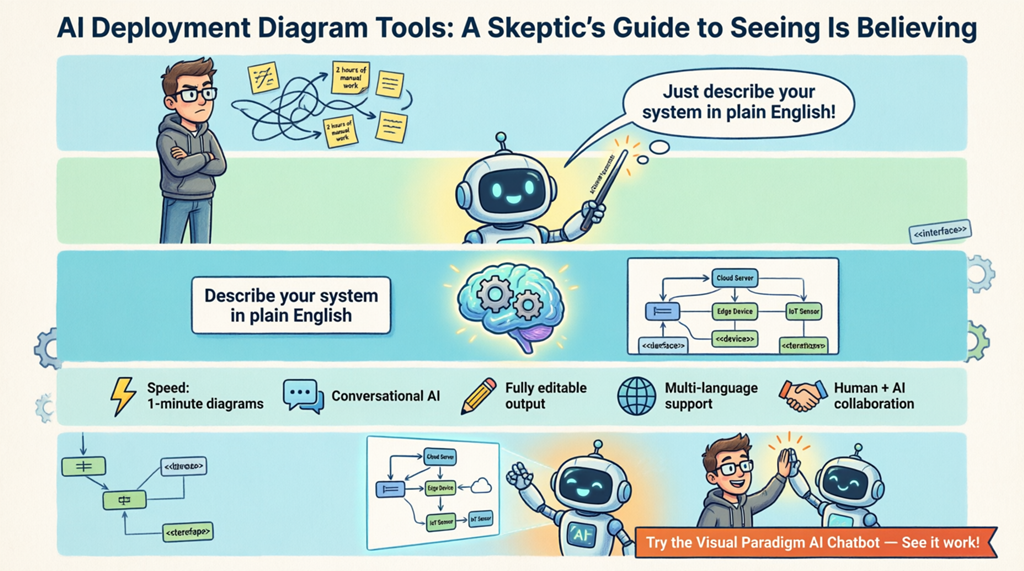
Why Your Skepticism Is Actually Smart
Let’s be honest: most “AI-powered” tools are just marketing fluff. You type something vague, and you get a generic mess that requires more fixing than if you’d just drawn it yourself. That’s not what we’re talking about here.
Real AI deployment diagram generators work differently. They understand:
- Technical context: They know the difference between a load balancer and a database server
- UML standards: They apply proper stereotypes like <<device>>, <<executionEnvironment>>, and <<artifact>> correctly
- Real-world architecture patterns: They recognize that a video streaming service needs CDNs, not just random boxes
Key Takeaways: What You’ll Actually Get
- Proof of concept: See actual diagrams generated from simple text descriptions
- No black box magic: Understand exactly how the AI interprets your requirements
- Professional output: Get standards-compliant UML diagrams in under a minute
- Full control: Start with AI, then refine manually – you’re always in charge
- Versatile support: Generate over 40 types of diagrams including UML, C4, ArchiMate, and SysML
The Conversational Approach: Talk to Your Diagram Tool
Here’s where skeptics usually roll their eyes: “An AI chatbot that draws diagrams? Sure.” But the Visual Paradigm AI Chatbot works as your professional online diagram maker in a way that’s surprisingly transparent.
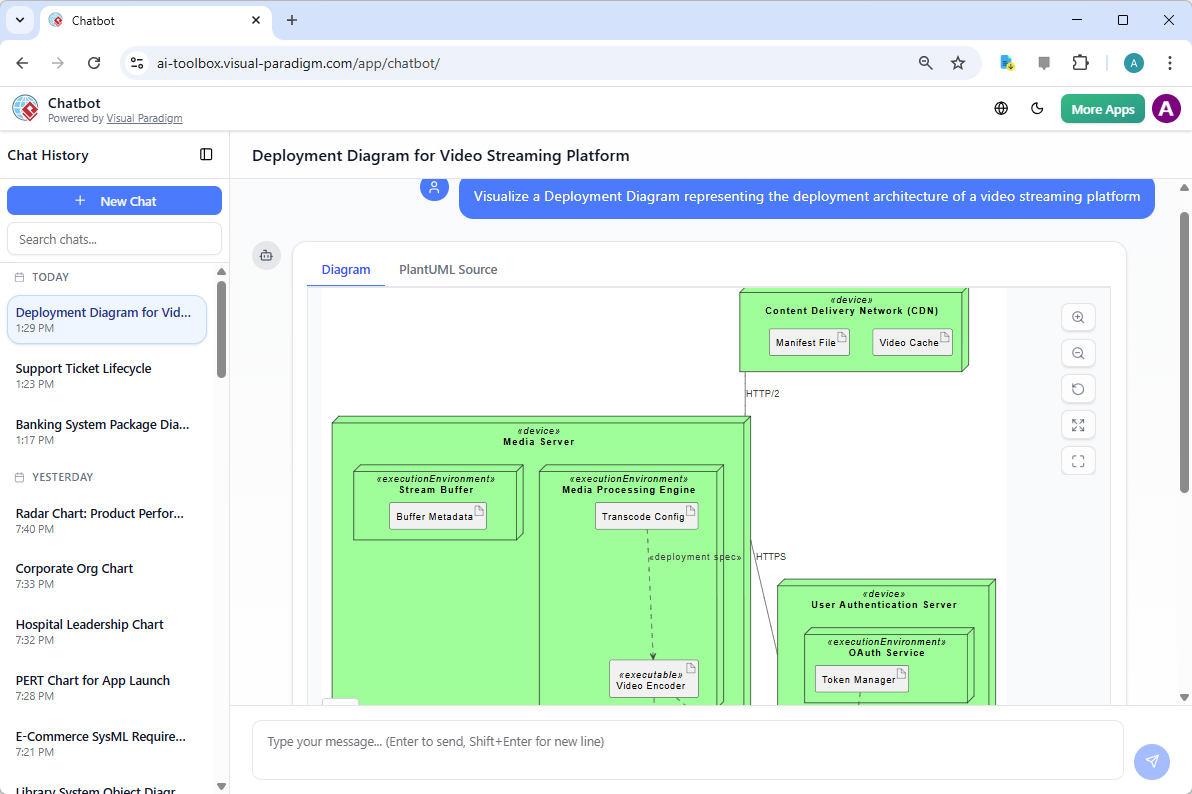
Let’s walk through a real example. Say you need to document a video streaming platform. Instead of dragging boxes for an hour, you simply type:
“Create a deployment diagram for a global video streaming service with CDN, media processing, and user authentication”
What happens next isn’t magic – it’s pattern recognition trained on thousands of real architecture diagrams. The AI identifies:
- Content Delivery Networks (CDNs) for edge caching
- Media Processing Engines for transcoding
- User Authentication Servers for security
- The relationships between these components
See the Logic, Not Just the Result
What makes this easy-to-use AI diagramming app different is transparency. Watch the diagram build in real-time. See how it creates a Media Server containing a Stream Buffer and Media Processing Engine. Notice how it adds manifest files and transcode configurations automatically.
But here’s the skeptic-friendly part: you can correct it immediately. Did it miss your PostgreSQL cluster? Just type:
“Add a redundant PostgreSQL cluster in the data tier”
The AI diagram generator updates instantly. No starting over, no complex reconfiguration. This conversational flow means you’re not handing over control – you’re collaborating with a very fast assistant who understands UML notation.
Desktop Power: When You Need Professional Precision
Maybe you’re thinking, “Chatbots are fine for brainstorming, but I need real enterprise-grade diagrams.” That’s where Visual Paradigm Desktop proves that AI deployment diagram generation isn’t just for quick sketches.
The desktop application integrates generative AI directly into professional modeling workflows. Here’s the workflow:
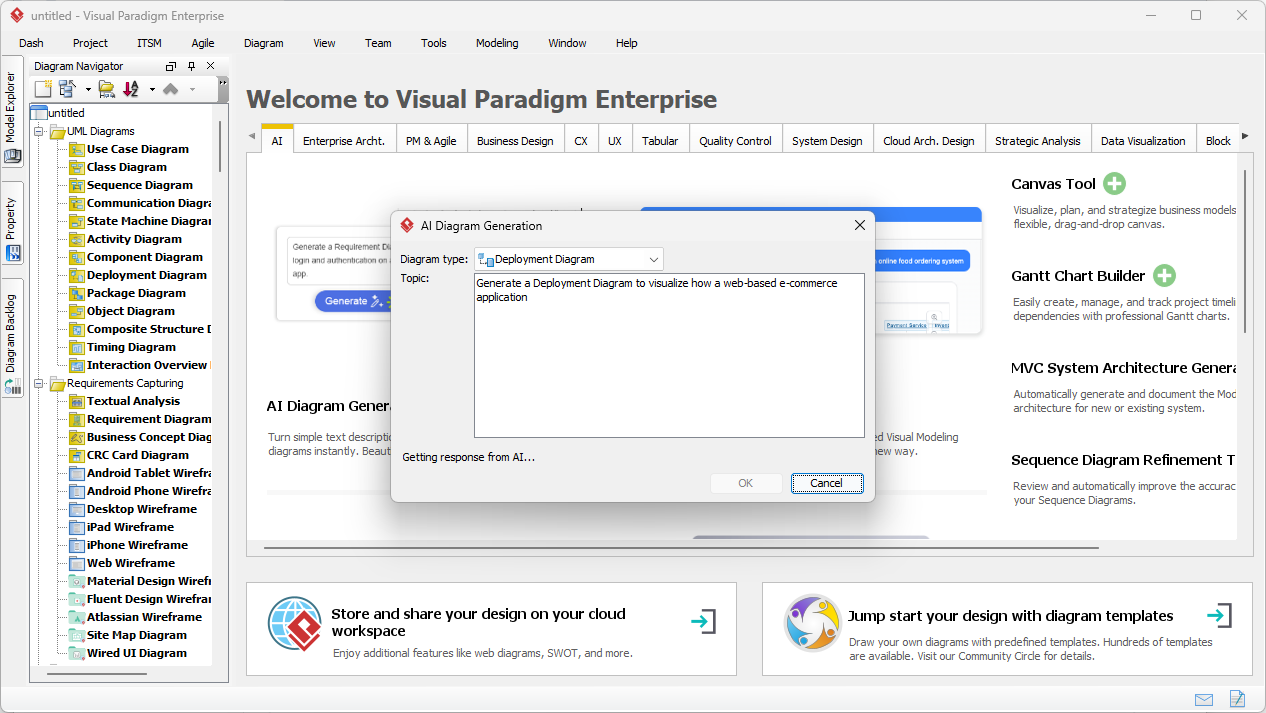
- Open the AI Diagram Generation window from the Tools menu
- Select “Deployment Diagram” as your type
- Enter your system description
- Click OK and watch it build
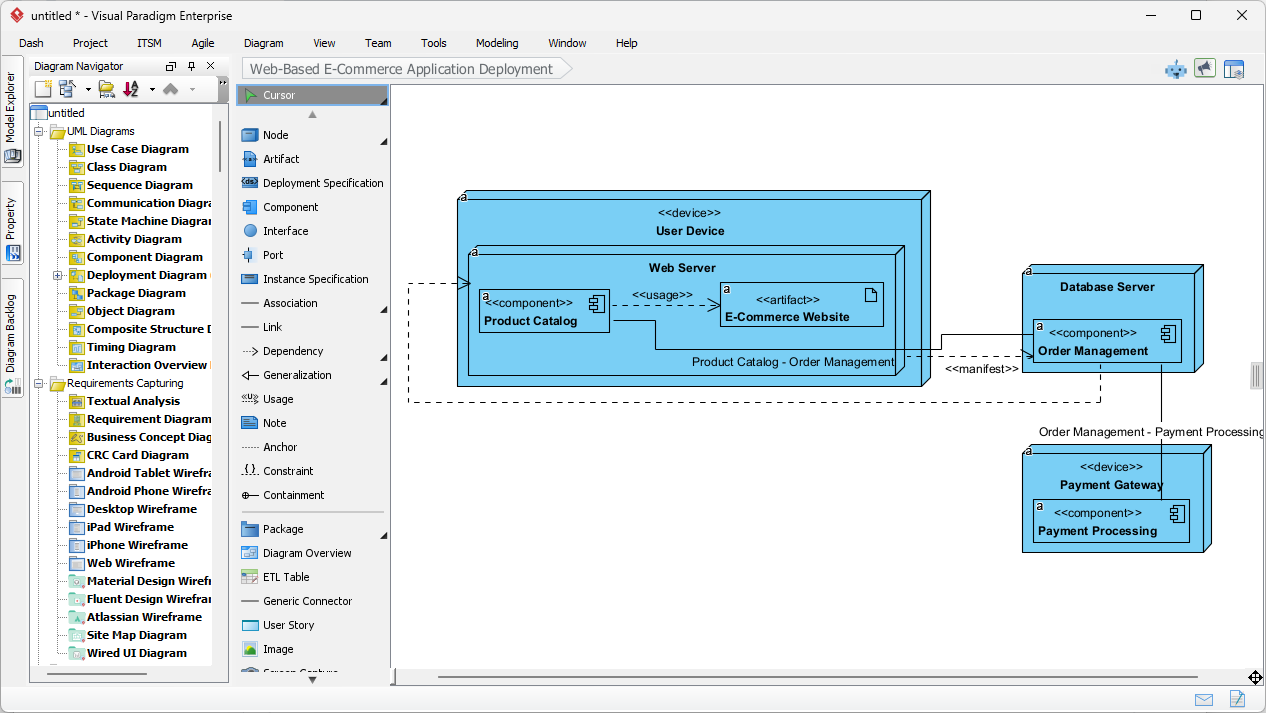
For example, try this prompt: “Generate a Deployment Diagram to visualize how a web-based e-commerce application is deployed”
From Text to Architecture: The Transformation
This is where skeptics become believers. The AI deployment diagram tool doesn’t just draw rectangles – it creates actual UML elements:
- Nodes: Physical devices like User Devices, Web Servers, Database Servers
- Artifacts: Software components like Product Catalog, E-Commerce Website
- Relationships: Dependencies, manifests, and communication paths
- External systems: Payment Gateways, third-party services
The result? A diagram that’s typically 80% complete. You handle the final 20% – adding specific port numbers, refining layouts, or linking to existing component diagrams. This is AI-powered speed meeting human-guided precision.
Addressing Common Skeptic Concerns
“Will it understand my specific domain?”
Visual Paradigm isn’t a one-trick pony. This all-in-one visual modeling solution supports UML (Class, Sequence, Use Case), Enterprise Architecture (over 20 ArchiMate viewpoints), and System Design (C4 models). The AI uses domain-specific agents – different “experts” for business analysis versus technical architecture.
“What if I need to make changes?”
Every AI-generated diagram is a native, fully editable Visual Paradigm diagram. Not a static image. Not a proprietary format. You can:
- Move elements manually
- Add or delete components
- Change properties and stereotypes
- Link to other diagrams in your project
“Is this just for UML experts?”
Actually, the AI diagram maker democratizes complex modeling. Project managers and consultants who aren’t UML experts can create professional visuals by describing what they need in plain English. The AI handles the notation; you focus on the architecture.
Smart Features That Actually Help
- Intelligent Layouts: The AI organizes elements logically – not randomly scattered
- Domain-Specific Agents: Specialized AI for different diagram types (SWOT analysis vs. sequence diagrams)
- Global Collaboration: Share read-only snapshots with stakeholders using Session Sharing
- Multi-Language Support: Communicate with the AI in your preferred language
- Seamless Integration: Move from AI-generated drafts to deep professional modeling without losing work
The Verdict: Try It Yourself
Look, we can tell you all day that this advanced AI diagramming software works. But the real proof is in trying it yourself. Here’s the beauty: you don’t have to commit to anything.
Start with the Visual Paradigm AI Chatbot – it’s free to try. Give it a simple prompt about a system you know well. See if it captures the architecture correctly. Test it. Break it. Ask it to revise.
If you need more power, download Visual Paradigm Desktop and use the AI Diagram Generation feature. Compare the AI output to what you’d create manually. Time yourself.
The skeptics who’ve tried it often become the biggest advocates – not because of marketing hype, but because they’ve seen with their own eyes how an AI deployment diagram generator can turn a 2-hour manual task into a 2-minute conversation.
Related Resources for Deep Dives
UML deployment diagrams provide a visual representation of software system architecture and hardware configurations, allowing teams to model component distribution, leverage AI-powered generation, and ensure system scalability within a collaborative design environment.
- What is a Deployment Diagram? A Complete Guide to UML Deployment Diagrams: This guide serves as a comprehensive introduction to the purpose, components, and best practices for modeling software system architecture using deployment diagrams.
- Deployment Diagram Features in Visual Paradigm Software: this article highlights powerful features such as drag-and-drop modeling and real-time collaboration for creating professional UML models.
- Visual Paradigm User Guide: Creating Deployment Diagrams: A detailed manual providing instructions on how to create and customize deployment diagrams using advanced software tools.
- Deployment Diagram in the Software Design Handbook: This handbook entry provides practical insights into designing scalable and maintainable software systems through effective architectural modeling.
- Step-by-Step Tutorial: Creating Deployment Diagrams with Visual Paradigm: A hands-on tutorial that covers the essential elements of deployment diagrams, including nodes, artifacts, and real-world relationships.
- Deployment Diagram Examples in Visual Paradigm Gallery: A curated collection of real-world examples intended to inspire and guide system architecture modeling projects.
- How to Create a UML Deployment Diagram for Cloud Apps with AI: This resource explains how to efficiently generate diagrams for cloud-based applications using AI-powered design tools.
- How to Draw a Deployment Diagram in UML: Step-by-Step Tutorial: A comprehensive walkthrough for drawing accurate diagrams that illustrate the relationships between system components.
- Free Deployment Diagram Tool – Visual Paradigm Online: An overview of a web-based tool for modeling system deployment without the need for software installation.
- Beginner’s Guide to Deployment Diagrams Using Visual Paradigm Online: An introductory guide for new users focused on modeling system deployment and infrastructure in a collaborative environment.
Related posts:
 How to Create Use Case Diagrams with AI: A Step-by-Step Tutorial
 Use Cases Are More Than Just Ovals: Unlock Hidden Power with AI Tools
 Common Mistakes: Pitfalls to Avoid When Modeling Interaction Overviews for Beginners
 Beyond Static Docs: A Hands-On Review of Visual Paradigm OpenDocs as a Living Knowledge Engine