In the high-velocity environment of an early stage startup, resources are scarce and time is the most valuable currency. While product development often dominates the conversation, the user experience (UX) strategy is the backbone that determines whether a product finds product-market fit or fades into obscurity. A robust UX strategy goes beyond aesthetics; it is a structured approach to solving user problems while aligning with business goals. This guide outlines the essential components of building a UX strategy that drives growth and retention without relying on guesswork.
🧠 Why Strategy Beats Pixels Alone
Many founders and teams mistake UX for visual design. They believe that making a screen look good is enough. However, without a strategic foundation, even the most beautiful interface can fail to convert or retain users. A UX strategy acts as a compass, guiding design decisions through ambiguity. It ensures that every interaction serves a purpose, whether it is to educate, persuade, or simplify a complex task.
For early stage startups, the stakes are particularly high. A poor user experience can lead to churn before the product even has a chance to prove its value. Conversely, a well-defined strategy helps prioritize features that matter most to the user and the business. It shifts the focus from “what should we build next?” to “what will create the most value for our users?”.
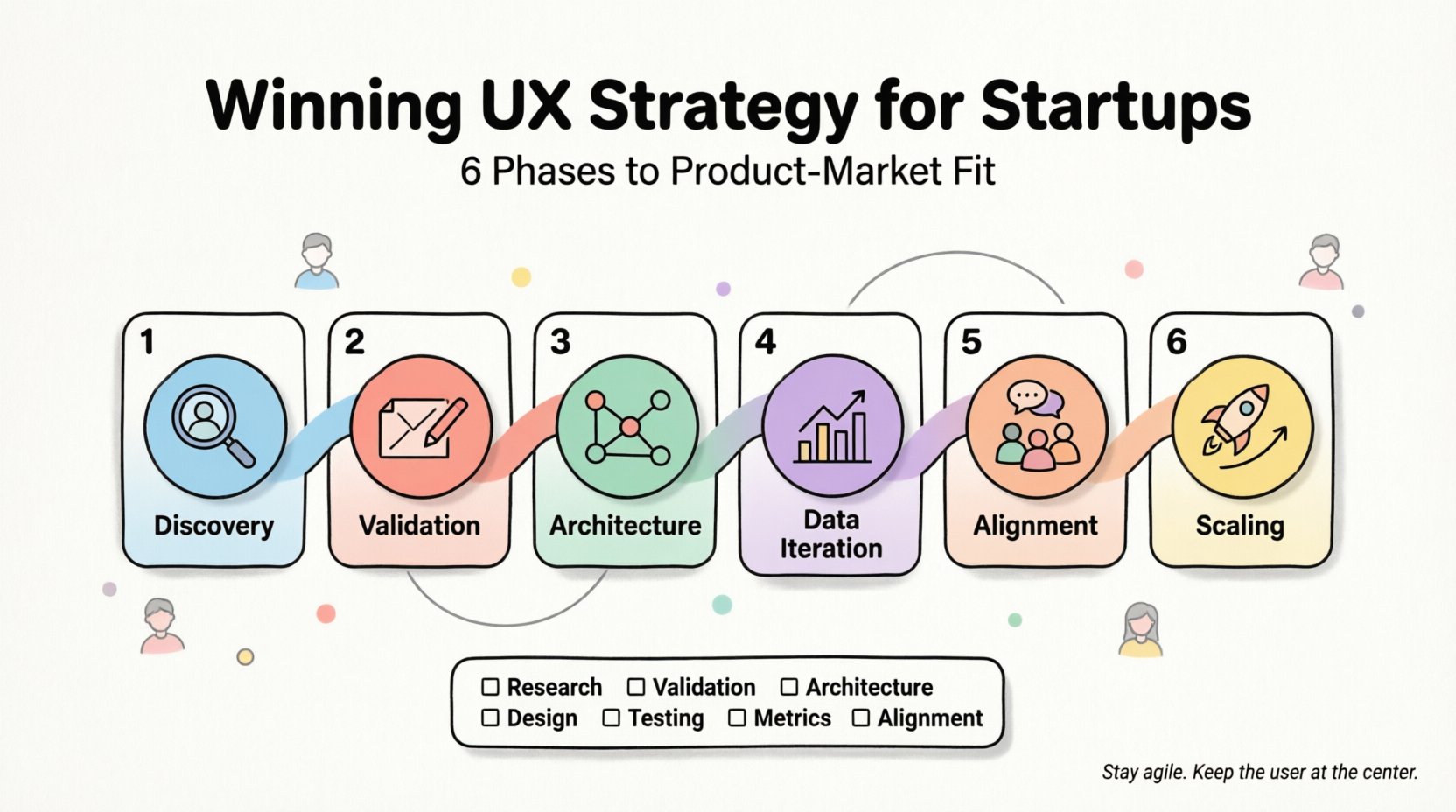
🌱 Phase 1: Discovery and Problem Definition
The foundation of any successful UX strategy lies in understanding the problem space. Before sketching a single interface, you must validate the assumptions driving the product. This phase is about gathering intelligence and defining the constraints within which you will operate.
Understanding User Needs
At the core of UX is empathy. You need to understand who you are building for and what pain points they are trying to solve. This involves qualitative and quantitative research methods.
- Interviews: Conduct one-on-one conversations with potential users to uncover deep-seated motivations and frustrations.
- Surveys: Gather broader data points to validate trends identified in interviews.
- Competitor Analysis: Review existing solutions to identify gaps in the market and opportunities for differentiation.
Defining the Value Proposition
Once you understand the user, you must articulate the value your product brings. This value proposition should be clear, concise, and aligned with the user’s needs. It serves as the north star for your design decisions.
- Clarity: Can a user understand what the product does within seconds of landing?
- Relevance: Does the product solve a real problem, or is it a “nice to have”?
- Differentiation: What makes this solution unique compared to alternatives?
🧪 Phase 2: Validation and Early Prototyping
Once the problem is defined, the next step is to test your assumptions with minimal investment. This phase is about learning fast and failing cheap. The goal is not to create a polished product, but to validate the core concept.
Low-Fidelity Prototyping
Start with sketches, wireframes, or paper prototypes. These tools allow you to iterate quickly without getting bogged down in visual details. They help you focus on structure and flow rather than colors and fonts.
- Sketching: Use pen and paper to map out ideas rapidly.
- Wireframing: Create grayscale layouts to establish hierarchy and layout.
- Storyboarding: Visualize the user journey to identify potential friction points.
Usability Testing
Get feedback from real users as early as possible. Watch them interact with your prototype to see where they struggle. This feedback loop is critical for refining the product before development begins.
- Moderated Testing: Observe users while they perform tasks, asking questions to understand their thought process.
- Unmoderated Testing: Collect data on how users navigate the product on their own time.
- A/B Testing: Compare different versions of a feature to see which performs better.
🏗️ Phase 3: Building the Architecture
With validated concepts, it is time to build the information architecture (IA) and user flows. This phase ensures that the product is logical, intuitive, and scalable.
Information Architecture
IA is the skeleton of your product. It organizes content and functionality in a way that makes sense to the user. A well-structured IA reduces cognitive load and helps users find what they need quickly.
- Sitemaps: Visual representations of the hierarchy of pages and sections.
- Navigation: Clear pathways that guide users through the product.
- Labeling: Consistent terminology that matches user mental models.
User Flows
User flows map out the steps a user takes to complete a specific task. These flows should be streamlined, minimizing the number of clicks and screens required.
- Onboarding: The first experience a user has with the product. It should be engaging and educational.
- Core Tasks: The primary actions users perform. These should be frictionless and efficient.
- Edge Cases: Scenarios where things go wrong. Plan for errors and provide helpful recovery paths.
📊 Phase 4: Iteration Based on Data
Once the product is live, the work is not done. Continuous iteration based on data is essential for long-term success. This phase involves monitoring performance and making adjustments to improve the user experience.
Defining Success Metrics
To measure success, you need clear metrics that align with your business goals. These metrics should be actionable and specific.
| Goal | Key Metric | Example |
|---|---|---|
| Acquisition | Sign-up Rate | % of visitors who create an account |
| Engagement | Active Users | DAU/MAU ratio |
| Retention | Churn Rate | % of users who stop using the product |
| Conversion | Task Completion | % of users who complete a purchase |
Analyzing Feedback
Data tells you what is happening, but feedback tells you why. Combining quantitative data with qualitative insights provides a complete picture of the user experience.
- Analytics: Track user behavior to identify drop-off points and popular features.
- Support Tickets: Review customer support inquiries to find common pain points.
- Reviews: Monitor app store reviews and social media mentions for sentiment analysis.
🤝 Phase 5: Aligning Stakeholders and Teams
A UX strategy is not just for designers. It requires buy-in from stakeholders, developers, marketers, and leadership. Alignment ensures that everyone is working towards the same vision.
Communication
Effective communication is key to alignment. Share your strategy, rationale, and progress regularly with the team.
- Design Reviews: Present designs and get feedback from the team.
- Documentation: Maintain up-to-date documentation of design decisions and rationale.
- Workshops: Facilitate collaborative sessions to brainstorm and align on goals.
Cross-Functional Collaboration
UX is a team sport. Involve developers early to ensure technical feasibility. Involve marketers to ensure messaging aligns with the experience.
- Design Systems: Create a shared library of components to ensure consistency.
- Developer Handoff: Provide clear specifications and assets for implementation.
- Marketing Sync: Ensure that promotional materials reflect the actual product experience.
🎯 Phase 6: Measuring Success and Scaling
As the startup grows, the UX strategy must evolve. What worked for 100 users may not work for 10,000. Scaling requires a focus on performance, accessibility, and maintainability.
Performance Optimization
Speed matters. Slow load times and laggy interactions can frustrate users and hurt retention. Optimize for performance at every stage of the design process.
- Load Times: Minimize image sizes and optimize code to reduce loading time.
- Responsiveness: Ensure the product works well on all devices and screen sizes.
- Caching: Use caching strategies to improve repeat visit performance.
Accessibility
Accessibility ensures that the product is usable by everyone, including people with disabilities. This is not just a moral obligation but a legal requirement in many regions.
- Contrast: Ensure sufficient color contrast for readability.
- Navigation: Ensure the product can be navigated using a keyboard.
- Screen Readers: Test the product with screen reading software.
📈 The UX Strategy Checklist
Use this checklist to ensure you have covered the essential elements of your UX strategy.
| Category | Checklist Item | Status |
|---|---|---|
| Research | Have we interviewed potential users? | ☐ |
| Validation | Have we tested our core assumptions? | ☐ |
| Architecture | Is our information architecture logical? | ☐ |
| Design | Have we created a consistent design system? | ☐ |
| Testing | Have we conducted usability testing? | ☐ |
| Metrics | Do we have clear success metrics? | ☐ |
| Alignment | Is the team aligned on the strategy? | ☐ |
🔍 Deep Dive: Common Pitfalls to Avoid
Even with a solid strategy, pitfalls can arise. Being aware of common mistakes can help you avoid them.
Pitfall 1: Designing for Yourself
One of the most common mistakes is designing based on personal preferences rather than user data. Always validate your designs with real users.
Pitfall 2: Ignoring Technical Constraints
Designing a feature that is technically infeasible leads to frustration and delays. Involve developers early in the process.
Pitfall 3: Focusing on Vanity Metrics
Metrics like page views or sign-ups can be misleading. Focus on metrics that indicate actual value, such as retention or task completion.
Pitfall 4: Skipping Documentation
Without documentation, design decisions become opaque. Documenting your strategy ensures continuity as the team grows.
Pitfall 5: Neglecting Post-Launch
Launching is not the end. Post-launch support and iteration are crucial for long-term success. Plan for ongoing maintenance.
🚀 Moving Forward
Building a winning UX strategy for an early stage startup requires a balance of creativity, logic, and empathy. It is a process of continuous learning and adaptation. By following a structured approach, you can create products that not only look good but function well and deliver real value.
Remember, the goal is not to create a perfect product on the first try. The goal is to create a product that evolves based on user needs and market feedback. Stay agile, stay focused, and always keep the user at the center of your decisions.
With the right strategy, your startup can navigate the uncertainties of early growth and build a foundation for sustainable success. The journey is challenging, but the rewards of a well-designed user experience are well worth the effort.