
Mastering VP Unified Platform: AI-Driven Architecture with VPasCode
Welcome to this deep-dive tutorial on Visual Paradigm’s modern architecture. If you are a systems engineer, software architect, or developer looking to bridge the gap between high-level modeling and production code, you need to understand how the Unified Platform functions as the central nervous system of your development lifecycle.
Visual Paradigm (VP) is no longer just a standalone desktop application for drawing diagrams. It is a comprehensive ecosystem designed to unify local engineering power with cloud-based collaboration. This article breaks down the architecture shown in the interface, explaining how the “Desktop Engine” interacts with the “Cloud Side” and how you can leverage VPasCode to make your diagrams a first-class citizen in your version control system.
1. The Unified Platform: The Digital Ecosystem’s “Front Door”
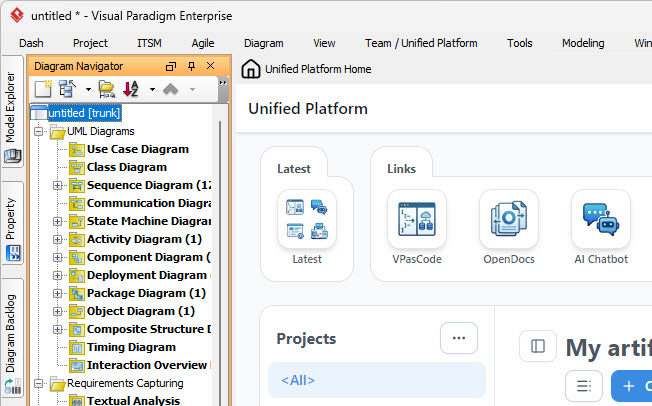
The interface you see in the screenshot represents the Unified Platform. Think of this as the “hub” or the dashboard for your entire project lifecycle. Instead of juggling multiple windows to find your files, this platform serves as a single point of entry to:
- Navigate Projects: Quickly switch between different initiatives.
- Launch Specialized Tools: Access the engineering engine or web-based tools directly.
- View Artifacts: See a unified list of files that includes both your local desktop models and cloud-based documents.
This architecture solves the common problem of data fragmentation. Whether a diagram was created by a local engineer or a remote collaborator, the Unified Platform treats them as part of a single coherent repository.
2. The Dual-Engine Architecture: VP Desktop vs. VP Online
The ecosystem is built on two distinct but connected engines. Understanding the distinction between them is crucial for effective workflow management.
3.3 VP Desktop (The Engineering Engine)
On the left side of your interface, you see the Diagram Navigator and the Model Explorer. This is the power of VP Desktop. It is the full-featured suite designed for rigorous, standards-based engineering.
It supports complex modeling standards such as:
- UML: For object-oriented software design.
- SysML: For systems engineering.
- ArchiMate: For enterprise architecture.
- Code Generation: Turning models into actual source code.
3.4 VP Online (The Cloud Side)
On the right side of the interface, you see the browser-based dashboard. This is VP Online. It is designed for accessibility, real-time collaboration, and lightweight work. It acts as the “broader home” for the collection of cloud apps, ensuring that diagrams created in the browser are synchronized with the central repository.
3. VPasCode: Diagrams as Code
One of the most transformative features in the ecosystem is VPasCode (Visual Paradigm as Code). In modern DevOps workflows, “Infrastructure as Code” is standard. VPasCode brings this concept to visual modeling.
VPasCode allows you to write diagrams using text-based syntax (similar to PlantUML) which is then rendered into visuals. This is significant because it allows diagrams to be:
- Version Controlled: You can track changes in Git just like source code.
- Diffable: You can see exactly what changed in a diagram definition between commits.
- Reviewable: Code reviews can be performed on the diagram logic before it is visually rendered.
Example: Creating a Sequence Diagram with VPasCode
Instead of dragging and dropping boxes, you can define the interaction flow in text. Here is how a simple VPasCode sequence diagram looks in a text editor:
@startuml
actor User
participant "Login System" as Login
participant "Database" as DB

User -> Login: Enter Credentials
Login -> DB: Verify User
DB --> Login: User Found
Login --> User: Dashboard
@enduml
When this code is committed to a repository (like Git), the Unified Platform can automatically render this text into the visual diagrams you see in the Diagram Navigator.
4. Living Documentation with OpenDocs
One of the biggest challenges in systems engineering is keeping documentation synchronized with the model. If you change a diagram, does the project documentation update automatically? In the VP ecosystem, the answer is yes.
OpenDocs creates rich, web-based documentation directly from your model’s contents. It is connected to a mechanism called Pipeline. This is a live integration that connects source models to published documents.
When a model changes, the documentation stays synchronized. This turns static PDF exports into living, dynamic artifacts that always reflect the current state of the system.
5. The Role of AI in the Ecosystem
Visual Paradigm has woven AI tools throughout the platform to accelerate the “early-stage work.” The AI Chatbot and diagram generation tools allow you to transform text requirements or rough ideas directly into structured outputs.
You can describe a system in natural language, and the AI can generate a baseline diagram. This result can then be refined in the Desktop or Online environments for engineering accuracy, drastically speeding up the brainstorming phase.
Conclusion
The Visual Paradigm Unified Platform represents a shift from isolated drawing tools to an integrated engineering environment. By combining the heavy lifting of VP Desktop with the accessibility of VP Online, and bridging the gap with VPasCode and AI, it provides a robust framework for modern systems and software engineering.