
Orchestration, Not Replacement: Architecting the VP Unified Platform
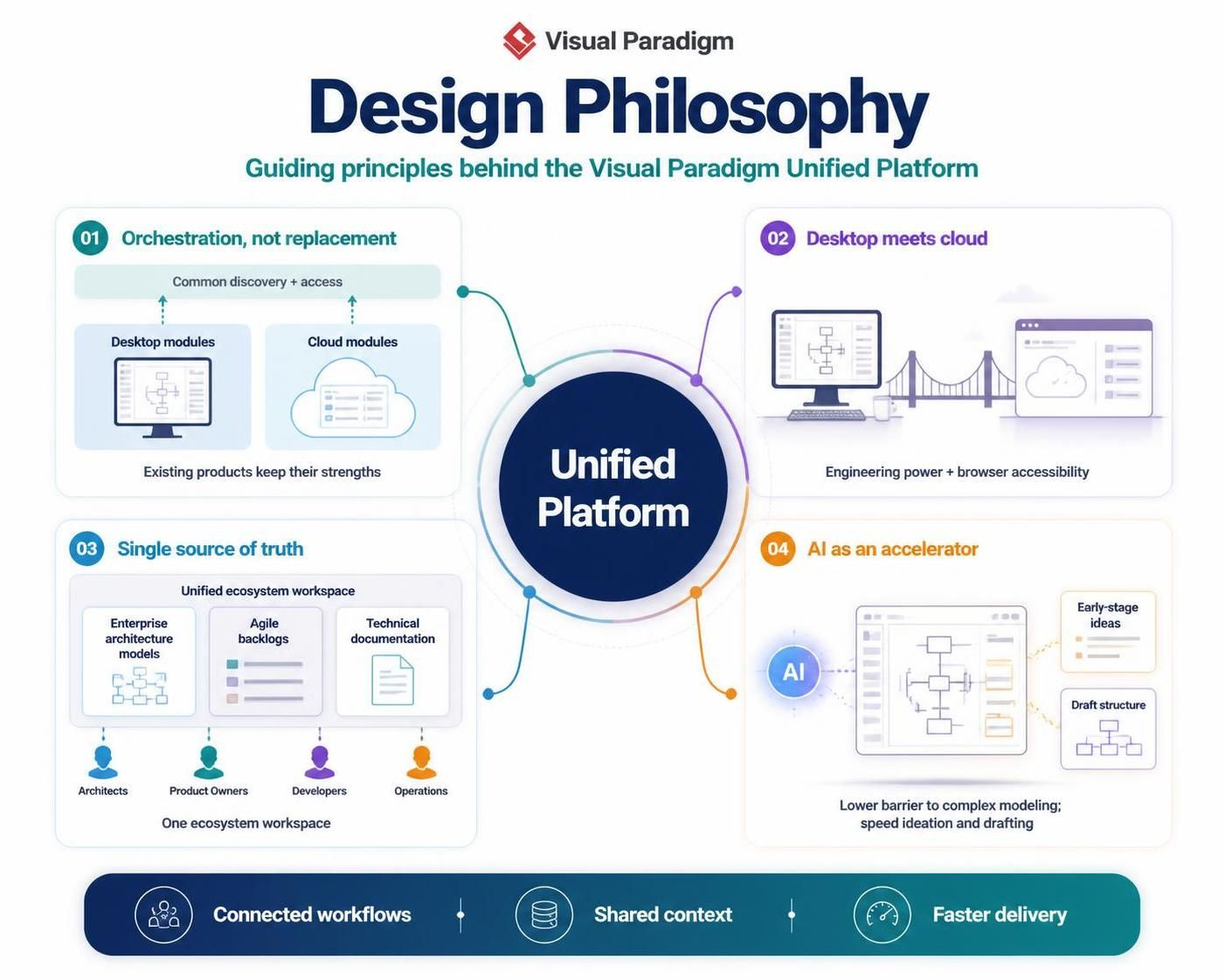
In the rapidly evolving landscape of enterprise architecture and software engineering, the challenge is rarely a lack of tools, but rather the fragmentation of data across them. Visual Paradigm has addressed this complexity not by building a monolithic “one-size-fits-all” application, but by adopting a sophisticated strategy of Orchestration, not replacement. This tutorial explores the underlying architecture and design philosophy of the Visual Paradigm Unified Platform, guiding you through how it harmonizes desktop power, cloud accessibility, and AI acceleration.
1. The Core Philosophy: Orchestration vs. Replacement
Traditionally, organizations often faced a “rip and replace” scenario where a new tool would force them to abandon their legacy processes. The Visual Paradigm Unified Platform rejects this approach. Its architecture is built on the principle of Orchestration. Imagine the platform as a conductor of an orchestra, where existing desktop modules and cloud modules are the musicians.
The Layered Architecture
The platform sits on top of existing products, adding a common discovery and access mechanism. This ensures that the deep engineering capabilities of the desktop suite remain untouched while making them accessible via the cloud.
- Desktop Modules: Retain their high-performance computing power for complex modeling.
- Cloud Modules: Provide lightweight, browser-based accessibility for collaboration.
- The Unified Layer: Bridges these two, ensuring that whether you are on a local machine or a remote server, you are interacting with the same underlying logic.
2. Desktop Meets Cloud: Hybrid Workflows
The “Desktop meets cloud” paradigm is a critical architectural shift. It acknowledges that not all tasks require the same environment. The platform creates a hybrid workflow where the strengths of both worlds are leveraged.
For heavy-lifting engineering tasks—such as generating complex UML diagrams or compiling massive system models—the Desktop Suite provides the necessary computational depth. Conversely, for quick reviews, feedback collection, or high-level stakeholder meetings, the Browser-based Tools offer immediate accessibility without the need for heavy installation.
Code Example: Defining the Hybrid Context
When modeling a system architecture that spans both environments, the Unified Platform allows you to define a context that spans these boundaries. Below is a conceptual representation of how a hybrid workflow might be structured in the platform’s metadata:
<model>
  <workflow>
    <stage name="Design">
      <tool type="Desktop" capability="Complex Modeling"/>
    </stage>
    <stage name="Review">
      <tool type="Cloud" capability="Browser Access"/>
    </stage>
    <integration point="Unified Discovery"/>
  </workflow>
</model>
3. Single Source of Truth: The Ecosystem Workspace
One of the most significant hurdles in enterprise architecture is the “silo effect,” where Enterprise Architecture (EA) models, Agile backlogs, and technical documentation exist in separate, disconnected repositories. The Unified Platform’s “Single source of truth” architecture centralizes these disparate data points into one Ecosystem Workspace.
This workspace acts as the central hub where:
- Enterprise Architecture Models: Define the high-level structure.
- Agile Backlogs: Define the iterative work.
- Technical Documentation: Define the detailed specifications.
By aligning these three pillars, the platform ensures that Architects, Product Owners, Developers, and Operations teams are all looking at the same data, regardless of their specific role.
4. AI as an Accelerator
Finally, the platform integrates Artificial Intelligence not just as a feature, but as an architectural accelerator. The goal is to lower the barrier to entry for complex modeling.
How AI Accelerates the Workflow
In the early stages of ideation, the “AI as an accelerator” module assists users in drafting structure and generating ideas. Instead of starting with a blank canvas, users can leverage AI to suggest valid structural patterns or generate initial drafts, significantly speeding up the transition from concept to formal model.
Conclusion
The Visual Paradigm Unified Platform represents a mature evolution in system architecture design. By orchestrating existing tools rather than replacing them, bridging the gap between desktop and cloud, and centralizing the ecosystem into a single source of truth, it empowers organizations to achieve connected workflows, shared context, and faster delivery.