
AI Chatbot & VPasCode: Mastering ArchiMate Technology Layer Architecture
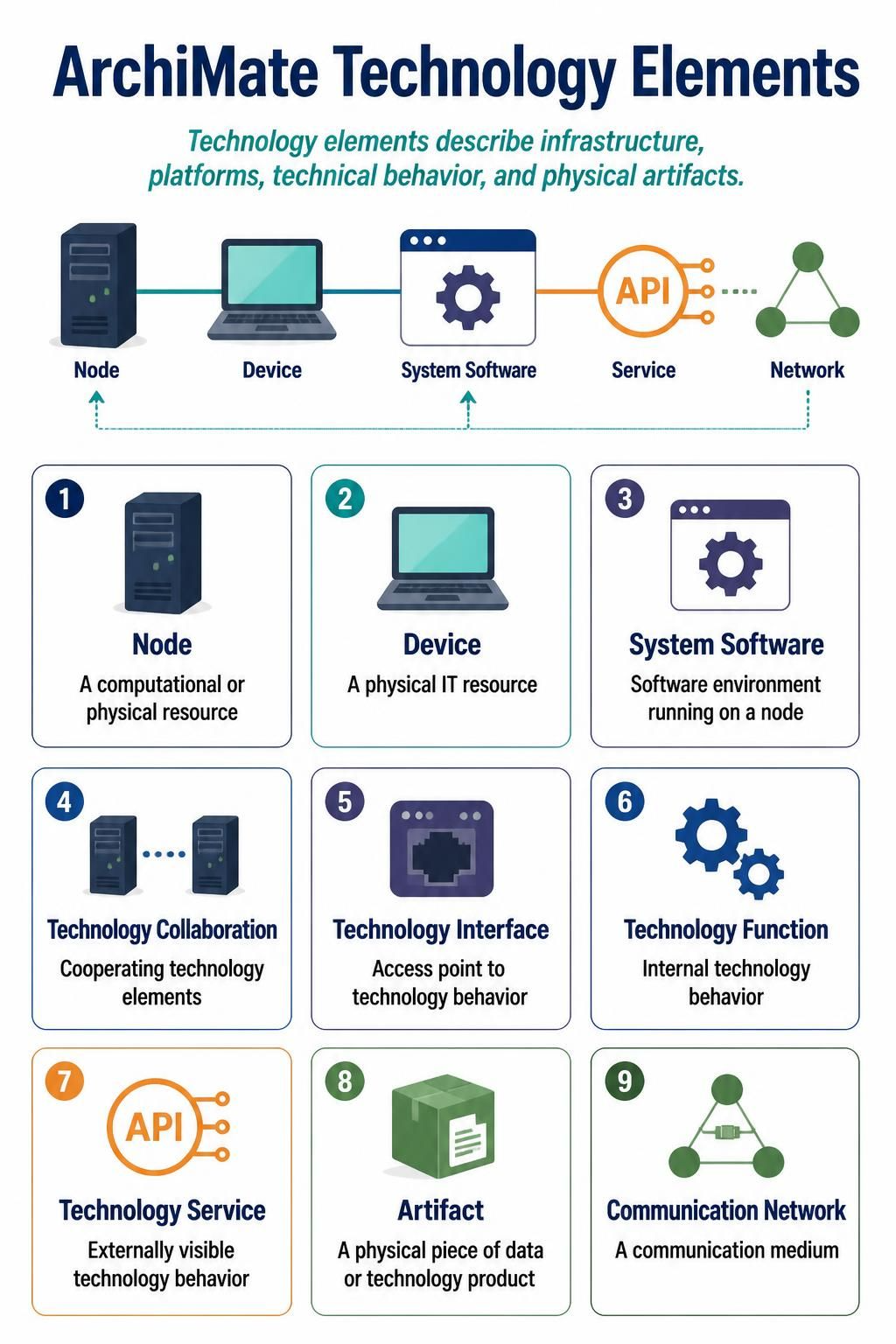
When architects visualize the infrastructure that powers an enterprise, they rely on the ArchiMate Technology Layer to describe the physical and virtual resources, platforms, and communication networks. While the Business and Application layers are often well-understood, the Technology layer is where the rubber meets the road—the hardware, the operating systems, and the networks that make it all possible.
In this tutorial, we will deconstruct the fundamental building blocks of the Technology layer. We will walk through the definitions of Nodes, Devices, System Software, and how they interact through Services and Interfaces to form a cohesive infrastructure.
1. The Foundation: Physical and Computational Resources
Every technology architecture begins with the physical reality. ArchiMate distinguishes between the container and the content, as well as the specific hardware and the software environment.
Node vs. Device
It is common to confuse Node and Device, but the distinction lies in their scope and role within a model.
- Node (Computational or Physical Resource): This is a broad term for any piece of hardware or software capable of hosting behavior. Think of it as a container. A Node is the generic “thing” that holds the architecture together.
- Device (Physical IT Resource): This is a specific type of Node. It refers to a physical piece of hardware, such as a server, laptop, or router. Every Device is a Node, but not every Node is a Device (e.g., a virtual machine is a Node, but not a physical Device).
System Software
Once you have the hardware, you need an environment to run on. System Software is the software environment that runs on a Node. This includes Operating Systems (OS), Database Management Systems (DBMS), and middleware. Crucially, System Software is defined as a Software Environment—it is the platform upon which specific applications run.
2. Behavior: Internal Logic vs. External Offerings
Hardware and software are useless without behavior. ArchiMate breaks down this behavior into distinct concepts: the internal mechanics (Function) and the external offering (Service).
Technology Function
A Technology Function represents the internal technical behavior of a node. This is the “how” it works. Examples include a “Data Processing Function” or a “Routing Function.” These behaviors are often hidden from the outside world and are specific to the internal logic of the technology.
Technology Service
Conversely, a Technology Service is the externally visible behavior. It is what the node offers to the outside world. For example, a server might have an internal “Data Processing Function,” but it exposes a “File Storage Service” to users. The Service is the interface through which the technology is consumed.
The Bridge: Technology Interface
How does one access the service? Through a Technology Interface. This is the access point to the technology behavior. It defines the protocol or method (like an API or a specific socket) required to invoke the service.
3. Collaboration and Communication
Modern systems are rarely isolated. They interact in groups and over networks.
- Technology Collaboration: This concept describes cooperating technology elements. It is used when multiple nodes work together to realize a specific function that a single node cannot achieve alone.
- Communication Network: This is the medium that allows data to flow between nodes. It represents the physical or virtual pathways (like a LAN, WAN, or the Internet) connecting the devices.
- Artifact: Finally, we must remember the data. An Artifact is a physical piece of data or a technology product (like a binary file, a database file, or a software package) that exists within the technology layer.
Tooling: Building Your Architecture with VPasCode
To truly master these concepts, you need tools that allow you to model them interactively. The modern architecture stack involves a powerful trio: Visual Paradigm for the diagramming canvas, ArchiMate + AI Chatbot for semantic guidance, and the VPasCode Editor for precise syntax generation.
Step 1: Visual Paradigm (The Canvas)
Start by setting up your workspace in Visual Paradigm. Select the ArchiMate Enterprise Architecture template. Here, you will visually drag and drop the elements we discussed—Nodes, Devices, and Services—to create your initial topology.
Step 2: VPasCode Editor (The Engine)
For a robust, text-based approach, the VPasCode Editor allows you to define these elements programmatically. This is superior for version control and rapid prototyping. Below is a code snippet demonstrating how to define a simple technology stack involving a Node, a Device, and a System Software environment.
// Define the Technology Layer
technologyLayer "TechLayer" {
    // Define a generic Node (Server)
    node "WebServerNode" {
        stereotype "Node"
    }

    // Define a specific Device (Laptop)
    device "AdminLaptop" {
        stereotype "Device"
    }

    // Define the System Software running on the Node
    systemSoftware "LinuxOS" {
        stereotype "SystemSoftware"
        // Link the OS to the Node
        node "WebServerNode"
    }

    // Define a Technology Service exposed by the Node
    service "WebHostingService" {
        stereotype "TechnologyService"
        // Realized by a Function inside the Node
        realizedBy "WebServerNode"
    }

    // Define an Interface to access the service
    interface "RESTInterface" {
        stereotype "TechnologyInterface"
        // Accesses the Service
        service "WebHostingService"
    }
}
Step 3: AI Chatbot (The Assistant)
Once your code is written, use the integrated AI Chatbot. You can prompt it with: “Analyze this ArchiMate model and identify if there are any missing interfaces between the Device and the System Software.” The AI leverages its training on ArchiMate specifications to check for logical consistency and completeness.
Putting It All Together: The Workflow
- Identify the Physical Resources: Start with your Devices (laptops, servers) and Nodes.
- Layer the Software: Place your System Software (OS, Middleware) onto the Nodes.
- Define the Behavior: Determine what the nodes Do (Functions) and what they Offer (Services).
- Connect the Dots: Use Interfaces to define how clients access the services, and Communication Networks to show how the nodes talk to each other.
- Validate with AI: Use your AI assistant to review the model for compliance with ArchiMate standards.
By mastering these elements, you move beyond simple drawing to true architectural modeling. You are no longer just drawing boxes; you are defining the logic of your enterprise’s infrastructure.