
Mastering ArchiMate Business Layer: AI Chatbots & VPasCode for Automated Modeling
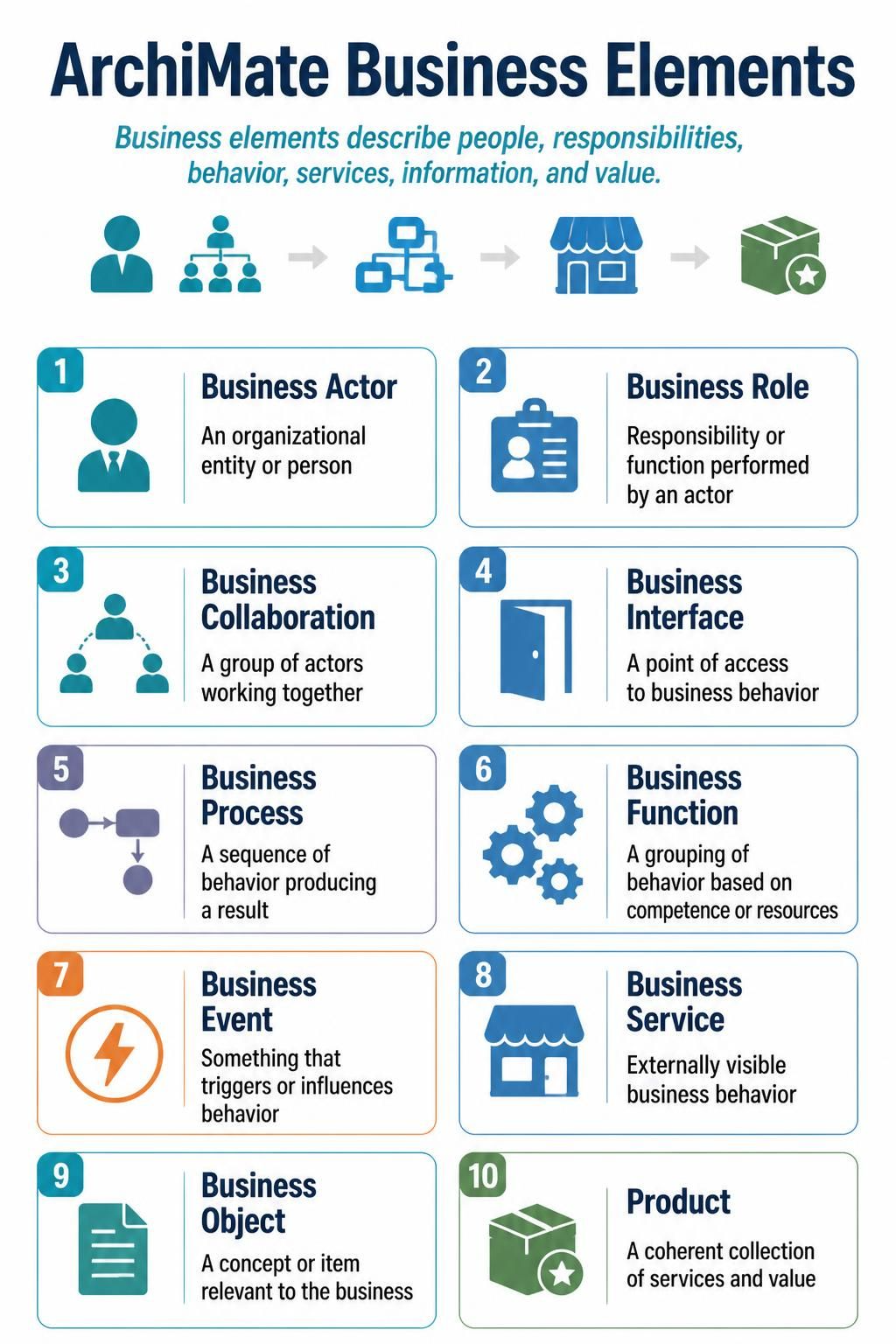
In the world of Enterprise Architecture, clarity is currency. The ArchiMate specification provides a standardized language to describe, analyze, and visualize business architecture. Specifically, the Business Layer focuses on the “what” of an organization—who is involved, what they do, and how value is delivered.
This tutorial breaks down the ten fundamental elements of the ArchiMate Business Layer, explains how they relate to one another, and demonstrates how modern tooling like Visual Paradigm and AI-assisted editors can accelerate your architecture workflow.
1. The Foundation: Actors and Roles
Every business story begins with the participants. In ArchiMate, we distinguish between the entity performing the work and the specific function they fill.
Business Actor
A Business Actor represents an organizational entity or person who performs activities in a business. Think of this as the “Who.” It could be a specific department (like “Human Resources”), an external client, or an individual employee.
Business Role
A Business Role describes a responsibility or function performed by an actor. It is the “Hat” the actor wears. For example, a “Business Actor” named John Doe might play the role of Project Manager. Roles allow us to assign responsibilities without tying them rigidly to a specific person.
Business Collaboration
When multiple actors work together to achieve a common goal, they form a Business Collaboration. This is essentially a team or a group. In modeling, this is crucial for defining the boundaries of a specific project team or a cross-functional working group.
2. The Engine: Behavior and Events
Once we know who is involved, we must define what they actually do. This is the behavioral layer of the architecture.
Business Process
A Business Process is a sequence of behavior producing a result. This is the most common diagram you will see. It describes a flow of activities, often triggered by an event, that leads to a specific outcome (e.g., “Order Fulfillment Process”).
Business Function
While a process is a sequence, a Business Function is a grouping of behavior based on competence or resources. It represents a capability. For example, “Order Processing” is a function (what you are good at), while “Receive Order -> Check Stock -> Ship” is the process (how you do it).
Business Event
Behavior rarely happens in a vacuum. A Business Event is something that triggers or influences behavior. It is the “Spark.” An event can be an external occurrence (like a “Customer Payment Received”) or an internal change (like a “Stock Level Low”).
3. The Interface: Services and Objects
How does the business interact with the outside world, and what data is involved?
Business Service
A Business Service is externally visible business behavior. It is what the business offers to a customer or stakeholder. It is the “Product” sold, but specifically the behavior aspect. If the value is the box, the service is the act of delivering it.
Business Interface
A Business Interface is a point of access to business behavior. It acts as the “Door” or “Port” through which an actor accesses a service or process. It defines the contract or the method of interaction.
Business Object
A Business Object is a concept or item relevant to the business. These are the nouns of the architecture: “Customer,” “Invoice,” “Product,” or “Contract.” They are passive entities that are acted upon by processes.
4. The Outcome: Value
Product
Finally, the Product is defined as a coherent collection of services and value. In ArchiMate, this often sits at the top of the value chain, representing the tangible or intangible result that satisfies a business need.
Implementation: The Tooling Stack
Understanding the theory is only half the battle. Modern Enterprise Architects leverage a powerful stack of tools to model these concepts efficiently. The synergy between Visual Paradigm, ArchiMate standards, AI Chatbots, and the VPasCode Editor creates a streamlined workflow.
1. Visual Paradigm (The Modeling Canvas)
Visual Paradigm provides the robust graphical interface required to drag-and-drop these elements onto a canvas. It ensures that your diagrams adhere to the strict visual notation of ArchiMate, making them readable by stakeholders worldwide.
2. ArchiMate + AI Chatbot (The Intelligent Assistant)
Complex architectures can be difficult to structure. An integrated AI Chatbot acts as a domain expert. You can ask questions like, “How should I model a customer returning a product?”, and the AI can suggest the correct relationships between Business Actor, Business Process, and Business Object. It helps validate your logic before you even draw a line.
3. VPasCode Editor (The Automation Engine)
For advanced users, the VPasCode Editor allows you to define architecture using code rather than mouse clicks. This is essential for version control and automation. Instead of manually placing a Business Process box, you write a script that generates it. This approach ensures consistency across large-scale enterprise models and allows for rapid iteration.
Step-by-Step: Modeling a Business Scenario
Let’s put these concepts together. Imagine we are modeling a “Customer Return” scenario. We will define the elements and then generate the diagram using code.
- Identify the Actor: We need a Customer (Business Actor).
- Identify the Trigger: The customer wants to return an item (Business Event).
- Define the Process: We need a process to handle this: “Process Return Request” (Business Process).
- Identify the Object: The item being returned is a “Product” (Business Object).
- Define the Service: The store offers a “Return Service” (Business Service).
Generating the Model with VPasCode
Using the VPasCode Editor, we can translate this logic into a structured script. This ensures that the relationships between the Actor, Event, and Process are mathematically precise.
// Define the Business Layer Elements
BusinessActor "Customer" {
    id: "BA01"
    description: "The entity initiating the return"
}

BusinessProcess "Process Return Request" {
    id: "BP01"
    description: "Handling the customer's return"
}

BusinessEvent "Return Trigger" {
    id: "BE01"
    description: "Customer requests a return"
}

BusinessObject "Product" {
    id: "BO01"
    description: "The item being returned"
}

BusinessService "Return Service" {
    id: "BS01"
    description: "The capability to process returns"
}

// Establish Relationships
// The Customer accesses the Service via an Interface
"Customer" --[Access]-> "Return Service"

// The Event triggers the Process
"Return Trigger" --[Trigger]-> "Process Return Request"

// The Process consumes the Product
"Process Return Request" --[Consumes]-> "Product"

// The Process realizes the Service
"Process Return Request" --[Realizes]-> "Return Service"
Conclusion
By mastering these ten elements—Actors, Roles, Collaborations, Processes, Functions, Events, Services, Interfaces, Objects, and Products—you build a solid foundation for Enterprise Architecture. When combined with the power of AI and automated coding tools, the complexity of modeling large organizations becomes manageable, allowing you to focus on strategy rather than syntax.