
Mastering Process Modeling: Flowcharts vs. BPMN & Integrating Visual Paradigm Tools
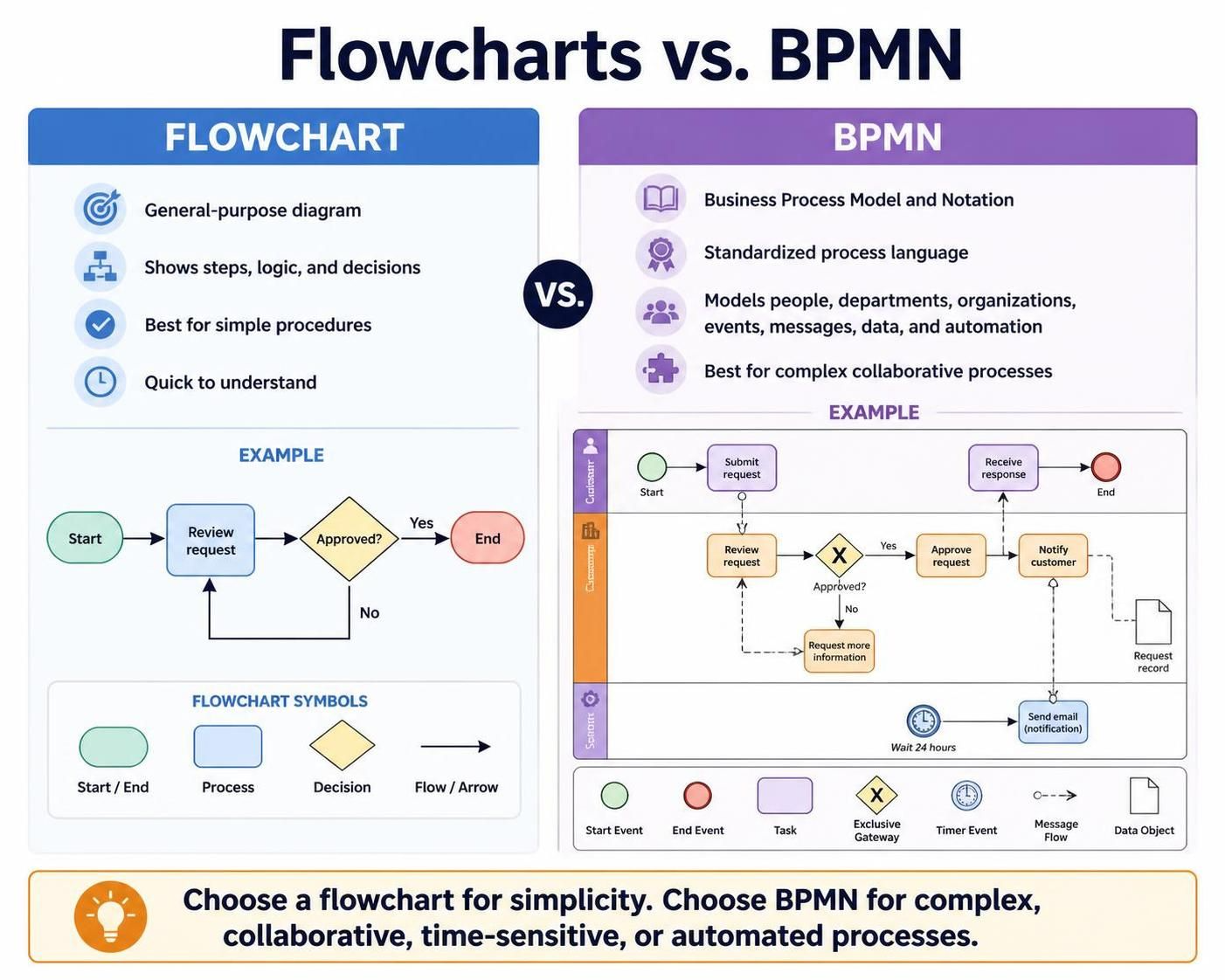
In the landscape of business process management (BPM), choosing the right visual language is critical for success. While both flowcharts and Business Process Model and Notation (BPMN) serve to map out workflows, they operate at different levels of abstraction and precision. This guide will walk you through the architectural differences between these two modeling techniques and explore how modern tooling—specifically Visual Paradigm and AI-assisted features—can bridge the gap between conceptualization and execution.
1. The Core Architectural Difference: Logic vs. Semantics
To understand why a business might choose one over the other, we must look at the semantic weight of the symbols used.
Flowcharts: The General-Purpose Logic Map
A flowchart is a general-purpose diagram designed to show the logical steps and decisions of an algorithm or procedure. It is the “quick and dirty” method of visualization.
- Focus: Logic, steps, and decisions.
- Complexity: Best for simple procedures or individual workflows.
- Limitations: It lacks the semantic depth to handle complex scenarios involving multiple departments, automated systems, or specific time constraints.
BPMN: The Standardized Process Language
BPMN (Business Process Model and Notation) is a standardized language (currently maintained as version 2.0.2 by the Object Management Group) designed specifically for modeling business processes. It acts as a universal language between business stakeholders and technical developers.
- Focus: People, responsibilities, events, messages, data, and automation.
- Complexity: Essential for processes involving multiple “swimlanes” (departments/roles), exceptions, and deadlines.
- Precision: It is precise enough to support technical implementation, meaning it can often be directly converted into executable code.
2. Analyzing the Workflow: From Simple to Collaborative
Let us look at a practical scenario: an “Order Request” process. The evolution from a flowchart to BPMN demonstrates the added value of structured modeling.
The Flowchart Approach
In a standard flowchart, the process is linear and abstract. It focuses on the decision tree.
graph TD
    A[Start] --> B(Review Request)
    B --> C{Approved?}
    C -->|Yes| D[End]
    C -->|No| E[Request More Info]
    E --> B
Analysis: While this shows the logic clearly, it does not specify WHO is doing the work, WHEN the work happens, or what happens if a system fails.
The BPMN Approach
A BPMN model introduces “Swimlanes” to define responsibility (Customer vs. System) and uses specific events to define timing and external interactions.
graph TD
    subgraph Customer
    A(Start Event) --> B[Submit Request]
    B -.-> C{Review Request}
    end
    subgraph System
    C -.-> D[Approve Request]
    D -.-> E[Notify Customer]
    E -.-> F[End Event]
    G[Timer Event: Wait 24h] -.-> H[Send Email]
    end
Analysis: Here, we see that the “System” has a specific role to play, potentially triggered by a Timer Event (Wait 24 hours). The flow also splits into a “Message Flow” (dashed line) indicating communication between the customer and the system, which a standard flowchart cannot explicitly represent.
3. Tooling: Boosting Collaboration with Visual Paradigm & AI
Once you have decided to model a process using BPMN, the challenge shifts to efficiency and accuracy. This is where the core pillars of Visual Paradigm—specifically its integration with AI-assisted features—become vital for team productivity.
Seamless Integration for Teams
Visual Paradigm (VP) provides a centralized repository where these diagrams are not just static images but living data. When teams use VP’s AI-assisted features, the workflow changes from manual drawing to structured generation.
- Reduced Cognitive Load: AI features can generate initial BPMN structures from natural language descriptions, allowing the team to focus on refining logic rather than drawing shapes.
- Consistency: AI-assisted modeling ensures that symbols adhere strictly to the BPMN 2.0.2 specification, preventing “notation errors” that often confuse developers and stakeholders.
- Real-time Collaboration: By standardizing the tool, teams can collaborate on complex processes without the friction of version control or incompatible diagram formats.
Usage Cases for AI-Enhanced BPMN
Here are three specific scenarios where this tooling stack significantly boosts productivity:
- Legacy System Migration: A team needs to document a complex, undocumented process. They can use AI to transcribe meeting notes or existing documentation directly into a draft BPMN model, which engineers then validate.
- Gap Analysis: Before automating a process, teams use the AI to compare the current state (As-Is) against the desired state (To-Be), highlighting missing steps or logic loops automatically.
- Documentation Generation: Once the BPMN model is complete, the tool can automatically generate the technical documentation or API specifications required to implement the workflow in software.
Conclusion
Choosing between a flowchart and BPMN is not just about aesthetics; it is about the complexity of the problem you are solving. For simple logic, a flowchart is sufficient. However, for collaborative, time-sensitive, and automated processes, BPMN is the industry standard. By leveraging tools like Visual Paradigm with AI capabilities, organizations can ensure that their process models are not only accurate representations of reality but also actionable blueprints for automation.