
Mastering BPMN Online: Architecting Workflows with AI Chatbot & Visual Paradigm
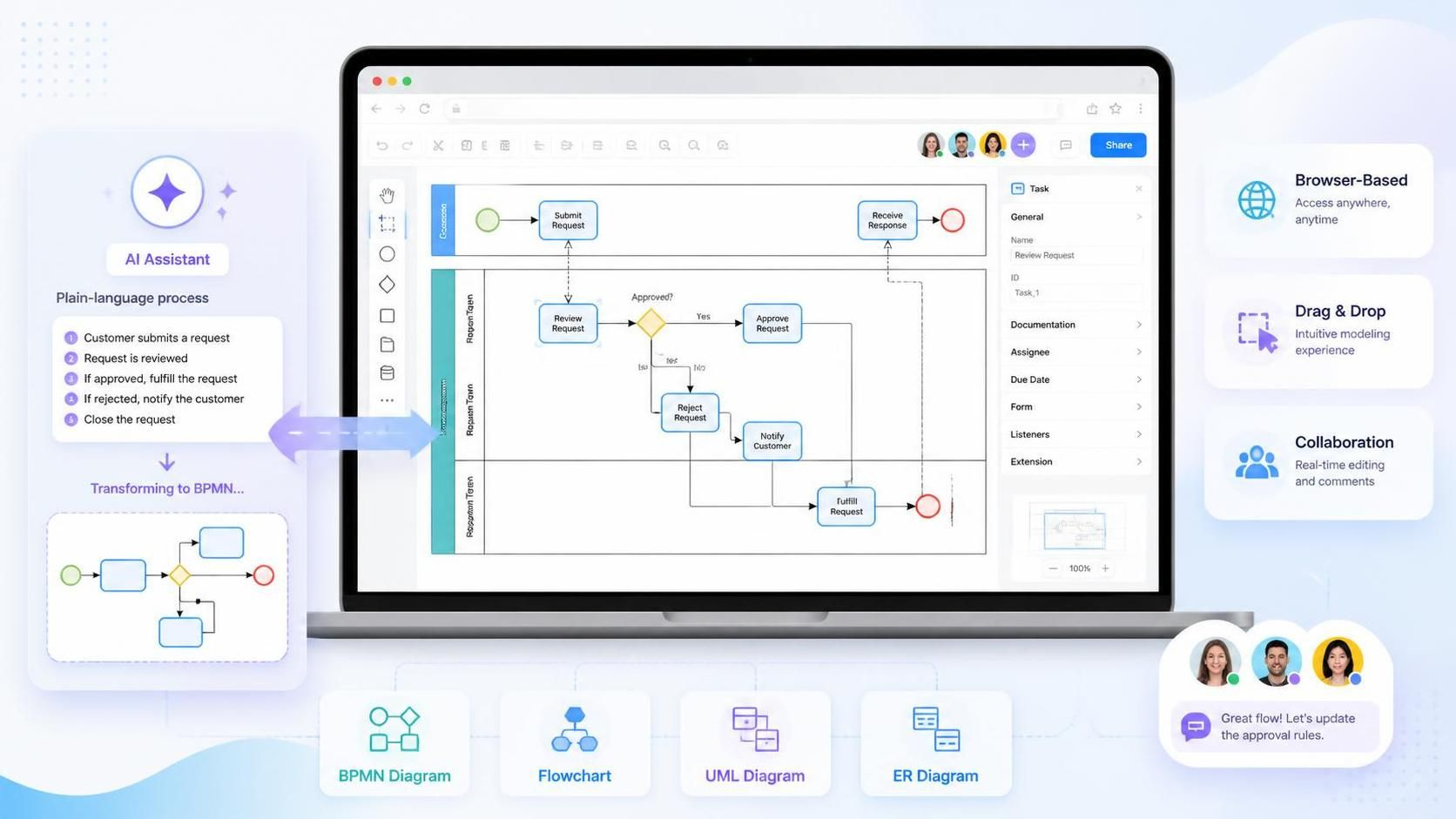
In the modern landscape of business analysis, the barrier to entry for creating professional process models has been removed. The days of requiring heavy desktop installations and complex file management systems are fading. Instead, we have entered the era of browser-based modeling, where the architecture of your process documentation is as accessible as a standard website. This tutorial explores the transition from a simple text description to a fully validated BPMN 2.0 diagram using Visual Paradigm Online, focusing on the synergy between AI assistance, cloud collaboration, and rigorous modeling standards.
The Architecture of an Online Modeling Environment
Understanding Visual Paradigm BPMN Online requires looking at it not just as a drawing tool, but as a distributed system. Unlike traditional desktop applications that store data locally, this environment utilizes a cloud-native architecture.
- Browser-Based Rendering: The core interface is rendered dynamically within the web browser. This eliminates the need for local software installation, ensuring that stakeholders, from business owners to technical developers, can access the same version of the truth without compatibility issues.
- Cloud-Based Workspace: The diagram is stored in a centralized cloud repository. This allows for real-time synchronization, meaning that when one user modifies a process lane, the change is immediately visible to others without the need for file versioning (e.g., “ProcessFinalv2.bpmn”).
- Unified Data Model: The system integrates various modeling standards—BPMN, UML, ER, and Flowcharts—into a single data structure. This ensures that if you are designing a workflow, the underlying data model for that workflow can be referenced or linked instantly.
Core Pillars of the Tooling
The efficacy of this platform rests on three interconnected pillars that drive productivity:
- AI-Assisted Generation: The system leverages Natural Language Processing (NLP) to interpret plain-language requirements and convert them into structural diagram elements.
- Visual Paradigm BPMN Engine: A robust, standards-compliant engine that ensures the generated diagrams adhere to BPMN 2.0 specifications, handling complex logic like gateways and events automatically.
- Integrated Product Review: A collaborative layer that overlays the diagram with commenting, tagging, and real-time editing capabilities, turning a static document into a living process.
From Plain Language to BPMN: A Step-by-Step Modeling Guide
The most transformative feature of the online tool is the ability to start with text rather than a blank canvas. This reduces the “blank page syndrome” and allows analysts to focus on business logic rather than drawing shapes.
Step 1: Inputting the Process Logic
Begin by defining your process in natural language. The AI Assistant is designed to recognize standard process verbs and nouns. Consider the following input describing a standard order fulfillment scenario:
1. Customer submits a request
2. Request is reviewed
3. If approved, fulfill the request
4. If rejected, notify the customer
5. Close the request
Step 2: AI Transformation and Visualization
When this text is fed into the Visual Paradigm Online tool, the AI engine parses the sentences to identify the following structural components:
- Actors: “Customer” is identified as the external actor.
- Tasks: “Submit,” “Review,” “Fulfill,” and “Notify” are mapped to Task nodes.
- Gateways: The “If approved / If rejected” logic triggers the creation of an Exclusive Gateway (the diamond shape).
- Flow Control: The sequence numbers (1-5) dictate the flow of sequence flows connecting these elements.
Step 3: Refining the Model
Once the diagram is generated, it is not static. The tool provides a visual editor that allows you to refine the model. You can:
- Assign Swimlanes: Drag the tasks into specific swimlanes (e.g., “Front Office,” “Back Office,” or specific Teams) to clarify responsibility.
- Adjust Logic: Modify the gateway conditions. For instance, change the “Yes/No” labels to specific data values like “Approved” or “Rejected.”
- Add Annotations: Use the properties panel to add detailed documentation to specific tasks.
Collaboration and the “Product Review” Workflow
The transition from a personal diagram to a team asset is seamless in the online environment. This is critical for the “Product Review” phase of any business analysis project.
Real-Time Co-Authoring
In a traditional desktop environment, a reviewer might have to download a file, make changes, and email it back. In Visual Paradigm Online, the “Share” button activates a collaborative session. Multiple users can view the diagram simultaneously.
- Live Comments: Stakeholders can click on any shape or connector to leave a comment. This is particularly useful for non-technical users (like Subject Matter Experts) who can point out missing steps without needing to understand the underlying BPMN syntax.
- Version Control: The system automatically maintains a history of changes, allowing the team to revert to previous states if a new change creates a logical error.
Usage Cases for Online BPMN
This tooling architecture supports a wide range of professional scenarios:
- Process Workshops: Facilitators can project the online diagram on a screen during a meeting. Participants can suggest changes on the fly, and the modeler can implement them immediately, creating a “live” record of the workshop.
- Remote Team Analysis: Distributed teams can collaborate on a single process model without the friction of file transfer. This is ideal for analyzing workflows that span multiple geographical locations.
- Student Education: Students can learn BPMN notation by interacting with a browser-based tool, avoiding the steep learning curve of desktop software installation.
- Consulting Deliverables: Consultants can prepare high-quality process documentation that clients can access and review instantly via a link, rather than waiting for a physical delivery of files.
Conclusion
Visual Paradigm BPMN Online represents a shift towards agile process modeling. By integrating AI for rapid prototyping and cloud collaboration for rigorous review, it allows teams to move quickly from a business idea to a shareable, standardized BPMN model. Whether you are a student learning the notation or a manager mapping departmental responsibilities, the combination of browser accessibility and powerful visual editing tools ensures that your process documentation is accurate, accessible, and actionable.