
BPMN Manual Tasks: From Physical Work to AI Chatbot Automation
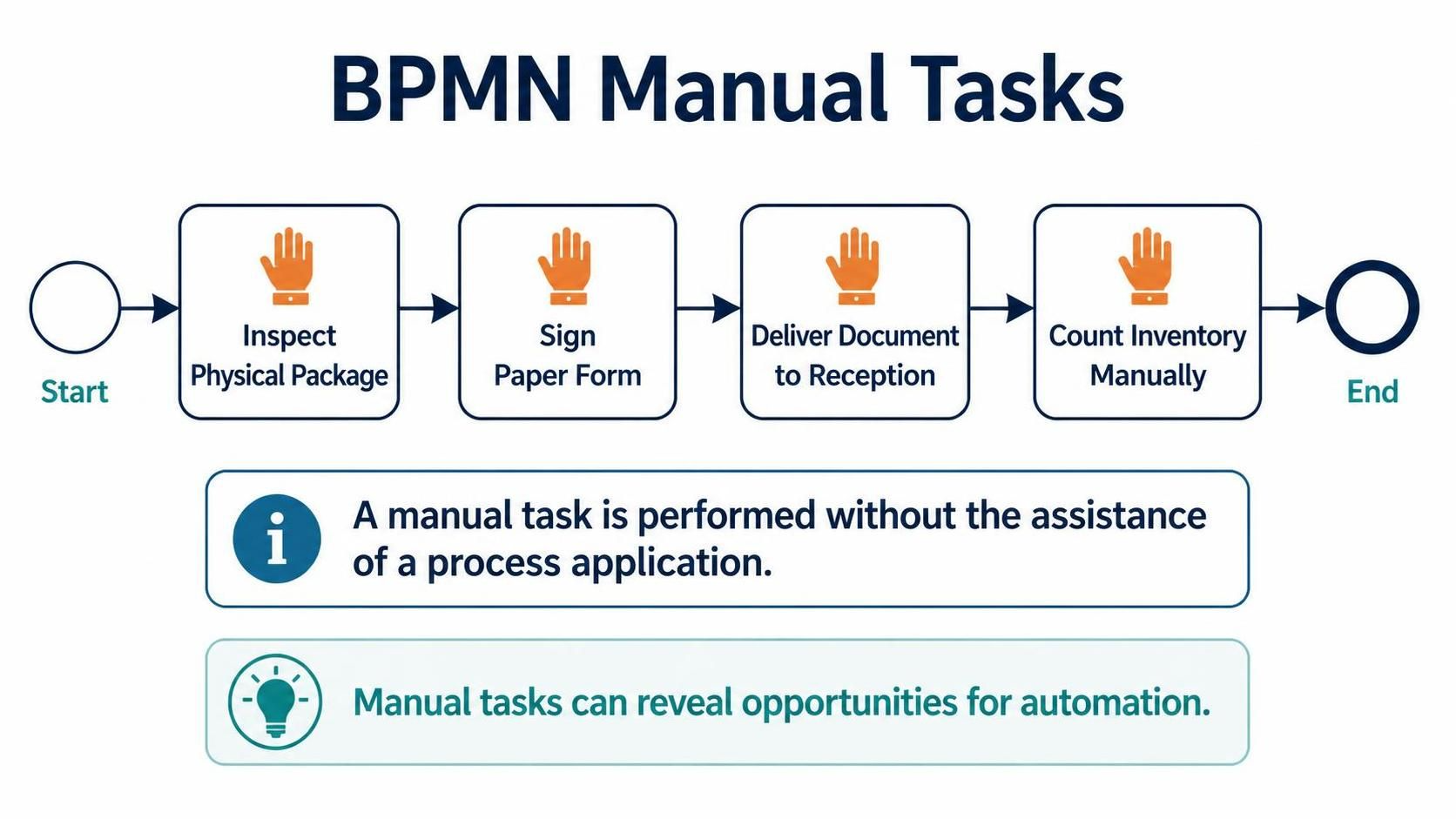
In the realm of Business Process Model and Notation (BPMN), accurately representing human effort is crucial for understanding where efficiency can be gained. This tutorial dives deep into the concept of the Manual Task, a specific type of activity used to model work that is performed by a human without the assistance of software or process applications.
Understanding the Manual Task
A Manual Task is a fundamental building block in process modeling. Unlike a “Service Task,” which is executed by a system (like an API call or a database update), or a “User Task,” which is a task assigned to a human but often supported by a digital interface, a Manual Task represents work done entirely by hand.
Visually, in tools like Visual Paradigm, this is typically represented by a task box with a specific icon (often a hand). The core definition is simple yet critical:
Definition: A manual task is performed without the assistance of a process application.
This distinction is vital. If a process step relies on physical manipulation, paper forms, or mental counting rather than a software input, it belongs in this category.
Real-World Examples of Manual Tasks
To effectively model a process, you must identify steps where digital automation is currently absent. Based on industry standards, here are common scenarios that require the Manual Task symbol:
- Inspect Physical Package: An employee physically checking a delivered box for damage.
- Sign Paper Form: A client signing a physical contract or a manager approving a hard-copy document.
- Deliver Document to Reception: Physically walking a file from one office to a central reception desk.
- Count Inventory Manually: A warehouse worker counting stock on a shelf without scanning barcodes.
Modeling Logic and Flow
When constructing a BPMN diagram, the flow of a manual task is treated just like any other task: it has an entry point (Sequence Flow) and an exit point. However, the semantic meaning changes the interpretation of the process duration and cost.
Consider the following logical flow for a “Receiving Goods” process:
graph TD
    A[Start Event] --> B[Manual Task: Inspect Package]
    B --> C[Manual Task: Sign Paper Form]
    C --> D[Manual Task: Deliver to Reception]
    D --> E[Manual Task: Count Inventory]
    E --> F[End Event]
Notice how each step represents a physical action. If you were to model this incorrectly as a “Service Task,” you might imply that the system automatically knows the package is damaged or that the inventory count is instant, leading to unrealistic process timelines.
The Strategic Value: Identifying Automation Opportunities
Why do we explicitly model these manual steps? The answer lies in process improvement. By isolating tasks that require human physical intervention, you create a map of inefficiency.
Manual tasks can reveal opportunities for automation. When a business analyst looks at a diagram full of Manual Tasks, they are essentially looking at a checklist for digital transformation. For example:
- If Inspect Physical Package is a Manual Task, can we install cameras for AI-based damage detection?
- If Sign Paper Form is a Manual Task, can we implement an e-signature workflow?
- If Count Inventory Manually is a Manual Task, can we implement RFID scanning?
Tooling and Collaboration
While manual tasks highlight where to improve, the tools you use to model them dictate how well your team collaborates. Modern modeling platforms like Visual Paradigm integrate powerful capabilities to bridge the gap between process design and reality.
By combining the core pillars of BPMN + AI, teams can significantly boost their productivity. When you model a manual task, an AI-enhanced workflow might suggest: “This step is a Manual Task. Have you considered integrating this with an RPA bot to automate the data entry part?”
These tools allow for seamless integration, meaning your diagram is not just a static image but a living specification that can drive automation scripts or workflow engines.
Conclusion
Understanding the Manual Task is the first step toward optimizing a business process. It forces you to acknowledge the reality of physical work and provides a clear target for future automation efforts. By accurately modeling these steps, you empower your organization to transition from manual inefficiencies to streamlined, automated success.