
Mastering BPMN Associations: Context, Data, and Grouping Explained
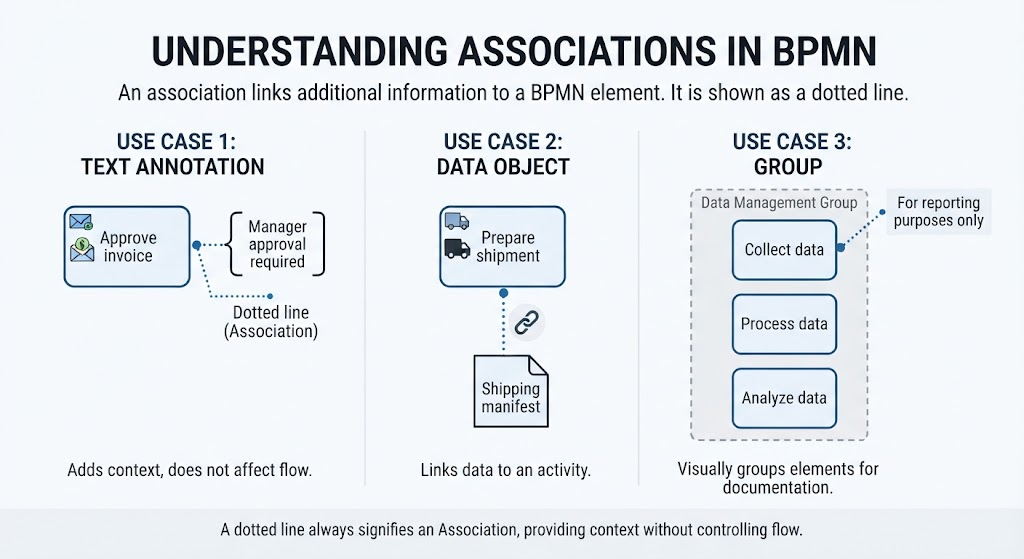
In the complex world of Business Process Model and Notation (BPMN), precision is paramount. While flow lines dictate the sequence of operations, associations provide the necessary context, linking information to the actions that generate or consume it. Without associations, a process diagram is merely a skeleton; with them, it becomes a fully fleshed-out blueprint.
This tutorial delves into the mechanics of associations, exploring how they connect annotations, data objects, and groups to BPMN elements. We will also introduce the recommended tooling for creating these diagrams efficiently.
What is a BPMN Association?
An association is a specific type of relationship used to link additional information to a BPMN element. Visually, it is distinct and unmistakable:
- Visual Style: It is rendered as a dotted line.
- Function: It adds context but does not control the order of the process.
Think of an association as a label or a reference. It tells the viewer “this is related to that,” but it does not dictate “do that after this.”
Use Case 1: Linking Text Annotations
One of the most common uses of an association is to attach a text annotation to an activity. This is crucial for explaining the why or how of a process step without cluttering the flow.
Example Scenario: Approving an Invoice
Consider a task where an invoice must be reviewed. The diagram might show a task named [Approve invoice]. To clarify the requirements, you can use an association to link this task to a text box stating:
“Manager approval required”
This ensures that stakeholders understand the constraints of the activity without implying that the approval text is a step in the workflow itself.
Use Case 2: Data Association
When modeling business processes, the movement of information is just as critical as the movement of tasks. A Data Association specifically shows how data enters or leaves an activity.
It is used to visualize:
- An input document being used.
- An output document being produced.
- Information being updated.
- Data being stored.
Visual Syntax
Unlike a standard association, a data association typically features an open arrowhead to indicate directionality (input vs. output).
Code Representation
When defining these relationships in modeling tools or syntax, the structure looks like this:
[Create Invoice] ─ ─ ─ → Invoice document
In this example, the dotted line with the open arrow indicates that the “Create Invoice” task produces the “Invoice document” as an output.
Use Case 3: Associating Groups
BPMN allows you to group related elements for better organization. These groups, often called Swimlanes or Pools, can also be linked via associations to provide meta-information.
For instance, a Data Management Group might contain several tasks like “Collect data,” “Process data,” and “Analyze data.” You might use an association to link this entire group to a note saying:
“For reporting purposes only”
This visually groups elements for documentation, ensuring that the scope of the group is understood.
Recommended Tooling: Visual Paradigm BPMN and AI
To effectively implement these concepts, you need robust modeling software. For professional-grade BPMN modeling, Visual Paradigm is the industry standard. It offers a comprehensive suite of features that handle complex diagrams with ease.
Furthermore, modern modeling is being transformed by AI. By leveraging Visual Paradigm’s AI capabilities, users can:
- Automatically generate BPMN diagrams from text descriptions.
- Validate process flows for errors instantly.
- Enhance the accuracy of associations and data links.
Whether you are manually drawing a dotted line to annotate a task or using AI to generate the entire process, the principles of association remain the same: they add context without altering the flow.
Conclusion
Mastering associations is the key to creating BPMN diagrams that are not just functional, but also communicative. By using dotted lines to link text annotations, data objects, and groups, you transform a simple sequence of steps into a rich, informative process model. For the best experience in creating these models, we highly recommend using Visual Paradigm BPMN integrated with AI tools to streamline your workflow and ensure accuracy.