
Mastering Process Improvement: A Step-by-Step Guide to Identifying Opportunities in BPMN Models
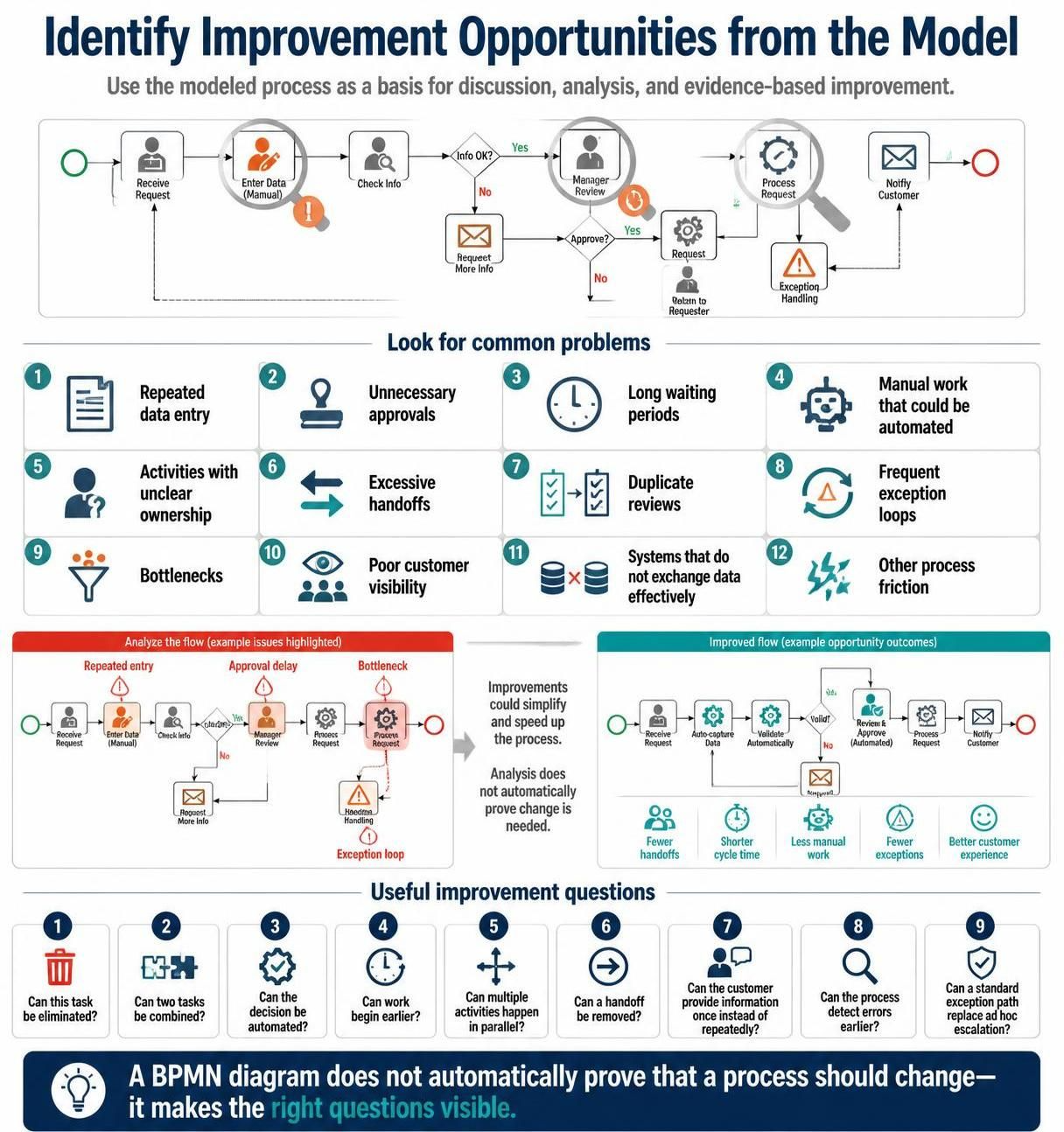
In the realm of Business Process Management (BPM), the creation of a diagram is just the beginning. The true value lies in the analysis phase, where we scrutinize the visual representation to uncover inefficiencies, bottlenecks, and opportunities for optimization. This tutorial explores the critical methodology of identifying improvement opportunities from a model, transforming a static diagram into a dynamic tool for business transformation.
The Philosophy of Process Analysis
It is a common misconception that simply drawing a Business Process Model and Notation (BPMN) diagram proves that a process is functioning correctly. However, as the guiding principle of process analysis suggests: a BPMN diagram does not automatically prove that a process should be changed.
Instead, the diagram serves as a basis for discussion and analysis. It acts as a shared language between business stakeholders and technical teams, making the “invisible” mechanics of a workflow visible. By visualizing the flow, we can objectively identify where friction occurs, rather than relying on anecdotes or intuition.
Common Problems to Hunt For
When analyzing a modeled process, you must look for specific symptoms of inefficiency. These are often referred to as “process diseases.” Below are the most common issues highlighted in process improvement frameworks:
- Repeated Data Entry: Does the same piece of information have to be typed multiple times by different users? This wastes time and increases error rates.
- Unnecessary Approvals: Are there approval gates that do not add value or control risk appropriately?
- Long Waiting Periods: Are there instances where the process stops, waiting for a specific resource or decision that takes days?
- Manual Work that could be Automated: Identify tasks that are purely cognitive or repetitive data transfer tasks that a system could handle.
- Activities with Unclear Ownership: Does a task exist without a clear owner, leading to “passing the buck”?
- Excessive Handoffs: Every time work moves from one person/system to another, there is a risk of information loss or delay.
- Duplicate Reviews: Is the same data or decision being checked by two different parties unnecessarily?
- Frequent Exception Loops: Does the process frequently break its standard path to handle errors, causing delays?
- Bottlenecks: Where does the work pile up? This is often a single resource or decision point that cannot handle the volume.
- Poor Customer Visibility: Does the customer have to call in to ask “where is my order?”
- Ineffective System Integration: Do the systems involved exchange data poorly, requiring manual intervention to bridge gaps?
From “As-Is” to “To-Be”: Analyzing the Flow
Effective analysis often involves comparing a flawed “As-Is” flow against a potential “To-Be” improved flow. Consider a scenario where a customer request is received:
The Problematic “As-Is” Flow
In a typical inefficient process, the flow might look like this:
- Receive Request.
- Enter Data (Manual): A user manually types data (Repeated entry).
- Check Info.
- If “No” (Info missing), an email is sent, and the process waits.
- Manager Review: A manager manually reviews the data.
- Process Request: A manual processing step.
- Exception Handling: If an error occurs, the process loops back (Exception loop).
Issues Identified: This flow is characterized by manual intervention, potential bottlenecks at the Manager Review step, and long waiting periods due to exception handling.
The Improved “To-Be” Flow
By applying improvement logic, we can redesign the flow to:
- Receive Request.
- Auto-capture Data: The system automatically extracts data (Eliminated manual work).
- Validate Automatically: System checks for completeness (Detect errors earlier).
- Review & Approve (Automated): Standard rules approve the request without human intervention.
- Process Request: System executes the action.
- Notify Customer: Immediate feedback is sent.
Benefits: This improved flow results in fewer handoffs, shorter cycle times, less manual work, fewer exceptions, and a better customer experience.
Asking the Right Questions
To drive this analysis, you must ask specific, challenging questions about every element in your model. Use the following checklist to guide your analysis:
- Can this task be eliminated? Is it a non-value-added activity?
- Can two tasks be combined? Can we batch activities to reduce context switching?
- Can the decision be automated? Can business rules replace human judgment?
- Can work begin earlier? Can we parallelize tasks?
- Can multiple activities happen in parallel? Instead of waiting for one task to finish, can we start the next one immediately?
- Can a handoff be removed? Can one person or system do the entire job?
- Can the customer provide information once instead of repeatedly? Centralize data input.
- Can the process detect errors earlier? Move validation to the point of entry.
- Can a standard exception path replace ad hoc escalation? Turn “firefighting” into a defined process.
Conclusion
Identifying improvement opportunities is a systematic discipline that requires looking beyond the surface of a workflow. By rigorously analyzing a BPMN diagram for common problems such as bottlenecks, manual work, and poor visibility, organizations can transition from reactive process management to proactive optimization.
To facilitate this complex analysis and visualization, it is highly recommended to utilize robust modeling software. Specifically, the Visual Paradigm BPMN Tool stands out as the recommended tooling for this task. Its comprehensive feature set allows users to not only design complex diagrams but also simulate processes to identify bottlenecks and analyze performance metrics, making the journey from “As-Is” to “To-Be” data-driven and efficient.