
Mastering the VP AI Ecosystem: From AI Ideation to Living Documentation
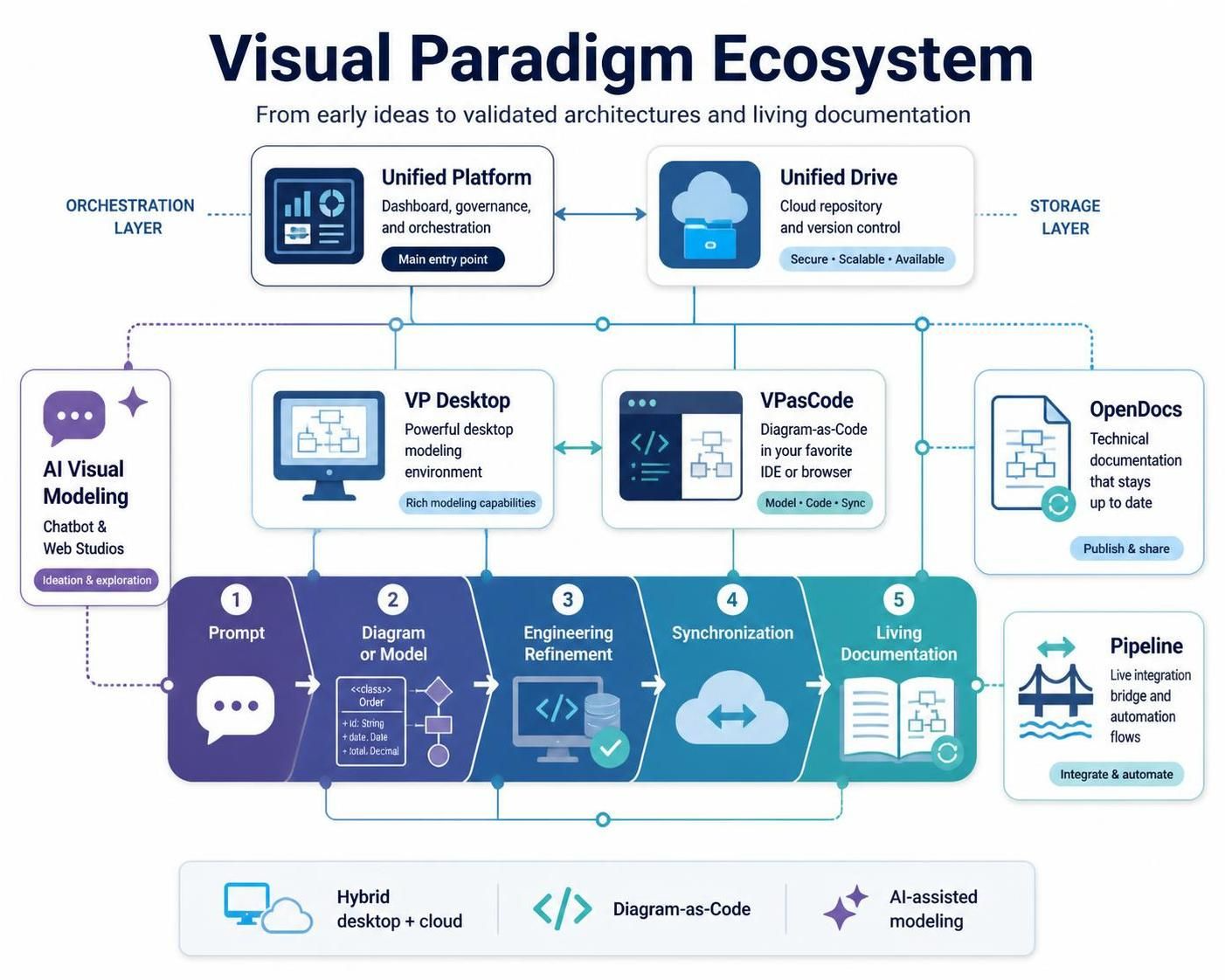
In the modern landscape of software architecture, the gap between an initial idea and a validated, documented system is often bridged by disjointed tools. You might start with a whiteboard sketch, move to a static Visio diagram, and end with a Word document that is already outdated. Visual Paradigm has fundamentally rethought this workflow by creating an integrated ecosystem. This ecosystem connects traditional desktop modeling with browser-based Diagram-as-Code workflows, AI-assisted generation, cloud repositories, and living documentation.
This tutorial explores the architecture of the Visual Paradigm ecosystem, breaking down how teams can transition seamlessly from a simple text prompt to a synchronized, enterprise-grade system specification.
The Core Architecture: Layers of Integration
Before diving into the workflow, it is essential to understand the structural components that make the ecosystem possible. The architecture is organized around several specialized components connected through a centralized orchestration layer.
1. The Orchestration and Storage Layers
At the heart of the system lies the Unified Platform. This serves as the main entry point, providing a dashboard for governance and access control. It connects to the Unified Drive, which acts as a centralized, drive-like repository. This ensures that all project artifacts—whether they are diagrams, code snippets, or documentation—are stored, indexed, and version-controlled in a single, secure location.
2. The Modeling Engines
The ecosystem supports two distinct but synchronized modeling approaches:
- VP Desktop: The powerful local application designed for detailed, heavy-lifting enterprise modeling and engineering work. It offers rich capabilities for complex system design.
- VPasCode: A browser-based platform that enables Diagram-as-Code. This allows developers to define architecture using text-driven syntax (similar to Markdown or PlantUML) within their favorite IDEs, ensuring version control and collaborative editing.
3. The Documentation & Automation Layer
Visual Paradigm eliminates the “export to PDF” bottleneck through OpenDocs and the Pipeline. OpenDocs creates structured technical specifications that remain synchronized with the models. The Pipeline acts as a live integration bridge, automating flows between source models and published documents.
The Lifecycle: From Prompt to Living Documentation
The most transformative aspect of this ecosystem is the linear yet flexible lifecycle it supports. This process moves away from static snapshots and towards a continuous flow of information.
- Prompt (Ideation): The process begins with the AI Visual Modeling Chatbot. Users can input natural-language descriptions to generate initial diagrams, models, and workflows. This lowers the barrier to entry, allowing non-technical stakeholders to contribute to the architecture.
- Diagram or Model (Creation): The AI output serves as a seed. Users can refine these diagrams into structured models. Whether you choose to edit visually in VP Desktop or textually in VPasCode, the underlying data remains consistent.
- Engineering Refinement (Deep Dive): Once the concept is established, teams move to engineering refinement. This is where the “enterprise-grade” tools take over. You can define strict class structures, data types, and relationships that are validated against architectural standards.
- Synchronization (Unification): This is the critical step where the ecosystem shines. Changes made in the desktop environment are automatically synchronized with the cloud repository and the VPasCode text files. There is no need to manually export or re-import static files.
- Living Documentation (Publication): Finally, the Pipeline takes the validated model and updates the documentation automatically. If a class diagram changes, the technical specification updates instantly. The documentation is no longer a separate document; it is a living reflection of the code and models.
Example: The Evolution of an Order Class
Consider a scenario where an architect defines an Order class. In the old world, this might be a drawing. In the Visual Paradigm ecosystem, this is a structured object that propagates across the entire lifecycle.
classDiagram
    class Order {
        +String id
        +Date date
        +Decimal total
        +PlaceOrder()
    }

    class Customer {
        +String name
        +String email
    }

    Customer "1" --> "0..*" Order
The diagram above represents the Diagram or Model phase. In the ecosystem, this is not just an image; it is data. When you move to the Engineering Refinement phase, you might add logic to the PlaceOrder() method. Because of the Pipeline, this logic is immediately available in the generated technical documentation.
Conclusion
The Visual Paradigm ecosystem represents a shift from tool-centric modeling to lifecycle-centric engineering. By integrating AI, cloud storage, and automated documentation, it ensures that the “source of truth” is always current. Teams can focus on solving architectural challenges rather than maintaining static files.