Mastering BPMN Message Flows: Connecting Independent Participants in Visual Paradigm
In the realm of Business Process Model and Notation (BPMN), distinguishing between internal workflow logic and external communication is critical. A common point of confusion for beginners is the concept of the Message Flow. While solid lines with arrowheads represent the sequence of tasks within a single actor’s workflow, a message flow tells a different story: it represents communication between distinct participants.
This tutorial will guide you through the architectural significance of message flows, how to interpret them in collaboration diagrams, and how to model interactions between entities like customers and retailers using Visual Paradigm.
Defining the Message Flow
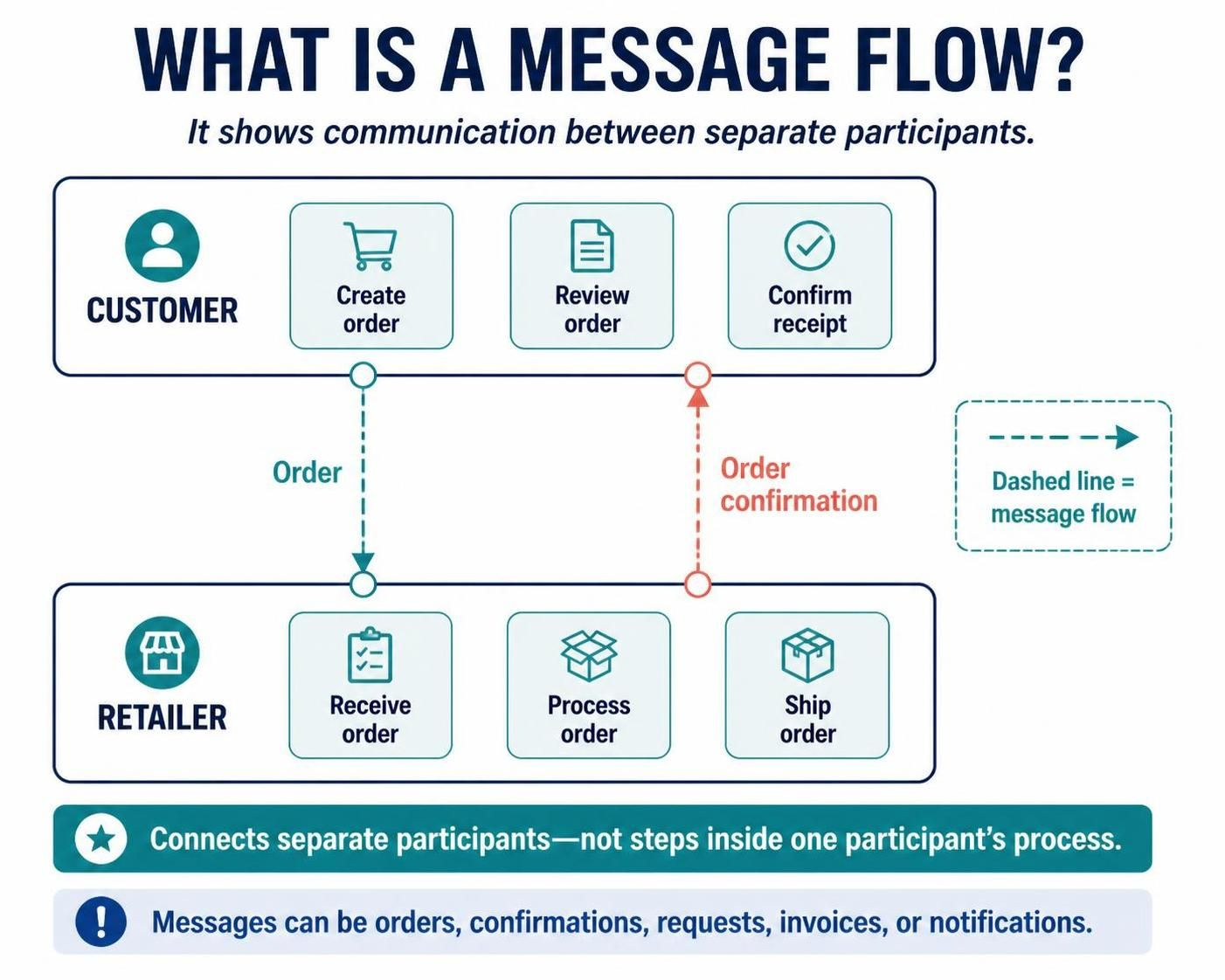
A message flow is a specific type of connector used in BPMN to represent communication between separate participants in a collaboration. Imagine a scenario involving a customer and a retailer. While the customer has their own internal process for creating an order, and the retailer has their own internal process for shipping goods, they must exchange information to complete the transaction.
Unlike a sequence flow, which dictates the order of execution within a single pool (e.g., “Task A happens, then Task B happens”), a message flow is asynchronous. It indicates that one participant is sending a signal, document, or data packet to another.
Visual Syntax and Notation
In Visual Paradigm and standard BPMN diagrams, the visual representation of a message flow is distinct to prevent confusion with internal process steps:
- Line Style: It is drawn as a dashed line.
- Start Point: It typically begins with an open circle at the sending end.
- End Point: It terminates with an arrowhead at the receiving end.
This specific syntax serves a functional purpose: it visually separates the concept of “flow of control” (what happens next) from “flow of information” (what is being shared).
Understanding Collaboration Diagrams
To effectively use message flows, you must understand the concept of a Collaboration Diagram. In BPMN, participants are represented as separate pools. A pool can represent an organization (e.g., “Retailer”), a department, or even a specific individual (e.g., “Customer”).
When you draw a line connecting two different pools, you are creating a message flow. If you were to draw a line connecting two tasks within the same pool, you would be creating a sequence flow. The boundary of the pool acts as a barrier; a message flow must cross this barrier.
Practical Example: The Order Lifecycle
Let us walk through a classic example involving a Customer and a Retailer to illustrate these concepts in action.
- The Customer Pool:
- The customer initiates the process by creating an order.
- This is an internal task for the customer.
- The Message Exchange (Order):
- Once the order is created, the customer sends it to the retailer. This is the Message Flow.
- It is labeled “Order”.
- The Retailer Pool:
- The retailer receives the order. This triggers their internal workflow.
- The retailer processes the order and prepares it for shipment.
- The Message Exchange (Confirmation):
- Once the retailer has processed the order, they send a confirmation back to the customer.
- This is another Message Flow.
Crucially, the message flow does not describe the internal order of work within the retailer’s pool. It only signifies the transfer of the order document from one party to the other.
Types of Messages
While the diagram might simply show a line, the content of a message flow can be any form of communication. In Visual Paradigm, you can specify the payload of the message to make the diagram more descriptive. Common examples include:
- Orders: A request for goods or services.
- Confirmations: Acknowledgment that an order has been received or completed.
- Requests: Queries or calls for action.
- Invoices: Financial documents exchanged between parties.
- Notifications: Alerts regarding status changes.
Visual Paradigm Implementation Guide
When using Visual Paradigm to model these interactions, you will typically work within a “Collaboration” view or a “BPMN Diagram” containing multiple pools. To create a message flow:
- Create two pools (e.g., “Customer” and “Retailer”).
- Add tasks within each pool (e.g., “Create Order” in Customer, “Receive Order” in Retailer).
- Select the Message Flow tool from the toolbar.
- Draw a line from the specific event or task in the Customer pool to the corresponding event or task in the Retailer pool.
- Visual Paradigm will automatically render the line as dashed with the correct circle and arrowhead notation.
Summary
Understanding message flows is fundamental to modeling real-world business interactions. By mastering the dashed line notation and the concept of crossing pool boundaries, you can accurately depict the complex web of communications that drive modern commerce, separating the “who is talking to whom” from the “what is happening inside.”