
Mastering AI-to-Code Diagramming: Visual Paradigm AI Chatbot & VPasCode
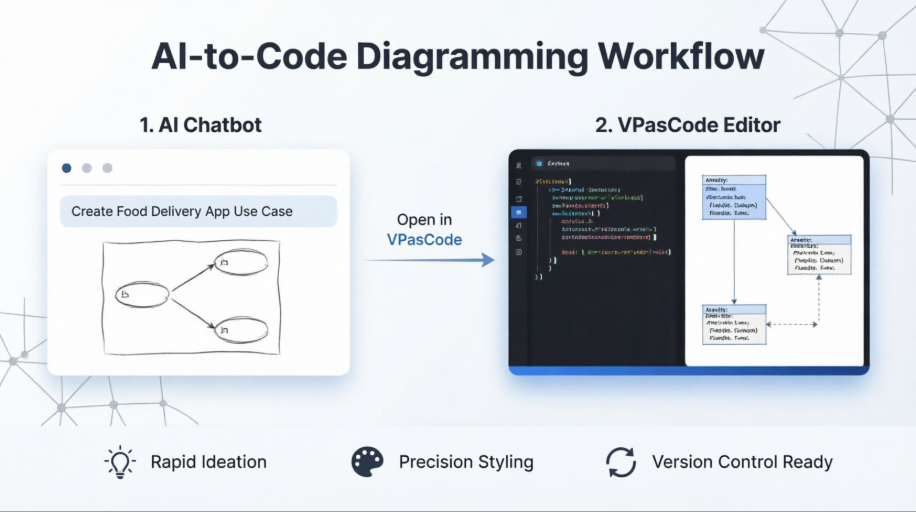
In the realm of modern systems engineering, the gap between conceptualizing an idea and creating a professional-grade architectural diagram has traditionally been bridged by a choice between speed and precision. Historically, engineers used fast, rough sketching tools for ideation and slow, manual editors for final documentation. However, Visual Paradigm has revolutionized this landscape by introducing a tightly integrated, two-phase workflow: the AI Chatbot for rapid generation and the VPasCode Editor for precise, code-driven refinement.
This tutorial explores the architectural logic behind this hybrid approach. By understanding how these two components interact, you can optimize your modeling process to leverage the best of both worlds: the creativity of AI and the rigor of code.
Phase 1: Rapid Ideation with the AI Chatbot
The workflow begins with the AI Chatbot. This component is designed to act as a collaborative brainstorming partner rather than just a generator. Its primary function is to take high-level, natural language prompts and convert them into a visual representation of your system.
- Natural Language Input: You do not need to know specific syntax or drag-and-drop coordinates. Simply describe your intent, such as “Create a Use Case Diagram for a Food Delivery App.”
- Instant Visualization: The AI interprets your request and renders a preliminary diagram. This is ideal for “Rapid Ideation,” allowing you to visualize connections, actors, and processes almost instantly.
- Flexible Layout: The output is a valid model, but it is optimized for logical structure rather than perfect aesthetic alignment. It serves as a solid foundation for further work.
Phase 2: Precision Styling with VPasCode
Once the AI has generated the initial draft, the workflow transitions to the second phase: the VPasCode Editor. This is where the “magic” of professional polish happens. The transition from a rough AI sketch to a production-ready diagram is handled through the VPasCode (Visual Paradigm as Code) environment.
VPasCode is a code-driven modeling language that allows you to define the structure, relationships, and styling of your diagram using a text-based syntax. This approach solves the common pain points of manual diagramming:
- Architectural Refinement: Instead of manually dragging lines to align boxes, you define the architecture in code. This ensures that the logical relationships (associations, dependencies, generalizations) are mathematically correct.
- Consistent Styling: The code editor allows for the application of strict style rules. You can define colors, fonts, and layout constraints programmatically, ensuring that every diagram in your documentation suite looks consistent.
- Version Control Ready: Because the diagram is essentially a text file, it can be stored in version control systems (like Git). This allows teams to track changes to the architecture over time, just like they would track changes to software source code.
The Hybrid Advantage
Why does this two-phase workflow outperform traditional methods? Traditional tools often force you to choose between “Sketch Mode” (which lacks detail) and “Edit Mode” (which is rigid). Visual Paradigm bridges this gap.
The AI Chatbot handles the “What”—defining the content and logic of the system. The VPasCode Editor handles the “How”—defining the layout, style, and professional presentation. This separation of concerns allows developers and architects to iterate quickly on ideas without getting bogged down in pixel-perfect alignment until the final stage.
By moving from a prompt to a code snippet, you effectively create a digital twin of your system architecture that is both flexible and immutable.