
From Shelf-Ware to Living Architecture: Mastering the Agile Power Trio with Visual Paradigm
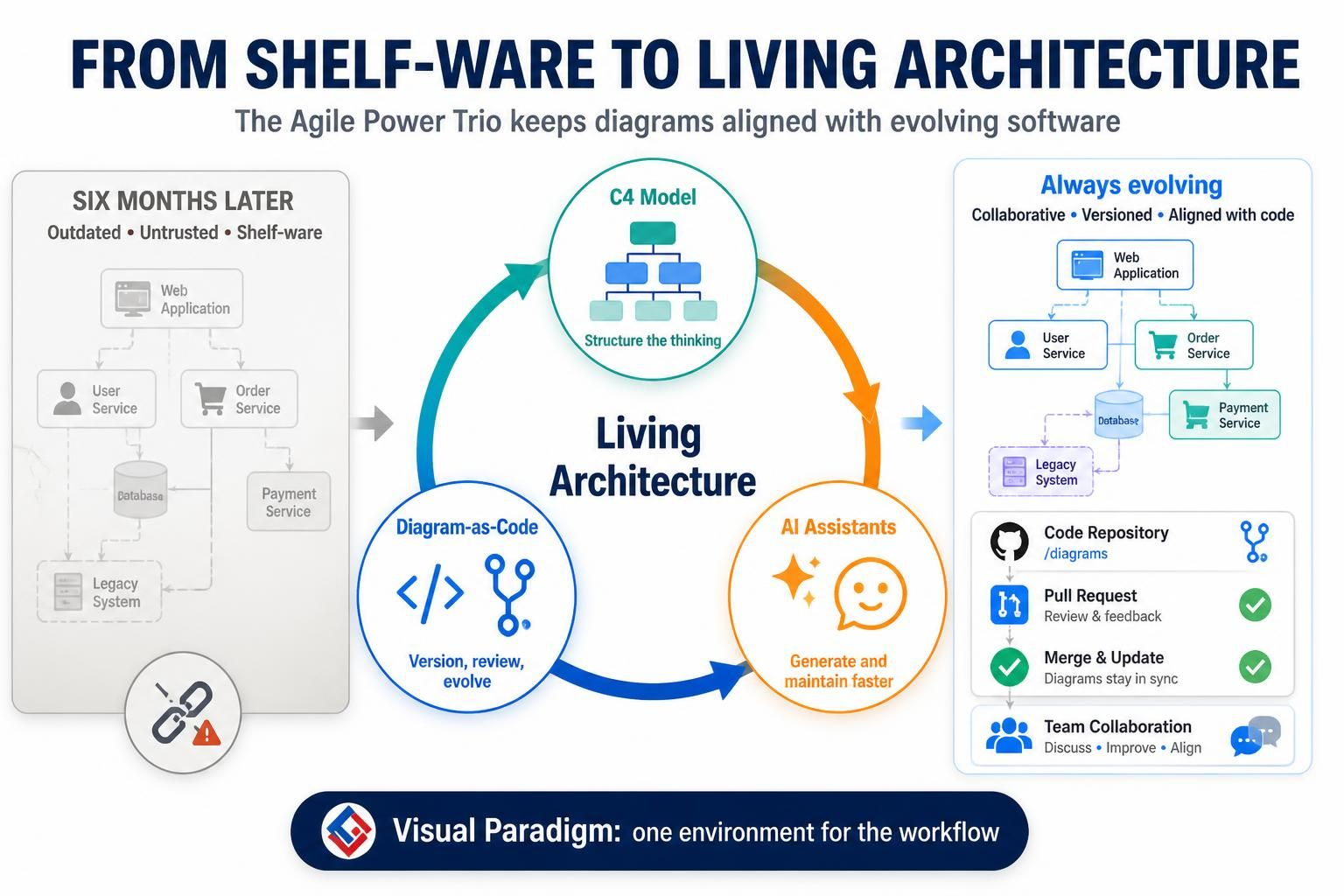
Have you ever spent weeks crafting a perfect architecture diagram, only to watch it become obsolete six months later? This is the classic “shelf-ware” problem. Traditional documentation is often slow, disconnected from the codebase, and hostile to version control. As software systems evolve—shifting to microservices, refactoring modules, or adding new features—static diagrams fail to keep up.
The solution lies in a paradigm shift: treating your architecture diagrams exactly like your software code. By adopting the Agile Power Trio, you can transform your documentation from a dreaded chore into a fast, collaborative, and living asset. This tutorial explores how combining the C4 Model, Diagram-as-Code, and AI Assistants within an environment like Visual Paradigm creates a robust workflow for modern software engineering.
1. The Foundation: The C4 Model for Structured Thinking
Before we can automate or version our diagrams, we need a consistent way to model them. The industry standard for this is the C4 Model (Context, Containers, Components, Code). It provides a structured hierarchy that helps teams communicate architecture at different levels of detail.
In the context of the “Always Evolving” diagram on the right, you will see a classic Level 2 (Container Diagram). This level is crucial for understanding how high-level systems interact. It typically includes:
- People & Systems: External entities like a User or a Legacy System.
- Containers: High-level application boundaries, such as a
Web Application,Order Service, orDatabase. - Connections: The data flows and dependencies between these containers.
By standardizing on the C4 Model, Visual Paradigm ensures that every diagram you generate follows a clear, logical structure that is immediately understandable by stakeholders.
2. The Engine: Diagram-as-Code for Version Control
Imagine your architecture diagram being stored in a Git repository alongside your Java or Python source code. This is the essence of Diagram-as-Code. Instead of manually dragging and dropping shapes in a GUI, you define your architecture using text-based syntax.
Visual Paradigm supports this workflow by allowing you to define diagrams using syntax that is compatible with version control systems (like Git). This enables:
- Versioning: Track every change to your architecture over time.
- Collaboration: Use Pull Requests to review architectural changes before they are merged.
- Traceability: Keep your diagrams in sync with your codebase.
Here is an example of how a C4 Container diagram might look when defined as code. This syntax is processed to generate the visual representation shown in the “Always Evolving” section of our infographic:
Container(webApp, "Web Application", "A web app built with Spring Boot", $tags="v1.0")
ContainerDb(database, "Database", "A PostgreSQL database", $tags="v1.0")
Container(orderService, "Order Service", "A service for handling orders", $tags="v1.0")
Container(paymentService, "Payment Service", "A service for processing payments", $tags="v1.0")
ContainerDb(legacyDb, "Legacy System", "A legacy database", $tags="v1.0")

Rel(webApp, orderService, "Sends orders", "HTTP/REST")
Rel(webApp, paymentService, "Processes payments", "HTTPS")
Rel(orderService, database, "Reads/Writes", "JDBC")
Rel(paymentService, legacyDb, "Syncs data", "API")
💡 Pro Tip: The /diagrams Folder
Visual Paradigm allows you to structure your project files so that your diagram code resides in a dedicated /diagrams folder within your code repository. This makes it easy for your CI/CD pipeline to detect architectural changes and automatically generate updated diagrams whenever a Pull Request is opened.
3. The Accelerator: AI Assistants for Rapid Maintenance
Even with a great model and code syntax, manual maintenance can be tedious. This is where AI Assistants come in. In the “Agile Power Trio,” AI is not just a buzzword; it is a critical tool for generating and maintaining diagrams at scale.
AI assistants can:
- Generate Diagrams: Convert natural language requirements or existing code comments directly into C4 model diagrams.
- Refactor Automatically: If you rename a service in your code, the AI can help update the corresponding diagram elements to ensure consistency.
- Analyze for Gaps: AI can review your architecture to suggest missing dependencies or potential bottlenecks.
By integrating AI into the Visual Paradigm environment, you reduce the “update tax” on your documentation. The diagram becomes a living artifact that evolves alongside your software.
Conclusion: A Unified Workflow
The transition from “Shelf-Ware” to “Living Architecture” is not just about buying a new tool; it is about adopting a new workflow. By combining the structural rigor of the C4 Model, the version-control power of Diagram-as-Code, and the speed of AI Assistants, Visual Paradigm provides a unified environment where architecture is built, reviewed, and maintained efficiently.
Stop letting your diagrams rot. Start building architecture that lives.