Introduction
In the world of Business Process Model and Notation (BPMN), creating clear, accurate, and easily understandable diagrams is paramount. However, business processes rarely exist in a vacuum; they frequently involve interactions with external parties, third-party vendors, and customers. A common challenge for process modelers is deciding how much detail to include about these external participants. Do you map out every internal step of a supplier’s process, or do you simply acknowledge their involvement?
This is where the Black Box Pool becomes an invaluable tool. By providing a standardized way to represent external participants without cluttering the diagram with irrelevant or unknown internal details, Black Box Pools help maintain the clarity and focus of your process models. This comprehensive guide will explore what Black Box Pools are, their key characteristics, and how to effectively utilize them in your BPMN diagrams.
What is a Black Box Pool?
In BPMN, a Black Box Pool is a specific type of Pool that does not contain any visible internal process elements, such as Activities, Events, Gateways, or Sequence Flows.
Instead of detailing the internal workings of a participant, this representation is used when a modeler wants to depict a participant in a collaboration but needs to keep their internal operations hidden. This is typically done because the internal details are either unknown to the modeling team, proprietary to the external organization, or simply irrelevant to the specific scope of the process being modeled.
Key Characteristics and Strategic Uses
To effectively implement Black Box Pools in your diagrams, it is essential to understand their defining characteristics and the strategic advantages they offer.
1. Representing External Entities
Black Box Pools are the standard method for illustrating interactions with external participants whose internal processes fall outside your organization’s control or visibility.
-
Common Use Cases: They are frequently used to represent customers, external suppliers, regulatory bodies, or third-party logistics providers.
-
Boundary of Control: By using a Black Box Pool, you clearly delineate the boundary of your organization’s control, acknowledging that while these entities interact with your process, you do not dictate or need to model their internal workflows.
2. The Message Flow Interface
One of the most critical technical rules regarding Black Box Pools involves how they handle communication. Because the pool is entirely empty of internal flow objects, the routing of messages changes.
-
Boundary Connection: Any Message Flow interacting with a Black Box Pool must connect directly to the Pool’s boundary (the outer edge of the rectangle).
-
Contrast with Standard Pools: This is a distinct contrast to standard Pools, where Message Flows typically connect to specific internal flow objects (like a specific Start Event or Task). The boundary itself acts as the singular interface for all incoming and outgoing communications.
3. Modeling Flexibility and Canvas Management
Standard pools often dictate the layout of a diagram, as they must be wide and long enough to contain a complex sequence of activities. Black Box Pools remove this spatial constraint.
-
Sizing and Positioning: Because they do not need to house a sequence of activities, Black Box Pools can be sized and positioned at the modeler’s convenience.
-
Space Efficiency: They do not necessarily have to extend the entire length of the diagram. This flexibility allows modelers to create cleaner, more compact diagrams, saving valuable canvas space for the core internal processes that actually need to be detailed.
4. Emphasis on Interfaces and Communication
Perhaps the greatest strategic benefit of the Black Box Pool is its ability to direct the viewer’s attention to what truly matters in a cross-organizational context.
-
Focus on the “What,” Not the “How”: By hiding internal details, the diagram naturally shifts focus to the interfaces and communication protocols between different business units or organizations.
-
Highlighting Handoffs: It makes it incredibly easy to identify exactly where information, goods, or services are handed off between entities, ensuring that the critical integration points of the business ecosystem are clearly visible.
BPMN Example
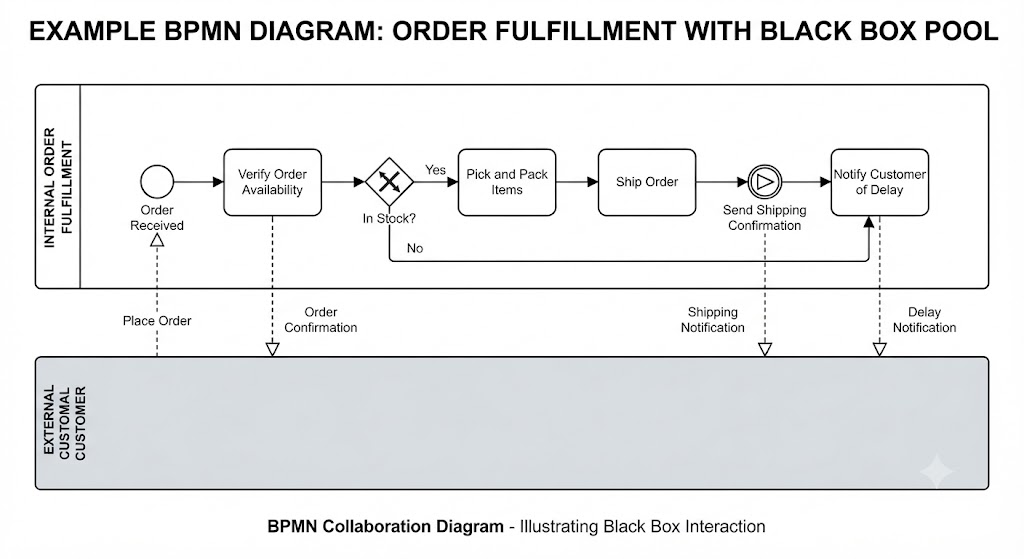
The BPMN diagram above serves as a clear illustration of how to model external interactions using a Black Box Pool. Below is an interpretation and discussion of the diagram’s components and adherence to modeling best practices.
Diagram Interpretation
The diagram visualizes an Order Fulfillment scenario, which is a collaboration between two distinct entities:
-
Internal Order Fulfillment (Standard Pool): This pool contains the organization’s visible, internal business logic. It includes a sequence of activities such as verifying order availability, picking/packing items, and shipping.
-
External Customer (Black Box Pool): Represented as a grey rectangle with no visible internal elements, this pool acts as an “elegant placeholder” for the customer. The internal operations of the customer are hidden because they are outside the organization’s control.
Discussion of Modeling Practices
The diagram effectively demonstrates the key technical and strategic principles outlined in the provided guide:
-
Boundary Connection: In alignment with technical requirements, the Message Flows do not connect to internal tasks. Instead, they connect directly to the boundary of the Black Box Pool, acting as the singular interface for communication between the internal process and the customer.
-
Focus on Interfaces: By hiding the customer’s internal steps, the diagram successfully shifts the viewer’s attention to the critical handoffs, such as “Place Order,” “Order Confirmation,” and “Shipping Notification”. This ensures the integration points are clearly visible.
-
Clarity and Labeling: Following best practices, both pools are clearly named (“Internal Order Fulfillment” and “External Customer”). Furthermore, the Message Flows are explicitly labeled to explain the nature of the interaction (e.g., “Delay Notification”), which is necessary since the Black Box Pool lacks internal context.
-
Canvas Management: The diagram utilizes the flexibility of the Black Box Pool to maintain a clean layout. By not requiring the External Customer pool to house a sequence of activities, the modeler has created a compact, readable, and focused diagram that prioritizes the core internal processes.
Best Practices for Using Black Box Pools
To get the most out of Black Box Pools, keep the following best practices in mind:
-
Label Clearly: Always give your Black Box Pools clear, descriptive names (e.g., “External Customer,” “Third-Party Shipping Provider”) so the reader immediately understands who the external entity is.
-
Label Message Flows: Since the pool itself lacks internal context, the Message Flows connecting to its boundary must be explicitly labeled (e.g., “Send Order Confirmation,” “Receive Raw Materials”) to explain the nature of the interaction.
-
Don’t Overuse: If you do know the internal process of an external partner and it is critical to the story you are telling, consider using a standard Pool or a collapsed Sub-Process instead. Reserve Black Box Pools for when the internal details are truly unnecessary or unknown.
Conclusion
In BPMN, the ultimate goal of process modeling is to communicate business logic clearly and efficiently. Attempting to map out the internal workings of every external partner can quickly lead to bloated, confusing, and inaccurate diagrams. The Black Box Pool solves this problem by acting as an elegant placeholder.
By defining who is communicating while intentionally keeping the how of their internal work hidden from view, Black Box Pools allow you to maintain a sharp focus on your organization’s core processes and the critical interfaces that connect them to the outside world. Mastering the use of Black Box Pools ensures that your collaboration diagrams remain visually clean, technically accurate, and highly focused on cross-organizational value delivery.
References
-
From Narrative to Diagram: How Visual Paradigm’s AI BPMN Generator Transforms Process Modeling Workflows: How AI converts text narratives into BPMN diagrams.
-
Mastering Business Process Modeling (BPMN 2.0) with Visual Paradigm’s AI-Powered Tools: Guide to mastering BPMN 2.0 using AI tools.
-
Visual Paradigm BPMN Review: Bridging the Gap Between Business Logic and Technical Execution: In-depth review of Visual Paradigm’s BPMN capabilities.
-
AI BPMN Business Process Diagram Generator Update: Release notes for the AI BPMN generator update.
-
Understanding the BPMN Notation: A Key to Effective Business Process Modeling: Foundational guide to understanding BPMN notation.
-
Visual Paradigm BPMN Tutorial: Video tutorial demonstrating BPMN features.
-
Beyond Code and AI: Why Visual Paradigm Remains Essential for Professional Software Architecture: Enduring value of Visual Paradigm in software architecture.
-
BPMN Activity Types Explained: Detailed explanation of different BPMN activity types.
-
How AI-Powered NLP is Revolutionizing Text-to-BPMN Generation for Enterprise Process Modeling: NLP technology behind text-to-BPMN generation.
-
Visual Paradigm Features: Overview of core features of Visual Paradigm.
-
BPMN Diagram and Tools: Look at BPMN diagramming tools and features.
-
Visual Paradigm Official Website: Official homepage for Visual Paradigm.
-
Click Start AI – Technical Support: Technical support for getting started with AI features.
-
Testing Visual Paradigm’s AI-Powered BPMN Diagram Generator for Real-World Process Mapping: Practical test of the AI generator for real-world mapping.