


Introduction
In the modern business landscape, organizations are on a never-ending journey to improve their operations for the benefit of stakeholders and shareholders. Business Process Management (BPM) serves as the management philosophy for this journey, centered on improving operational processes. To support these efforts, the Business Process Modeling Notation (BPMN) has emerged as a worldwide standard, providing a common graphical language that facilitates communication and understanding between business leaders and information technology developers. A core component of mastering BPMN is recognizing that it supports three main categories of processes: Orchestration, Choreography, and Collaboration. Understanding the differences between these categories—distinguished by their perspective, scope, and control mechanisms—is vital for developing rigorous yet understandable representations of how work happens within and between organizations.
In BPMN, Orchestration, Choreography, and Collaboration represent different ways of modeling business processes, distinguished primarily by their perspective, control mechanism, and scope of interaction.
Orchestration
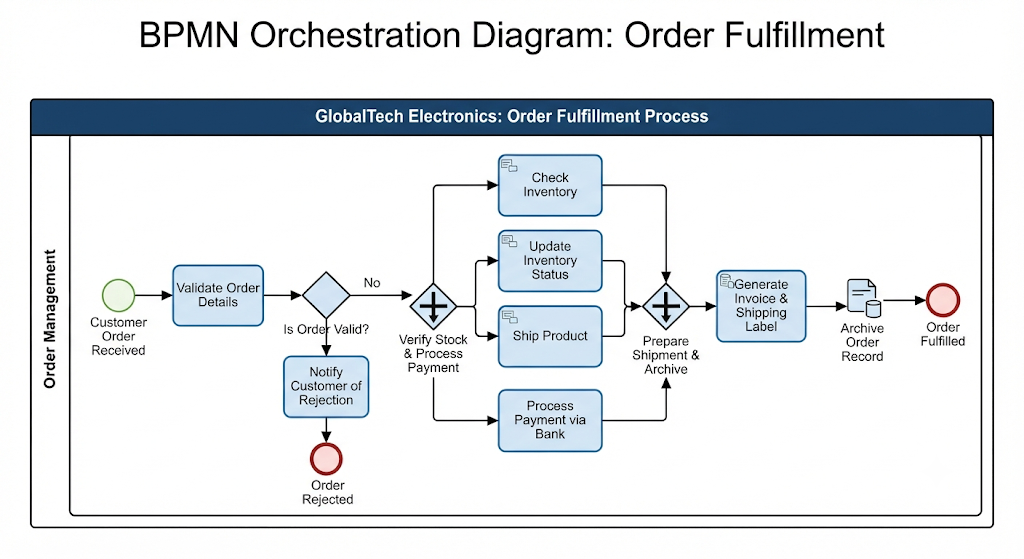
Orchestration describes a process from the perspective of a single business entity or organization. It focuses on how that specific entity coordinates its internal activities to achieve a goal.
-
Locus of Control: Orchestrations have a well-defined context or locus of control. Because they represent a single entity’s view, all data within that process is available to all its elements.
-
Graphical Representation: Orchestrations are always contained within a Pool. In most BPMN literature, the term “Process” is synonymous with an orchestration.
Choreography
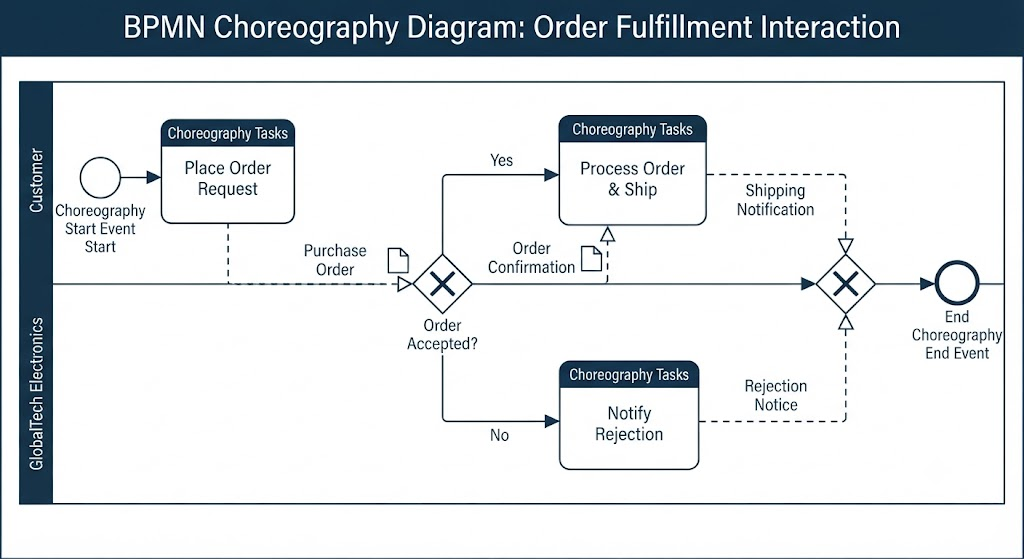
Choreography is a definition of the expected behavior or procedural contract between two or more interacting participants. It is often compared to a ballet, describing the “sequence of interactions” (message exchanges) between parties rather than the internal work of any one party.
-
Locus of Control: Unlike orchestration, choreography does not exist within a central locus of control. There is no central mechanism driving or tracking the interaction, and consequently, there is no shared data available to all elements of the choreography.
-
Graphical Representation: In BPMN 1.1, choreographies are often shown as Message Flows between Pools. While orchestration exists inside a Pool, a choreography exists between Pools. (Note: BPMN 2.0 is expected to introduce explicit, stand-alone choreography diagrams).
Collaboration
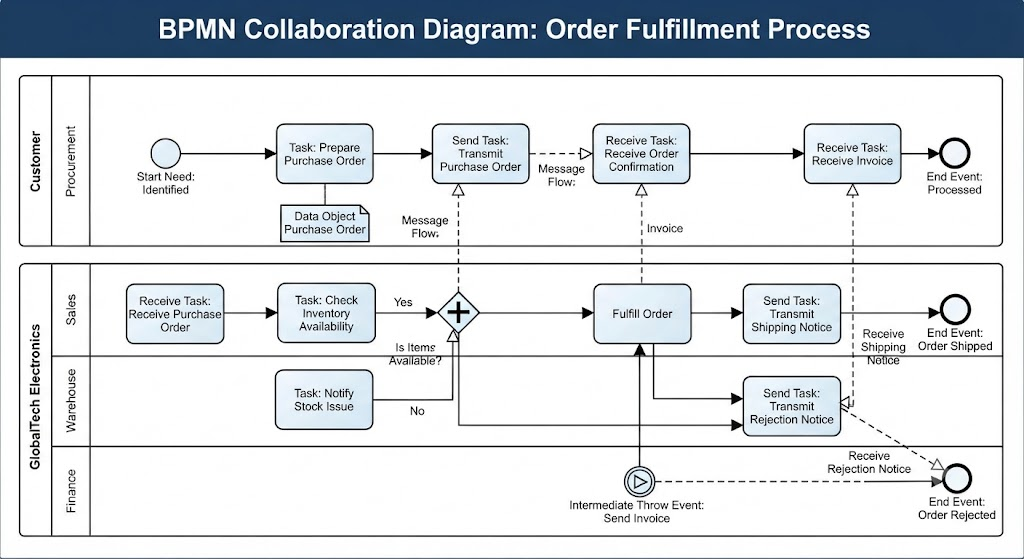
Collaboration is a broader view that simply shows multiple participants and their interactions. While a choreography defines the strict protocol of interactions, a collaboration focuses on the participants themselves.
-
Scope: A collaboration diagram is any diagram that contains two or more Pools with Message Flow between them.
-
Composition: A collaboration can act as a container; it may include one or more orchestrations (inside the Pools) and an implicit or explicit choreography.
Summary of Differences
| Feature | Orchestration | Choreography | Collaboration |
|---|---|---|---|
| Perspective | Single participant | Interaction between 2+ participants | Multiple participants and their links |
| Control | Centralized (one coordinator) | Decentralized (no central tracker) | N/A (Focuses on the relationship) |
| Data Access | Data is shared across the process | No shared data | N/A |
| Container | Contained inside a Pool | Exists between Pools | Consists of multiple Pools |
| Primary Link | Sequence Flow | Message Flow | Message Flow |
Conclusion
Mastering the distinctions between orchestration, choreography, and collaboration is essential for modelers who wish to provide clarity across all stakeholders. While orchestrations offer a focused view of a single entity’s internal activities, collaborations and choreographies provide the necessary framework for modeling the complex interactions that occur between different business participants. Without a rigorous way to describe these business processes, the interpretation of any given model is left to the reader, which can defeat the purpose of the modeling effort. By correctly applying these BPMN process categories, organizations can ensure that their business requirements are accurately translated into reality, supporting the agility and optimization required to succeed in a competitive environment. As the notation continues to evolve, these concepts will remain fundamental to achieving a comprehensive 360-degree view of business process modeling.
References
- From Narrative to Diagram: How Visual Paradigm’s AI BPMN Generator Transforms Process Modeling Workflows: How AI converts text narratives into BPMN diagrams.
- Mastering Business Process Modeling (BPMN 2.0) with Visual Paradigm’s AI-Powered Tools: Guide to mastering BPMN 2.0 using AI tools.
- Visual Paradigm BPMN Review: Bridging the Gap Between Business Logic and Technical Execution: In-depth review of Visual Paradigm’s BPMN capabilities.
- AI BPMN Business Process Diagram Generator Update: Release notes for the AI BPMN generator update.
- Understanding the BPMN Notation: A Key to Effective Business Process Modeling: Foundational guide to understanding BPMN notation.
- Visual Paradigm BPMN Tutorial: Video tutorial demonstrating BPMN features.
- Beyond Code and AI: Why Visual Paradigm Remains Essential for Professional Software Architecture: Enduring value of Visual Paradigm in software architecture.
- BPMN Activity Types Explained: Detailed explanation of different BPMN activity types.
- How AI-Powered NLP is Revolutionizing Text-to-BPMN Generation for Enterprise Process Modeling: NLP technology behind text-to-BPMN generation.
- Visual Paradigm Features: Overview of core features of Visual Paradigm.
- BPMN Diagram and Tools: Look at BPMN diagramming tools and features.
- Visual Paradigm Official Website: Official homepage for Visual Paradigm.
- Click Start AI – Technical Support: Technical support for getting started with AI features.
- Testing Visual Paradigm’s AI-Powered BPMN Diagram Generator for Real-World Process Mapping: Practical test of the AI generator for real-world mapping.
Related posts:
 Mastering Business Process Modeling: A Review of Visual Paradigm’s BPMN Capabilities
 The Comprehensive Guide to BPMN: Enhancing Efficiency and Productivity with Visual Paradigm BPMN + AI
 Mastering BPMN: A Comprehensive Guide to Business Process Modeling and Notation
 The Consultant’s Playbook: Conducting Live Process Mapping Workshops with AI
