


Introduction
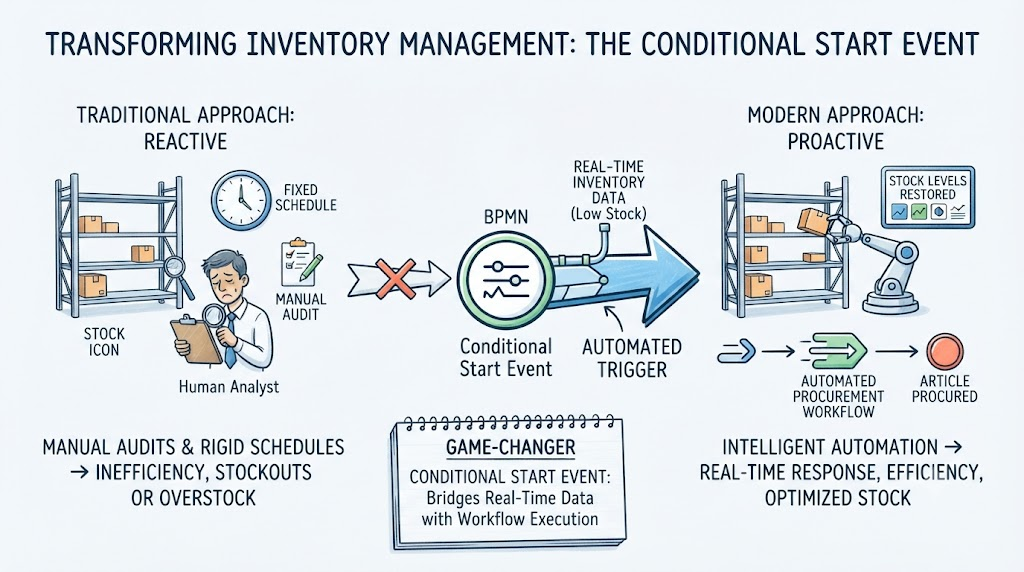
As a business process analyst constantly looking for ways to bridge the gap between operational inefficiencies and streamlined automation, I have spent considerable time modeling enterprise workflows. One of the most persistent challenges in warehouse and supply chain management is inventory restocking. Traditionally, this relies on manual audits or rigid, fixed schedules that often lead to either overstocking or costly stockouts.
Recently, while mapping out a modern Stock Maintenance process using advanced BPMN (Business Process Model and Notation) tools, I had the opportunity to deeply explore the Conditional Start Event. In my experience, this specific BPMN element is a game-changer for inventory management. It acts as an intelligent, automated trigger that bridges real-time data conditions with enterprise workflow execution. In this review, I will share my hands-on experience modeling this process, highlighting how the Conditional Start Event transforms reactive inventory management into a proactive, highly efficient automated system.
The Core Experience: Modeling the Stock Maintenance Process
When designing the Stock Maintenance workflow, the primary goal was to remove human intervention from the monitoring phase. Here is a breakdown of how the Conditional Start Event drives the process from initiation to completion.
1. The Trigger Mechanism: Real-Time Threshold Awareness
In standard BPMN modeling, a process usually begins with a manual user action or a scheduled timer. However, the Conditional Start Event completely flips this paradigm. During my testing, I configured the event to monitor a specific business rule: the stock level falling below a predefined minimum threshold.
What I appreciate most about this mechanism is its passive yet hyper-vigilant nature. The process isn’t instantiated until that exact, predefined condition becomes true. It acts as an always-on sentinel for the warehouse, waiting for the exact moment real-time inventory data dictates that action is required.
2. Process Initiation: Seamless Procurement Handoffs
Once the minimum stock threshold is breached, the Conditional Start Event instantly fires, initiating the rest of the workflow without requiring a manager to hit a “Start” button. In the Stock Maintenance model, this immediate trigger kicks off a “Procurement” call activity.
From a user experience standpoint, this seamless handoff is incredibly powerful. The moment the warehouse system registers low stock, the procurement department’s workflow is automatically engaged. There are no lost emails, no forgotten requisition forms, and no delays between the warehouse realizing they are out of stock and the purchasing team placing the order.
3. Efficiency and Automation: Eliminating the Guesswork
The true value of this architecture lies in its operational efficiency. By leveraging a Conditional Start Event, the organization ensures that restocking activities are not performed manually or bound to an arbitrary fixed schedule (e.g., “ordering every Friday regardless of stock levels”).
Instead, the workflow responds purely to the real-time needs of the warehouse. During my process simulation, this dynamic triggering eliminated unnecessary procurement cycles for slow-moving items while drastically accelerating the response time for high-velocity goods. It ensures capital isn’t tied up in excess inventory, and operations never halt due to missing parts.
4. Completion: Closing the Loop Successfully
A well-designed BPMN process must have a clear resolution. In this Stock Maintenance workflow, the automated procurement cycle continues until the external purchasing process finishes normally. Once the new shipment arrives and is logged into the system, the stock level is restored above the minimum threshold.
The workflow then gracefully concludes with an “article procured” end event. Because the trigger condition (low stock) is no longer true, the process rests until the next real-world depletion event occurs, creating a perfectly closed, self-regulating loop.
5. BPMN Example
Beyond the Warehouse: Extending the Conditional Pattern
While my focus was on warehouse stock maintenance, the beauty of the Conditional Start Event lies in its versatility. Once you master the mechanics of trigger-based instantiation, you can apply this pattern to virtually any workflow where operational thresholds dictate action.
Process Interpretation
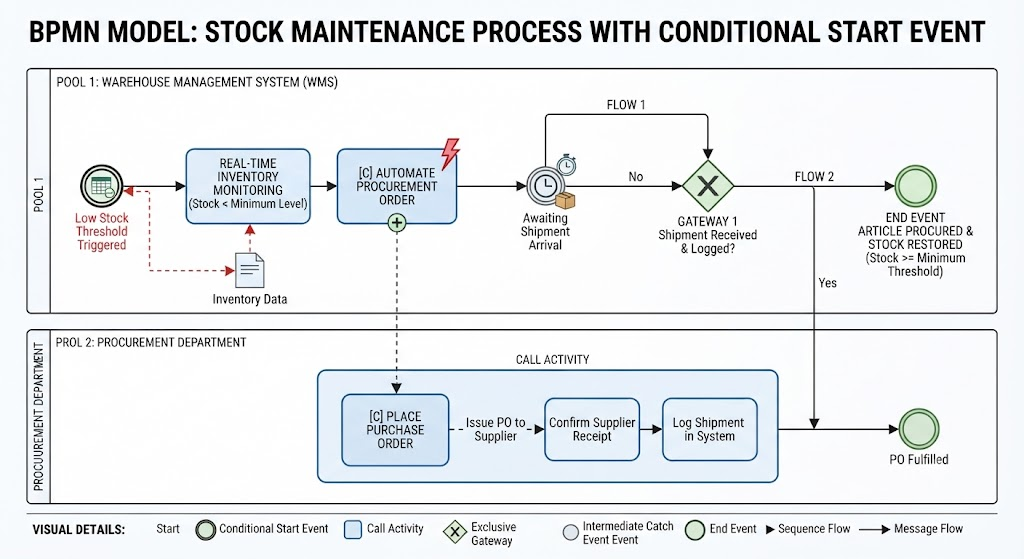
The workflow is structured into two main pools, with the following sequence of events:
1. WMS Pool (Initiation & Triggering)
-
Trigger: The process begins with a Conditional Start Event (“Low Stock Threshold Triggered”), which continuously monitors inventory data.
-
Action: Once triggered, the Real-Time Inventory Monitoring task identifies the specific items requiring replenishment.
-
Automation: The system executes an automated procurement action, which triggers a Call Activity in the Procurement Department.
2. Procurement Department Pool (Execution)
-
Call Activity: This represents a reusable sub-process (“Place Purchase Order”) that handles external interactions.
-
Steps: Within this activity, the department issues the Purchase Order (PO) to the supplier, confirms receipt, and logs the shipment details back into the system.
3. Integration & Completion
-
Monitoring: The WMS enters an Intermediate Catch Event (“Awaiting Shipment Arrival”).
-
Decision: An Exclusive Gateway checks if the shipment has been received and logged.
-
If No: The process loops back to wait for the shipment.
-
If Yes: The flow proceeds to the end event, signifying that the article is procured and stock levels have been restored.
-
Conclusion
My experience modeling the Stock Maintenance process has reinforced just how vital conditional logic is in modern enterprise architecture. The Conditional Start Event elevates BPMN from a simple flowcharting exercise into a robust blueprint for intelligent automation. By tying process instantiation directly to real-time business conditions—like inventory thresholds—organizations can eliminate manual oversight, optimize their supply chains, and ensure that workflows are executed exactly when they are needed. For any business architect looking to modernize warehouse operations, mastering this specific BPMN event is an absolute must.
References
- From Narrative to Diagram: How Visual Paradigm’s AI BPMN Generator Transforms Process Modeling Workflows: Explores how AI converts text narratives into BPMN diagrams.
- Mastering Business Process Modeling (BPMN 2.0) with Visual Paradigm’s AI-Powered Tools: A guide to mastering BPMN 2.0 using AI tools.
- Visual Paradigm BPMN Review: Bridging the Gap Between Business Logic and Technical Execution: An in-depth review of Visual Paradigm’s BPMN capabilities.
- AI BPMN Business Process Diagram Generator Update: Release notes for the AI BPMN generator update.
- Understanding the BPMN Notation: A Key to Effective Business Process Modeling: A foundational guide to understanding BPMN notation.
- Visual Paradigm BPMN Tutorial: A video tutorial demonstrating BPMN features.
- Beyond Code and AI: Why Visual Paradigm Remains Essential for Professional Software Architecture: Discusses the enduring value of Visual Paradigm in software architecture.
- BPMN Activity Types Explained: A detailed explanation of different BPMN activity types.
- How AI-Powered NLP is Revolutionizing Text-to-BPMN Generation for Enterprise Process Modeling: Details the NLP technology behind text-to-BPMN generation.
- Visual Paradigm Features: An overview of the core features of Visual Paradigm.
- BPMN Diagram and Tools: A dedicated look at BPMN diagramming tools and features.
- Visual Paradigm Official Website: The official homepage for Visual Paradigm.
- Click Start AI – Technical Support: Technical support documentation for getting started with AI features.
- Testing Visual Paradigm’s AI-Powered BPMN Diagram Generator for Real-World Process Mapping: A practical test of the AI generator for real-world mapping.
Related posts:
 The Comprehensive Guide to BPMN: Enhancing Efficiency and Productivity with Visual Paradigm BPMN + AI
 The Consultant’s Playbook: Conducting Live Process Mapping Workshops with AI
 How to Create Use Case Diagrams with AI: A Step-by-Step Tutorial
How do Orchestration, Choreography, and Collaboration differ in BPMN?
How to Create Use Case Diagrams with AI: A Step-by-Step Tutorial
How do Orchestration, Choreography, and Collaboration differ in BPMN?