Mastering Gantt Chat: AI-Driven Planning with Diagram-as-Code and VPasCode
The landscape of project management is undergoing a paradigm shift. Historically, creating Gantt charts required navigating complex interfaces, manually dragging bars, and wrestling with rigid dependency lines. Today, we are entering the era of Conversational Project Management. At the forefront of this evolution is Gantt Chat, an AI-powered approach developed by Visual Paradigm that transforms project planning from a manual chore into a fluid, conversational dialogue.
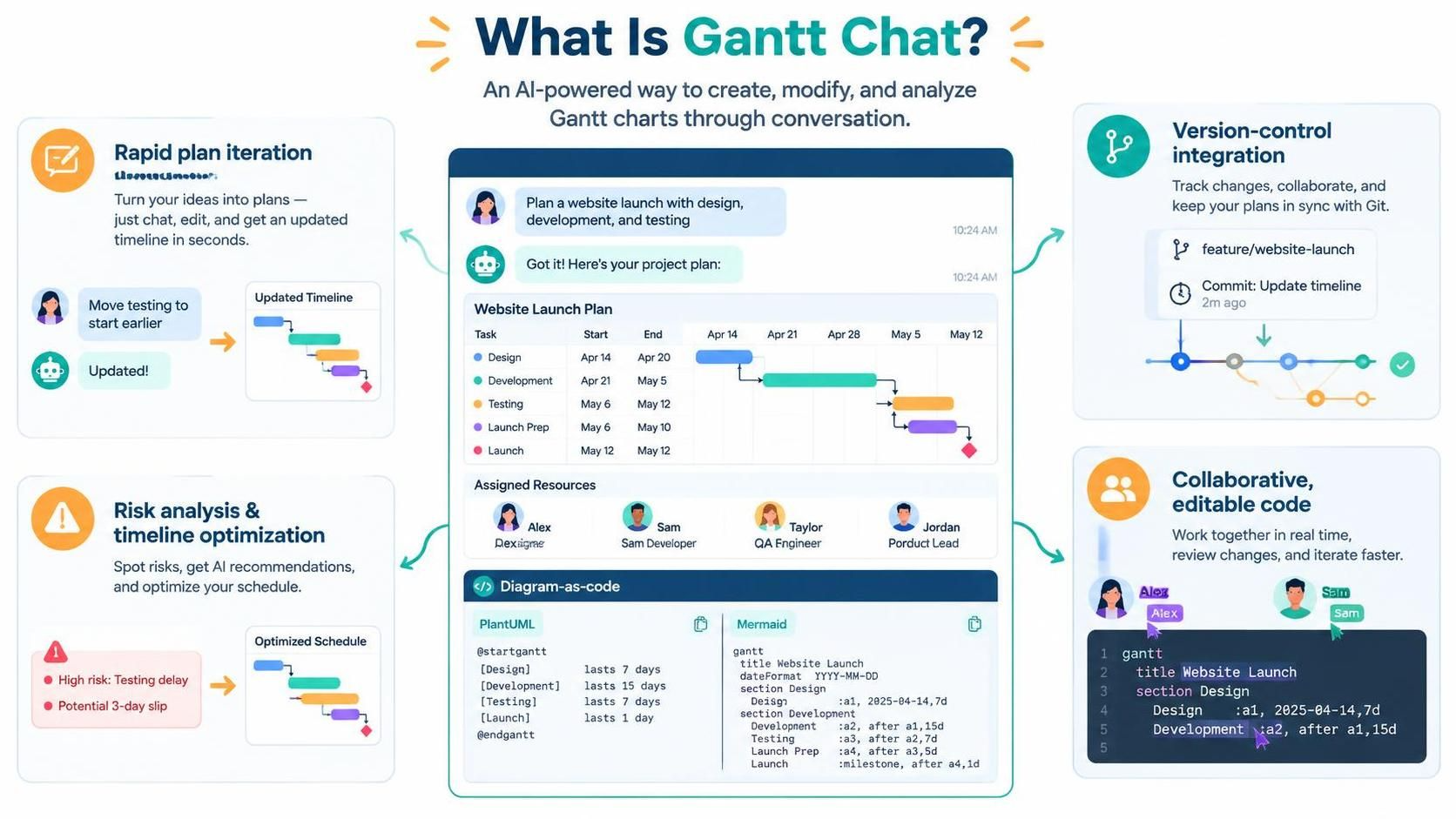
This tutorial explores the technical architecture behind Gantt Chat, demonstrating how it leverages Diagram-as-Code principles and Large Language Models (LLMs) to generate, analyze, and optimize project schedules with unprecedented speed.
1. The Core Architecture: From Natural Language to Structured Code
At its heart, Gantt Chat is a sophisticated translation engine. It bridges the gap between human intent and machine-readable structure. The workflow operates on a specific “Model-View-Controller” (MVC) style logic, adapted for AI interactions.
The Input Layer: Natural Language Processing
The process begins when a user interacts with the AI Chatbot. Instead of clicking through menus, the user provides a prompt in natural language. For example, a user might say:
“Plan a website launch with design, development, and testing phases.”
The system parses this request, identifying key entities (tasks) and implied temporal relationships (sequencing).
The Processing Layer: Generative AI
Once the intent is understood, the AI does not simply render a static image. Instead, it generates structured code. This is the critical differentiator. The AI produces text-based representation of the schedule using standard programming syntax. This ensures the project plan is not just a visual artifact, but a programmable data object.
The Output Layer: Rendering Engines
The generated code is then fed into a rendering engine. Visual Paradigm utilizes two primary standards for this:
- PlantUML: A text-based diagramming language known for its simplicity and integration with Java-based tools.
- Mermaid.js: A web-native syntax for generating diagrams from text, widely used in documentation tools like GitHub and GitLab.
2. Deep Dive: Modeling with PlantUML and Mermaid
To understand the power of Gantt Chat, one must understand the underlying syntax. By generating code, Visual Paradigm allows users to treat their Gantt charts like software code—version-controlled, diffable, and editable.
PlantUML Implementation
PlantUML uses a specific block structure to define Gantt charts. The syntax typically begins with @startgantt and ends with @endgantt. Inside this block, tasks are defined with their duration and dependencies.
The code snippet below demonstrates how Gantt Chat translates a project plan into PlantUML syntax:
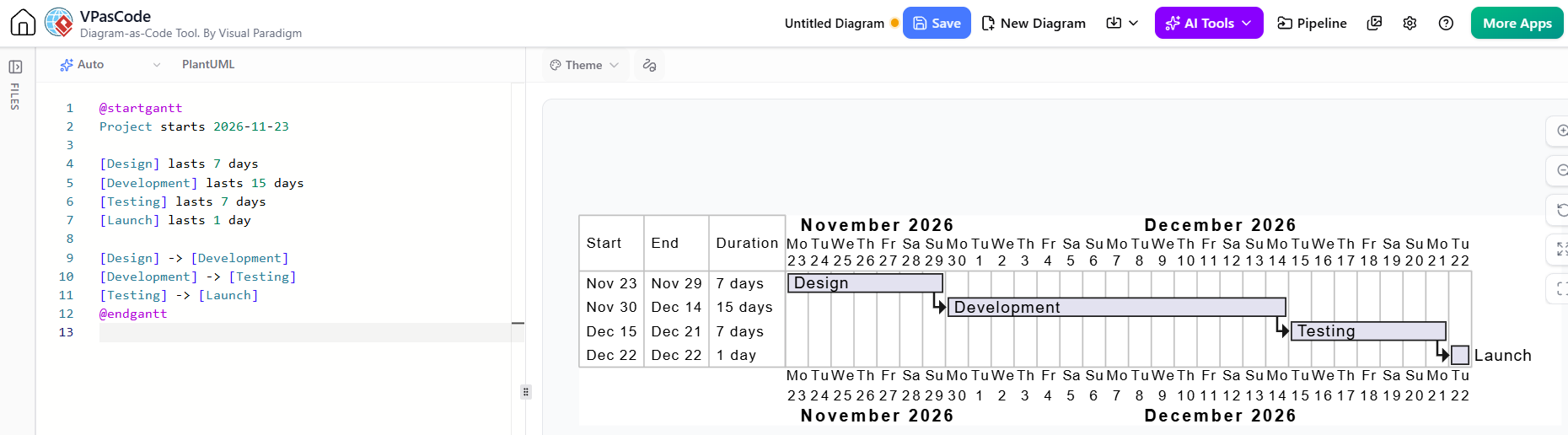
@startgantt
Project starts 2026-11-23

[Design] lasts 7 days
[Development] lasts 15 days
[Testing] lasts 7 days
[Launch] lasts 1 day

[Design] -> [Development]
[Development] -> [Testing]
[Testing] -> [Launch]
@endganttMermaid Implementation
Mermaid offers a slightly more descriptive syntax, allowing for the definition of section headers and specific date formats directly within the chart definition.
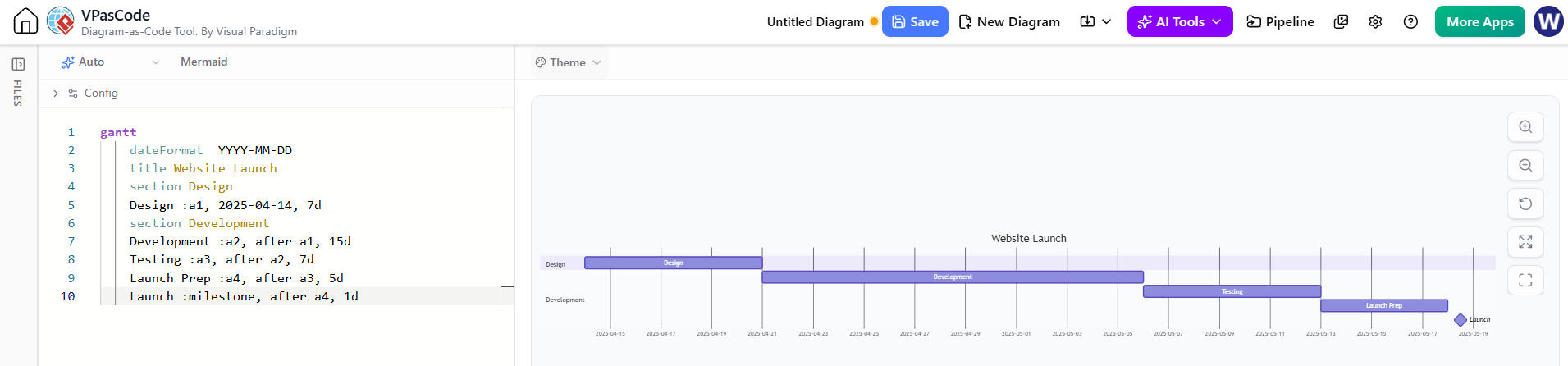
gantt
    dateFormat  YYYY-MM-DD
    title Website Launch
    section Design
    Design :a1, 2025-04-14, 7d
    section Development
    Development :a2, after a1, 15d
    Testing :a3, after a2, 7d
    Launch Prep :a4, after a3, 5d
    Launch :milestone, after a4, 1d
3. Advanced Capabilities: Risk Analysis and Optimization
Gantt Chat moves beyond simple creation. It acts as an intelligent analyst. When a project plan is generated, the AI can simulate the schedule to identify potential bottlenecks.
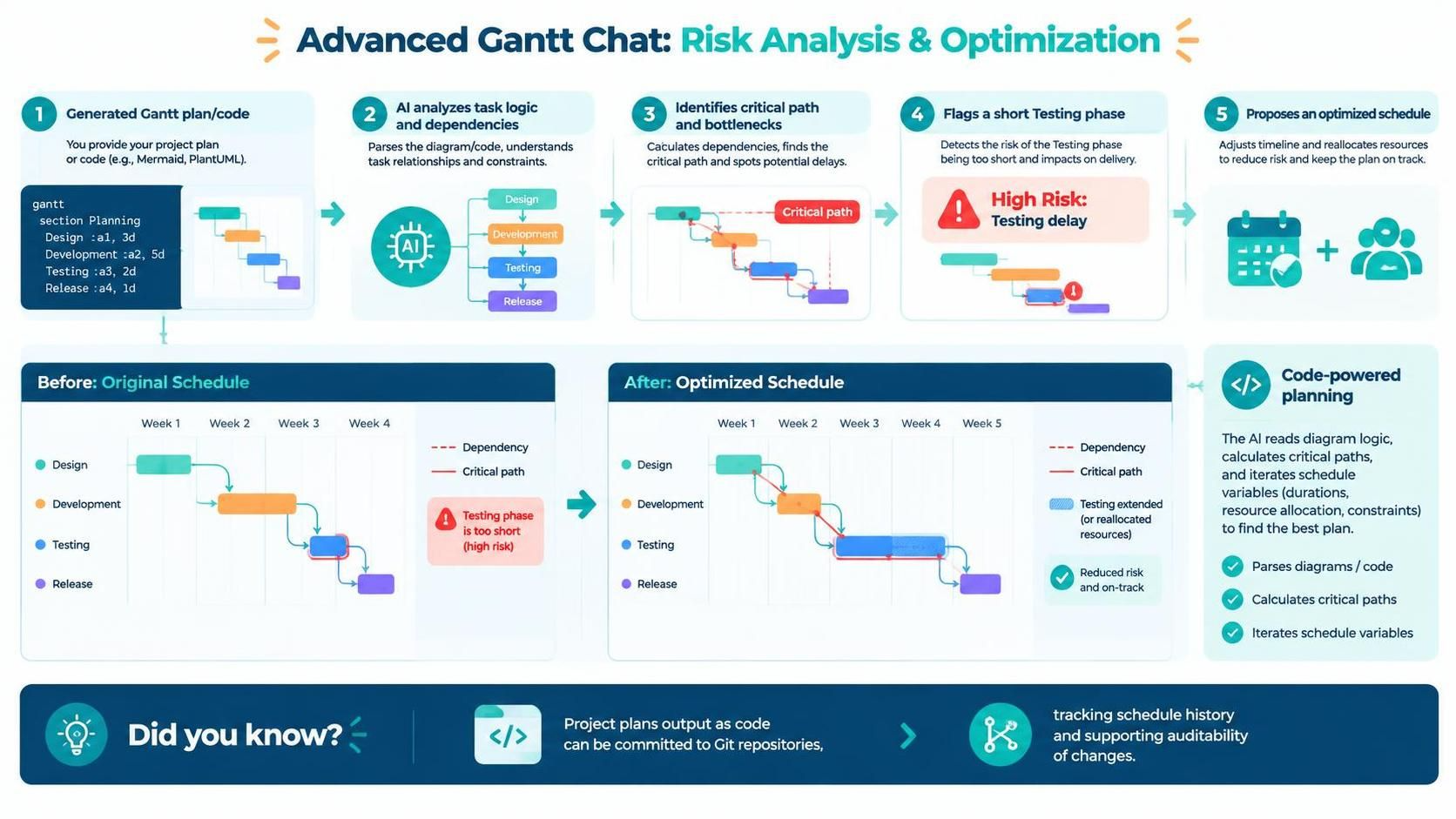 For instance, if a project has a “Testing” phase that is too short to catch bugs, the AI might flag a “High Risk: Testing delay”. It can then automatically propose an Optimized Schedule by suggesting adjustments to the timeline or resource allocation.
This capability is powered by the system’s ability to read the logic of the generated code, calculate critical paths, and iterate on the variables until an optimal solution is found.
4. The VPasCode Advantage
The implementation of these concepts is realized through VPasCode, Visual Paradigm’s code-generation engine. VPasCode is the bridge that allows the AI to speak the language of diagrams.
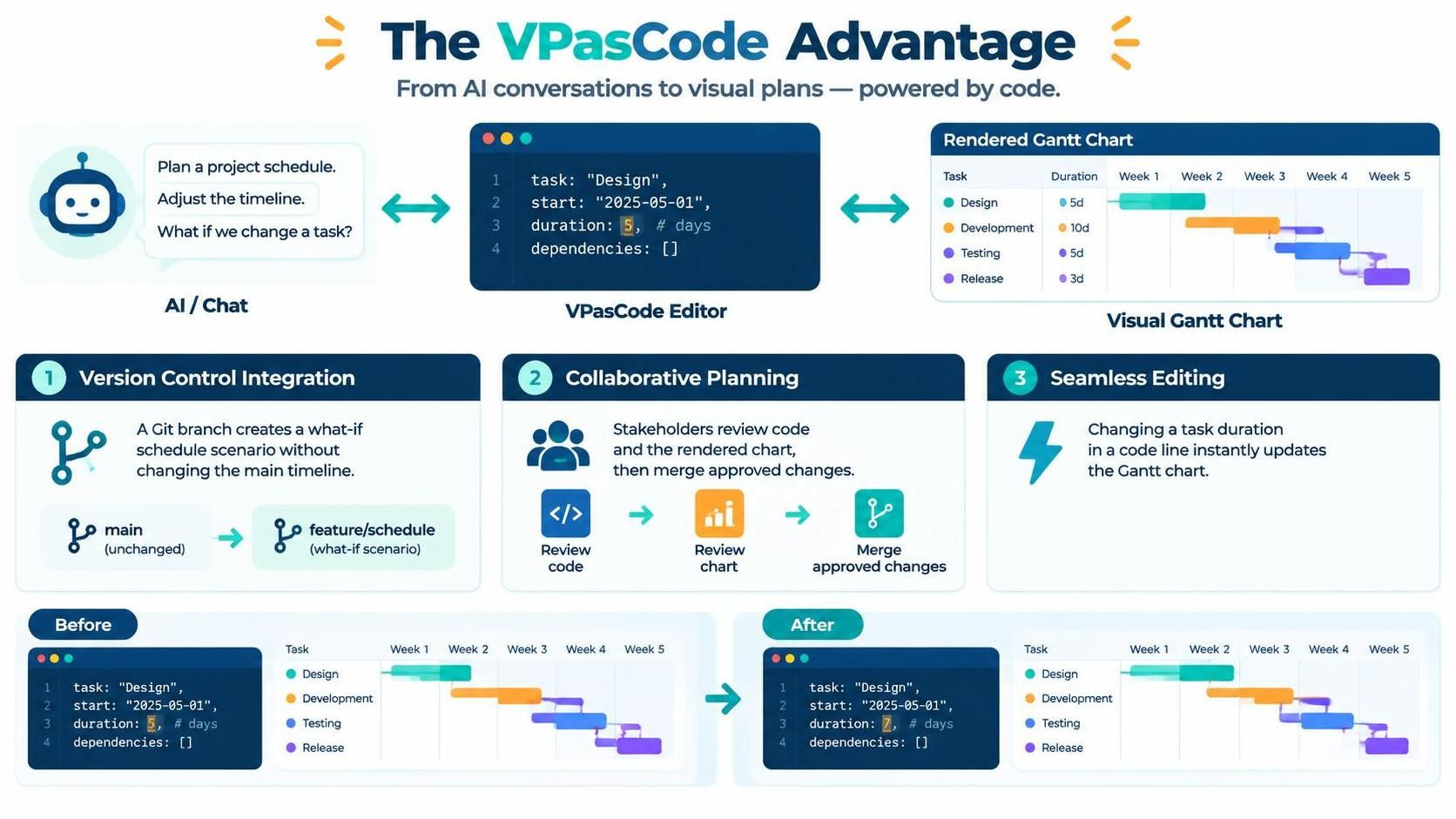
- Version Control Integration: By treating the Gantt chart as code, teams can use Git to manage project plans. You can branch off a plan to test a “what-if” scenario without affecting the main timeline.
- Collaborative Planning: Multiple stakeholders can review the code or the rendered chart simultaneously. Changes are merged and reviewed, fostering a transparent planning environment.
- Seamless Editing: If you want to change the duration of a task, you don’t need to drag a bar on a canvas. You can simply edit the code line, and the entire chart updates instantly.
Conclusion
Gantt Chat represents the convergence of natural language interfaces and rigorous engineering principles. By leveraging the power of Diagram-as-Code through PlantUML and Mermaid, Visual Paradigm has created a tool that is not only fast but also robust, versionable, and collaborative. Whether you are managing a simple website launch or a complex enterprise rollout, Gantt Chat offers a modern, AI-driven pathway to project success.