
Mastering BPMN Sub-Process Representations: From High-Level Overview to Granular Detail
In the landscape of Business Process Model and Notation (BPMN), the primary goal of any modeler is to communicate process logic effectively. However, a common pitfall is creating diagrams that are either too simplistic to be useful or so detailed that they become unreadable “spaghetti charts.” The solution to this complexity lies in the strategic use of Sub-Processes.
A Sub-Process is a fundamental BPMN element that allows you to encapsulate a set of activities, events, and gateways into a single, manageable block. This guide will explore the mechanics of the two distinct representations of Sub-Processes—Expanded and Collapsed—and how to utilize them to create professional, maintainable process models.
1. The Expanded Sub-Process: Deep Dive into Logic
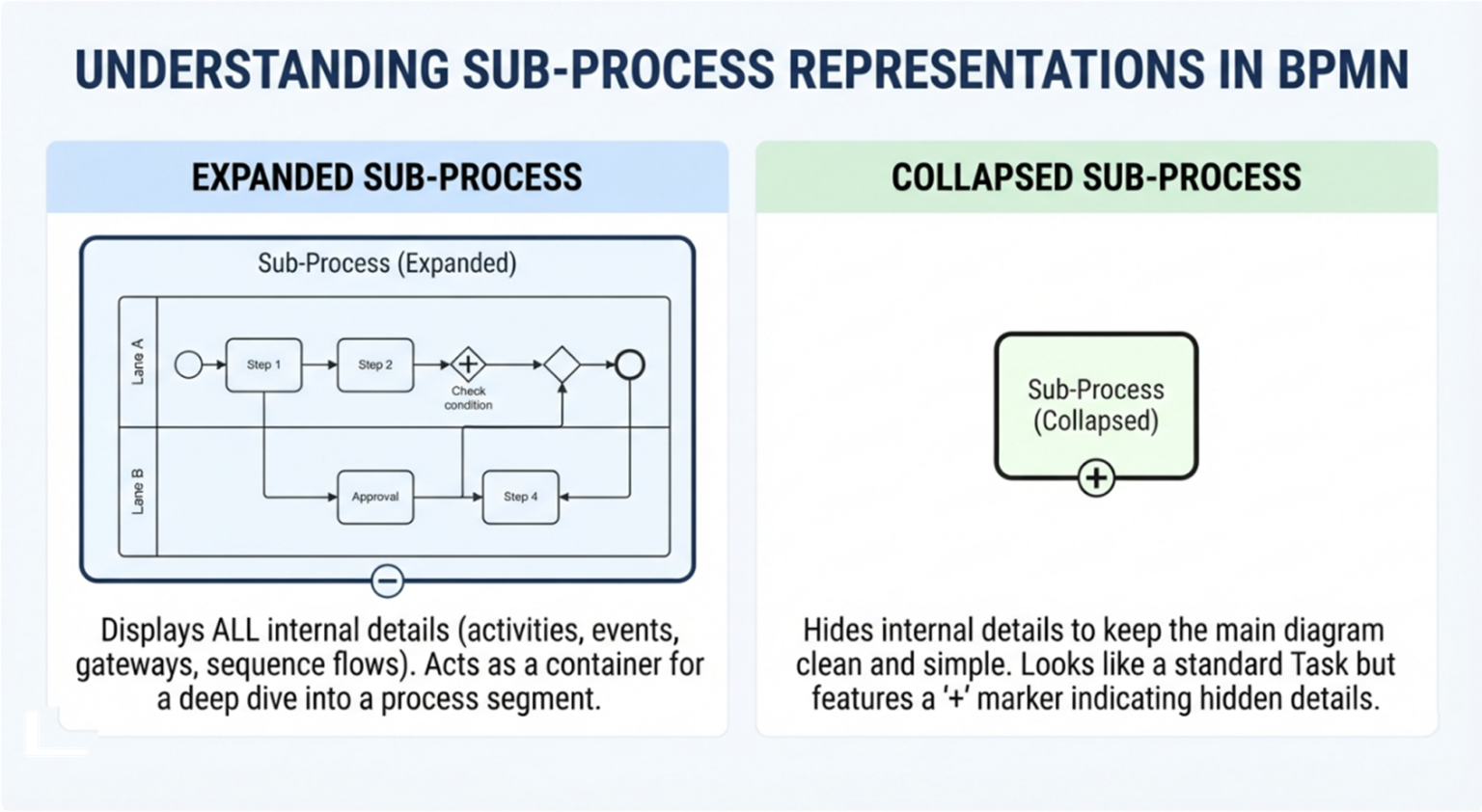
The Expanded Sub-Process is used when the immediate context requires the audience to understand the internal workflow of a specific segment. It functions as a container that reveals all the underlying details.
Visual Characteristics
- Appearance: It is visually represented as a large rounded rectangle. Unlike a standard task, its boundaries act as a “window” into the internal logic.
- Internal Content: Inside the boundary, you will see a full workflow including:
- Activities (Tasks)
- Events (Start, Intermediate, End)
- Gateways (Decision points)
- Sequence Flows (Arrows connecting steps)
- Swimlanes (Pools or Lanes to denote responsibility)
- Indication: In some modeling tools, you might see a small circle with a minus sign (-) at the bottom edge, indicating that the view is currently expanded and can be collapsed.
When to Use It
Use an Expanded Sub-Process when:
- Process Definition: You are defining the exact steps of a specific functional area (e.g., “Order Fulfillment”) and need to show the sequence of steps within that area.
- Exception Handling: The internal logic of the sub-process contains complex decision points that are critical to the current discussion.
- Collaboration: You are working with a team to debug or refine a specific segment of the business logic.
2. The Collapsed Sub-Process: High-Level Abstraction
The Collapsed Sub-Process is the most common representation in high-level business process modeling. It adheres to the principle of “information hiding,” allowing you to focus on the flow of the overall process without getting bogged down in the minutiae of every step.
Visual Characteristics
- Appearance: It looks almost identical to a standard BPMN Task (a rectangle with rounded corners). The key differentiator is the visual cue at the bottom.
- The “+” Marker: A small plus sign (+) is placed in the lower center of the shape. This is the universal BPMN symbol indicating that this task is actually a container for a more detailed process that is currently hidden.
- Simplicity: The main diagram remains clean. The internal swimlanes and sequence flows are completely hidden from view.
When to Use It
Use a Collapsed Sub-Process when:
- Executive Overview: You need to present the process flow to stakeholders who only care about the major milestones (e.g., “Order Received” → “Sub-Process: Fulfillment” → “Order Shipped”).
- Complexity Management: The internal process is too large or detailed to fit comfortably on the current diagram page. It allows you to keep the main diagram clean and readable.
- Drill-Down Capability: You intend for the reader to double-click the icon to navigate to a separate diagram page containing the detailed logic.
3. Structuring Your Model: Best Practices
To create a highly professional model in tools like Visual Paradigm, you should adopt a hierarchical approach.
- Start High-Level: Begin your diagram with Collapsed Sub-Processes. Treat each sub-process as a “black box” with a clear input (trigger) and a clear output (result).
- Layer Detail: Create separate diagrams (or pages) for the internal logic of each sub-process. This keeps the main canvas uncluttered.
- Use Swimlanes: Even within a Sub-Process, ensure you use Swimlanes (Pools/Lanes) to define exactly which role or department performs the internal tasks.
- Consistency: Ensure that the entry and exit points of your Sub-Process are consistent. Typically, a Sub-Process starts with a Start Event and ends with an End Event (or an Intermediate Event in advanced scenarios).
Conclusion
Mastering the art of switching between Expanded and Collapsed Sub-Processes is essential for effective process modeling. By hiding complexity where it isn’t needed (Collapsed) and revealing it only where it adds value (Expanded), you create process models that are not only accurate but also user-friendly for all stakeholders.