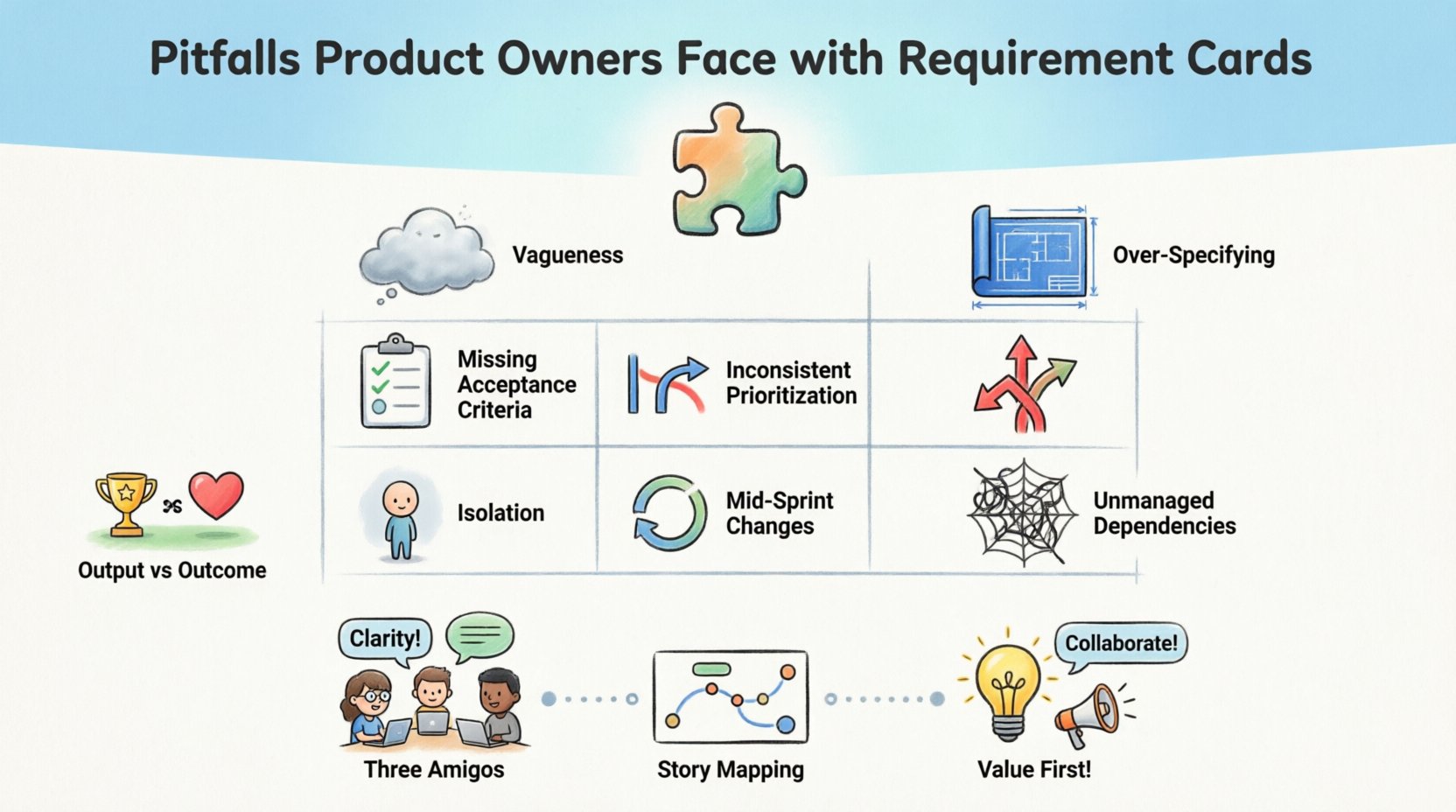
In the fast-paced environment of modern software development, the Product Owner role acts as the bridge between business vision and technical execution. At the heart of this connection lies the requirement card, often manifested as a User Story. These cards are the fundamental unit of work, yet they are frequently the source of friction, delays, and misalignment. When a Product Owner missteps in crafting these artifacts, the ripple effects can disrupt the entire delivery pipeline.
This article explores the common pitfalls Product Owners face with requirement cards. By understanding these challenges, teams can refine their approach to backlog management, ensuring clarity, efficiency, and value delivery. We will examine the anatomy of a requirement card, identify specific failure modes, and discuss strategies to mitigate risks without relying on specific tools.
Understanding the Requirement Card 🧩
A requirement card is more than a task ticket. It is a placeholder for a conversation. In Agile frameworks, it typically follows a structure that defines who the user is, what they need, and why it matters. However, the physical or digital representation of this story often obscures the intent behind it. When the card becomes the destination rather than the starting point, problems arise.
The card serves three primary functions:
- Communication: It conveys value to the development team.
- Prioritization: It allows stakeholders to rank work based on value.
- Planning: It provides the data needed for estimation and forecasting.
When these functions are compromised, the team loses direction. A card that fails to communicate value leads to low engagement. A card that lacks prioritization data leads to wasted effort. A card that is too vague prevents accurate planning.
Pitfall 1: Vagueness and Ambiguity 🌫️
The most frequent error involves writing requirements that are too broad. Phrases like “improve performance” or “make it user-friendly” are subjective. They lack the specificity required for a developer to build a solution that satisfies the business need.
Why this happens:
- Product Owners often assume the team shares their mental model of the problem.
- There is pressure to fill the backlog quickly, leading to superficial descriptions.
- Stakeholders provide high-level goals without detailing functional needs.
The Impact:
- Developers must guess the intent, leading to rework.
- Acceptance criteria become difficult to verify.
- Testing efforts increase because edge cases are undefined.
Example of the Problem:
- Bad: “Allow users to filter search results.”
- Better: “Allow users to filter search results by date range, category, and price.”
Pitfall 2: Over-Specifying the Solution 🛠️
Conversely, some requirement cards become too prescriptive. The Product Owner dictates not just the “what,” but the “how.” This restricts the development team’s ability to apply technical expertise and find more efficient solutions.
Signs of Over-Specification:
- Specifying database schema within the story.
- Dictating specific UI components (e.g., “Use a dropdown menu”).
- Defining API endpoints in the description.
The Impact:
- Developers feel undervalued and disengaged.
- Technical debt may increase if a suboptimal solution is forced.
- Innovation is stifled because the team is not encouraged to solve the problem creatively.
The Balance:
The goal is to define the problem space, not the solution space. The team should be empowered to propose the architecture that best fits the requirement. This requires trust and a clear understanding of constraints, but it yields higher quality outcomes.
Pitfall 3: Neglecting Acceptance Criteria ✅
A requirement card without clear acceptance criteria is an open invitation for scope creep and disagreement. Acceptance criteria define the boundaries of “Done.” Without them, the definition of completion is subjective.
Common Mistakes:
- Writing acceptance criteria that are too complex.
- Using vague language like “ensure it works” or “check for errors.”
- Listing them as an afterthought during the sprint.
Best Practices:
- Use the Given-When-Then format for clarity.
- Include edge cases (e.g., empty states, network failures).
- Ensure criteria are testable and measurable.
Pitfall 4: Inconsistent Prioritization 📉
When every item in the backlog is marked as “High Priority,” nothing is actually prioritized. This creates confusion regarding what the team should focus on during a sprint cycle. It also leads to context switching, which reduces overall productivity.
Causes of Prioritization Issues:
- Vocal stakeholders demanding immediate attention.
- Lack of a clear framework for ranking value (e.g., MoSCoW, RICE).
- Reactive management rather than proactive planning.
The Consequence:
Teams end up working on low-value features while critical business needs are delayed. This erodes trust between the business and the development team.
Pitfall 5: Isolation and Lack of Refinement 🔒
Requirement cards should not be created in a vacuum. A common pitfall is the Product Owner drafting stories alone without input from the development team. This leads to gaps in technical understanding and missing dependencies.
Refinement is Key:
- Refinement sessions allow the team to ask questions before the sprint begins.
- Developers can identify technical risks early.
- Designers can contribute to user experience details.
Collaboration Dynamics:
| Isolated Approach | Collaborative Approach |
|---|---|
| PO defines everything alone. | PO guides, team contributes. |
| Stories are vague. | Stories are detailed and clear. |
| Questions arise during sprint. | Questions are answered beforehand. |
| Higher rework rate. | Lower rework rate. |
Pitfall 6: Ignoring Dependencies 🕸️
Requirement cards rarely exist in isolation. They often rely on other cards, external systems, or third-party APIs. Failing to map these dependencies leads to blocked work and stalled sprints.
Dependency Management:
- Identify cross-team dependencies early.
- Visualize dependencies on the backlog view.
- Coordinate with other Product Owners or teams.
When a card is ready but the prerequisite is missing, the sprint velocity drops. This is a direct result of poor requirement planning.
Pitfall 7: Changing Context Mid-Sprint 🔄
Agility is valuable, but instability is destructive. Constantly changing the scope or requirements of a card that has already been committed to disrupts the team’s flow. This is often referred to as “churn” or “scope creep.”
Why it Occurs:
- Market conditions change rapidly.
- Stakeholder feedback is delayed.
- The initial understanding of the problem was flawed.
Mitigation Strategy:
While changes are inevitable, they should be managed. New requirements should be added to the backlog, not forced into active work unless absolutely critical. This protects the team’s focus and ensures commitments are respected.
Pitfall 8: Focusing on Output Over Outcome 🎯
A significant strategic pitfall is measuring success by the number of cards completed rather than the value delivered. A Product Owner might prioritize finishing cards quickly to show activity, rather than ensuring the card solves the right problem.
Output vs. Outcome:
- Output: Number of cards done, lines of code written.
- Outcome: User adoption, revenue growth, error reduction.
If the team finishes all cards but the feature is unused, the effort was wasted. The requirement card must align with business goals, not just technical tasks.
Structuring Effective Requirement Cards 📝
To avoid these pitfalls, Product Owners should adopt a structured approach to writing cards. While the exact format may vary, the core components remain consistent.
1. The Title
Should be concise and descriptive. It acts as the index entry for the story.
2. The User Story Statement
Follows the standard format: “As a [role], I want [feature], so that [benefit].” This ensures the user perspective is central.
3. The Context
Background information that helps the team understand the environment. This includes business rules, constraints, and related documentation.
4. Acceptance Criteria
The checklist for completion. It should cover happy paths and error states.
5. Visual Aids
Wireframes, diagrams, or mockups can reduce ambiguity significantly. A picture is worth a thousand words when explaining complex flows.
Refinement Techniques 🛠️
Refinement is not a one-time event. It is an ongoing process of grooming the backlog. Here are techniques to improve the quality of requirement cards over time.
- Three Amigos: A meeting involving the PO, a Developer, and a QA Engineer. This ensures business, technical, and testing perspectives are aligned.
- Story Mapping: Visualizing the user journey to ensure no steps are missed in the requirements.
- Pre-Mortems: Discussing how a requirement could fail before work begins. This identifies risks early.
- Definition of Ready: A checklist that a card must meet before it enters a sprint. This prevents half-finished stories from clogging the queue.
The Role of Data in Requirement Management 📊
Data can help identify which pitfalls are affecting your specific team. By tracking metrics, Product Owners can make evidence-based decisions about their backlog.
Key Metrics to Track:
- Change Request Rate: How often are requirements changed after refinement? High rates indicate poor initial clarity.
- Blocked Stories: How many stories are blocked due to dependencies? This highlights planning gaps.
- Rework Percentage: How much work is redone due to misunderstandings? This measures requirement quality.
- Sprint Completion Rate: Are teams consistently delivering what they planned? Low rates suggest over-commitment or unclear stories.
Communication Strategies for Clarity 🗣️
Written requirements are static; communication is dynamic. A requirement card is a trigger for a conversation, not a replacement for it.
- Walkthroughs: Present the story to the team verbally before the sprint starts.
- Office Hours: Keep specific times open for developers to ask questions about requirements.
- Feedback Loops: Ensure the team can report back if a requirement is unclear during the sprint.
Handling Complex Requirements 🧠
Not all cards are created equal. Some are simple tasks, while others are epics requiring multiple sprints. Complex requirements need special handling to avoid overwhelm.
Decomposition:
Break large requirements into smaller, independent stories. Each story should deliver a slice of value. This makes estimation easier and risk lower.
Technical Spikes:
For unknown technical challenges, use a spike. This is a time-boxed research task to reduce uncertainty before writing the actual requirement card.
Maintaining Focus on Value 🚀
It is easy to get lost in the mechanics of writing cards. The Product Owner must constantly ask: “Does this card move us toward our goals?” If a card does not align with the vision, it should be discarded or deferred.
Questions to Ask:
- Who is the user for this feature?
- What problem does it solve?
- Is this the best way to solve it now?
- What happens if we don’t build this?
Building a Culture of Quality 🌱
Improving requirement cards is not just about the Product Owner. It requires a cultural shift across the organization. The development team must feel safe to question requirements. The business must understand that clarity takes time.
- Praise Clarity: Recognize when a story is well-defined.
- Review Retrospectives: Discuss requirement issues in sprint retrospectives.
- Training: Provide training on writing effective user stories for the whole team.
Conclusion of Analysis 🔍
The pitfalls Product Owners face with requirement cards are often rooted in human factors, process gaps, and communication breakdowns. By recognizing these patterns, teams can take corrective action. The goal is not perfection, but continuous improvement. A well-crafted requirement card reduces friction, builds trust, and accelerates delivery.
When the team understands the “why” behind the work, engagement increases. When the team understands the “what” clearly, rework decreases. When the team understands the “how” constraints, technical debt is managed better. The requirement card is the foundation of this understanding.
Implementing these changes takes time and discipline. It requires a commitment to quality over speed. However, the long-term benefits to velocity, morale, and product success are substantial. The Product Owner must act as a guardian of clarity, ensuring that every card entering the workflow is ready to deliver value.
Summary of Key Takeaways 📌
- Avoid vagueness by defining specific acceptance criteria.
- Do not dictate the solution; focus on the problem.
- Involve the team in refinement to catch technical risks.
- Prioritize based on value, not urgency.
- Measure outcomes, not just output.
- Manage dependencies proactively.
- Treat cards as conversation starters, not just tickets.
By adhering to these principles, Product Owners can navigate the complexities of requirement management with confidence. The result is a smoother development process and a product that truly meets user needs.