Transitioning from writing functional code to building robust software systems requires a shift in mindset. Many developers spend years mastering syntax, learning loops, functions, and basic class structures. However, true expertise lies in how those building blocks connect to form a cohesive whole. Object-Oriented Analysis and Design (OOAD) provides the framework for this transition. It is the process of defining the objects, behaviors, and interactions that make up a software system before a single line of implementation code is written.
For mid-level developers, understanding OOAD is the difference between maintaining spaghetti code and architecting solutions that scale. This guide explores the core principles, methodologies, and practical applications of OOAD. We will examine how to analyze requirements, model domains, and design systems that adhere to established engineering standards.
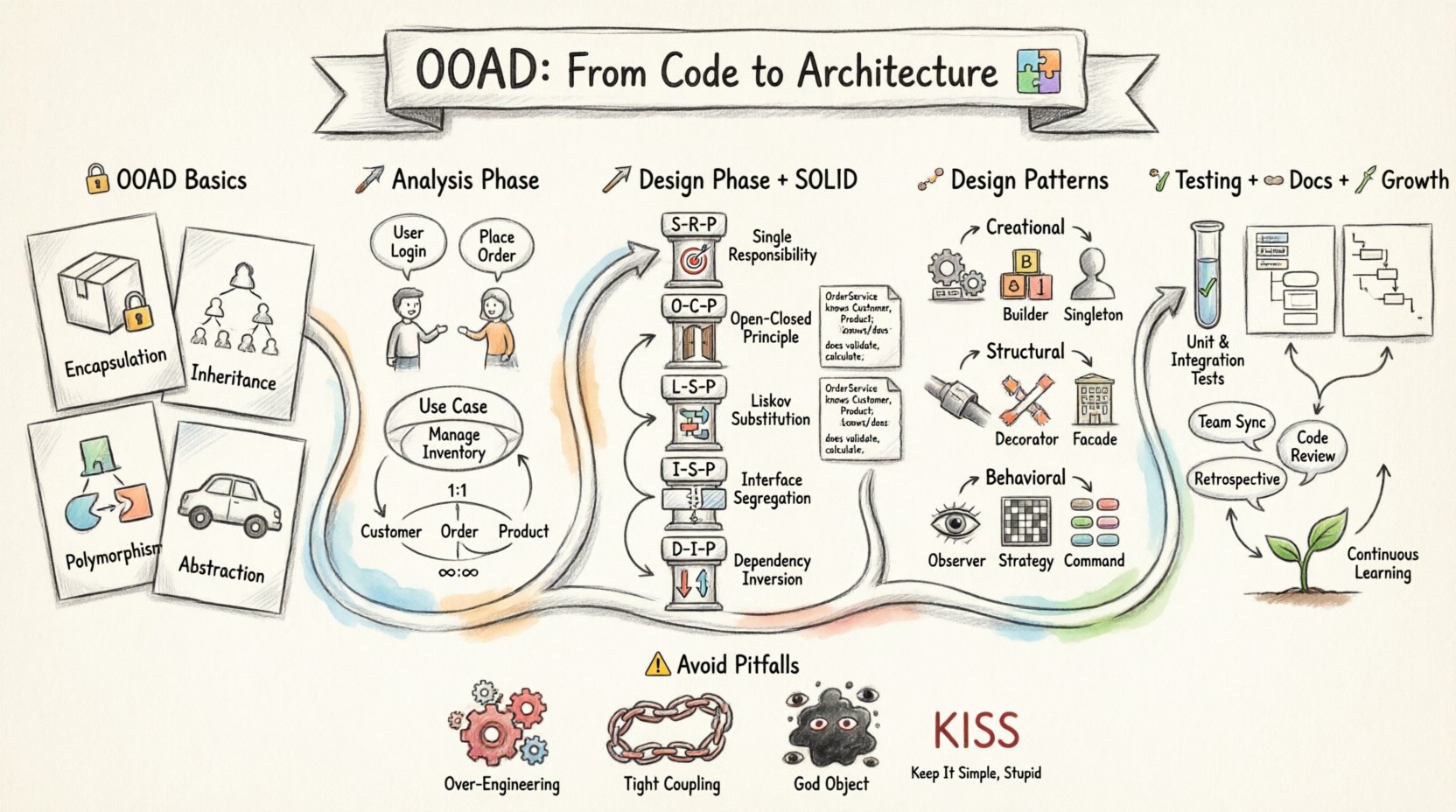
Understanding the Basics of OOAD 🧩
Object-Oriented Analysis and Design is not a single tool or language feature. It is a discipline. It focuses on identifying the objects within a system and determining how they interact. The goal is to create a model that reflects the real-world problem space accurately.
When you write code without OOAD, you often focus on functions and data structures. When you apply OOAD, you focus on entities and their responsibilities. This approach promotes modularity, making it easier to change one part of the system without breaking another.
Key Concepts to Grasp
- Encapsulation: Bundling data and methods that work on that data within one unit, usually a class. It restricts direct access to some of an object’s components.
- Inheritance: A mechanism where a new class derives properties and behaviors from an existing class. This reduces code duplication.
- Polymorphism: The ability of different classes to respond to the same message in different ways. This allows for flexible code structures.
- Abstraction: Hiding complex implementation details and showing only the necessary features of an object.
The Analysis Phase: Defining the Problem 📝
Before designing, you must analyze. This phase is about understanding what the system needs to do, not how it will do it. Skipping this step often leads to rework later when requirements change.
Identifying Actors and Use Cases
Every system has external entities that interact with it. These are called actors. They can be human users, other systems, or hardware devices. Once you identify the actors, you define the use cases. A use case describes a specific interaction between an actor and the system.
- Actor: Who is using the system? (e.g., Administrator, Customer, Payment Gateway).
- Goal: What does the actor want to achieve? (e.g., Place Order, Generate Report).
- Flow: What steps are required to complete the goal?
Domain Modeling
Domain modeling translates business concepts into technical entities. This involves identifying the core nouns in the problem statement. These nouns often become classes in your design.
For example, in an e-commerce system, nouns might include Customer, Product, Order, and Invoice. Analyzing these entities involves defining their attributes and relationships.
Relationships in the Domain
Entities do not exist in isolation. They relate to one another. Understanding these relationships is crucial for database design and object navigation.
| Relationship Type | Description | Example |
|---|---|---|
| One-to-One | One instance of A relates to exactly one instance of B. | A User has one Profile. |
| One-to-Many | One instance of A relates to many instances of B. | A Customer places many Orders. |
| Many-to-Many | Many instances of A relate to many instances of B. | Students enroll in many Courses; Courses have many Students. |
The Design Phase: Building the Solution 🛠️
Once the analysis is complete, the design phase begins. This is where you determine the classes, interfaces, and how they communicate. The focus shifts from requirements to implementation structure.
Responsibility-Driven Design
In this approach, you assign responsibilities to classes. A responsibility is a contract a class must fulfill. There are two main types of responsibilities:
- Informational: The class knows something.
- Behavioral: The class does something.
When assigning responsibilities, ask: Who has the information needed to fulfill this responsibility? Who is best suited to perform the action? This helps avoid placing logic in the wrong class.
SOLID Principles
The SOLID acronym represents five design principles intended to make software designs more understandable, flexible, and maintainable. Adhering to these principles is a hallmark of a senior-level understanding of OOAD.
1. Single Responsibility Principle (SRP)
A class should have one, and only one, reason to change. If a class handles both database logic and user interface rendering, it violates SRP. Changing the UI should not require touching the database logic. Keep concerns separate.
2. Open/Closed Principle (OCP)
Software entities should be open for extension but closed for modification. You should be able to add new functionality without changing existing code. This is often achieved through interfaces and abstract classes.
3. Liskov Substitution Principle (LSP)
Objects of a superclass should be replaceable with objects of its subclasses without breaking the application. If a parent class expects a method to return a string, a child class cannot change that return type to an integer.
4. Interface Segregation Principle (ISP)
Clients should not be forced to depend on methods they do not use. Instead of one large interface with ten methods, create smaller, specific interfaces. This reduces coupling.
5. Dependency Inversion Principle (DIP)
High-level modules should not depend on low-level modules. Both should depend on abstractions. Abstractions should not depend on details; details should depend on abstractions. This decouples your system, allowing you to swap implementations easily.
Design Patterns: Proven Solutions 🧠
Design patterns are general reusable solutions to commonly occurring problems within a given context in object-oriented design. They are not code to be copied, but templates for how to solve a problem.
Creational Patterns
These patterns deal with object creation mechanisms, trying to create objects in a manner suitable to the situation. The basic form of object creation could result in design problems or added complexity to the design.
- Factory Method: Defines an interface for creating an object, but lets subclasses alter the type of objects that will be created.
- Builder: Constructs a complex object step by step. This pattern is useful when an object requires many parameters for construction.
- Singleton: Ensures a class has only one instance and provides a global point of access to it. Use with caution to avoid hidden dependencies.
Structural Patterns
These patterns ease design by identifying a simple way to realize relationships between entities.
- Adapter: Allows incompatible interfaces to work together. It wraps an existing class to make it compatible with a new interface.
- Decorator: Allows behavior to be added to an individual object, dynamically, without affecting the behavior of other objects from the same class.
- Facade: Provides a simplified interface to a complex subsystem.
Behavioral Patterns
These patterns specifically deal with communication between objects and how they distribute responsibility.
- Observer: Defines a dependency between objects so that when one object changes state, all its dependents are notified and updated automatically.
- Strategy: Defines a family of algorithms, encapsulates each one, and makes them interchangeable. The strategy lets the algorithm vary independently from clients that use it.
- Command: Encapsulates a request as an object, thereby letting you parameterize clients with different requests, queue or log requests, and support undoable operations.
Managing Technical Debt and Refactoring 🧹
Even with a solid design, code degrades over time. New requirements arrive, and old assumptions become false. This is where refactoring comes in. Refactoring is the process of changing a software system in such a way that it does not alter the external behavior of the code, yet improves its internal structure.
Signs You Need to Refactor
- Duplicate Code: Copy-pasting code blocks leads to maintenance nightmares.
- Long Methods: If a method exceeds 10-15 lines, it likely does too much.
- Large Classes: If a class manages too many variables, split it.
- Deep Inheritance: If you have deep class hierarchies, consider composition over inheritance.
Refactoring Techniques
- Extract Method: Turn a chunk of code into a new method.
- Extract Class: Move some fields and methods into a new class.
- Pull Up Field/Method: Move a field or method to a superclass.
- Push Down Field/Method: Move a field or method to a subclass.
- Replace Temp with Query: Encapsulate a temp variable with a method.
Testing Strategies in OOAD 🧪
Design and testing go hand in hand. A well-designed object is inherently easier to test because its responsibilities are clear and isolated.
Unit Testing
Unit tests verify the behavior of individual units of source code. In OOAD, you should test classes in isolation. Use mocking to simulate dependencies so you do not need a real database or network connection.
Integration Testing
Integration testing verifies that different modules work together. This is where you check if the interfaces defined in your design actually function correctly when implemented.
Test-Driven Development (TDD)
TDD is a process where you write tests before the implementation code. The cycle is Red (write a failing test), Green (write code to pass the test), and Refactor (clean up code). This ensures that your design decisions are driven by requirements and usability.
Documentation and Communication 🗣️
Design is a communication tool. Your code communicates with other developers, but diagrams communicate with the whole team, including stakeholders.
Unified Modeling Language (UML)
UML is a standard visual language for specifying, constructing, and documenting the artifacts of software systems. While you do not need to draw every diagram, understanding the types is vital.
- Class Diagrams: Show the static structure of the system. Classes, attributes, operations, and relationships.
- Sequence Diagrams: Show how objects interact over time. Useful for understanding workflows.
- Use Case Diagrams: Show the functional requirements from a user perspective.
- State Machine Diagrams: Show the states an object can be in and the transitions between them.
Keeping Documentation Current
Documentation becomes useless if it is outdated. It is better to have code that is self-documenting than to maintain a separate document that lags behind the codebase. Use clear naming conventions and comments only when the code is not self-explanatory.
Common Pitfalls to Avoid ⚠️
Even experienced developers fall into traps when applying OOAD. Being aware of these common mistakes can save significant time.
Over-Engineering
Applying complex patterns to simple problems creates unnecessary overhead. If a feature is simple, keep the design simple. Use the KISS principle (Keep It Simple, Stupid). Do not design for a problem you do not have yet.
Premature Optimization
Focusing on performance before functionality often leads to rigid code. Optimize only when you have identified a bottleneck. Design for clarity first.
Tight Coupling
When classes depend heavily on each other, changing one affects the other. Use interfaces and dependency injection to loosen these connections. High coupling makes the system fragile.
God Objects
Classes that know too much or do too much are called God Objects. They become a central point of failure and are difficult to test. Distribute the logic across smaller, focused classes.
Practical Application Steps 📋
How do you start applying this tomorrow? Follow this workflow for your next feature.
- Analyze Requirements: Write down the use cases. Identify actors and goals.
- Identify Entities: List the nouns. These are potential classes.
- Define Relationships: Determine how entities relate (One-to-Many, etc.).
- Draft Class Diagrams: Sketch the structure on paper or whiteboard.
- Apply SOLID: Review your draft. Does it violate any principles?
- Implement Interfaces: Define the contracts before writing concrete classes.
- Write Tests: Verify the behavior matches the design.
- Refactor: Clean up the implementation as you go.
Conclusion: Continuous Growth 🌱
Object-Oriented Analysis and Design is not a destination; it is a journey. As you gain experience, your intuition for identifying objects and relationships will improve. You will find yourself naturally applying SOLID principles without consciously thinking about them. The goal is to create systems that are easy to understand, easy to change, and easy to maintain.
Start by analyzing your current codebase. Look for God objects, long methods, and tight coupling. Apply one refactoring technique at a time. Read design patterns books, but apply them to your specific context. Remember that the best design is often the simplest design that meets the requirements. By focusing on architecture and principles rather than just syntax, you elevate your capabilities as a developer and contribute to more stable, resilient software systems.