In the vast landscape of software engineering, few concepts are as foundational as Object-Oriented Analysis and Design (OOAD). Whether you are constructing a small utility or an enterprise-level platform, the way you structure your data and logic determines the longevity and maintainability of the system. This guide explores the core mechanics of OOAD, providing a clear path to understanding how objects interact, how responsibilities are distributed, and how to build systems that adapt to change without collapsing.
Why OOAD Matters 🧠
Traditional procedural programming focused on functions and actions. While effective for simple scripts, it often struggles with complex, large-scale applications. OOAD shifts the focus to objects. An object bundles data and behavior together, mimicking real-world entities. This approach offers several distinct advantages:
- Modularity: Systems are broken down into independent components that can be developed and tested in isolation.
- Reusability: Once an object is designed correctly, it can be utilized across different parts of the application or even in entirely different projects.
- Maintainability: Changes in one area of the system are less likely to break functionality elsewhere, reducing the risk of regression.
- Scalability: New features can be added by introducing new objects rather than rewriting existing code blocks.
By adhering to OOAD principles, developers create systems that are easier to understand. When a new team member joins a project, they can trace the flow of data through objects rather than deciphering a tangled web of global variables and function calls.
Core Pillars of Object Orientation 🔑
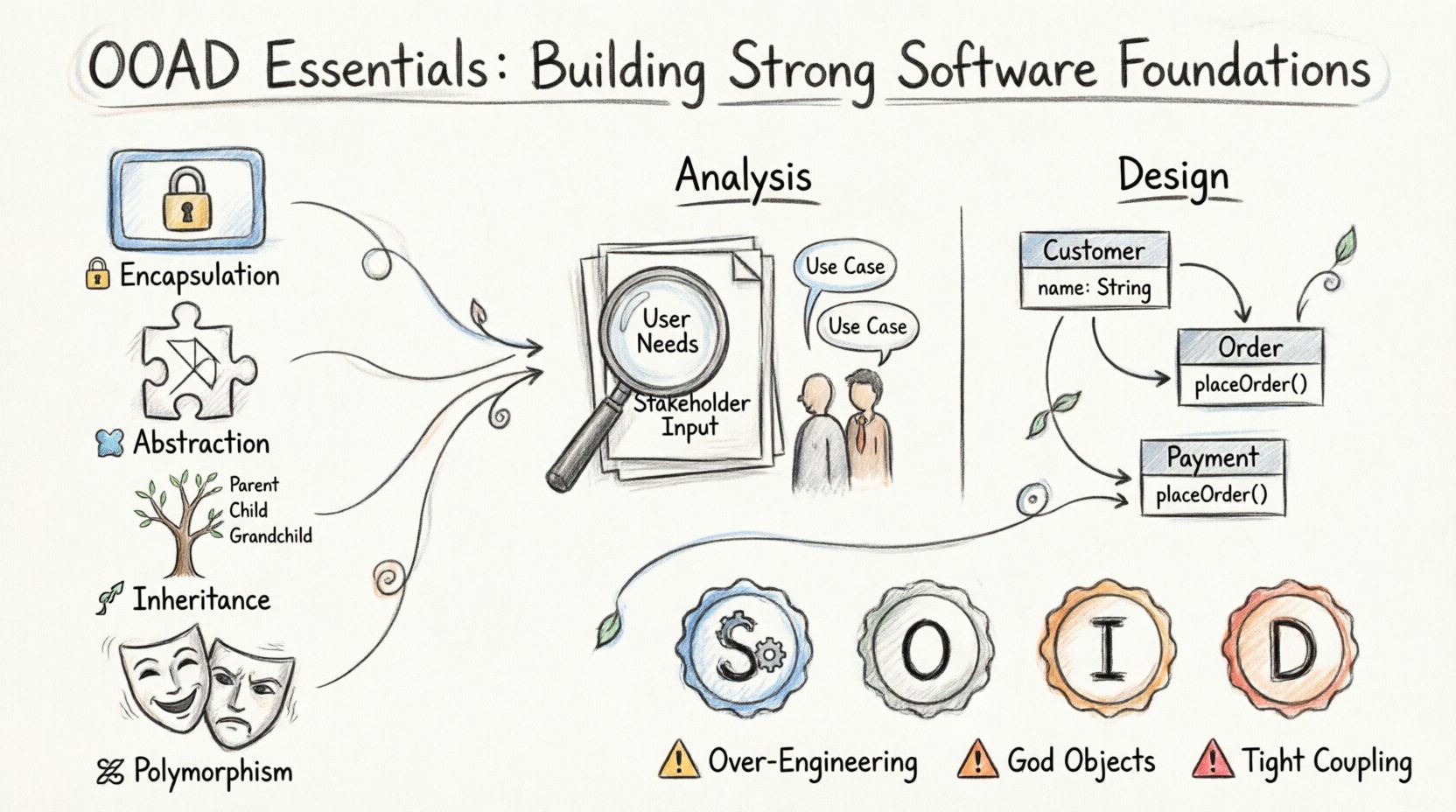
Before diving into the analysis and design phases, it is essential to understand the four fundamental pillars that support the object-oriented paradigm. These concepts dictate how you model your solution.
1. Encapsulation 🔒
Encapsulation is the practice of restricting direct access to some of an object’s components. It involves bundling the data (attributes) and the methods (functions) that operate on the data into a single unit. This protects the internal state of the object from unintended interference.
- Visibility Modifiers: Use public, private, and protected access levels to control what is visible outside the class.
- Getters and Setters: Provide controlled ways to read and modify internal data.
- Data Hiding: Prevent external code from relying on internal implementation details.
2. Abstraction 🧩
Abstraction involves hiding complex implementation details and exposing only the necessary features of an object. It allows developers to focus on what an object does rather than how it does it.
- Abstract Classes: Define a blueprint for other classes without providing a full implementation.
- Interfaces: Specify a contract that implementing classes must follow.
- Simplification: Reduces complexity by filtering out unnecessary information.
3. Inheritance 🌳
Inheritance allows a new class to acquire the properties and behaviors of an existing class. This promotes code reuse and establishes a hierarchical relationship between classes.
- Parent/Super Class: The class being inherited from.
- Child/Sub Class: The class that inherits the attributes and methods.
- Override: The ability to redefine a method in the child class to provide specific behavior.
4. Polymorphism 🎭
Polymorphism allows objects to be treated as instances of their parent class rather than their actual class. This enables a single interface to represent different underlying forms (data types).
- Runtime Polymorphism: Method overriding where the method to execute is determined at runtime.
- Compile-time Polymorphism: Method overloading where multiple methods share the same name but differ in parameters.
- Flexibility: Makes code more flexible and extensible.
The Analysis Phase: Understanding Requirements 📋
Analysis is the phase where you determine what the system needs to do. It is independent of technical implementation details. The goal is to understand the problem domain and identify the key entities and behaviors required.
Identifying Actors and Use Cases 🎭
Start by identifying who or what interacts with the system. These are the actors. Actors can be human users, other systems, or hardware devices.
- Primary Actors: Users who initiate the system to achieve a goal.
- Secondary Actors: Systems or devices that support the primary actors.
Once actors are defined, map out their interactions. A Use Case describes a specific interaction between an actor and the system to achieve a result.
Modeling the Domain 🗺️
In this step, you identify the core concepts or classes that exist in the problem domain. You do not write code yet; you model the concepts.
- Noun Identification: Read the requirements and highlight nouns. These often become candidate classes.
- Verb Identification: Highlight verbs to identify potential methods or behaviors.
- Relationships: Determine how these nouns relate to each other (e.g., a Student enrolls in a Course).
The Design Phase: Building the Solution 🛠️
Design transforms the analysis models into a blueprint for implementation. It focuses on how the system will achieve the requirements defined during analysis. This phase involves defining class structures, relationships, and interactions.
Class Diagrams 📊
Class diagrams are the backbone of object-oriented design. They visualize the static structure of the system.
- Class Structure: Define attributes (fields) and operations (methods) for each class.
- Visibility: Indicate public (+), private (-), and protected (#) members.
- Relationships: Show associations, aggregations, compositions, and inheritances.
Defining Relationships 🔗
Understanding how classes connect is critical. Incorrect relationships lead to tight coupling and rigid code.
- Association: A structural relationship where objects are connected.
- Inheritance: A “is-a” relationship between classes.
- Aggregation: A “has-a” relationship where parts can exist independently of the whole.
- Composition: A strong “has-a” relationship where parts cannot exist without the whole.
Principles for Robust Design 🛡️
To ensure your design stands the test of time, adhere to established principles. These guidelines help manage complexity and facilitate change.
Coupling and Cohesion ⚖️
These two concepts are inversely related and fundamental to good design.
- Coupling: The degree of interdependence between software modules. Low coupling is preferred.
- Cohesion: The degree to which elements belong together within a module. High cohesion is preferred.
Aim for High Cohesion, Low Coupling. This ensures that a change in one module does not force changes in others.
Design Principles
Several principles guide object-oriented design decisions. Focusing on these helps maintain a clean architecture.
- Single Responsibility: A class should have one, and only one, reason to change.
- Open/Closed: Software entities should be open for extension but closed for modification.
- Liskov Substitution: Objects in a program should be replaceable with instances of their subtypes without altering the correctness of that program.
- Interface Segregation: Clients should not be forced to depend on interfaces they do not use.
- Dependency Inversion: High-level modules should not depend on low-level modules. Both should depend on abstractions.
Comparing Analysis and Design 📉
While related, Analysis and Design serve different purposes. Confusing them can lead to a solution that meets requirements but is technically unviable.
| Aspect | Analysis | Design |
|---|---|---|
| Focus | Problem Domain | Solution Domain |
| Question | “What does the system do?” | “How does the system do it?” |
| Artifacts | Use Case Diagrams, Domain Models | Class Diagrams, Sequence Diagrams |
| Technical Detail | Low (Implementation Agnostic) | High (Language Specific) |
| Stakeholders | Business Users, Clients | Developers, Architects |
Common Pitfalls to Avoid ⚠️
Even experienced practitioners fall into traps when applying OOAD. Being aware of these common mistakes can save significant time during development.
- Over-Engineering: Creating complex hierarchies and patterns for simple problems. Start simple and refactor later.
- God Objects: Classes that know too much and do too much. They become difficult to test and maintain.
- Tight Coupling: Classes that depend heavily on the internal details of other classes. This makes refactoring a nightmare.
- Ignoring Interfaces: Coding directly to concrete classes instead of interfaces. This reduces flexibility.
- Shallow Abstraction: Creating abstractions that do not add value or handle edge cases poorly.
Bridging the Gap: From Model to Code 💻
Once the design is complete, the transition to implementation begins. This step requires discipline to ensure the code matches the design.
- Consistency: Ensure variable names and class names in code match the design diagrams.
- Validation: Review the code against the design principles. Does it follow the Single Responsibility Principle?
- Iteration: Design is not a one-time event. As requirements change, update the models and the code.
- Documentation: Keep design documents updated. Outdated documentation is worse than no documentation.
Tools and Techniques 🛠️
While you do not need specific software to practice OOAD, visual aids help immensely. Diagramming tools allow you to sketch models before writing code. Whiteboards are also excellent for collaborative sessions where you can draw relationships and iterate quickly.
When documenting, consider using standard notations to ensure clarity across teams. Standardized notation helps different teams understand the architecture without ambiguity.
Final Thoughts on OOAD 🚀
Mastering Object-Oriented Analysis and Design is a journey, not a destination. It requires practice and a willingness to refactor. The goal is not to create perfect diagrams but to create systems that work well and evolve gracefully.
By focusing on the core pillars, respecting the separation between analysis and design, and adhering to fundamental principles, you build a strong foundation. This foundation supports the entire lifecycle of the software, from initial concept to long-term maintenance.
Remember that the best design is often the simplest one that meets the requirements. Avoid adding complexity for the sake of complexity. Focus on clarity, maintainability, and flexibility. With these principles in mind, you can build software that stands the test of time and adapts to the changing needs of the business.
Keep practicing. Draw diagrams. Refactor code. Engage with your peers. The skills required for effective OOAD develop over time through consistent application. Start small, build confidence, and gradually tackle more complex systems. The effort invested in proper analysis and design pays dividends throughout the life of the project.