As a software architect who has evaluated numerous diagramming tools over the years, I recently decided to put Visual Paradigm’s C4 Model support through its paces. After three months of daily use across multiple projects, here’s my honest assessment of what it’s really like to work with their AI-enhanced ecosystem.
First Impressions: The Ecosystem Overview
When I first discovered that Visual Paradigm (VP) offers comprehensive support for C4 Model diagrams, I was skeptical. Having been burned by tools that claim “full support” but deliver half-baked implementations, I approached this cautiously. The C4 Model (Context, Containers, Components, and Code) is my go-to framework for visualizing software architecture, and I needed a tool that could handle all six diagram types: System Context, Container, Component, System Landscape, Dynamic, and Deployment.
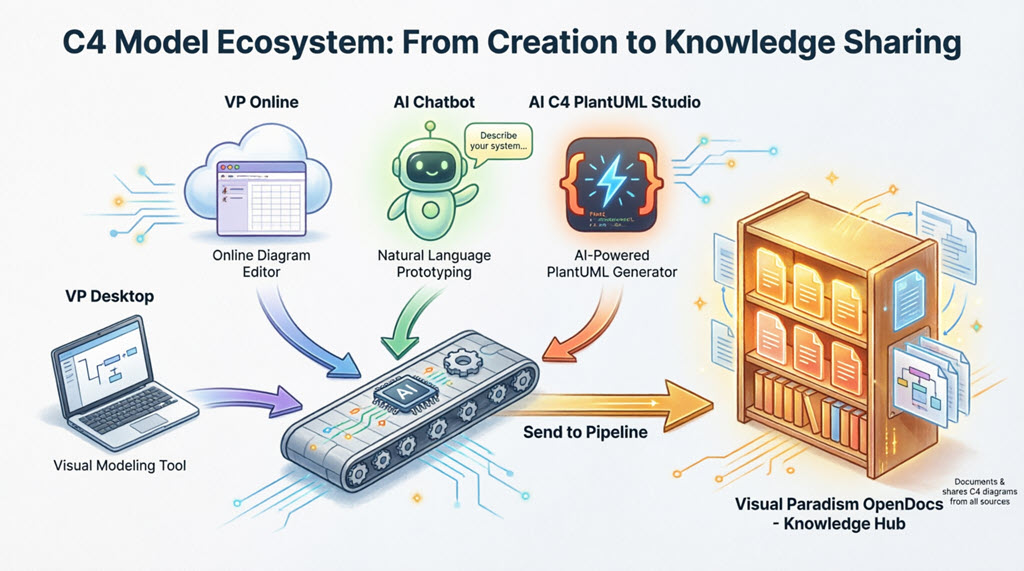
What I found was an interconnected ecosystem spanning Desktop, AI Chatbot, AI C4 Studio (also known as C4-PlantUML Studio), and OpenDocs Pipeline. Here’s how my experience unfolded.
Visual Paradigm Desktop: Where the Real Work Happens
The AI C4 Diagram Generator Changed My Workflow

I’ll be honest—I was resistant to AI diagram generation at first. But after trying the embedded AI C4 Diagram Generator (available via Tools → AI Diagram Generation → C4 Model), I’m a convert. The December 2025 update brought native support for all six C4 diagram types, and it shows.
My typical workflow now starts with a simple prompt like “Generate a C4 Container diagram for an e-commerce system.” Within seconds, I have a standards-compliant diagram that actually respects C4 notation rules. What impressed me most was the AI’s ability to customize for different audiences—high-level views for stakeholders versus technical details for engineers—without me having to rebuild from scratch.
What I love:
-
Offline capability: I can work on flights without internet
-
Smart Sweeper tool: Automatic layout cleanup saves hours of manual adjustment
-
Sub-diagrams: Easy decomposition from Context → Container → Component levels
-
Bidirectional sync: Changes flow between Desktop and Online seamlessly
The learning curve: Expect to spend a day or two mastering the interface if you’re new to VP Desktop. The feature set is comprehensive, which is both a strength and a minor hurdle.
Best for: Enterprise teams needing offline depth, custom attributes, or full lifecycle integration from requirements through architecture to code.
AI Chatbot: My Secret Weapon for Rapid Prototyping
The AI Chatbot at chat.visual-paradigm.com has become my go-to for quick architecture spikes. Here’s a real scenario from last week:
I was onboarding a new developer and needed to explain our microservices architecture. Instead of spending an hour drawing, I typed: “Create a C4 System Context diagram for a ride-sharing app.” The chatbot generated a professional diagram in under 30 seconds. Then I refined it conversationally: “Add a payment gateway,” “Rename the database to PostgreSQL,” and “Suggest improvements for scalability.”
The import feature is seamless: One click sends the diagram to Visual Paradigm Online for cloud refinement. If you have Visual Paradigm Desktop with Modeler Edition (or higher), you can then open and edit those same diagrams in Desktop. Everything syncs to your account automatically.
My verdict: Perfect for rapid prototyping and onboarding. No drawing skills required. I’ve cut my initial diagram creation time by about 70%.
AI C4 Studio: Maintaining Structural Integrity Across Levels
This is where Visual Paradigm truly separates itself from competitors. The AI C4 Studio (also called AI-Powered C4 Diagram Generator or C4-PlantUML Studio) enforces complete C4 hierarchy in a way I haven’t seen elsewhere.
The drill-down navigator is brilliant: A resizable panel lets me switch instantly between Context → Container → Component → Landscape/Dynamic/Sequence/Deployment levels. But here’s the key difference: diagrams generated at one level maintain logical linkage and structural consistency with related views.
Last month, I generated an entire C4 suite from a single text description for a client presentation. The AI didn’t just create isolated diagrams—it built an interconnected model where changes at the Container level automatically reflected in related Component diagrams. This “living documentation” approach means my diagrams stay aligned as systems evolve.
Standout features:
-
Stakeholder-specific views
-
Sequence and dynamic overlays
-
Landscape overviews
-
One-click import to Visual Paradigm Online or Desktop
Team Collaboration: The OpenDocs Pipeline Experience
Our team adopted the OpenDocs Pipeline as our central knowledge hub, and it’s transformed how we share architecture documentation. Here’s my typical workflow:
From Desktop: Right-click any C4 diagram → Export → Send to OpenDocs Pipeline → Add optional comment → Confirm.
From Visual Paradigm Online or AI C4 Studio: Top-menu Export → Send to OpenDocs Pipeline.
From AI Chatbot: After generation, choose Export → Send to OpenDocs Pipeline.
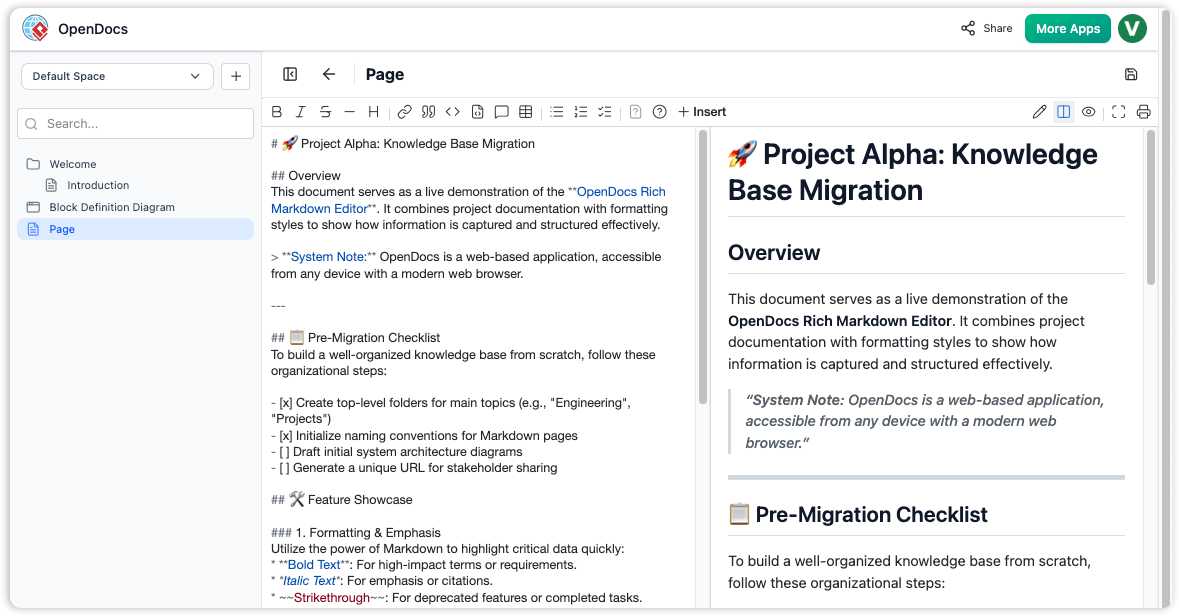
Then, in an OpenDocs document, I go to Edit → Insert → Pipeline sidebar → Select my diagram. The diagram embeds as a living, editable artifact—not a static image. This is huge.
The click-to-edit experience:
-
If the diagram originated in Desktop, clicking the top-right corner opens it in the full Visual Paradigm Desktop application
-
If it came from Online, clicking pops up the Visual Paradigm Online editor for instant refinement
-
Version history is preserved with one-click updates to the latest revision
Real-world impact: Our architecture reviews used to involve emailing PowerPoint slides back and forth. Now, everyone sees real-time changes without manual file transfers. We have a single source of truth with comments for context and rollback capability.
My Integrated Workflows & Best Practices
After three months, here are the workflows that actually work:
-
Quick prototyping: Idea → AI Chatbot → Visual Paradigm Online for refinement → Export to OpenDocs
-
Comprehensive modeling: Idea → AI C4 Studio for full hierarchy → Export to OpenDocs
-
Enterprise documentation: Develop in Visual Paradigm Desktop with AI assistance → Export to OpenDocs
-
Maintenance: Update source in Desktop/Online → Re-export to Pipeline → Update artifact instances across OpenDocs pages
Best practices I’ve learned:
-
Define your audience first (stakeholders vs. engineers)
-
Generate the full view suite with AI, then refine
-
Use sub-diagrams for drill-down clarity
-
Version everything religiously
-
Export to OpenDocs early and often to retain institutional knowledge
Getting Started: My Recommendations
For Desktop: Download from visual-paradigm.com — I recommend Professional+ edition for full AI and import features.
For Online/Chatbot/Studio: Visit online.visual-paradigm.com or chat.visual-paradigm.com — there’s a free tier available; just sign in with a Visual Paradigm account.
For OpenDocs: Accessible via your Visual Paradigm workspace (contact support for team licensing).
Final Verdict
Visual Paradigm’s C4 ecosystem eliminated the pain points I’ve struggled with for years: disconnected diagrams, manual syncing, and lost hierarchy. From a single sentence to enterprise-ready, shareable architecture documentation, everything is connected, AI-assisted, and team-ready.
What impressed me most: The structural integrity across diagram levels. Too many tools treat C4 diagrams as isolated artifacts. Visual Paradigm understands that C4 is a hierarchical model, and their tools enforce that discipline while still providing flexibility.
The bottom line: If you’re serious about C4 modeling and want AI assistance that actually understands software architecture (not just pretty pictures), this ecosystem is worth the investment. I’ve recommended it to three other teams in my organization, and all have adopted it within weeks.
Start experimenting today. Your future self—and your team—will thank you.
- References
- Visual Paradigm Features: Official Visual Paradigm website featuring AI chatbot and diagram generation capabilities.
- Fast Track Use Case Diagrams with Visual Paradigm AI Chatbot: Guide on accelerating use case diagram creation using Visual Paradigm’s AI chatbot.
- Import AI Activity Diagram Visual Paradigm Desktop: Release notes for importing AI-generated activity diagrams into Visual Paradigm Desktop.
- AI Diagram to OpenDocs Pipeline: Documentation on syncing AI-generated diagrams to OpenDocs pipeline for living documentation.
- AI-Assisted UML Class Diagram Generator: An interactive tool that helps users create class diagrams with AI suggestions, validation, PlantUML export capabilities, and design analysis to streamline software modeling.
- AI State Machine Diagram Generator Order Lifecycle: A guide demonstrating how to combine AI-powered visual modeling with specific workflows to generate complex, professional UML state machine diagrams for order lifecycles in seconds.
- Comprehensive Review: Visual Paradigm’s AI Diagram Generation Features: A third-party review analyzing the capabilities, accuracy, and workflow integration of Visual Paradigm’s suite of AI-driven diagram generation tools.
- AI Diagram Generation Overview: The main feature page detailing the broad spectrum of AI capabilities available for generating various types of diagrams within the Visual Paradigm ecosystem.
- AI Sequence Diagram Refinement Tool: A specialized tool designed to refine and enhance existing sequence diagrams using AI to improve interaction flows and message clarity.
- AI Use Case Diagram Refinement Tool: A feature that utilizes artificial intelligence to analyze and refine use case diagrams, ensuring accurate actor relationships and system boundaries.
- AI-Assisted UML Class Diagram Generator (Main Feature): The primary interface for generating UML class diagrams from natural language prompts, offering automated entity detection and relationship mapping.
- AI Component Diagram Generator Update: Release notes announcing updates to the AI component diagram generator, focusing on improved architecture visualization and node identification.
- AI Class Diagram Generator Release: An announcement regarding the launch of the new AI class diagram generator, highlighting its ability to convert requirements directly into structured class models.
- Visual Paradigm Desktop AI Activity Diagram Generation: Updates introducing AI-driven activity diagram generation capabilities within the Visual Paradigm desktop application for process modeling.
- Guide to Powered UML Diagram Generation: A guide (likely in Traditional Chinese based on the path) explaining how to leverage the AI chatbot to powerfully generate UML diagrams through conversational interfaces.
- Choosing Between Generative AI and Visual Paradigm AI: An article comparing general generative AI tools against Visual Paradigm’s specialized AI, discussing trade-offs in accuracy, formatting, and engineering standards.
- Visual Paradigm Chat Interface: The direct access point to the Visual Paradigm AI chatbot, allowing users to interactively request and generate diagrams via text prompts.
- Visual Paradigm AI Demo Video: A YouTube video demonstration showcasing the practical application of Visual Paradigm’s AI features in real-world diagramming scenarios.
- AI Chatbot Feature Page: The official product page describing the integrated AI chatbot that assists users in creating, editing, and understanding diagrams through natural language.
- Visual Paradigm AI Tutorial Video: A second YouTube video providing a tutorial or walkthrough of specific AI diagram generation techniques within the software.
- AI Diagram to OpenDocs Pipeline Update: Release notes detailing a new pipeline that allows AI-generated diagrams to be automatically converted and synced with OpenDocs for documentation purposes.
- AI-Powered C4 PlantUML Studio: Dedicated AI workspace for building and preserving complete, hierarchical C4 models with drill-down integrity.
- OpenDocs Features: Information about Visual Paradigm’s OpenDocs knowledge hub for team collaboration and living documentation.
- C4 Diagram Tool Solution: Visual Paradigm’s professional C4 modeling solution page.
- Best AI Diagram Generator Visual Paradigm Ecosystem: Guide to Visual Paradigm’s AI-enhanced ecosystem for diagram generation.
- Visual Paradigm Download: Download page for Visual Paradigm Desktop application.
- Visual Paradigm Online: Access point for Visual Paradigm’s web-based diagramming tool.
- Sync AI Diagram to OpenDocs Pipeline Guide: Guide on keeping OpenDocs synchronized with diagrams exported from Visual Paradigm Desktop.
- Visual Paradigm Online to OpenDocs Export: Guide on keeping OpenDocs synchronized with diagrams exported from Visual Paradigm Online.