📋 What You’ll Learn
- How to generate use case diagrams from natural language
- Techniques for refining diagrams through conversation
- Methods for creating comprehensive use case documentation
- Best practices for AI-assisted UML modeling
🎥 Watch the Introductory Video
Step 1: Access the AI Chatbot
Start by navigating to Visual Paradigm’s AI Chatbot. This intelligent assistant serves as your gateway to rapid use case diagram creation.
Step 2: Generate Your First Use Case Diagram
The AI Chatbot excels at converting plain English into structured diagrams. Follow these steps:
2.1 Craft Your Initial Prompt
Be specific about actors, actions, and system boundaries. For example:
“Generate a use case diagram for an ATM system where a Customer can check balance, withdraw cash, and change PIN, while a Technician can maintain the machine and load cash.”
2.2 What the AI Does Automatically
- Extracts Entities: Identifies actors (Customer, Technician) and use cases (Withdraw Cash, Check Balance)
- Maps Relationships: Establishes associations, includes, and extends connections
- Creates System Boundary: Places use cases within the boundary and actors outside
The result is a clean, professional diagram with correct actor placement, logical associations, and clear system boundaries—without any manual dragging or configuration.
Step 3: Refine Through Conversation
Once your initial diagram is generated, you can refine it through natural conversation. No need to start over or manually adjust elements.
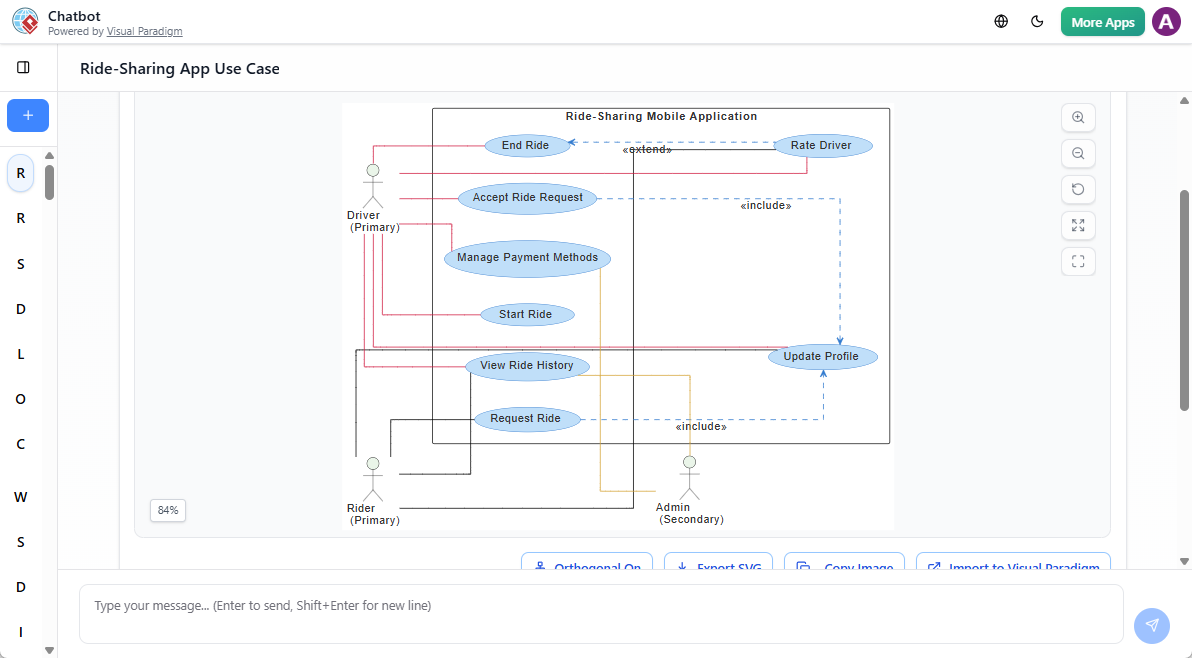
3.1 Add Relationships
Use natural language to define dependencies:
“Add an ‘Include’ relationship from ‘Withdraw Cash’ to ‘Validate PIN’.”
3.2 Adjust Scope
Simplify or expand based on your needs:
“Remove maintenance-related use cases and focus only on banking transactions.”
3.3 Refine Structure
Modify relationships or group use cases without leaving the chat interface. This conversational approach supports iterative design and early validation of system behavior.
Step 4: Generate Use Case Documentation
A diagram alone doesn’t tell the complete story. The AI Chatbot automatically generates detailed descriptions for each use case.
What You’ll Receive:
- Basic Flow: Step-by-step sequence of successful execution
- Alternative Flows: Branches for common variations (e.g., insufficient funds)
- Exception Flows: Error handling and edge cases (e.g., invalid PIN)
✅ These descriptions come in professional formats—bulleted lists or tables—ready for requirement documents or user stories. No more writing flow-of-events from scratch.
Step 5: Export and Continue Editing
Your AI-generated diagram integrates seamlessly with Visual Paradigm’s full modeling ecosystem.
Next Actions:
- Open in Editor: Click to open the diagram in Visual Paradigm Online or Desktop editor
- Customize Styling: Adjust colors, fonts, layout, and add notes
- Export or Share: Generate PNG, PDF, or integrate into documentation
This ensures your diagram remains editable and reusable across teams and projects.
💡 Best Practices for Success
- Be Specific in Prompts: Include clear roles, actions, and constraints for better results
- Iterate with Conversation: Use follow-up commands to refine logic progressively
- Validate AI Output: Always review generated relationships and flows for accuracy
- Combine with Documentation: Pair diagrams with AI-generated descriptions for completeness
🎯 When to Use This Approach
The AI Chatbot is valuable across multiple scenarios:
- Software Development: Define system features before coding begins
- Business Analysis: Translate stakeholder needs into technical requirements
- Academic Projects: Support student learning and thesis modeling
- Agile Teams: Create and update use cases rapidly during sprints
🚀 Why This Matters
Using the AI Chatbot as your AI UML tool reduces the cognitive load of learning UML. Instead of memorizing syntax or struggling with layout, you can:
- Focus on understanding system behavior
- Experiment with requirements without fear of “doing it wrong”
- Receive immediate visual feedback on your inputs
🔍 For those new to UML, the AI Chatbot provides a low-friction entry point—turning abstract concepts into tangible visuals.
📚 Continue Learning
Deepen your understanding with these comprehensive resources:
- How AI Chatbot Can Help You Learn UML Faster
This article explains how the AI Chatbot creates an interactive learning environment for UML, offering real-time visualization and feedback to help beginners grasp modeling concepts quickly and effectively. - AI-Powered Use Case Diagram Analyzer
A detailed overview of how Visual Paradigm’s AI automatically generates use case diagrams from natural language, with support for refining models and integrating with existing workflows. - AI Use Case Diagram Generator: A Definitive Guide
A step-by-step guide that walks users through generating and refining use case diagrams using the AI Chatbot, emphasizing efficiency and accuracy in requirement gathering. - AI-Powered UCDD Assistant Guide
A comprehensive reference on using AI to generate problem statements and use case descriptions, helping teams align business needs with technical design. - Use Case Modeling: A Comprehensive Guide
A foundational resource covering the principles of use case modeling, including actor roles, system boundaries, and relationship types, ideal for both new and experienced users. - AI Deployment Diagram Example: Food Delivery Platform
Demonstrates how the AI Chatbot supports not only use case diagrams but also deployment, activity, and other UML diagrams, showcasing its versatility across modeling tasks. - System Boundary in Use Case Diagrams
Explains the role of the system boundary in defining what’s inside and outside a system, helping users correctly position actors and use cases in their diagrams.
🎓 Ready to Start?
Now that you’ve learned the process, head over to Visual Paradigm’s AI Chatbot and create your first AI-generated use case diagram. Remember: start specific, iterate often, and let the AI handle the heavy lifting while you focus on system design.