In the landscape of modern software development, communication is the currency of delivery. User stories serve as the primary vehicle for conveying value from a business perspective to the engineering team. When these descriptions lack precision, the entire development lifecycle suffers. Ambiguity is not merely an annoyance; it is a risk that manifests as rework, budget overruns, and product friction. This article explores the mechanics of writing clear, actionable, and valuable user story descriptions. It provides a framework for teams to align their understanding and reduce the cognitive load required to interpret requirements.
Why Clarity Matters in Agile Delivery 🎯
The foundation of any successful project lies in shared understanding. When a user story is vague, different team members interpret it through their own mental models. A developer might focus on technical implementation, while a tester focuses on edge cases, and a product owner focuses on business value. If these three perspectives are not aligned, the resulting feature may satisfy the code but fail the user.
Clarity is not just about writing good sentences; it is about reducing the need for assumptions. Every assumption made during development is a potential point of failure. By ensuring descriptions are precise, teams can:
- Reduce Rework: Clear requirements mean the build matches the expectation the first time.
- Speed Up Estimation: Developers can estimate effort more accurately when the scope is well-defined.
- Improve Testing: Testers can create comprehensive test cases based on explicit criteria.
- Enhance Collaboration: Less time is spent asking clarifying questions, and more time is spent building.
Consider the scenario where a story asks for a “user-friendly interface.” This phrase is subjective. One developer might interpret this as minimal clicks, while another might interpret it as bright colors. Without specific constraints, the output will vary, leading to frustration during the review phase. Clarity eliminates the guesswork.
The Anatomy of a Clear User Story 🏗️
A standard user story follows a specific structure designed to keep the focus on the user and the value delivered. While there are variations in how teams write these, the core components remain consistent. A complete description typically includes a headline, the story statement itself, and acceptance criteria.
1. The User Story Statement
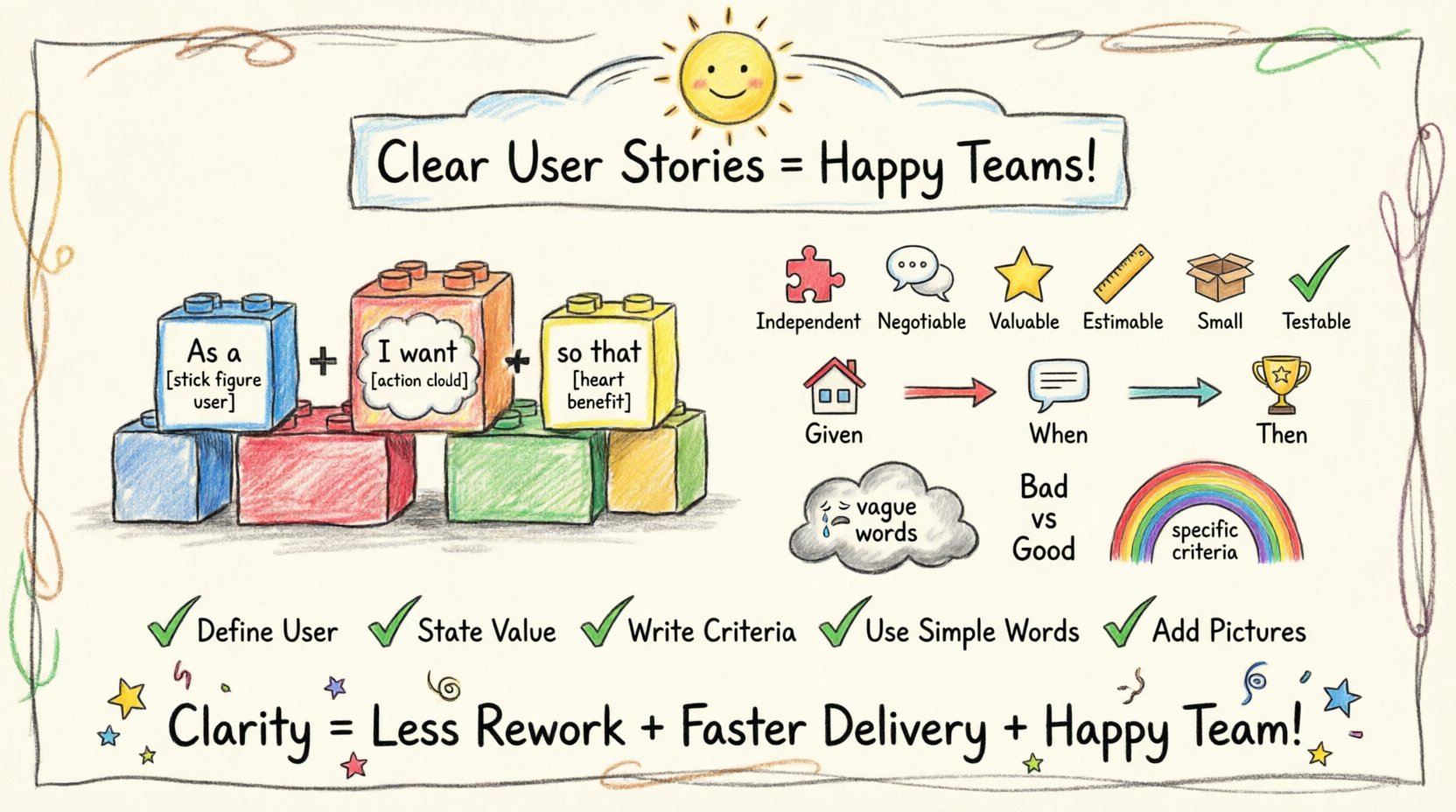
The most common format is the “Who, What, Why” structure. This template forces the writer to consider the actor, the action, and the motivation.
- Who (Role): Identify the specific persona. Is it an administrator, a guest, or a paying customer?
- What (Action): Describe the specific capability. Use active verbs.
- Why (Benefit): Explain the value. This helps prioritize the work if conflicts arise.
Example: As a registered user, I want to reset my password, so that I can regain access to my account if I forget my credentials.
Notice how the example above is specific. It does not say “fix login.” It specifies the action and the reason. This context guides the technical approach.
2. The Headline
Before the full description, a concise title is essential. This title acts as a reference point in backlogs and meetings. It should be descriptive enough to be understood without reading the full text, but brief enough to fit in a list view.
- ❌ Poor: Update Profile
- ✅ Good: Allow Users to Update Profile Picture and Bio
3. Acceptance Criteria
The acceptance criteria define the boundaries of the work. They are the conditions that must be met for the story to be considered complete. These are not vague goals; they are testable statements.
- Functional Requirements: What the system must do.
- Non-Functional Requirements: Performance, security, and accessibility standards.
- Edge Cases: How the system behaves when things go wrong.
The Cost of Ambiguity 💸
When user stories lack clarity, the cost is not just measured in hours spent coding. It is measured in the degradation of team morale and product quality. Ambiguity creates a ripple effect throughout the software delivery pipeline.
1. The Rework Cycle
If a developer builds a feature based on a misunderstanding, that work is likely to be rejected during the review process. This rejection does not mean the work is worthless, but it means it must be discarded or significantly altered. This cycle consumes resources that were allocated for new value creation.
2. Integration Issues
Modern applications consist of many interconnected parts. If a story regarding one module is unclear, it can break dependencies in other modules. For example, if an API endpoint is described vaguely, the frontend team might consume it incorrectly, causing errors in the user experience.
3. Technical Debt Accumulation
Unclear requirements often lead developers to make quick decisions to “move forward.” These quick decisions often bypass best practices because the full scope was not understood. Over time, these shortcuts accumulate into technical debt, making future development slower and more expensive.
Frameworks for Structuring Requirements 📐
To maintain consistency, teams often adopt frameworks to evaluate their stories. One well-known approach is the INVEST model. While originally designed for stories in general, it serves as a checklist for clarity.
| Principle | Description | Clarity Impact |
|---|---|---|
| Independent | Stories should not rely on other stories to be delivered. | Reduces dependency confusion. |
| Negotiable | Details can be discussed and refined before work begins. | Encourages collaboration and clarification. |
| Valuable | The story must deliver value to the user or business. | Ensures the “Why” is clear. |
| Estimable | The team must be able to guess the effort required. | Requires enough detail to assess size. |
| Small | Stories should be small enough to complete in a sprint. | Forces breaking down complex requirements. |
| Testable | There must be a way to verify the work is done. | Directly links to acceptance criteria. |
When writing a story, run it through this checklist. If a story is not testable, it is not clear. If it is too large to estimate, it is too vague.
Crafting Acceptance Criteria 🧪
Acceptance criteria are the safety net of the user story. They prevent the “it works on my machine” syndrome by defining success objectively. There are several ways to format these criteria, but the goal is always the same: testability.
1. The Given/When/Then Format
This structure is widely used because it reads like a test case. It separates the context, the action, and the expected outcome.
- Given: The initial context or state of the system.
- When: The action taken by the user or system.
- Then: The observable result.
Example: Given a user is logged in When they navigate to the settings page Then they should see the “Change Password” button
2. Scenario-Based Criteria
Complex features often have multiple paths. Instead of one long paragraph, break the criteria into distinct scenarios. This helps testers visualize different flows.
- Happy Path: The ideal scenario where everything goes right.
- Alternate Path: A valid scenario that deviates from the norm (e.g., user has no internet).
- Error Path: Handling invalid inputs or system failures.
3. Non-Functional Requirements
Clarity extends beyond functionality. Performance and security are often overlooked in stories. If a story does not specify how fast a page should load, it will be implemented as slowly as possible unless constrained.
- Performance: “Page load time must be under 2 seconds.”
- Security: “Passwords must be hashed using bcrypt.”
- Accessibility: “All interactive elements must be keyboard navigable.”
Common Mistakes to Avoid 🚫
Even experienced teams fall into traps when writing descriptions. Recognizing these patterns is the first step to improvement.
1. Using Subjective Language
Words like “fast,” “easy,” “beautiful,” or “robust” are open to interpretation. They do not provide a concrete standard for success.
- Bad: “Make the dashboard look better.”
- Good: “Increase font size to 14px and ensure high contrast ratio.”
2. Focusing on the Solution, Not the Problem
Stories should describe the need, not dictate the implementation. If you write “Add a dropdown menu,” you restrict the developer’s ability to find a better solution, like a modal or a search bar.
- Bad: “Add a button to the sidebar.”
- Good: “Allow users to export data in CSV format.”
3. Overloading the Story
One story should address one specific value proposition. If a story combines a login feature with a password reset feature, it becomes too large to estimate and too complex to test.
- Bad: “Implement user registration and login.”
- Good: “Implement user registration.” AND “Implement user login.”
4. Ignoring the Context
Developers need to know where the feature fits. If a story does not mention the platform or the specific user journey, context is lost.
The Definition of Ready (DoR) ✅
To ensure clarity before work begins, teams should establish a Definition of Ready. This is a checklist of conditions that must be met before a story enters a sprint. It acts as a gatekeeper to prevent vague work from entering the development pipeline.
A typical DoR includes:
- Story Title: Clear and concise.
- User Role: Defined.
- Acceptance Criteria: Written and agreed upon.
- Mockups/Wireframes: Attached if UI is involved.
- Dependencies: Identified and documented.
- Estimates: Completed by the team.
By enforcing a DoR, the team signals that they are ready to work. If a story is unclear, it is sent back for refinement. This protects the sprint capacity and ensures focus.
Refinement and Collaboration 🤝
Writing a user story is rarely a solitary activity. It is a collaborative effort that happens over time. The initial draft is just a starting point. The true clarity emerges through discussion.
1. The Refinement Session
Regular meetings dedicated to reviewing the backlog are essential. During these sessions, the team walks through stories to identify gaps. Questions are asked, and criteria are added. This is where ambiguity is exposed.
2. The Three Amigos
A common practice involves three roles discussing a story before development starts: a Business Analyst (or Product Owner), a Developer, and a Tester. This triangulation ensures that business value, technical feasibility, and testability are all addressed.
3. Visual Aids
Text alone is often insufficient. Flowcharts, wireframes, and diagrams can clarify complex interactions. If a story involves a multi-step process, a flow diagram is better than a paragraph of text.
Measuring Clarity 📊
How do you know if your user stories are actually clear? You can measure this through feedback loops and metrics.
- Rejection Rate: If stories are frequently returned during refinement, clarity is low.
- Change Frequency: If requirements change mid-sprint, the initial story was likely incomplete.
- Query Volume: If developers are constantly asking the Product Owner questions about the same story, the description needs work.
- First-Time Fit: The percentage of stories that pass acceptance criteria on the first test attempt.
Bad vs. Good Examples 🆚
Comparing examples side-by-side is often the most effective way to learn. The following table illustrates the difference between vague and clear descriptions.
| Feature | Vague Description | Clear Description |
|---|---|---|
| Search | Users should be able to search for products. | As a shopper, I want to filter products by price range, so that I can find items within my budget. Acceptance: Search bar accepts numeric input; results update dynamically. |
| Notifications | Send emails to users. | As a system, I want to send an email notification when a password is reset, so that the user knows their account is secure. Acceptance: Email sent within 1 minute; link expires in 24 hours. |
| Reporting | Make reports look good. | As a manager, I want to export a monthly sales report as a PDF, so that I can present data to stakeholders. Acceptance: File size under 5MB; includes date range header. |
| Performance | Make the site fast. | As a visitor, I expect the homepage to load in under 3 seconds on a 4G connection. Acceptance: Load time measured via web vitools; 95th percentile compliance. |
Remote Work and Documentation 🌍
In distributed teams, clarity becomes even more critical. Without the ability to turn around and ask a neighbor a quick question, the written word carries more weight. Documentation must be self-contained.
- Centralize Information: Store stories and criteria in a single source of truth.
- Record Decisions: If a clarification is made verbally, document it in the story comments.
- Time Zone Awareness: Allow time for review before work begins. Do not assume immediate availability.
Iterative Improvement 🔄
Writing clear user stories is a skill that improves with practice. Teams should regularly review their own stories to see where they went wrong. Retrospectives should include a discussion on requirement quality.
Ask the team:
- Did we have to guess on any features?
- Were there any misunderstandings during the sprint?
- Did the acceptance criteria catch the bugs?
Use these answers to adjust the templates and guidelines for the next cycle. Clarity is not a destination; it is a continuous process of refinement.
Summary of Best Practices 🏆
To wrap up, here is a consolidated list of actions to take for better clarity:
- Define the User: Always specify who is performing the action.
- State the Value: Never leave the “so that” part out.
- Write Criteria: Ensure every story has testable conditions.
- Use Simple Language: Avoid jargon where possible.
- Visualize: Use diagrams for complex flows.
- Review Early: Discuss stories before the sprint starts.
- Refine Often: Update stories as new information emerges.
By adhering to these principles, teams can build a culture of precision. This precision translates directly into higher quality software, happier stakeholders, and a more sustainable development pace. The effort invested in writing a clear story pays dividends in every stage of the build process.
Remember, the goal is not just to write words on a screen. The goal is to create a shared mental model that allows a team to execute complex tasks with confidence and alignment. When clarity is prioritized, the focus shifts from fixing misunderstandings to delivering value.