Customer experience is defined not by what a business says, but by what the user feels. While Customer Journey Maps provide the chronological skeleton of a user’s interaction, they often lack the internal texture of the human experience. This is where the Empathy Map becomes essential. By layering the emotional and cognitive dimensions onto the structural timeline, teams can build a product or service that truly resonates. This guide details the process of creating Empathy Maps, ensuring they serve as a robust companion to your existing journey mapping efforts.
What is an Empathy Map? 🧠
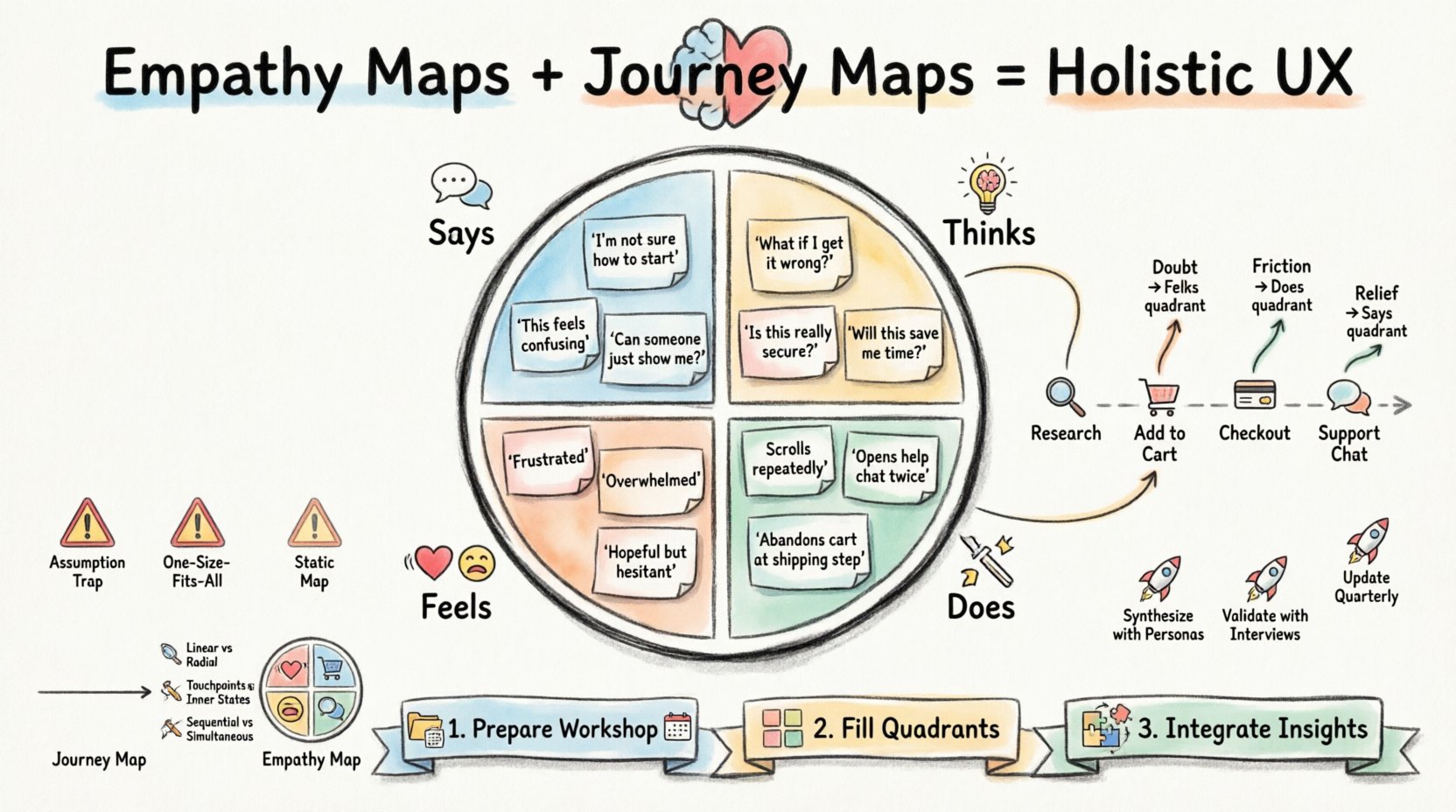
An Empathy Map is a visual representation of the user’s experience regarding a specific product or service. It captures what the user says, thinks, does, and feels. Unlike a journey map, which tracks a process over time, an empathy map focuses on the psychological state of the user at a specific moment or across a defined scenario.
This tool bridges the gap between observable behaviors and internal motivations. It allows stakeholders to step outside their own biases and view the situation through the user’s eyes. By organizing qualitative data into four distinct quadrants, teams can identify gaps in understanding and uncover opportunities for improvement.
- Says: Direct quotes and verbatim feedback from users.
- Thinks: Internal monologues and beliefs that may not be spoken aloud.
- Does: Observable actions and behaviors.
- Feels: Emotional states and sentiments.
Why Pair Empathy Maps with Journey Maps? 🤝
Using a Journey Map in isolation can lead to a linear, functional view of the experience. It tells you when a user does something, but not why. An Empathy Map answers the why. When used together, they create a holistic picture of the customer experience.
A Journey Map outlines the touchpoints and channels. An Empathy Map provides the emotional context for those touchpoints. For instance, a journey map might show a user navigating a checkout page. An empathy map for that same step reveals anxiety about payment security or frustration with the number of required fields.
Comparison: Journey Map vs. Empathy Map
| Feature | Customer Journey Map | Empathy Map |
|---|---|---|
| Focus | Timeline and Process | Psychological State |
| Structure | Linear (Stages) | Radial (Quadrants) |
| Output | Touchpoints & Pain Points | Insights & Motivations |
| Best Used For | Optimizing flow and friction | Deepening user understanding |
Preparing for the Workshop 🛠️
Creating an Empathy Map is a collaborative exercise. It requires the right participants, the right data, and the right environment. Rushing this process often leads to assumptions rather than evidence-based insights.
1. Define the Scope
An Empathy Map should not cover the entire lifecycle of a customer. It is too broad. Instead, focus on a specific persona, a specific task, or a specific moment of truth. For example, “The moment a user attempts to reset their password” is a better scope than “The entire onboarding process.” Narrowing the focus allows for deeper, more granular insights.
2. Gather Qualitative Data
You cannot create a valid map without evidence. Relying on internal opinions will result in a map that reflects the team, not the user. Collect data from:
- Customer support transcripts.
- Usability testing sessions.
- One-on-one interviews.
- Social media comments.
- Survey open-ended responses.
3. Assemble the Team
Invite cross-functional members to the session. Designers, developers, marketers, and customer support agents all have different perspectives on the user. Including diverse roles prevents siloed thinking. Ensure you have a facilitator to keep the discussion focused on the data, not personal opinions.
4. Choose the Canvas
Whether you use a physical whiteboard or a digital collaboration space, the goal is visibility. Ensure there is enough space to write sticky notes or draw diagrams. The medium should not distract from the content. If using a digital tool, ensure it supports real-time collaboration without requiring specific software accounts that create friction.
The Four Quadrants: A Deep Dive 🔍
The core of the Empathy Map lies in the four quadrants. Each quadrant requires specific types of inquiry and data collection. Here is how to populate them effectively.
1. Says 💬
This quadrant contains direct quotes. It is the most straightforward section. During interviews or testing, record exactly what the user says. Do not paraphrase. If a user says, “I just want this to work,” write that down. Avoid filtering out negative comments; they are often the most valuable.
- Key Question: What are the exact words the user uses to describe their experience?
- Tip: Use sticky notes for each quote. This allows you to group similar sentiments later.
2. Thinks 🤔
What a user thinks is often different from what they say. Users may hesitate to share negative thoughts due to politeness or fear of judgment. This quadrant requires interpretation. Look for gaps between their actions and their words.
- Key Question: What is on their mind that they aren’t saying?
- Tip: Ask yourself, “If they could say this aloud, what would it be?” Look for underlying concerns about privacy, cost, or competence.
3. Does 🛠️
Actions speak louder than words. This section tracks observable behaviors. How do they navigate the interface? Do they click the back button? Do they hesitate before entering credit card information? This quadrant grounds the map in reality.
- Key Question: What physical or digital actions are they taking?
- Tip: Record both successful actions and workarounds. Workarounds indicate friction points.
4. Feels 😐
Emotions drive decisions. This quadrant captures the affective state of the user. Are they frustrated? Excited? Anxious? Confused? Use adjectives that describe the intensity of the emotion. This is often the most difficult quadrant to populate accurately without deep empathy.
- Key Question: How does this experience make them feel?
- Tip: Use an emotional scale (e.g., Happy to Angry) to categorize sentiments. Look for shifts in emotion throughout the interaction.
Integrating the Map into the Journey 📈
Once the Empathy Map is created, it must be integrated into the broader Journey Map. This integration ensures that the emotional context is linked to the specific stages of the user’s path.
Step 1: Select the Journey Stage
Identify which stage of the journey the Empathy Map represents. Is this the discovery phase? The purchase phase? The support phase? Label the Empathy Map clearly so it is not lost in a sea of information.
Step 2: Map Insights to Touchpoints
Take the insights from the “Thinks” and “Feels” quadrants and place them at the corresponding touchpoint on the Journey Map. If the user feels anxiety during the checkout process, annotate the checkout touchpoint on the Journey Map with a warning icon or a specific insight note.
Step 3: Identify Opportunities
Look for the friction between what the user needs to do (Does) and what they feel (Feels). If a user feels confused (Feels) but the process is simple (Does), there is a communication gap. If a user thinks it is expensive (Thinks) but the price is clear (Says), there is a value perception issue. These gaps are where innovation happens.
Common Pitfalls and How to Avoid Them ⚠️
Even with the best intentions, teams can misapply Empathy Maps. Being aware of these common errors helps maintain the integrity of the research.
- Assuming rather than observing: Do not fill in the “Thinks” quadrant with your own thoughts. If you do not have data, leave it blank or mark it as a hypothesis to be tested.
- Creating one map for all users: A map for a power user is different from a map for a novice. Ensure your persona segmentation is clear before starting.
- Ignoring the “Says”: Sometimes users say one thing but do another. If you focus only on what they say, you miss the behavioral reality.
- Static maps: User emotions change. An Empathy Map is a snapshot in time. Revisit it regularly as user expectations evolve.
From Insights to Action 🚀
The goal of creating an Empathy Map is not to make a pretty diagram. The goal is to drive change. Once the map is complete, the team must synthesize the findings into actionable items.
1. Prioritize Pain Points
Not all insights are equal. Use a matrix to prioritize based on impact and frequency. A high-impact, high-frequency pain point should be addressed immediately.
2. Define Success Metrics
How will you know if the empathy gap is closed? If the “Feels” quadrant indicates frustration with speed, define a metric for speed (e.g., page load time or task completion time). Align the emotional goal with a measurable business metric.
3. Share Widely
Keep the map visible. Place digital copies on project dashboards or print physical copies for team walls. If the team does not see the user’s perspective daily, the map becomes a forgotten artifact.
Advanced Techniques for Deeper Insight 🧩
For teams looking to go beyond the basics, there are advanced methods to enrich the Empathy Map.
Empathy Mapping over Time
Instead of a single snapshot, create a series of Empathy Maps that track the user’s emotional state across different days or weeks. This longitudinal approach reveals patterns in emotional resilience or recurring frustration points.
Stakeholder Empathy
Apply the same framework to internal stakeholders. What does the support agent think while handling the user’s complaint? Understanding the employee experience often clarifies the customer experience.
Bias Checks
After completing the map, review it for bias. Are we assuming the user is tech-savvy? Are we assuming they care about price over convenience? Challenge every assumption written on the board.
Final Thoughts on User-Centric Design 🌟
Building a product that users love requires more than functional efficiency. It requires emotional connection. The Empathy Map is a tool that forces teams to slow down and consider the human behind the screen. By combining this deep psychological insight with the structural clarity of a Journey Map, organizations can design experiences that are not just usable, but meaningful.
Remember that this is a living document. As you test changes and gather new data, the map must evolve. Keep the user at the center of every decision. Let their words, thoughts, actions, and feelings guide the path forward.
Start your next workshop with this framework. Gather your team, collect your data, and begin the work of truly understanding who you are building for.