Designing digital products requires understanding the people who will use them. However, the common perception is that thorough user research demands significant financial investment. This belief often stalls progress for startups, small businesses, and solo practitioners. The reality is that effective usability testing does not require a massive budget or enterprise-grade software suites. It requires discipline, strategy, and a focus on the right questions.
When resources are constrained, every dollar spent must yield actionable insights. This guide outlines a structured approach to conducting usability testing that prioritizes insight over expense. We will explore methods that leverage existing technology, low-cost recruitment channels, and manual analysis techniques. The goal is to build a sustainable research practice that integrates into your workflow without draining your funds.
Understanding the Core Objective 🎯
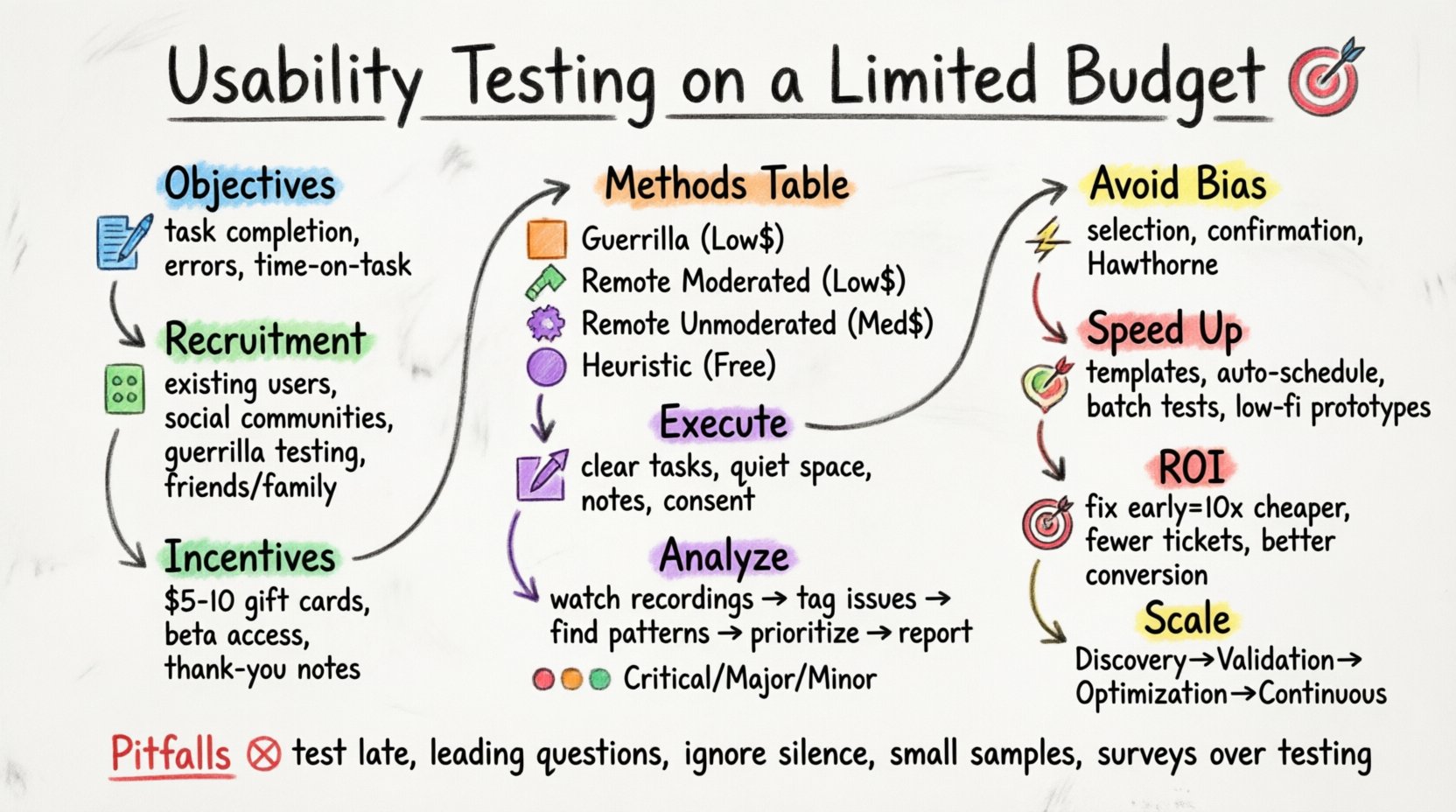
Before spending money, you must define what success looks like. Usability testing is not about proving your design is perfect; it is about finding where users struggle. A limited budget forces you to be more specific about your hypotheses. Instead of broad “feel-good” metrics, focus on task completion rates, error frequency, and time-on-task.
Key Objectives for Low-Budget Testing:
- Identify critical friction points in the user journey.
- Validate if the core value proposition is communicated clearly.
- Ensure navigation logic aligns with user mental models.
- Reduce the cost of post-launch fixes by catching issues early.
By narrowing the scope, you reduce the number of sessions required to reach statistical significance for your specific goals. This focus prevents the “boil the ocean” syndrome where teams test everything and learn nothing.
Recruiting Participants Without Breaking the Bank 👥
Recruitment is often the most expensive part of research. Traditional panels charge per participant. However, you can bypass these costs by leveraging your own networks and community channels. The quality of participants matters more than the size of the sample.
Low-Cost Recruitment Strategies:
- Existing User Base: Reach out to current users via email or in-app notifications. Offer them early access to features or a small gift card in exchange for feedback.
- Social Communities: Utilize industry-specific forums, Slack groups, or Reddit threads where your target audience hangs out. Post clear recruitment criteria.
- Guerrilla Testing: Conduct in-person or remote sessions in public spaces or virtual waiting rooms. This method relies on convenience and immediate availability.
- Friends and Family: While this introduces bias, it is excellent for early-stage concept validation. Ensure they do not know the design intent to avoid social desirability bias.
- Internal Stakeholders: Non-design team members can act as proxies for users. They provide a sanity check on internal jargon and assumptions.
Incentive Structure:
Even with a tight budget, offering an incentive is standard practice to respect the participant’s time. You do not need to offer large sums.
- Small digital gift cards (e.g., $5-$10).
- Access to beta features or premium content.
- A handwritten thank-you note or public acknowledgment.
- Donation to a charity in their name.
Selecting the Right Methodology 🛠️
Not all testing requires a moderator in the room. Choosing the right method depends on your stage of development and specific questions. Below is a comparison of methods suitable for limited budgets.
| Method | Cost | Best For | Resource Intensity |
|---|---|---|---|
| Guerrilla Testing | Low | Early wireframes, quick feedback | Low |
| Remote Moderated | Low | Complex flows, deep qualitative insight | Medium |
| Remote Unmoderated | Medium | Large scale, quantitative data | Low |
| Heuristic Evaluation | Free | Internal audit, compliance check | Medium |
1. Guerrilla Testing 🏃
This involves approaching potential users casually. You might find them in a coffee shop or a relevant online community. The goal is to ask them to perform a specific task on your screen or prototype and observe their reaction. It is fast, cheap, and provides immediate validation.
2. Remote Moderated Testing 💻
Using screen-sharing capabilities built into operating systems, you can guide a participant through a task remotely. You can ask them to think aloud, which reveals their cognitive process. This method is superior for understanding why a user makes a mistake.
3. Remote Unmoderated Testing 📹
Participants complete tasks on their own time. You record their screen and audio. This allows you to gather data from geographically dispersed users without scheduling conflicts. While setup takes time, the per-session cost is negligible.
4. Heuristic Evaluation 🔍
This is an internal audit. Your team reviews the interface against established usability principles. It costs nothing but time. It is excellent for catching obvious errors before involving external users.
Executing the Test Session 🎬
Once you have participants and a method, the execution phase determines the quality of your data. You do not need expensive recording hardware. Modern devices capture high-quality video and audio.
Preparation Checklist:
- Task Scenarios: Write clear, neutral instructions. Avoid leading language like “Click the blue button.” Instead, say “Find the option to save your changes.”
- Environment: Ensure the participant is in a quiet space. For remote tests, instruct them to mute notifications.
- Note-Taking System: Prepare a spreadsheet or document to log issues in real-time. Categorize them as Severity 1 (Critical), Severity 2 (Major), or Severity 3 (Minor).
- Consent: Always obtain verbal or written consent to record the session. This builds trust and protects your legal standing.
Analysis: Turning Observations into Insights 📊
Collecting data is only half the work. The value lies in synthesizing that information into actionable changes. Without a budget for dedicated analysts, the design team must own this process.
Step-by-Step Analysis:
- Review Recordings: Watch each session. Pause when a user hesitates, clicks the wrong thing, or expresses frustration.
- Tag Issues: Assign tags to specific UI elements (e.g., “Navigation,” “Form Validation,” “CTA Visibility”).
- Identify Patterns: If three out of five users fail to find the search bar, this is a pattern. If only one user struggles with a specific field, it might be an individual preference.
- Prioritize: Create a matrix based on Impact vs. Effort. High impact, low effort issues should be fixed immediately.
- Document: Write a brief report summarizing findings. Include video clips to illustrate the problem for stakeholders.
Severity Rating Scale:
- Severity 1: Blocks user from completing a critical task. Requires immediate fix.
- Severity 2: Causes confusion or extra steps. Should be fixed in the next sprint.
- Severity 3: Minor annoyance. Fix if time permits.
Managing Bias in Low-Cost Research 🧠
When you cannot afford large sample sizes, bias becomes a significant risk. You must actively manage how you recruit and interpret data.
Common Biases:
- Selection Bias: Testing only with friends who have the same background as you. Counter this by setting strict inclusion criteria (e.g., “Must use mobile device only”).
- Confirmation Bias: Looking for data that supports your design choices. Counter this by asking “What did you expect to happen here?” rather than “Did you like this?”
- Hawthorne Effect: Users behave differently because they are being watched. Mitigate this by making them comfortable and emphasizing that you are testing the product, not them.
Optimizing Your Workflow for Speed ⚡
Time is money. A streamlined workflow ensures you get insights faster, allowing you to iterate more times within your budget.
Efficiency Tips:
- Template Creation: Build a standard test script and consent form template. Reusing these saves setup time for every new test.
- Automated Scheduling: Use calendar links to let participants book their own slots. This removes the back-and-forth emails.
- Batch Testing: Run multiple sessions in a single day to maintain momentum and reduce context switching.
- Lightweight Prototyping: Use paper prototypes or low-fidelity wireframes for early testing. High-fidelity designs often distract users from the flow.
Measuring Return on Investment 💰
Stakeholders often want to know why they should invest in research. For low-budget testing, the ROI is calculated through risk reduction and efficiency.
Calculating Value:
- Cost of Change: Fixing a bug after launch is 10x more expensive than fixing it during design. Documenting this ratio helps justify testing time.
- Support Tickets: If testing reveals a confusing checkout process, you can estimate the reduction in customer support calls.
- Conversion Rates: Even a small improvement in task completion can lead to significant revenue increases over time.
- Team Alignment: Seeing a user struggle firsthand aligns the entire team around user needs, reducing internal debate time.
Scaling Your Research Practice 📈
Start small. You do not need to test every screen. Prioritize the critical paths: sign-up, purchase, and core content consumption. As your product matures, you can allocate more resources to continuous testing.
Phased Approach:
- Phase 1: Discovery. Test concepts and flows with paper or low-fidelity screens. Cost: Minimal.
- Phase 2: Validation. Test interactive prototypes. Cost: Low.
- Phase 3: Optimization. Test the live product with specific features. Cost: Medium.
- Phase 4: Continuous. Integrate testing into the development cycle. Cost: Variable.
By treating testing as a habit rather than a project, you normalize the activity. It becomes part of the culture, requiring less formal planning and budget approval over time.
Common Pitfalls to Avoid 🚫
Even with a small budget, mistakes can waste your time. Be aware of these common traps.
- Testing Too Late: Waiting until the product is fully built makes changes expensive. Test early and often.
- Leading Questions: Asking “Was that button easy to find?” biases the answer. Ask “How did you find that button?”
- Ignoring Silence: When a user is quiet, do not jump in to help. Let them struggle. Their frustration is data.
- Small Sample Sizes: Five users are generally enough to find 80% of usability issues. Do not waste time recruiting 20 users for a single task.
- Over-Reliance on Surveys: Surveys tell you what people think. Testing tells you what people do. Trust behavior over self-reported opinion.
Tools vs. Manual Methods 🛠️
Software can automate data collection, but it often costs money. Manual observation is free and often more insightful.
Manual Data Collection:
- Screen Recording: Use the built-in screen recorder on your operating system.
- Audio Recording: Use the voice memo app on your phone if the participant is in person.
- Annotation: Use a digital whiteboard to draw over screenshots during the session.
- Spreadsheet: Track issues, severity, and frequency in a simple grid.
While specialized software offers heatmaps and click tracking, these require traffic to generate data. For new products, manual testing provides the depth that automated tools cannot offer without volume.
Final Thoughts on Budget Constraints 💡
Limitations often breed creativity. When you cannot afford to do everything, you are forced to focus on what matters most. Usability testing is not about having the most sophisticated tools; it is about listening to the user.
By planning carefully, recruiting strategically, and analyzing rigorously, you can conduct high-quality research with minimal spend. The insights gained from a single well-run session are often more valuable than a month of expensive data that no one reviews. Start today. Pick a task. Find a user. Watch them work. The answers are waiting.
Remember, the goal is not perfection. The goal is progress. Every test you run brings the product closer to the needs of the people who will use it. This iterative process is the heartbeat of successful design. Keep it moving, keep it low-cost, and keep it human.