Creating precise requirement cards is the foundation of successful software delivery. When a card contains vague language, the entire development team risks misalignment. Ambiguity in requirement cards often leads to rework, delayed timelines, and frustrated stakeholders. This guide explores how to eliminate uncertainty from your user stories and requirement specifications.
Requirement cards act as the primary communication tool between product owners, developers, and testers. They define what needs to be built and why. However, natural language is inherently flexible. Words can mean different things to different people. A developer might interpret “fast” differently than a user. A tester might look for a different “edge case” than the product owner. The goal is to narrow this gap.
This article provides a deep dive into the mechanics of clear requirements. It covers common pitfalls, structural techniques, and review strategies to ensure every card is actionable.
🔍 What Defines Ambiguity?
Ambiguity occurs when a statement allows for multiple interpretations. In the context of requirement cards, this means the implementation is not unique or obvious. If a developer has to ask, “What do you mean by this?”, the requirement is ambiguous.
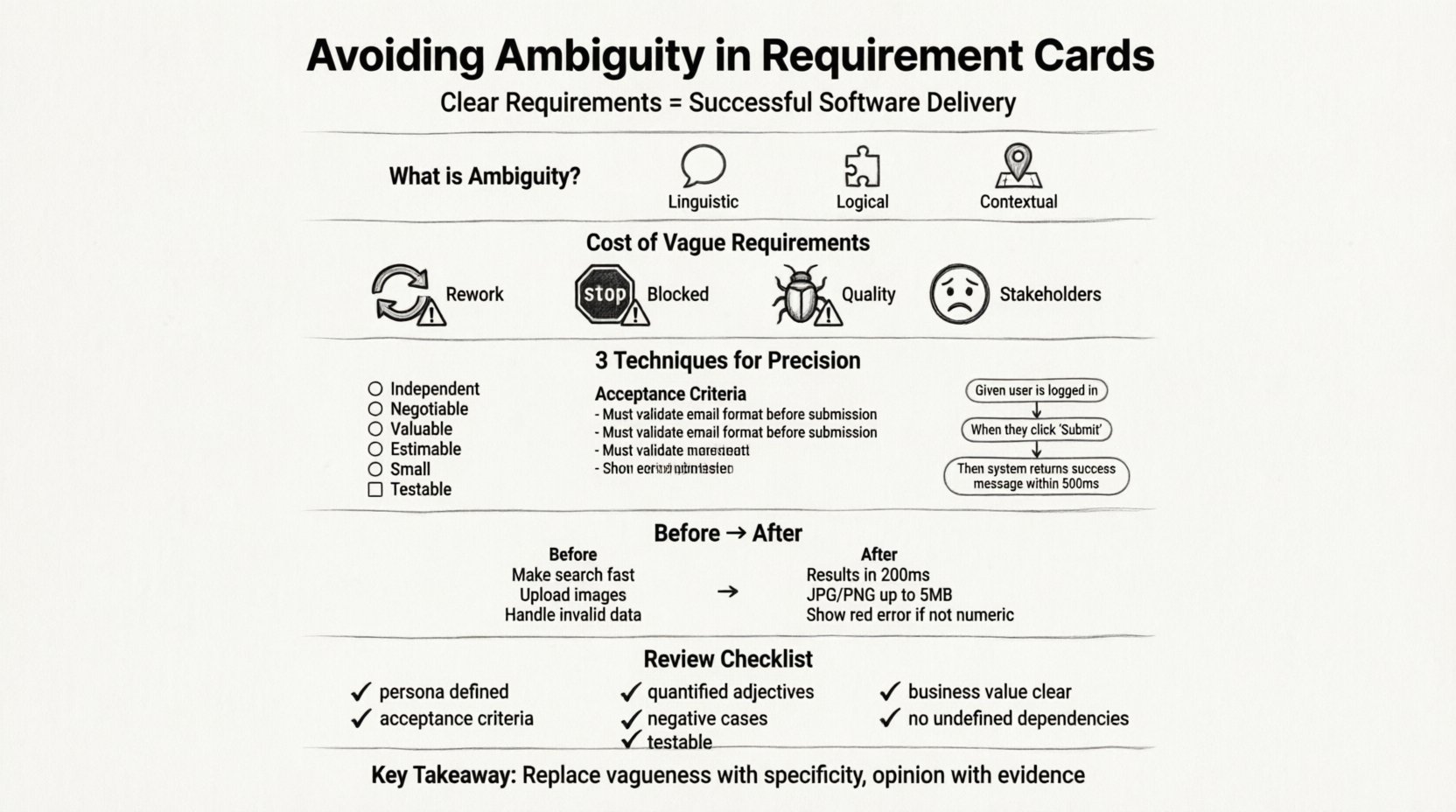
It is not just about grammar. It is about logic and measurability. Consider the following dimensions of ambiguity:
- Linguistic: Vague adjectives like “user-friendly” or “robust”.
- Logical: Missing conditions or undefined states.
- Contextual: Lack of background information about the user or environment.
When these elements are missing, the card becomes a suggestion rather than a specification. Teams spend time guessing instead of building.
📉 The Cost of Vague Requirements
Ignoring clarity in requirement cards has tangible consequences. The cost of fixing a defect increases exponentially the later it is found in the lifecycle. Ambiguity pushes defects into the testing phase, where they are more expensive to resolve.
Key impacts include:
- Increased Rework: Developers build one thing, testers expect another. The code must be rewritten.
- Blocked Teams: Work stops while clarification is sought. This creates bottlenecks.
- Quality Issues: Edge cases are missed because the requirements did not specify them.
- Stakeholder Frustration: The delivered product does not meet business expectations.
For example, if a card states “The system should handle errors,” a developer might assume this means a generic error message. The business might expect a specific recovery workflow. Without precision, the outcome is misalignment.
🛑 Common Sources of Ambiguity
Understanding where ambiguity comes from is the first step to preventing it. Certain words and structures are notorious for creating confusion.
1. Subjective Adjectives
Words that depend on opinion rather than fact are dangerous in specifications. Avoid using these without quantitative backing:
- Fast / Quick: How many seconds? 100ms? 1s?
- Easy / Simple: For whom? A novice user or an expert?
- Robust / Reliable: What is the failure rate tolerance? 99%? 99.9%?
- Modern: What standards define modern?
- Beautiful: Design is subjective. Use specific style guides instead.
2. Missing Negative Cases
Many cards focus only on the happy path. They describe what happens when everything goes right. They fail to describe what happens when things go wrong.
If a user enters an invalid email address, the system should validate it. If a card only says “Enter email,” the developer might assume validation is optional or handled elsewhere. Ambiguity thrives in the missing details.
3. Implicit Assumptions
Teams often assume shared knowledge that does not exist. A product owner might assume the backend can handle a specific data load without stating it. A developer might assume a specific third-party API is available. These assumptions must be written down.
🛠 Techniques for Precision
To avoid ambiguity, you must move from natural language to structured language. Several frameworks exist to help structure requirement cards effectively.
1. The INVEST Model
The INVEST model is a standard for evaluating user stories. While it covers many aspects, two letters are critical for clarity:
- I – Independent: The story should not rely on other stories being completed first to be understood.
- S – Small: Large stories hide ambiguity. Breaking them down forces clarity on specific behaviors.
- T – Testable: This is the most important factor for avoiding ambiguity. If it cannot be tested, it cannot be verified.
2. Acceptance Criteria
Acceptance criteria define the boundaries of a story. They are the checklist used to determine if the story is complete. They should be written before development begins.
Effective criteria follow a specific structure. They should not be a list of tasks. They should be conditions of satisfaction.
Example of Bad Criteria:
- Update the database.
- Send an email.
Example of Good Criteria:
- When the user clicks “Submit”, a success toast appears.
- The confirmation email is sent within 5 minutes.
- The email contains the order ID.
3. Gherkin Syntax
Using Given-When-Then syntax forces the writer to define the preconditions, the action, and the expected outcome. This structure reduces ambiguity by separating state from behavior.
Structure:
- Given: The initial context or state.
- When: The action or event.
- Then: The observable result.
Example:
- Given the user is logged in.
- When they navigate to the profile page.
- Then the system displays their current avatar.
This format leaves little room for interpretation. It clearly defines the state of the system before and after the action.
📊 Ambiguity vs. Clarity Comparison
The following table illustrates how vague statements transform into precise requirements. Use this as a reference during refinement sessions.
| Ambiguous Statement | Problem | Clear Rewrite |
|---|---|---|
| Make the search fast. | “Fast” is subjective. | Search results display within 200ms for up to 1000 items. |
| Allow users to upload images. | No constraints on size or format. | Users can upload JPG or PNG files up to 5MB in size. |
| Handle invalid data. | What is invalid? How is it handled? | Display a red error message below the field if input is not numeric. |
| Improve security. | Too broad to implement. | Enable two-factor authentication for all admin accounts. |
| Ensure data is saved. | When? How do we know it worked? | Save data automatically every 30 seconds and show a green checkmark. |
🧩 The Definition of Done (DoD)
It is important to distinguish between Acceptance Criteria and the Definition of Done. Acceptance Criteria are specific to a single requirement card. The Definition of Done applies to all cards in the system.
Ambiguity often arises when teams confuse these two. A card might say “Code must be reviewed.” This is an Acceptance Criterion for that card. However, “Code must be reviewed” is also a global DoD item.
When writing requirement cards, assume the global DoD is met. Do not repeat global standards in every card unless they vary by context. Focus the card on the unique business logic.
Global DoD items typically include:
- Code has been peer-reviewed.
- Unit tests are passing.
- Documentation is updated.
- No new security vulnerabilities.
By separating global standards from specific logic, the card remains focused on the user value, reducing cognitive load and ambiguity.
🔎 Reviewing Cards for Clarity
Writing a card is not the end of the process. Reviewing it is essential. A fresh set of eyes can spot vague terms that the author missed.
1. The Developer Walkthrough
Before a card moves to development, the developer should read it. Ask them: “Can you build this without asking me questions?” If they hesitate, the card needs refinement.
2. The Tester Perspective
Testers look for edge cases. They ask: “How do I test this?” If there is no way to verify the requirement, it is ambiguous. They can suggest adding specific input ranges or error states.
3. The Stakeholder Check
Does the technical detail match the business intent? Sometimes developers add technical constraints that the business did not request. The card should reflect the business goal, not the implementation detail.
🗺 Handling Edge Cases
Edge cases are where ambiguity hides. Most requirement cards focus on the standard flow. Real users, however, often do things in unexpected ways.
Consider the following scenarios:
- Empty States: What does the list look like when there are no items?
- Network Failures: What happens if the internet cuts out during a save?
- Concurrent Users: What happens if two people edit the same record?
- Long Data: What happens if a name is 100 characters long?
Explicitly stating how these scenarios are handled prevents the developer from guessing. It is better to write a few extra lines in the card than to fix a bug in production.
🤝 Collaboration and Refinement
Clarity is not a one-person job. It is a collaborative effort. Refinement sessions are the time to discuss requirements before the sprint begins.
During these sessions:
- Ask Questions: Encourage the team to ask “What if…” questions.
- Visualize: Use diagrams or wireframes to support text.
- Define Terms: If a domain term is used (e.g., “Premium User”), define it clearly.
Visual aids are particularly effective. A screenshot of the desired UI can remove ambiguity regarding layout and spacing better than a paragraph of text. However, text remains the source of truth for logic.
📝 Writing Actionable Descriptions
The description field of a requirement card sets the context. It should answer the “Who”, “What”, and “Why”.
- Who: Which user persona is performing this action?
- What: What is the specific action being taken?
- Why: What business value does this deliver?
Without the “Why”, developers may not understand the priority. Without the “Who”, they may optimize for the wrong user group. Ensure the card starts with a clear user story format.
Format:
As a [role], I want [feature], so that [benefit].
This format forces the writer to consider the value proposition. It shifts the focus from features to outcomes.
🛡 Avoiding Technical Jargon
Requirement cards are often read by non-technical stakeholders. Using heavy technical jargon creates a barrier to understanding. This can lead to ambiguity regarding what is actually being delivered.
Use plain language where possible. Instead of “Implement a RESTful API endpoint,” use “Allow the mobile app to retrieve user data.” Focus on the capability, not the technology.
Technical details belong in design documents or technical specifications, not in the user-facing requirement card. The card describes the behavior, not the implementation.
🔄 Iterative Improvement
Requirements are living documents. As the project evolves, requirements may need to change. When a card is updated, ensure the change is documented clearly. Do not modify a card silently.
Updates should include:
- The reason for the change.
- The impact on other cards.
- The version or date of the change.
This history helps the team understand why a decision was made later on. It preserves context and reduces confusion during future maintenance.
✅ Final Checklist for Clarity
Before moving a card to the “Ready for Development” column, run it through this checklist.
- ☐ Is the user persona defined?
- ☐ Are there specific acceptance criteria?
- ☐ Are all adjectives quantified or removed?
- ☐ Are negative cases described?
- ☐ Can the tester write a test case from this card?
- ☐ Is the business value clear?
- ☐ Are there no undefined technical dependencies?
Meeting these criteria ensures the card is robust. It reduces the likelihood of ambiguity creeping in during the sprint.
🚀 Summary of Best Practices
Avoiding ambiguity in requirement cards requires discipline and practice. It involves replacing opinion with evidence, and vagueness with specificity. By focusing on testable outcomes and clear acceptance criteria, teams can build software that meets expectations.
Key takeaways include:
- Replace subjective adjectives with measurable metrics.
- Use Given-When-Then for complex logic.
- Distinguish between global DoD and specific acceptance criteria.
- Include edge cases and error states.
- Review cards with developers and testers before work begins.
Investing time in the preparation phase pays off in the execution phase. Clear cards lead to faster development and higher quality software.